

Full Site Editing (FSE) vs. Classic Themes: Making the Right Choice in 2026
Table of Contents
- The Architectural Divide: Understanding the Core Mechanics
- Deep Dive into theme.json: The Central Nervous System
- Performance Benchmarks: Speed as a Core Business Asset
- Workflow and Operational Efficiency
- Custom Development and Agency Integration
- The Financial Equation: Custom Development Costs in 2026
- Future-Proofing: The WordPress 2026 Roadmap
- The Integration of Artificial Intelligence and Large Language Models
- Custom Python Automations and Business Logic
- Real-World Business Use Cases: Making the Architectural Choice
- The Path Forward: Embracing Modern Web Architecture
- Show all

Navigating the Future of Web Architecture: WordPress FSE vs Classic Themes in 2026
The digital landscape has fundamentally shifted, and the technology underpinning business websites is evolving at an unprecedented pace. As we navigate 2026, the WordPress ecosystem—which now powers over forty-three percent of the entire internet—stands at a critical juncture. The platform is deeply divided by two distinct architectural approaches: the legacy familiarity of classic PHP-based themes and the modern, block-driven paradigm of Full Site Editing (FSE). For business owners, enterprise leaders, and marketing teams, this is no longer a niche debate relegated to developer forums. The choice between WordPress FSE vs classic themes directly impacts your site’s performance, long-term scalability, operational maintenance costs, and your ability to integrate with the latest artificial intelligence and business automation tools.
At Tool1.app, we have observed firsthand how this architectural decision influences a company’s digital trajectory over the long term. Migrating to a new framework or building a corporate platform from scratch requires a clear, uncompromising understanding of what these technologies represent not just today, but for the next decade of web development. The transition from monolithic themes to block-based composable architecture is as significant as the transition from static HTML sites to content management systems was two decades ago.
This comprehensive report demystifies the technical differences between these two ecosystems, evaluates rigorous performance benchmarks, explores the financial implications of custom development across global markets, and provides actionable insights. Furthermore, we will explore how this architectural foundation dictates a business’s ability to leverage custom Python automations and AI/LLM solutions for unparalleled efficiency.
The Architectural Divide: Understanding the Core Mechanics
To make an informed, ROI-driven decision, one must first understand how these two methodologies render the digital experiences your customers interact with daily. The difference is not merely cosmetic; it is a fundamental reimagining of the WordPress core architecture, altering how data is processed, how files are structured, and how content creators interface with the system.
The Anatomy of a Classic Theme
For well over a decade, classic themes have been the undisputed standard for WordPress development. They are primarily built using PHP—a server-side scripting language—alongside HTML, CSS, and JavaScript. The architecture relies on a rigid, predefined template hierarchy. When a user visits a page, WordPress queries the database and processes a series of interconnected PHP files, such as header.php, page.php, sidebar.php, and footer.php, stitching them together on the server before delivering the final rendered HTML document to the user’s browser.
In this classic setup, site customization is heavily fragmented. Users typically navigate to the WordPress Customizer for global settings (like site identity and basic color schemes), a separate Widgets screen for sidebars and footers, and a dedicated Menus screen for navigation. Furthermore, because PHP dictates the structural layout of the page, profound design changes often require a developer to write custom code or necessitate the installation of heavy third-party page builders. While this approach is proven, battle-tested, and boasts virtually universal plugin compatibility, it often creates operational bottlenecks for agile marketing teams who are forced to rely on developers for structural website changes.
The Paradigm Shift to Full Site Editing (FSE)
Full Site Editing, introduced progressively and now fully matured in the WordPress 7.0 era, shifts the balance of power from backend PHP files to a visual, block-based interface. In an FSE environment, themes are constructed entirely of modular blocks. The underlying files are no longer PHP; they are standard HTML files containing specific block markup comments that WordPress parses dynamically.
With FSE, the traditional Customizer, Widgets, and Menus screens are entirely deprecated. In their place is the unified Site Editor. This powerful interface allows users to visually edit every conceivable part of the site—headers, footers, 404 error pages, search result templates, and global typography—using a drag-and-drop block interface. The ultimate promise of FSE is complete design democratization, allowing site owners and marketing departments to bypass code entirely when executing layout changes, launching landing pages, or redesigning the digital storefront.
https://3vtbcl1luszhiuzq0m5tmr7qqmjw23f6ihk2dqe20n7s8oyini-h881409884.scf.usercontent.goog/gemini-code-immersive/shim.html?origin=https%3A%2F%2Fgemini.google.com&cache=1
Deep Dive into theme.json: The Central Nervous System
Perhaps the most significant technical evolution in the Full Site Editing era is the introduction and maturation of theme.json. In classic development, theme logic lived primarily in functions.php. If a developer wanted to add support for a custom logo, enable wide image alignments, or load specific editor styles, they relied on a series of cluttered add_theme_support() PHP calls. It was functional, but often led to bloated, difficult-to-maintain codebases.
In a modern Block Theme, theme.json acts as the central nervous system. It is a massive, structured configuration file that controls the block editor, defines global styles, and manages the exact presets available to content creators.
Enforcing Brand Consistency and Preventing Design Drift
For enterprise agencies and internal development teams, theme.json is an invaluable tool for preventing “design drift.” By explicitly defining what a user can and cannot edit within the JSON schema, developers can ensure strict brand consistency. Consider the following implementation example of a theme.json file:
JSON
{
    "$schema": "https://schemas.wp.org/trunk/theme.json",
    "version": 3,
    "settings": {
        "color": {
            "custom": false,
            "customGradient": false,
            "palette":
        },
        "typography": {
            "customFontSize": false,
            "fontSizes":
        }
    }
}
In this highly controlled snippet, the custom color and customFontSize properties are intentionally set to false. This disables the arbitrary color picker and custom pixel font size inputs in the WordPress visual editor. Content creators are forced to select only from the pre-approved “Corporate Blue” or “Action Red” brand colors, and can only choose “Body Text” or “Subheading” sizes. This level of granular control protects the integrity of the corporate design system while still empowering marketing teams to build new landing pages entirely independently.
Automatic CSS Generation and Cascading Logic
Beyond settings, the styles section of theme.json effectively replaces the traditional style.css file for establishing global visual defaults. When WordPress parses the theme.json file, it automatically generates the necessary CSS classes and native CSS variables (e.g., var(--wp--preset--color--primary)).
This allows developers to apply hierarchical overrides. You can apply distinct styles to specific blocks—such as forcing all standard buttons to have a specific border radius and background color—without writing complex, highly specific CSS selectors that are prone to breaking during platform updates. The logic is encapsulated perfectly within the block definition, creating a highly maintainable, scalable codebase.
Performance Benchmarks: Speed as a Core Business Asset
In the modern digital economy, website speed is inextricably linked to top-line revenue. Search engines heavily penalize slow websites in their ranking algorithms, and users ruthlessly abandon e-commerce pages that fail to load within a few seconds. When comparing WordPress FSE vs classic themes from a purely technical standpoint, performance is where the new architecture delivers a decisive, measurable victory.
The Monolithic CSS Loading Dilemma
Classic themes have historically struggled with profound CSS bloat. Because a traditional PHP theme does not inherently know which specific content elements are present on a dynamically generated page, it typically enqueues a monolithic style.css file—often exceeding 100KB to 200KB—on every single subpage of the website. Even if a user visits a simple text-only blog post, their mobile browser is forced to download, parse, and render the styling rules for complex image galleries, WooCommerce product grids, slider carousels, and contact forms that do not even exist on that specific URL.
This approach cripples the Time to First Byte (TTFB) and severely impacts the Largest Contentful Paint (LCP), two metrics that are absolutely critical for mobile search engine optimization in 2026.
Selective Styling and Core Web Vitals
Block Themes fundamentally solve this technical inefficiency. Because FSE is built entirely of distinct, isolated blocks, the WordPress core rendering engine can dynamically assess which blocks are actively present on the page being requested. It then selectively loads only the CSS required for those specific blocks. If a page contains only paragraphs, a single featured image, and a button, only the minimal, highly compressed styles for those three block types are injected into the head of the HTML document.
This dynamic loading directly impacts Core Web Vitals. Modern, well-coded Block Themes routinely achieve perfect 100/100 Lighthouse performance scores almost immediately out of the box. While early iterations of FSE generated HTML structures that sometimes exhibited “div-itis”—an abundance of nested wrapper elements—recent core updates have aggressively streamlined the Document Object Model (DOM). The removal of extra wrapper div tags in the editor has further improved rendering speeds, making FSE the fastest native framework available in the WordPress ecosystem.
Workflow and Operational Efficiency
The transition to Full Site Editing goes far beyond code; it dramatically alters internal business workflows, impacting everyone from freelance content creators to enterprise marketing departments and IT administrators.
Eliminating the Dependency on Page Builders
For years, classic themes often served merely as a blank structural canvas, requiring businesses to license and install heavy third-party page builder plugins to achieve custom, conversion-optimized layouts. These page builders, while visually intuitive, inject massive amounts of proprietary JavaScript and bloated CSS into the site, slowing down performance and creating severe technical debt.
Furthermore, relying on a page builder creates vendor lock-in. If a business decides to rebrand and change its theme, the content built within a specific page builder is often trapped in proprietary shortcodes, requiring a costly, manual, and painful database migration.
FSE natively integrates the capabilities of these page builders directly into the WordPress core. Marketing teams can create complex, multi-column landing pages, interactive calls-to-action, and visually stunning product showcases directly in the core Site Editor without relying on third-party design plugins. This reduces plugin bloat, minimizes the severe security vulnerabilities associated with outdated third-party add-ons, and ensures that your content remains highly portable and natively integrated with the core WordPress database structure.
True Real-Time Previews and Unified Global Styling
With the Classic Editor, making design adjustments often felt like working in the dark. Users would tweak a setting in the backend Customizer, save the changes, refresh the live frontend page, and repeat the tedious process until the desired look was achieved. FSE eliminates this operational friction by offering true real-time previews. As you adjust padding on a container, swap out corporate fonts, or realign navigation headers, the Site Editor displays the changes exactly as they will appear to the end-user, drastically accelerating the design iteration process.
Furthermore, the introduction of Global Styles in FSE allows for unified design management. By adjusting a color hex code or typography setting once in the global panel, the change cascades perfectly and instantly across every single block, template, and page on the site. This eliminates the manual labor previously required to hunt down disparate CSS classes to maintain a cohesive brand identity across a massive enterprise platform.
Custom Development and Agency Integration
As a forward-thinking business owner or technology executive, you might wonder how this sweeping architectural shift affects custom software development. At Tool1.app, we specialize in building bespoke web solutions, mobile applications, and enterprise platforms. The transition to block architecture has revolutionized our development lifecycle, allowing us to deliver more robust, scalable products to our clients.
Engineering Modern Digital Experiences with React
While FSE provides highly visual, no-code tools for end-users, the backend development process required to build these modern themes is highly sophisticated. Modern WordPress development has moved away from simple PHP scripting and now increasingly relies on JavaScript, specifically the React library, for creating custom interactive blocks.
Instead of writing monolithic PHP templates, our software engineers create modular, reusable components. This modularity is a massive advantage for business scalability. For example, if a financial services company needs a highly complex, custom pricing calculator that integrates dynamically with an external CRM via an API, we do not need to hardcode this into a page template. Instead, we develop a proprietary, React-based custom block specifically for that purpose.
This block can then be inserted by the marketing team anywhere on the site—within a blog post, on a landing page, or in a sidebar. It retains all of its dynamic functionality and backend API connections, while automatically inheriting the global design system dictated by the site’s theme.json file. This decoupling of logic and presentation represents the pinnacle of modern web engineering.
Navigating the Learning Curve and Legacy Systems
It is crucial to acknowledge that Full Site Editing comes with a steep learning curve for developers and administrators accustomed to the old ways. For technical teams that have spent years mastering the quirks, hooks, and filters of Classic themes, the visual Site Editor and the shift toward JavaScript-heavy block development can initially feel disruptive.
Moreover, attempting to force FSE onto highly complex, legacy platforms can present significant challenges. There are still valid business scenarios where Classic Themes—or carefully engineered hybrid approaches—remain a viable, financially prudent choice. If a business operates an intricate web portal that relies heavily on custom PHP routing, bespoke database queries executed via archaic template files, or deeply embedded non-block legacy plugins, a forced, immediate migration to FSE might not yield an immediate return on investment.
However, for all new digital builds, aggressive content-driven platforms, and WooCommerce e-commerce stores looking for long-term agility and performance, FSE is undeniably the correct architectural path. Clinging to classic themes for new projects in 2026 is akin to building a new logistics fleet around combustion engines while the rest of the industry shifts to electric automation.
The Financial Equation: Custom Development Costs in 2026
Budgeting for an enterprise web development project in 2026 requires a nuanced understanding of both the initial capital expenditure (CapEx) and the long-term total cost of ownership (TCO). Because WordPress powers such a vast, dominant portion of the internet, there is a massive global market for development talent, leading to significant geographic cost variations and opportunities for strategic budget optimization.
Global Pricing Benchmarks and Talent Acquisition
When hiring custom WordPress developers for high-level block theme engineering, geographic location heavily influences hourly rates. In North America and Western Europe, premium agency developers typically charge between €90 and €185 per hour. While this provides local accountability, it can quickly inflate project budgets for complex builds.
Conversely, savvy businesses and enterprise IT procurement teams increasingly look to highly skilled tech hubs in Eastern Europe to optimize their budgets without sacrificing an ounce of code quality. For instance, top-tier developers and full-stack software agencies in regions like Bulgaria or Poland offer exceptional engineering capabilities—particularly in modern React and headless WordPress setups—charging highly competitive rates between €35 and €75 per hour. This geographic arbitrage allows businesses to build vastly superior digital products for the same budget.
Project-Based Cost Estimations for Modern Builds
The architectural choice between Block and Classic themes naturally influences project pricing. Building a highly optimized, custom FSE theme from scratch requires deep expertise in modern JavaScript, Block API Version 3, and strict theme.json configuration. While the initial development hours might be slightly higher as engineers build bespoke React blocks, it ultimately results in a significantly more maintainable, scalable product.


For a baseline, professionally configured corporate website in 2026, initial costs typically start around €1,050 to €2,000 when leveraging highly skilled nearshore teams. For robust e-commerce platforms utilizing WooCommerce—requiring advanced product filtering, secure international payment gateways, dynamic shipping calculators, and custom block-based checkout flows—the starting cost rises to approximately €1,300, quickly scaling upwards of €5,000 to €15,000 depending on the sheer complexity of custom API integrations, headless frontends, and CRM synchronizations.
Beyond the initial build, ongoing maintenance is a critical financial factor that is often overlooked during the procurement phase. Professional maintenance, proactive security patching, database optimization, and performance monitoring generally start at around €280 per month.
Notably, sites built on a streamlined FSE architecture often incur significantly lower long-term maintenance costs. Because they rely on native WordPress core features rather than a fragile house of cards built from dozens of volatile third-party plugins, there are fewer code conflicts, fewer security vulnerabilities to patch, and less developer time required to ensure the site remains operational after major platform updates.
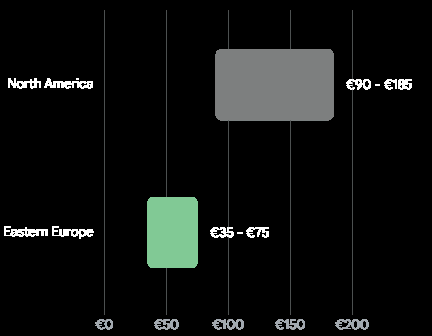
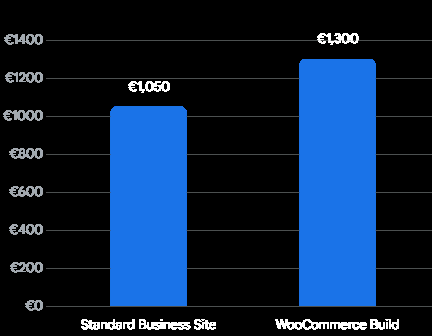
Eastern European development hubs offer significant leverage, while complex integrations like WooCommerce naturally increase the baseline project floor.
Future-Proofing: The WordPress 2026 Roadmap
To understand why FSE is not merely a passing design trend but a permanent architectural reality, we must look closely at the official WordPress development roadmap. The Gutenberg project was conceptualized years ago in four distinct, sequential phases. Phase 1 (Easier Editing) and Phase 2 (Customization and Full Site Editing) are now fully complete and foundational to the core software. We are currently navigating deep into Phase 3: Collaboration, with Phase 4 (Built-in Multilingual support) firmly on the horizon.
| Roadmap Phase | Core Focus Area | Status in 2026 | Impact on Business Users |
| Phase 1 | Easier Editing (Block Editor) | Completed | Replaced classic TinyMCE editor; established basic block structure. |
| Phase 2 | Customization (FSE) | Completed | Introduced theme.json, Site Editor, and global visual control. |
| Phase 3 | Collaboration & Workflows | Active Rollout | Enables asynchronous notes, approvals, and multi-user editorial flows. |
| Phase 4 | Core Multilingual Support | Upcoming | Will natively handle translations without heavy plugins like WPML. |
Phase 3: Collaboration, Workflows, and the End of Silos
The release of WordPress 7.0 irrevocably cements the platform’s transition from a solitary content management system to a comprehensive, team-based business operational platform. Phase 3 introduces advanced, native collaboration tools directly into the block editor environment.
Features like asynchronous block-level notes, fragment-level commenting (targeting specific text within a block), and @ mentions allow marketing teams, managing editors, compliance officers, and external clients to review, debate, and approve content directly within the WordPress dashboard. This eliminates the need to draft content in external tools like Google Docs or Microsoft Word, export it, reformat it, and manage endless, confusing email threads for approvals.
While full real-time co-editing—similar to multiple cursors flying around a Figma file—presents distinct backend infrastructure challenges for standard PHP hosting environments (which often lack persistent WebSocket connections), the asynchronous groundwork laid in 2026 enables a level of editorial workflow previously impossible in classic themes. By locking your business into a classic architecture today, you risk isolating your entire content team from these powerful, native collaboration features tomorrow, putting you at a distinct operational disadvantage against competitors using modern block environments.
The Integration of Artificial Intelligence and Large Language Models
Perhaps the most transformative aspect of the 2026 web ecosystem is the seamless, native integration of Artificial Intelligence. At Tool1.app, we specialize in bridging the gap between standard web platforms and advanced AI/LLM solutions for business efficiency. The modern WordPress Block architecture is uniquely positioned to capitalize on this AI revolution in ways that classic PHP themes simply cannot accommodate.
The Abilities API and Model Context Protocol (MCP)
A critical update in recent WordPress 6.9 and 7.0 releases is the introduction of the Abilities API, working in tandem with the Model Context Protocol (MCP). This open standard is revolutionary; it allows external AI agents and LLMs (like Claude, ChatGPT, or specialized enterprise models) to securely understand, interact with, and execute commands directly within a WordPress site.
Because FSE standardizes the entire site structure into clean, machine-readable blocks and JSON configurations, AI tools can interface with it flawlessly. They can parse the underlying structure of a page without getting confused by the messy, unstructured, and often proprietary PHP code of a classic theme.
Imagine an AI assistant leveraging your site’s Abilities API to automatically generate a localized, high-converting landing page. You simply provide a natural language prompt. The AI can pull dynamic inventory data from your WooCommerce store, draft SEO-optimized copy tailored precisely to predictive search intent, and seamlessly assemble the page using your pre-approved theme.json block patterns. It handles the layout, the styling, and the initial draft—all without human coding intervention. The user simply reviews the generated block layout and publishes. This is not science fiction; this is the current capability of WordPress block architecture combined with modern AI integration.
The Rise of Predictive SEO and AI Plugins
The days of sprinkling keywords into a blog post and hoping for a first-page ranking are dead. In 2026, search engine algorithms predict user intent and value before the query is even fully typed. Modern SEO is about semantic structure and predictive ranking, and AI tools are essential to navigating this.
The ecosystem of WordPress AI plugins has exploded, moving far beyond simple text generation. Tools are now categorized into highly specific operational functions:
| AI Plugin Category | Primary Use Case in 2026 | Benefit for Block Themes |
| AI SEO Assistants | Predictive ranking analysis, semantic entity extraction, and automated internal linking. | Easily parses standard HTML block output to inject schema markup and structured data flawlessly. |
| Workflow Automation | Bulk product description generation, image generation, and automated tag management. | Connects via REST API to populate distinct blocks (e.g., updating a WooCommerce Product Data block). |
| Intelligent Chatbots | Context-aware customer support handling complex, multi-step user inquiries. | Native integration into FSE template parts (like the global footer) without slowing down page rendering. |
Classic themes, with their convoluted PHP structures, often struggle to pass clean, semantic data to these advanced SEO and AI tools, requiring constant manual overrides. FSE provides the clean data layer that AI requires to function optimally.
Custom Python Automations and Business Logic
While WordPress is an exceptional presentation layer and content management system, enterprise businesses often require heavy computational logic that PHP is simply not designed to handle efficiently. The true power of a modern WordPress setup lies in its ability to serve as the agile front-end presentation layer for complex, backend business operations driven by other technologies.
Decoupling the Front End with the REST API
With the mature WordPress REST API, businesses can deploy custom Python automations to handle the heavy operational lifting behind the scenes. Python is the undisputed king of data science, machine learning, and enterprise automation.
For instance, an enterprise supply chain company might use custom Python scripts to continuously aggregate real-time tracking data from global logistics APIs. This data is then processed using machine learning models to predict inventory shortages or shipping delays. Once the Python backend crunches the numbers, it securely authenticates with the WordPress REST API and pushes automated, block-based alerts and product status updates directly to the WooCommerce storefront. The customer sees a beautifully rendered Block Theme notification, completely unaware of the massive Python data pipeline operating in the background.
At Tool1.app, we frequently architect these types of integrated solutions. We leverage custom Python development to streamline workflows, optimize supply chains, and build predictive dashboards. By utilizing a modern WordPress FSE theme for the user interface, we ensure the front end remains lightning-fast, highly secure, and easily editable by the marketing team, while the Python applications handle the rigid, complex business logic on separate, dedicated infrastructure.
Automating Operations Through Intelligent Systems
The use cases for Python and AI-powered business process automation in operations are expanding rapidly. Teams benefit significantly from intelligent automation systems integrated directly into their digital platforms. Examples include:
- Automated Invoice Processing: Python scripts parse incoming vendor PDFs using Optical Character Recognition (OCR), validate the data against the database, and utilize the WordPress REST API to update internal accounting dashboards built with secure FSE block layouts.
- Compliance Monitoring: Automated bots crawl site content and user-submitted data to ensure strict adherence to GDPR or industry-specific compliance standards, automatically flagging non-compliant block content for editorial review via Phase 3 collaboration tools.
- HR Onboarding Workflows: When a new employee is added to the corporate system, Python automations trigger the creation of specific user roles in WordPress, dynamically generating personalized, block-based intranet dashboards tailored to the employee’s department and clearance level.
Because the front end (WordPress FSE) is entirely decoupled from the heavy processing logic (Python/AI), the site remains highly performant. Attempting to build this level of integration into an old-school classic theme often results in a fragile, slow, and unmaintainable monolithic application.
Real-World Business Use Cases: Making the Architectural Choice
The theoretical debate between WordPress FSE vs classic themes ultimately distills down to your specific business requirements, your organizational maturity, and your long-term digital strategy. To contextualize this decision, let us examine three common business scenarios and the optimal architectural path for each.
Scenario A: The Agile Enterprise Service Provider
The Profile: A mid-sized B2B consulting firm is overhauling its digital presence. Their primary operational goal is to empower a lean, fast-moving marketing team to rapidly deploy conversion-optimized landing pages for new webinars, whitepapers, and specific service offerings. They need this agility without constantly submitting IT tickets to developers. However, the Chief Marketing Officer requires strict adherence to a newly established corporate brand guide.
The Architectural Recommendation: Full Site Editing (Block Theme).
By implementing a custom-engineered FSE theme, developers can utilize theme.json to strictly lock down global typography, spacing scales, and brand colors. The marketing team is provided with a curated library of pre-designed, heavily tested block patterns (e.g., “Webinar Signup Layout”, “Executive Bio Block”). They can build endless variations of pages visually, knowing they cannot accidentally break the corporate branding. The result is a high-performance site that scores perfectly on Core Web Vitals, dramatically lowering bounce rates and increasing landing page conversion efficiency.
Scenario B: The Legacy E-Commerce Ecosystem
The Profile: A high-volume online retailer operates a massive, highly complex WooCommerce store that has been heavily customized over eight consecutive years. The site relies on dozens of custom PHP functions injected into a classic child theme’s functions.php file. These functions handle dynamic wholesale pricing tiers, complex regional tax calculations based on legacy APIs, and a highly bespoke checkout flow built with older plugins that are not currently block-compatible.
The Architectural Recommendation: Classic Theme (or a Gradual Hybrid approach).
A full, immediate migration to FSE for this specific architecture would be a massive, high-risk undertaking that could disrupt active revenue streams and break critical third-party integrations. Instead, the business should maintain the Classic architecture for its core transactional pages. However, they can adopt a Hybrid theme approach—slowly introducing block-based editing capabilities exclusively for their editorial blog and standard informational pages. This allows the marketing team to enjoy modern publishing tools while giving the engineering team the necessary time (perhaps 12 to 18 months) to carefully rebuild the complex e-commerce logic into modern React blocks and external Python microservices.
Scenario C: The Automated Digital Publisher
The Profile: A rapidly growing digital media company requires a robust platform capable of handling tens of thousands of articles while integrating deeply with advanced AI tools for content curation and SEO optimization. They want to leverage AI agents to automate internal linking structures, generate predictive meta descriptions at scale, and dynamically restructure the homepage layout based on trending topics detected via social media APIs.
The Architectural Recommendation: Full Site Editing with Custom Python API Integrations.
FSE’s structured block architecture is absolutely essential here. The predictable, programmatic nature of blocks allows sophisticated Python automations and AI plugins (utilizing the new Abilities API) to securely parse, rewrite, and optimize content across the entire database programmatically. The publisher can deploy headless architecture or heavily automated block themes that react to real-time data inputs. The result is a highly efficient, self-optimizing media engine that requires minimal human intervention for technical SEO and layout management, allowing the editorial staff to focus entirely on investigative journalism and high-level content strategy.
The Path Forward: Embracing Modern Web Architecture
As we look toward the remainder of the decade, the trajectory of web development is unmistakable. The era of writing bespoke, monolithic PHP templates for simple visual changes is drawing to a permanent close. Full Site Editing, powered by modular block architecture, React-based components, and global configuration files like theme.json, represents the definitive standard for modern, scalable, and high-performance WordPress websites.
While Classic Themes will undoubtedly continue to be supported by the WordPress core team—largely to ensure that millions of legacy sites do not break overnight—they are effectively entering a prolonged, maintenance-only twilight phase. All active innovation, from the Phase 3 collaboration tools to deep AI API integrations and Core Web Vitals optimizations, is being funneled exclusively into the block ecosystem.
For business owners, enterprise executives, and digital strategists, the decision matrix is incredibly clear. If you are launching a new digital initiative, modernizing an aging web presence, or seeking to integrate powerful AI and custom Python automation workflows into your daily operations, Full Site Editing is the required technical foundation. It systematically strips away technical debt, accelerates mobile page load speeds, reduces reliance on vulnerable third-party plugins, and empowers your internal teams to operate with unprecedented agility.
However, recognizing the superiority of FSE is only the first step; executing the transition is where the true challenge lies. The migration process is not always simple plug-and-play. Successfully leveraging the raw power of theme.json, building secure custom React-based blocks, and seamlessly connecting your WordPress frontend to advanced Python data pipelines requires sophisticated, multidisciplinary technical expertise. It demands an engineering approach that values clean architecture, data security, and long-term digital strategy over quick, fragile fixes.
Need a Custom Theme Built for Speed and Flexibility?
Navigating the deep technical complexities of modern web architecture requires a development partner who understands both the intricate code and the overarching business objectives driving the project. Whether you are looking to meticulously migrate a fragile legacy system to a high-performance Block Theme, build a bespoke web application from the ground up, or integrate custom Python scripts and AI automations to supercharge your operational efficiency, Tool1.app’s elite WordPress engineers and data scientists have you covered. Reach out to our technical team today for a comprehensive architecture consultation, and let us engineer a digital platform designed specifically for the future of your business.
P








Leave a Reply
Want to join the discussion?Feel free to contribute!
Join the Discussion
To prevent spam and maintain a high-quality community, please log in or register to post a comment.