

Top 10 Ways to Automate Your Agency: Google Brings Gemini-Powered Content Creation Tools to Docs, Sheets, Slides, and Drive
Table of Contents
- Drafting Custom Client Proposals Through Intelligent Synthesis
- Auto-Formatting Financial Summaries and Profitability Dashboards
- Intelligent Email Triage and High-Priority Client Prioritization
- Seamless Meeting Summaries and Action Item Extraction
- Cross-Application Knowledge Retrieval with Connected Apps
- Structuring Complex Projects with Dynamic Views
- Multimodal File Understanding for Deep Strategy Generation
- Creating Automated Cinematic Video Pitches with Google Vids
- Building Autonomous No-Code Agents in Workspace Studio
- Scaling with Custom Python Workflows and the Gemini API
- Enterprise Data Security Analysis: Protecting Your Agency's IP
- Strategic Guide: Built-in Workspace AI vs. Custom AI Automation
- Understanding the Financial Investment: 2026 Pricing Breakdown
- Conclusion: Engineering the Future of Your Agency Operations
- Show all

For modern software development agencies, marketing firms, and B2B consultancies, time is the ultimate currency. Every hour spent manually drafting client proposals, formatting financial spreadsheets, hunting through disorganized project files, or triaging endless email threads is an hour stolen from high-value strategic work and client acquisition. The recent updates to the Google ecosystem have fundamentally changed this operational equation. By embedding advanced generative artificial intelligence natively into its suite of productivity tools, Google has transitioned from being a passive host of your business documents into an active, reasoning partner in your daily workflows.
At the center of this transformation is Google Gemini Workspace automation. This suite of intelligent, interconnected features allows business owners and agency leaders to leverage built-in AI tools to boost productivity exponentially, all without necessarily purchasing disjointed, third-party software subscriptions. However, as business workflows become increasingly complex and data-heavy, knowing exactly when to rely on these native, out-of-the-box tools versus when to build custom Python-driven autonomous agents is the defining factor that separates average agencies from industry leaders.
As experts in digital transformation and workflow engineering at Tool1.app, we specialize in helping businesses navigate this exact technological intersection. Whether you are leveraging out-of-the-box features for daily administrative relief or require advanced, custom AI and LLM solutions for true business efficiency, mastering these capabilities is no longer optional in a competitive landscape. This comprehensive guide explores the most impactful ways to automate your agency using Gemini, examines the strict enterprise data security measures in place, and provides a strategic framework for deciding between built-in features and custom API development.
Drafting Custom Client Proposals Through Intelligent Synthesis
Creating highly tailored, persuasive client proposals historically required a frustrating and manual workflow. Account managers would open multiple browser tabs, copy and paste text from previous successful pitches, extract fragmented notes from CRM systems, and spend hours refining the tone to match the new prospect. This manual, time-consuming method of writing a proposal is inherently prone to error and inconsistency. With the latest updates to Google Docs, this entire pipeline can be compressed into a few minutes through intelligent content synthesis.
Google Docs now features a powerful capability that allows you to reference existing files directly within your generative prompts. By using the specific “@filename” syntax, you can instruct Gemini to read, analyze, and synthesize data from across your entire Google Drive repository. The days of cluttered workspaces and disjointed data sources are over; the new standard is a clean interface where a single prompt acts as a bridge between your raw data and a finalized document.
Consider a practical B2B scenario where your software development agency has just finished an extensive discovery call with a prospective enterprise client. You possess a rough transcript of the meeting notes, a complex spreadsheet detailing their proposed budgetary constraints, and your standard, highly polished agency capabilities deck. Instead of starting from a blank page and manually synthesizing these inputs, you can open a new Google Doc and prompt the system directly.
A highly effective prompt for this use case involves instructing the AI to act as a senior business developer: “Draft a comprehensive B2B software development proposal for the client discussed in @Discovery_Call_Notes. Align the pricing and project phases precisely with the data in @Q3_Budget_Estimates. Ensure the tone is authoritative, persuasive, and professional, and incorporate our core service offerings seamlessly from @Tool1_App_Capabilities_Deck. Structure the document with an executive summary, a detailed project timeline, a technical architecture overview, and a formal sign-off section.”
Gemini processes these diverse data sources and streams a fully formatted, multi-page document directly onto the screen. It understands the underlying context of the discovery call, correctly extracts and places the financial figures into the appropriate timeline phases, and aligns the technical jargon with your agency’s established brand voice. Furthermore, because the system utilizes advanced dynamic view structures, you receive an output that is categorized into clear, easily navigable sections. This entirely eliminates writer’s block and provides a robust draft that typically only requires your final expert review and minor tailoring before sending.
Auto-Formatting Financial Summaries and Profitability Dashboards
For agency owners, tracking operational spending, analyzing project profit margins, and presenting clean financial data to stakeholders are critical but notoriously tedious tasks. Google Sheets has been enhanced with deep analytical capabilities that elevate it far beyond a simple grid for mathematical formulas. Gemini in Sheets acts as a dedicated, senior financial analyst capable of taking raw, unstructured export data and transforming it into an executive-ready dashboard in seconds.
When importing monthly expense reports or project profitability tracking from external time-tracking software, the resulting data is often incredibly messy. It frequently contains duplicate rows, inconsistent date formats, and missing categorization labels. You can now use a sidebar prompt to instruct the AI to clean the entire sheet automatically. By simply asking the system to identify duplicate charge entries, align all date formats to a specific standard, and categorize raw transaction descriptions into standardized budget buckets, you save hours of manual data hygiene work.
Beyond basic cleanup, the real power lies in automated financial analysis and auto-formatting. Suppose you have raw revenue and cost data for the third quarter, representing various client retainers and project expenses. You can ask Gemini to calculate complex ratios and format them for an upcoming board presentation. A practical implementation involves prompting the system with detailed instructions: “Calculate the Gross Profit Margin, Operating Profit Margin, and Net Profit Margin based on the raw revenue and expense columns. Present the final results in a new table, apply conditional formatting to instantly highlight any margins falling below our target of 20% in red, and include a dedicated column containing a one-sentence executive interpretation of each ratio for non-technical stakeholders.”
The AI does not merely insert static formulas; it comprehends the semantic meaning of the financial data it is processing. It will output a beautifully formatted, structured table where a 30% Operating Profit Margin is automatically accompanied by an accurate interpretation, such as noting that after paying for direct production and core operational expenses, the agency successfully retains 30 cents per Euro of revenue generated. It will automatically apply professional corporate color schemes, bold headers, and conditional highlights, effectively turning raw, intimidating numbers into a clear narrative that you can instantly share with your leadership team with complete confidence.
Intelligent Email Triage and High-Priority Client Prioritization
Agency founders, project managers, and account executives often lose hours every single week drowning in their inboxes. Triaging incoming client requests, routing vendor invoices to accounting, and reading through endless internal updates represents a massive, invisible drain on agency productivity. Google Gemini Workspace automation introduces sophisticated, agent-based email management directly into the Gmail interface, fundamentally transforming how you handle your daily communications.
Using the newly introduced Workspace Studio, you can deploy intelligent, background agents without needing to write a single line of code. You simply describe your desired workflow in plain, natural language. For example, a project manager can create a persistent rule that states: “If an incoming email from a recognized client domain contains a specific question, a request for a meeting, or urgent language regarding a project blocker, automatically label it as ‘High Priority Action’, summarize the core request in three concise bullet points, and ping me with the summary instantly in Google Chat.”
Because the AI possesses deep reasoning capabilities rather than relying on outdated, rigid keyword matching, it understands the underlying sentiment and intent of the email text. It knows the fundamental difference between a client asking a casual, hypothetical question about a future phase and a client urgently requesting a status update on a critical, overdue deliverable. This level of intelligent, context-aware prioritization ensures that your team focuses their cognitive energy only on what matters most, elevating your agency’s responsiveness and overall client satisfaction while keeping the noise of the inbox contained.
Seamless Meeting Summaries and Action Item Extraction
Agencies live and die by the quality of their meetings. Initial discovery calls, daily engineering stand-ups, and extensive sprint planning sessions generate massive amounts of unstructured, highly valuable data. Historically, capturing this value required a dedicated project manager taking meticulous, manual notes, which often resulted in missed details or subjective interpretations of what was agreed upon.
The native integration of generative AI within Google Meet and Google Chat automates this entire lifecycle. During an active video call, the system can automatically take comprehensive notes, capturing the nuance, context, and flow of the conversation in real-time. But the automation extends far beyond simple, verbatim transcription. At the conclusion of the meeting, the AI can intelligently analyze the transcript to extract specific, actionable items.
It can identify which team members were assigned which tasks, translate the entire summary into multiple languages simultaneously if you operate a distributed global workforce, and instantly draft a polished follow-up email to the client summarizing the next steps and agreed-upon timelines. This end-to-end automation ensures that no crucial detail falls through the cracks and that your agency maintains a posture of extreme professionalism and meticulous organization, all without adding any manual administrative overhead to your project management team.
Cross-Application Knowledge Retrieval with Connected Apps
One of the most profound bottlenecks in daily agency operations is the severe fragmentation of project information. A single project’s context might be split across a casual Chat channel, a lengthy Gmail thread, a formal Google Doc scope of work, and a complex Sheets timeline. Finding the definitive answer to a simple question from a client used to require forensic searching across all these different interfaces.
The introduction of Connected Apps transforms Gemini into a unified, overarching intelligence layer across your entire business ecosystem. You no longer interact with applications in isolated silos. Instead, you interact holistically with your overarching business data. This capability acts like an enterprise-grade search engine that not only locates relevant documents but reads, comprehends, and synthesizes them on your behalf.
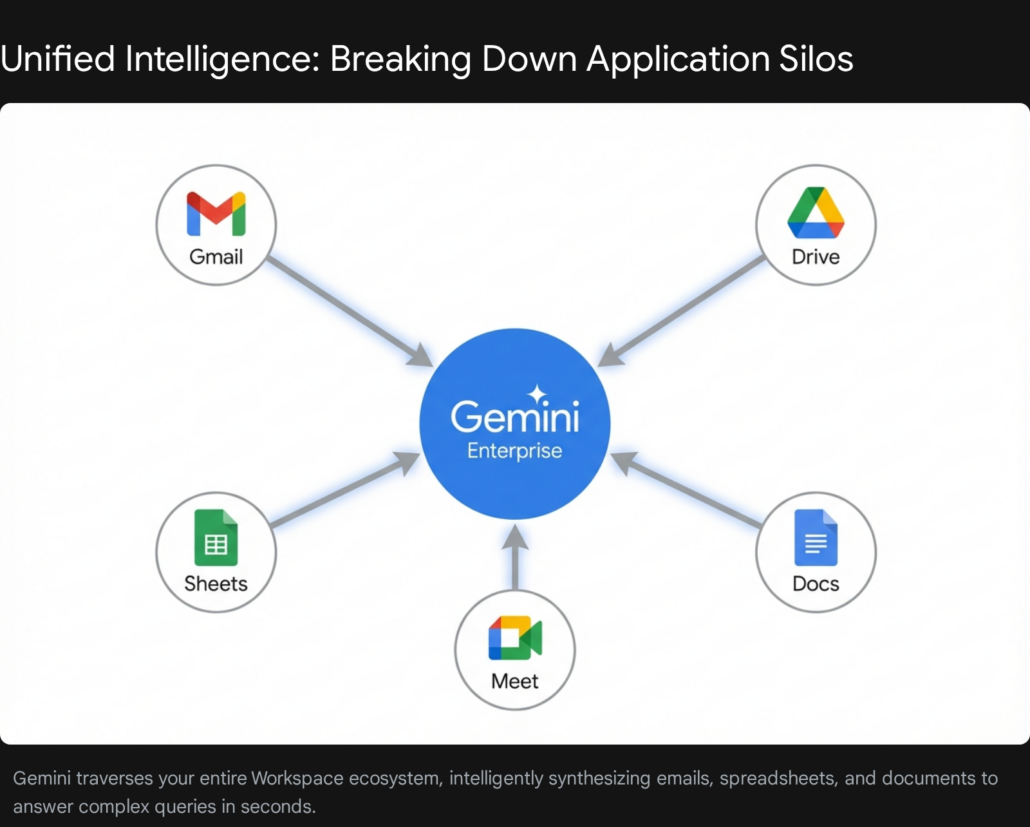
As an account director, you can ask the central AI assistant a complex, multi-part question: “Find all conversations, strategy documents, and spreadsheet budgets related to the upcoming ‘Project Alpha’ website redesign. Summarize the current technical blockers, extract the remaining available budget, and draft a formal status update for the client’s executive team.” The system securely traverses your Gmail history, your Drive folders, your Calendar events, and your Chat logs, synthesizes the cross-platform data, and delivers a cohesive, accurate output instantly. This eliminates the frantic search for information right before a major client check-in.
Structuring Complex Projects with Dynamic Views
When artificial intelligence generates long, comprehensive outputs—such as a full go-to-market strategy for a new application launch or a highly complex technical architecture document—the sheer volume of text can quickly become overwhelming and difficult to digest. Google addresses this fundamental user experience challenge with Dynamic View functionality, which effectively turns the AI into a structured project manager.
When you ask the system to build a comprehensive marketing plan, it does not just return a monolithic wall of text. It intelligently structures the response into distinct, logically categorized, and clickable modules. The output is cleanly separated into relevant sections such as target audience analysis, media budgeting allocations, detailed launch timelines, and ongoing content strategy.
You can open, close, and navigate these sections instantly, keeping your digital workspace incredibly organized and focused. This structured approach is incredibly valuable for agency teams during collaborative brainstorming or agile sprint planning. It allows different departments—from copywriting to media buying to design—to focus purely on the specific module relevant to their unique expertise, without getting lost in the noise of the broader document.
Multimodal File Understanding for Deep Strategy Generation
The latest iteration of Google’s enterprise AI models includes highly advanced multimodal capabilities. This means the system can understand, cross-reference, and connect information across entirely different file formats simultaneously. It is no longer limited to analyzing just text documents or just numerical spreadsheets; it understands the synthesis of diverse media.
Imagine a scenario where your agency is pitching a comprehensive digital rebrand to a massive, traditional corporate client. In your preparation folder, you have a dense PDF of their annual financial report, a massive spreadsheet containing thousands of rows of customer feedback scores, and a twenty-minute video recording of their CEO’s recent industry keynote speech. You can upload all of these incredibly diverse files into the Workspace Studio and prompt the system to analyze them holistically.
The AI will intelligently pull strict financial constraints and growth targets from the PDF, identify recurring customer pain points and feature requests from the spreadsheet data, and analyze the overarching tone, vision, and strategic direction presented in the video. It synthesizes these completely different formats to output one cohesive, highly targeted content strategy that addresses the nuances of all three inputs simultaneously. This level of deep, multi-format synthesis used to take a dedicated team of senior strategists several days to compile and correlate; it can now be generated with astonishing accuracy in a matter of minutes.
Creating Automated Cinematic Video Pitches with Google Vids
Compelling storytelling is a crucial component of agency success, whether you are pitching a radical new concept, onboarding a major new client, or delivering a final performance report. However, high-quality video production is notoriously resource-intensive, requiring specialized software, skilled editors, and significant time investments. Google Vids introduces a revolutionary new medium for corporate storytelling directly at work.


You can now take a static, traditional Google Slides presentation or a text-heavy Google Doc and instruct the system to transform it into an engaging, dynamic video. The AI will automatically generate a compelling narrative script based entirely on the text in your document. It will then intelligently assemble relevant stock footage or branded imagery, structure the scenes for maximum pacing and impact, and even overlay a highly realistic, AI-generated voiceover to guide the viewer.
This capability completely empowers account managers and business developers to send dynamic, cinematic video summaries to clients instead of the traditional, often-ignored static PDFs. It allows your agency to communicate faster, far more cost-effectively, and with a significantly higher degree of professional polish, instantly differentiating your brand from competitors who still rely entirely on text-based communication.
Building Autonomous No-Code Agents in Workspace Studio
For recurring, complex operational tasks, simple, one-off command-based prompts are insufficient. Google Workspace Studio addresses this by allowing any employee, regardless of their technical background or coding experience, to build truly autonomous AI agents tailored to their specific daily friction points.
These agents move significantly beyond the simple, rigid rule-based “if/then” logic that defined older automation platforms. Because they are powered by advanced reasoning engines, these agents can handle ambiguity, understand complex context, and adapt instantly to new information. An operations manager, for example, can describe a complex workflow in plain English: “Every Friday at 3 PM, automatically check the master project tracker spreadsheet. For any project marked specifically as ‘At Risk’, locate the latest email thread with that particular client, summarize the current technical blocker, and draft a standardized update email for me to review before sending.”
The Studio builds this sophisticated agent instantly. Furthermore, these agents can be connected seamlessly to third-party enterprise platforms like Asana, Jira, Salesforce, and Mailchimp. This true democratization of AI development means that every single member of your agency can essentially build their own custom, tireless digital assistant to handle their specific administrative burdens, massively increasing the overall throughput and operational velocity of your entire organization.
Scaling with Custom Python Workflows and the Gemini API
While the built-in Workspace Studio is phenomenal for everyday tasks and personal productivity, there inevitably comes a point where out-of-the-box solutions hit a hard ceiling. When an agency needs to automate highly complex, deeply integrated, or mission-critical backend processes that require flawless precision and vast scale, they must graduate from no-code tools to custom software engineering.
This is precisely where the specialized expertise of an agency like Tool1.app becomes an invaluable asset. By leveraging the raw power of the Gemini API and custom Python scripts, our developers can build multi-step, goal-oriented systems that operate completely autonomously outside the confines of the standard Google UI. For instance, utilizing the Model Context Protocol and the Vertex AI Agent Engine, we can build an autonomous agent that not only reads incoming emails but automatically queries an external, proprietary database, executes complex Python code to perform rigorous statistical analysis on the retrieved data, dynamically formats a custom PDF report, and securely distributes it via a third-party API webhook.
Custom development allows for deep looping logic, infinite iteration, and seamless integration with legacy systems that native Workspace tools simply cannot reach. By utilizing advanced open-source frameworks in conjunction with the Gemini API, you can build a bespoke, highly secure AI workforce tailored precisely to your agency’s exact operational specifications.
Enterprise Data Security Analysis: Protecting Your Agency’s IP
A critical and highly valid concern for any business owner considering widespread AI adoption is enterprise data security. When an artificial intelligence system reads your proprietary source code, highly sensitive client financial records, and confidential strategic roadmaps, where exactly does that data go? Google has established rigorous, enterprise-grade data security commitments for 2026 to ensure that your intellectual property remains exclusively and securely yours.
It is paramount to understand that deploying generative AI within enterprise Workspace accounts does not alter foundational privacy protections; it operates strictly within them. Google explicitly and legally guarantees that all of your interactions with Gemini stay entirely within your organization’s secured perimeter. Gemini does not share your content outside your organization without explicit permission.
When you purchase a Gemini Business or Gemini Enterprise license, your organizational data is completely isolated. Crucially, your proprietary content, the prompts you write, and the generated responses are never used to train Google’s general, public AI models outside of your domain. Furthermore, there is absolutely no human review of your submissions. If you upload a highly sensitive client financial spreadsheet to analyze profit margins, that data cannot leak into the public model and be regurgitated to a competitor down the line. The system provides the intelligence of a global model with the security of a private server.
Granular Security Controls for Administrators
Google integrates AI seamlessly with the existing, robust data security measures in Workspace, giving IT administrators granular, centralized control over information flow to prevent unauthorized access and potential data exfiltration.
- Trust Rules for Drive Sharing: Administrators can implement strict trust rules in Google Drive that explicitly restrict the AI’s access. If a confidential document is governed by a rule preventing external or broad internal sharing, the AI rigorously respects that boundary and will not synthesize or summarize that data for unauthorized users.
- Information Rights Management (IRM) and DLP: Data Loss Prevention (DLP) policies can seamlessly apply Information Rights Management (IRM) controls to highly sensitive files. If an administrator flags a specific document containing employee salaries or trade secrets to prevent downloading, printing, or copying, Gemini is automatically and permanently blocked from retrieving or generating any responses based on that protected file.
- Drive Inventory Reporting: Administrators possess the ability to utilize advanced Drive inventory reporting to gain a holistic, real-time view of exactly how their data is classified, who possesses access to it, and how it is being utilized by AI agents across the organization.
- Client-Side Encryption (CSE): For the absolute highest tier of data protection—often required by agencies working in healthcare, finance, or government contracting—organizations can enable Client-Side Encryption. When CSE is active, the data is mathematically indecipherable to any unauthorized third party, including Google itself. Generative AI assistants, including Gemini, cannot access, read, or process CSE-protected data under any circumstances, guaranteeing absolute zero-knowledge security and supporting compliance with strict regulatory frameworks like HIPAA and FedRAMP High.
Security teams no longer need to fear the phenomenon of “Shadow AI”—where employees use unauthorized, unvetted public AI tools and inadvertently leak company secrets to the web. By keeping the AI completely inside the secured perimeter of Google Workspace, you enable massive productivity gains for your staff while maintaining strict regulatory compliance and ultimate peace of mind.
Strategic Guide: Built-in Workspace AI vs. Custom AI Automation
One of the most vital strategic decisions a business owner must make in this new era is determining exactly when to rely on the built-in, no-code tools provided by Google, and when it is absolutely necessary to hire a specialized development agency like Tool1.app for custom Python automation.
Understanding the inherent technical limitations of out-of-the-box software is the crucial key to preventing catastrophic workflow bottlenecks and wasted resources. Workspace Studio is an incredible internal orchestration layer for daily tasks, but it is not designed to be a universal, enterprise-wide automation backbone.
The Technical Limitations of Workspace Studio
While highly empowering for individual users, the native Workspace Studio has several distinct, hard technical constraints that make it unsuitable for highly complex, mission-critical, or high-volume enterprise automations:
- No Complex Looping or Iteration Logic: Native flows generally run in a strict, linear sequence. If your agency needs an automation to systematically loop through a massive dataset of thousands of client records, rigorously evaluate multiple conditions for each specific record, and branch into vastly different complex execution pathways based on the results, the native no-code tools will fail.
- Absence of External Webhook Triggers: Workspace Studio workflows can only be initiated by events happening strictly inside the Google Workspace ecosystem (for example, receiving an email or updating a specific row in a Sheet). There is no native support for external event ingestion. You cannot currently have a payment failing in an external gateway like Stripe automatically trigger a complex Workspace recovery flow without custom bridging.
- Strict Execution Quotas: Depending on your specific licensing tier, Google imposes strict, hard limits on flow executions. The entry tier allows for a mere 100 flow executions per month. Business Standard and Plus plans allow for 400 runs per month. Even the Expanded Access allows for 2,000, and the Ultra Access caps at 10,000 executions per month. For high-volume transactional businesses or agencies running continuous data syncs, you will burn through these limits in a matter of days, halting your automated operations entirely.
- No Organizational Directory Access: The Studio lacks deep access to the Google Directory organizational structure or Google Groups. It cannot automatically route complex, multi-tiered financial approvals based on a dynamic corporate reporting hierarchy.
- Lack of Determinism and Code Execution: Purely AI-driven behavior inherently introduces a degree of uncertainty. Standard agents rely on prompt interpretation rather than exact code execution. For critical financial or regulated workflows, relying on LLM interpretation rather than deterministic Python code introduces unacceptable risk.
When to Hire Tool1.app for Custom API Development
If your specific business workflow touches mission-critical financial data, requires complex mathematical processing and absolute determinism, needs to integrate deeply with third-party legacy systems, or operates at a massive scale that shatters native execution limits, you need custom software engineering.
By utilizing the Gemini API, Google Cloud’s Vertex AI, and custom Python scripts, our expert developers at Tool1.app can build robust, deterministic, and infinitely scalable systems. We construct autonomous agents that can actually execute Python code internally to ensure absolute mathematical precision when analyzing your data, eliminating the risk of AI hallucination in calculations. We build secure API bridges that allow your CRM, your accounting software, and your proprietary internal databases to communicate flawlessly with the LLM reasoning engine, creating a unified, automated enterprise.
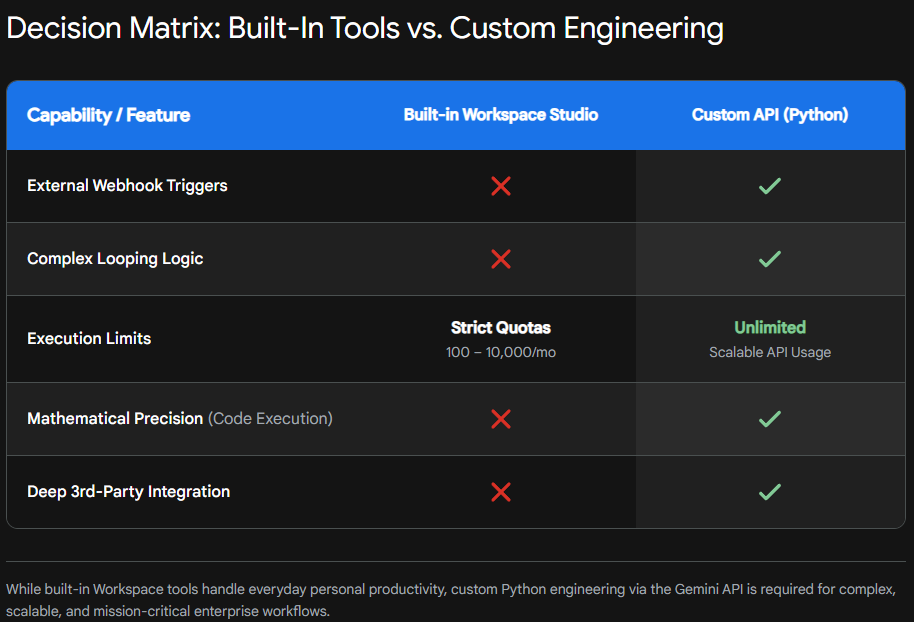
The following table provides a clear, strategic delineation of when to utilize standard features versus when to engage a technical agency:
| Feature / Capability | Google Workspace Studio (Built-in) | Custom Python & Gemini API (Tool1.app) |
| Primary Business Use Case | Personal productivity, simple email triage, drafting text content. | Mission-critical backend automation, heavy data processing, core operations. |
| Workflow Logic Complexity | Linear, basic conditional rules, limited steps. | Advanced looping, dynamic routing, complex machine state management. |
| Initiation Triggers | Internal Workspace events only (e.g., new email, sheet update). | Any external system via Webhooks and custom API endpoints. |
| Execution Volume Limits | Strict monthly execution caps (ranging from 100 to 10,000 runs). | Virtually unlimited, highly scalable cloud infrastructure. |
| Mathematical Precision | Relies entirely on LLM reasoning (prone to calculation hallucination). | Utilizes deterministic Python code execution for flawless calculations. |
| Enterprise System Integrations | Shallow integrations with select major third-party apps. | Deep API integration with any proprietary, obscure, or legacy system. |
When you fundamentally outgrow the sandbox of consumer-grade tools, custom development is the only viable path forward. At Tool1.app, we ensure that your automations are not just convenient novelties, but robust, secure, and infinitely scalable engines of operational efficiency.
Understanding the Financial Investment: 2026 Pricing Breakdown
Adopting Google Gemini Workspace automation requires a clear understanding of the current licensing and pricing structure. Google offers varied, highly segmented tiers to accommodate businesses of different sizes and operational demands. To access the advanced AI capabilities discussed in this report, businesses typically need a foundational Workspace plan combined with a specific Gemini add-on license.
It is important to note that pricing is subject to local currency fluctuations, regional taxation, and the duration of your commitment terms (annual vs. flexible monthly). The following figures represent approximate annual commitment pricing converted directly to Euro to provide a clear baseline for European agencies.
Foundational Google Workspace Plans
Before adding any artificial intelligence capabilities, your organization must be situated on a standard operational tier. These plans primarily define your pooled cloud storage capacity, participant limits for video conferencing, and baseline administrative security controls:
- Business Starter: Priced at approximately €6.45 per user/month (when billed on an annual fixed-term plan), this entry-level tier provides secure custom business email, 30 GB of pooled cloud storage per user, and standard video conferencing for up to 100 participants.
- Business Standard: At approximately €12.90 per user/month, this tier significantly upgrades organizational capability. It provides a massive 2 TB of pooled storage per user, expands video meeting capacities to 150 participants, and crucially allows for meeting recordings and electronic signatures.
- Business Plus: Designed for larger or more regulated agencies, at approximately €20.25 per user/month, organizations receive 5 TB of pooled storage per user, a 500-participant meeting limit with attendance tracking, advanced endpoint management, and the enhanced security features necessary for strict data compliance.
The Gemini Enterprise and Business AI Add-Ons
The foundational plans provide the infrastructure, but to unlock the generative AI features—including “Help me create” in Docs, dynamic analytical formatting in Sheets, autonomous Workspace Studio agents, and cross-application data retrieval—you must purchase the AI add-on licenses specifically for the users who need them.
- Gemini Business (AI Expanded Access): Costing approximately €18.40 per user/month (with an annual commitment), this add-on unlocks the full suite of Gemini AI capabilities directly within your daily Workspace apps. It is designed for standard organizational use, providing robust access to Workspace Studio features with an allowance of up to 2,000 flow executions per month.
- Gemini Enterprise (AI Ultra Access): Designed specifically for heavy power users, technical specialists, and organizations requiring maximum capability. This premium tier offers the highest possible access to the advanced Gemini 3.1 Pro models, exclusive Deep Research capabilities, and the maximum execution limits within Workspace Studio (up to 10,000 flow executions per month). While pricing for enterprise tiers is often custom negotiated based on overall seat volume, standard listed pricing runs higher than the Business tier, but it ensures full compliance with the most stringent regional data laws and provides priority access to the newest models.
To calculate the return on investment, consider a mid-sized development agency of 20 people opting for the Business Standard foundation plus the Gemini Business add-on. The total technological investment is roughly €31.30 per employee, per month. When analyzing the ROI, this relatively minor operational cost is vastly overshadowed by the dozens of hours saved per employee each month on manual financial reporting, inbox triage, meeting transcription, and proposal generation. The efficiency gains directly translate to increased billable hours and improved margins.
Conclusion: Engineering the Future of Your Agency Operations
The deep integration of Gemini into Google Workspace represents a fundamental, irreversible shift in how digital agencies, consultancies, and development firms operate. We have officially moved past the era of tedious manual data entry, disjointed administrative tasks, and siloed information architecture. By intelligently utilizing native AI tools for generating dynamic client proposals, automating complex financial formatting, and orchestrating intelligent email triage, forward-thinking business owners can instantly reclaim thousands of hours of lost productivity. Furthermore, Google’s uncompromising 2026 enterprise data security standards, including robust Trust Rules and Client-Side Encryption, ensure that this rapid technological innovation does not come at the unacceptable cost of your intellectual property or client confidentiality.
However, as we have explored, built-in tools represent only the first step on the automation maturity curve. As your agency scales in client volume and operational complexity, the rigid limitations of no-code platforms will eventually become bottlenecks that throttle your growth. True, sustainable competitive advantage lies in building deterministic, highly complex, and deeply integrated autonomous systems that run your backend operations flawlessly, without the constraints of execution limits or internal application silos.
Looking to take your business automations beyond the limitations of Google Workspace? Contact Tool1.app to build custom AI agents tailored to your exact workflows. Our expert software developers specialize in leveraging Python and the advanced Gemini API to engineer bespoke, scalable solutions that permanently transform your operational bottlenecks into autonomous engines of growth.








Leave a Reply
Want to join the discussion?Feel free to contribute!
Join the Discussion
To prevent spam and maintain a high-quality community, please log in or register to post a comment.