

The Top 3 Multilingual Plugins for WordPress: WPML vs. TranslatePress vs. Polylang
Table of Contents
- The Hidden Architecture: Database Structure and Performance Impact
- Database Architecture and Performance Matrix
- Technical Compatibility: Page Builders and Complex Ecosystems
- Mastering Global Search: Multilingual SEO Capabilities
- Developer Experience: REST API, Custom Endpoints, and Automations
- E-commerce Mastery: WooCommerce Synchronization
- Cost vs. Scale: Analyzing the Total Cost of Ownership
- Synthesizing the Choice: Architectural Recommendations
- Engineering Your Global Expansion
- Show all

The Ultimate Engineering Guide to the Best WordPress Multilingual Plugin: WPML vs. TranslatePress vs. Polylang
Expanding a digital presence across international borders is one of the most effective strategies for scaling enterprise operations. However, transitioning a single-language WordPress website into a robust multilingual platform introduces profound technical complexities. Selecting the best WordPress multilingual plugin is not merely a matter of translation accuracy; it is a fundamental architectural decision that directly dictates database performance, server load, search engine visibility, and long-term maintainability.
When organizations approach localization, the hidden costs of poor technical infrastructure quickly become apparent. A poorly configured translation environment can bloat the database, severely degrade the Time to First Byte (TTFB), and create inescapable conflicts with page builders or custom automation workflows. Software development agencies, such as Tool1.app, routinely audit and reconstruct digital ecosystems for enterprises that have outgrown their initial translation tools. Based on extensive performance benchmarking, database analysis, and application programming interface (API) integrations, the market is dominated by three undisputed leaders: WPML, TranslatePress, and Polylang.
This comprehensive technical analysis dissects these plugins far beyond their surface-level marketing claims. The evaluation examines proprietary database architectures, behavior within complex page builder ecosystems, compliance with international search engine optimization (SEO) standards, and readiness for custom REST API integrations.
The Hidden Architecture: Database Structure and Performance Impact
The most critical differentiator between WPML, TranslatePress, and Polylang lies invisible to the end-user: how translated content is stored within the MySQL database. Every time a page is requested, WordPress queries the database. How the translation plugin manages these queries dictates whether the site loads in milliseconds or stalls entirely under concurrent user traffic.
WPML: The Custom Table Ecosystem
WPML (WordPress Multilingual) employs a highly structured, complex custom table architecture. Rather than relying solely on native WordPress core tables, WPML creates an ecosystem of proprietary tables to map relationships between original and translated content.
The core of this system relies on the wp_icl_translations table. This table stores language and translation information for every translatable element, including posts, pages, tags, categories, and custom post types. Entries that belong to the same translation cluster share a unique translation ID (trid). The original entry is identified by a NULL value in the source_language_code column, while subsequent translations reference the original language code.
For string translations, which include elements outside of standard post content such as theme labels or widget text, WPML utilizes wp_icl_strings to track the original string and wp_icl_string_translations to store the translated output.
While this architecture allows WPML to offer an incredibly granular level of control, it introduces significant overhead. On large-scale websites with thousands of products and dozens of languages, these custom tables can expand massively. The constant cross-referencing between standard wp_posts tables and the wp_icl_translations table results in complex, heavy SQL queries. Over time, WPML is known to suffer from “database bloat”. This phenomenon occasionally requires administrators to run manual table optimization scripts located in the WPML Troubleshooting section to clean up orphaned data and redundant translation statuses, and compress existing data. In extreme cases involving massive media libraries, orphaned entries in the wp_postmeta table (such as wpml_media_processed keys) can inflate the database to unmanageable sizes, requiring specialized SQL deletion queries.
Polylang: The Native Taxonomy Approach
Polylang takes an entirely different, brilliantly lean approach to database management. Instead of creating a web of custom tables, Polylang hijacks the native WordPress taxonomy system.
It leverages the existing wp_term_relationships and wp_term_taxonomy tables to store language assignments and translation links. When a post is assigned a language, Polylang creates an entry in the taxonomy table under a custom taxonomy called language. The serialized language data is stored seamlessly in the description column, structured as an array (e.g., a:4:{s:9:"fallbacks";a:0:{}s:6:"locale";s:5:"en_US";s:3:"rtl";i:0;s:9:"flag_code";s:2:"us";}).
To link translated versions of the same post, Polylang utilizes another taxonomy termed post_translations. The description column for these entries contains a serialized array mapping language codes to specific post IDs. For example, a single database row might define the translation group as follows: a:3:{s:2:"en";i:7834;s:2:"de";i:7859;s:2:"nl";i:7860;}. Term translations for categories and tags follow the exact same logic, utilizing term_language and term_translations taxonomies.
This native architectural approach makes Polylang phenomenally lightweight. Because it relies on standard WordPress core tables, database queries remain simple and highly optimized. In performance benchmarks, Polylang consistently adds minimal overhead, often resulting in less than a 5% slowdown. This operational efficiency makes it the optimal choice for high-traffic environments, speed-critical digital publications, and custom applications where database latency is unacceptable.
TranslatePress: The Front-End Dictionary
TranslatePress completely reimagines the translation process by operating visually on the front end, but this requires a unique database mechanism to support the functionality. Instead of tying translations strictly to specific post IDs like WPML or Polylang, TranslatePress filters the final HTML output of the page.
To achieve this, TranslatePress stores translations in proprietary dictionary tables, primarily wp_trp_dictionary. Every single string of text that is translated is stored row-by-row in this table. When a user loads a translated page, TranslatePress scans the HTML, cross-references the text against the dictionary table, and replaces the strings in real-time. The plugin proactively scans and saves strings automatically when users access translated pages, although this can be restricted via settings.
While this makes the user experience incredibly intuitive for content editors, the database implications are severe for massive websites. A site with 500 pages translated into 10 languages will generate hundreds of thousands of individual rows in the wp_trp_dictionary tables. This string-by-string storage mechanism can bloat the database by gigabytes, slowing down SQL queries and increasing the TTFB. Furthermore, because TranslatePress relies on scanning the frontend HTML, it stores Gettext wrapping directly within the database (wp_trp_gettext), which sometimes requires administrators to utilize the built-in optimization tool to remove duplicate rows, untranslated links, and CDATA.
Database Architecture and Performance Matrix
| Feature / Metric | WPML | Polylang | TranslatePress |
|---|---|---|---|
| Storage Mechanism | Custom Tables | Native Taxonomies | Dictionary Tables |
| Primary Tables Used | WPML Custom Database Tables | wp_term_relationshipswp_term_taxonomy | wp_trp_dictionarywp_trp_gettextwp_trp_original_strings |
| Query Complexity | Connects language, translation, and string data to standard WordPress tables and content. | Efficiently queries large batches by filtering serialized language data and ID mappings within the taxonomy description column. | Standardized structure filtering output, but SQL queries slow down as dictionary tables fill with translated sentences. |
| Database Bloat Risk | Requires ongoing optimization strategies on large-scale deployments. | Lean structure; minimizes bloat by utilizing native taxonomy system instead of new custom tables. | High Risk. Stores every translated sentence; database can grow by gigabytes (e.g., 500 pages in 10 languages), increasing TTFB. |
Polylang offers the leanest database footprint by utilizing native WordPress taxonomies, whereas TranslatePress and WPML introduce custom tables that require ongoing optimization strategies on large-scale deployments.
Technical Compatibility: Page Builders and Complex Ecosystems
A translation plugin cannot exist in a vacuum; it must interface seamlessly with the overarching theme, the e-commerce platform, and dynamic page builders. The method by which a plugin extracts and translates content heavily influences its technical compatibility.
Navigating the DOM with TranslatePress
TranslatePress shines brightest in complex visual ecosystems. Because it operates by parsing the Document Object Model (DOM) and translating the final HTML output, it is inherently compatible with almost any WordPress page builder, including Elementor, Divi, Beaver Builder, and Gutenberg.
When marketing teams design highly customized landing pages using drag-and-drop builders, TranslatePress circumvents the need to understand how the page builder structures its shortcodes or JSON data in the backend. It simply waits for the page to render, allowing the user to click any text element on the live site and translate it via a visual front-end interface. This operational model guarantees near 100% translation completeness, eliminating the need for specific integration add-ons; if an element renders on the screen, TranslatePress can capture and translate it.
The Deep Integration of WPML
WPML approaches page builders from an entirely different angle, translating content at the database level before it is rendered. To achieve this, WPML must inherently understand the exact shortcode structure or block architecture utilized by the specific page builder.
WPML manages this through extensive, official integrations. It provides native support for all major page builders, parsing complex layouts into clean, individual translation strings that appear in WPML’s Advanced Translation Editor. This methodology is highly efficient for professional translation teams, as a translator does not need to navigate the visual design of the page; they simply translate text strings in a clean, side-by-side interface. Furthermore, WPML boasts the most comprehensive WooCommerce compatibility on the market, effortlessly handling complex variable products, multi-currency synchronization, and global tax classes.
Polylang’s Developer-First Ecosystem
Polylang requires a more hands-on, architectural approach when dealing with complex builders. While it fully supports standard WordPress structures and standard blocks, highly complex page builders can sometimes present hurdles if they fail to follow strict WordPress coding standards.
However, for custom-coded themes and tailored applications, Polylang provides exceptional utility. Because it utilizes native WordPress architecture, developers can easily query translated content using standard WordPress loops. Software engineering firms, such as Tool1.app, frequently pair Polylang with headless architectures or highly customized Gutenberg block ecosystems because the data remains pristine and untangled from proprietary translation tables.
Recent updates have drastically improved Polylang’s compatibility with Advanced Custom Fields (ACF) Pro. In Polylang Pro 3.7, the ACF integration underwent a complete rewrite, introducing the “Translate Once” feature. Field groups are no longer translatable entities themselves; instead, language rules dictate field display, and content within ACF blocks is automatically translatable and exportable via XLIFF. For e-commerce, Polylang strictly requires the dedicated “Polylang for WooCommerce” premium add-on to successfully synchronize carts, checkout processes, HPOS structures, and product attributes across varying languages.
Mastering Global Search: Multilingual SEO Capabilities
Translating website content holds little value if international search engines cannot index the material properly. Multilingual SEO requires a flawless, technically sound implementation of localized URLs, hreflang tags, canonical attributes, and translated metadata.
Server-Side Rendering and Core Web Vitals
A critical advantage shared by WPML, Polylang, and TranslatePress is that all three plugins operate server-side. They deliver fully translated HTML directly to the browser and the search engine crawler. This provides a massive SEO advantage over cheaper, JavaScript-based translation tools that overlay translations dynamically in the browser (client-side rendering). Search engines occasionally struggle to index client-side JavaScript translations effectively, making server-side rendering an absolute requirement for serious international SEO deployments.
Implementing Hreflang and Sitemaps
All three premium contenders handle the fundamentals of multilingual SEO, though their execution methods differ significantly. Search engines rely heavily on hreflang attributes to understand the geographical and linguistic targeting of a specific page.
WPML delivers a fully automated, out-of-the-box SEO package. It automatically injects the correct hreflang tags, generates language-specific sitemaps, and permits the translation of URL slugs. It integrates deeply with industry-standard SEO plugins like Yoast SEO and Rank Math, ensuring that meta titles and descriptions are properly mapped to their respective languages.
TranslatePress matches this functionality, but specifically requires its premium SEO Pack Add-on. This add-on enables users to translate URL slugs, page metadata, and crucial accessibility elements like image alt text directly from the visual interface. TranslatePress seamlessly overrides the output of Yoast or Rank Math to serve the correct translated meta tags to search engine crawlers.
Polylang, true to its minimalist philosophy, relies on existing SEO plugins to shoulder the heavy lifting. It does not generate its own complex sitemaps but integrates flawlessly with Yoast to ensure the output of localized sitemaps and metadata. Polylang handles the hreflang tags automatically, and its Pro version enables comprehensive URL slug translation across custom post types, taxonomies, and custom data structures.
| Plugin | Hreflang Tags | URL Slug Translation | Sitemap Generation | Yoast/Rank Math Compatibility |
| WPML | Automatic | Included natively | Native & via SEO plugins | Deeply integrated out-of-the-box |
| Polylang | Automatic | Requires Pro version | Relies on SEO plugins | Excellent (Rank Math may require tweaks) |
| TranslatePress | Automatic | Requires SEO Pack (Pro) | Relies on SEO plugins | Full override capabilities |
Developer Experience: REST API, Custom Endpoints, and Automations
As digital enterprises scale, they inevitably require custom automations. Connecting WordPress to external Customer Relationship Management (CRM) systems, Enterprise Resource Planning (ERP) software, or utilizing Large Language Models (LLMs) for mass content generation relies heavily on the WordPress REST API. The manner in which these translation plugins interact with the REST API directly determines how seamlessly an organization can automate its workflows.
Polylang: The API Powerhouse
For programmatic control and advanced software engineering, Polylang Pro remains unmatched. It introduces comprehensive REST API endpoints that permit developers to fully orchestrate language assignments programmatically.


When executing a custom Python automation script to generate localized content, Polylang permits the creation of a post and its immediate linkage to existing translations via a single API call. For example, to assign the French language to a specific post (ID 3376) and link it to an existing English parent post (ID 3374), developers execute a standard POST request appending specific arguments :
POST /wp/v2/posts/3376?lang=fr&translations[en]=3374
Furthermore, Polylang provides a dedicated endpoint (/pll/v1/languages) to retrieve all configured languages, returning detailed objects that include native names, locales, and flag URLs. This makes it incredibly straightforward to construct decoupled applications, React frontends, or mobile apps that require dynamic language switching. Agencies focusing on backend architecture, such as Tool1.app, frequently leverage Polylang’s API capabilities alongside custom Python automations to build massive, AI-driven content localization pipelines that synchronize instantly with the native WordPress database.
WPML: The Custom Endpoint Requirement
WPML’s approach to the REST API is functional but demands significantly more developer intervention when handling complex translation linking. While it is possible to create a translated post by appending a language parameter to the API call (e.g., ?lang=fr), WPML does not currently offer a native, single-step REST API method to strictly link a newly created translation to its original parent post.
To achieve programmatic linking with WPML, developers must manually create custom REST API endpoints utilizing WPML’s internal PHP hooks. The workflow typically dictates a three-step process: execute an API POST call for the original language article, execute a second POST call for the translated article, and finally, trigger a custom endpoint to bind their translation IDs (trid) together. While this methodology is entirely viable for an experienced software agency, it lacks the immediate plug-and-play elegance of Polylang’s native API arguments.
WPML does offer robust PHP hooks for localized development within themes. To retrieve the current language programmatically, developers utilize standard WPML filters:
PHP
$my_current_lang = apply_filters( 'wpml_current_language', NULL );
This filter outputs the active language code, enabling developers to build custom logic or bespoke language switchers directly within the theme files.
TranslatePress: Front-End Bias
TranslatePress possesses a heavy bias toward the frontend DOM and visual user interaction. Because it stores translations as localized strings mapped against the original HTML, interacting with TranslatePress via the REST API for content creation is fundamentally different.
When developers fetch posts via the standard WordPress REST API on a TranslatePress-enabled site, the system will typically return the content exclusively in the default language. To access TranslatePress data programmatically or modify output, developers must interface with its specific PHP components or custom shortcodes. For example, developers can use simple conditional shortcodes like “ or interact with standard WordPress localization functions like get_locale() in PHP to conditionally execute code based on the user’s active language view.
To build a custom language switcher programmatically, TranslatePress provides a specific array function:
PHP
$array = trp_custom_language_switcher();
This function returns an array containing the language name, code, flag link, and current page URL, allowing developers to construct unstyled HTML lists that can be manipulated freely via CSS. For headless operations or deep programmatic content generation, however, TranslatePress is less ideal than Polylang.
E-commerce Mastery: WooCommerce Synchronization
For enterprises engaged in global digital commerce, the multilingual plugin must flawlessly synchronize with WooCommerce. E-commerce localization involves more than translating product titles; it requires synchronizing stock inventory, aligning variable product attributes, handling localized tax classes, and managing multi-currency checkout gateways.
WPML provides the deepest, most battle-tested WooCommerce integration on the market. Through its dedicated WooCommerce Multilingual framework, WPML effortlessly handles the complexities of global online stores. It allows merchants to run fully independent multi-currency setups, assign distinct pricing models based on geographical regions, and ensures that stock levels remain perfectly synchronized across all language variations.
Polylang requires the procurement of the premium “Polylang for WooCommerce” add-on to function effectively in an e-commerce environment. Once installed, it performs admirably, offering one-click duplication of products and their translations. It synchronizes taxonomies, attributes, and metadata across product translations, and is fully High-Performance Order Storage (HPOS) ready. While slightly leaner than WPML, it requires a more deliberate configuration process to ensure all cart and checkout endpoints are successfully localized.
TranslatePress simplifies the WooCommerce translation process by allowing users to navigate directly to the product page, cart, or checkout frontend, and visually translate the text strings. This is remarkably intuitive for smaller stores or teams without technical expertise. However, because it stores translations as localized strings rather than duplicate product data, it lacks the deep, systemic multi-currency and global tax controls inherent to WPML’s dedicated e-commerce architecture.
Cost vs. Scale: Analyzing the Total Cost of Ownership
Selecting the correct plugin is ultimately a business decision heavily influenced by the organizational budget, the technical proficiency of the team, and the sheer scale of the digital project. Pricing for these enterprise-grade tools is structured differently, which significantly impacts long-term operational costs.
WPML Pricing and Economics
WPML operates exclusively as a premium, paid product. For standard business use, the Multilingual CMS tier costs €99 per year, permitting usage on up to three websites. For agencies managing multiple client sites, the Agency tier is priced at €199 per year for unlimited sites.
A significant factor in WPML’s cost structure is its integration with Automatic Translation (powered by engines such as DeepL, Google, or Microsoft Azure). WPML utilizes a proprietary credit-based system. An initial CMS purchase includes 90,000 credits, equating to roughly 45,000 translated words. Once exhausted, organizations must purchase additional credits on a pay-as-you-go model. Costs scale based on volume; for instance, the next 10,000 credits cost €0.70 per 1,000 credits, dropping to €0.10 per 1,000 credits at enterprise volumes exceeding 50,000,000 credits. For massive, content-heavy sites utilizing machine translation exclusively, these recurring credit costs must be carefully factored into the annual localization budget.
Polylang Pricing and Economics
Polylang offers a generous, highly functional free version available on the WordPress repository, which is often sufficient for basic manual translations on simple blogs. However, serious business applications require Polylang Pro, starting at €99 per year for a single site.
If operating an e-commerce store, the required Polylang for WooCommerce add-on is priced at an additional €99 per year. To optimize costs, organizations generally purchase the Polylang Business Pack at €139 per year, which strategically bundles both the Pro and WooCommerce functionalities. Polylang also offers substantial multi-site discounts, reducing the per-site cost by up to 80% for 25-site licenses (€649/year for the Business Pack). Because Polylang focuses heavily on manual translation or API-driven workflows, it does not lock users into a proprietary translation credit system, making the operational costs highly predictable.
TranslatePress Pricing and Economics
TranslatePress operates on a freemium model. The free version allows for the addition of one language, making a site bilingual. To unlock essential business features, including SEO support, unlimited languages, and deep DeepL integration, an upgrade is mandatory.
The Personal plan is €99 per year for a single site, while the Business plan costs €199 per year for up to three sites. The Developer tier is €349 per year for unlimited sites. TranslatePress also offers AI-translated words tied to the license (e.g., 50K words for the Personal plan, 200K for Business). Organizations can purchase additional AI word packages, ranging from 100K words for €24 up to 10M words for €1050.
| Plugin | Entry Pricing | WooCommerce Support | Auto-Translation Costs | Best Feature |
| WPML | €99 / year | Included (CMS tier) | Pay-as-you-go credits | Comprehensive ecosystem |
| Polylang | Free / €99 Pro | Requires €99 Add-on | API/External limits | Lean database performance |
| TranslatePress | Free / €99 Pro | Visual frontend only | Word packages (up to €1050) | Intuitive visual editor |
Synthesizing the Choice: Architectural Recommendations
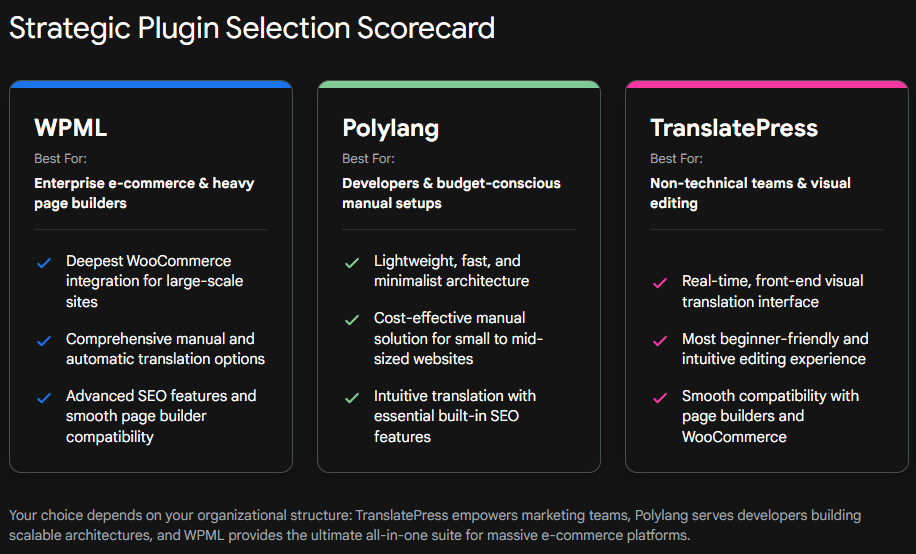
The concept of a singular “best” multilingual plugin is a fallacy; the optimal choice is entirely dependent on the specific organizational structure, the existing technical infrastructure, and the projected localization workflow.
Organizations should deploy TranslatePress if the overarching priority is speed of execution and ease of use for a non-technical marketing team. If the team relies heavily on visual page builders like Elementor and needs to see exactly how translations fit into complex frontend designs in real-time, TranslatePress entirely eliminates the learning curve. It operates as the ultimate “what you see is what you get” translation tool, making it perfect for solopreneurs, digital agencies handing localized sites off to clients, and visually driven corporate sites.
Conversely, WPML is the mandated choice for massive, multifaceted enterprise sites or complex WooCommerce stores. WPML remains the heavy-duty industry standard. While its customized database architecture absolutely requires active monitoring and occasional optimization to prevent bloat, no other plugin on the market offers the same level of granular backend control, translation team management dashboards, and out-of-the-box compatibility with the broader WordPress plugin ecosystem. It is an all-in-one localization powerhouse.
Finally, Polylang is the definitive selection when performance, database integrity, and developer control are the highest operational priorities. For developers architecting a custom theme, integrating headless applications via the REST API, or managing a high-traffic publication where every millisecond of TTFB matters, Polylang is the superior technical choice. Its utilization of native WordPress taxonomies guarantees that the underlying database remains pristine, lean, and incredibly fast, devoid of proprietary string tables or overwhelming query complexity.
Engineering Your Global Expansion
Transitioning an enterprise to a global audience is a monumental technical undertaking. The multilingual software deployed today will serve as the unyielding foundation of an organization’s digital infrastructure for years to come. Whether a project demands the visual simplicity of TranslatePress, the enterprise robustness of WPML, or the lightning-fast, API-driven architecture of Polylang, the success of the implementation relies entirely on precision engineering and architectural foresight.
Choosing the right plugin represents only the initial phase of deployment. Configuring the database architecture to prevent long-term bloat, establishing flawless multilingual SEO rules across thousands of dynamic URLs, and constructing custom Python automations to streamline AI-driven translations require deep technical expertise.
Ready to take your business global? The software development agency Tool1.app builds lightning-fast multilingual WordPress sites, custom web applications, and cutting-edge AI integrations. Do not let poorly configured translation infrastructure compromise international growth or degrade server performance. Contact the engineering team at Tool1.app today to architect a highly scalable, perfectly localized digital ecosystem tailored exactly to your advanced business needs.








Leave a Reply
Want to join the discussion?Feel free to contribute!
Join the Discussion
To prevent spam and maintain a high-quality community, please log in or register to post a comment.