

Building an Automated Content Pipeline Using the Gemini API
Table of Contents
- The Strategic Business Case for Content Automation
- Selecting the Optimal AI Engine: The 2026 Gemini Ecosystem
- Architecting the Automated Pipeline: Core Principles
- Phase 1: Environment Initialization and System Instructions
- Phase 2: API Execution, Resilience, and Quota Management
- Phase 3: Data Transformation: Markdown to HTML
- Phase 4: Automating CMS Delivery via WordPress REST API
- Orchestrating the Complete Content System
- Advanced Capabilities: Multimodality and Structured JSON Output
- Pipeline Optimization: Context Caching and Data ETL
- Conclusion: Transform Your Content Operations Today
- Show all

Architecting a High-Performance Automated Content Pipeline Using the Gemini API
The digital business landscape operates on a relentless, insatiable demand for high-quality, relevant, and authoritative content. For modern enterprises, software development agencies, and marketing teams, satisfying this demand manually is no longer a viable long-term strategy. The sheer volume of output required to maintain search engine visibility, nurture email subscriber lists, and engage social media followers inevitably leads to creative burnout, escalating operational costs, and rapidly diminishing returns.
The definitive solution lies in shifting from traditional manual content creation to sophisticated algorithmic content generation. By leveraging advanced large language models programmatically, businesses can decouple the volume of their output from the strict constraints of human labor hours. This paradigm shift is where Gemini API content automation becomes a highly transformative business strategy. Google’s Gemini models—particularly the highly efficient Flash variants and the deeply analytical Pro series—offer unprecedented capabilities in contextual reasoning, multimodal data understanding, and structured output generation.
At Tool1.app, we frequently consult with business owners who understand the theoretical value of artificial intelligence but struggle immensely with its practical execution. They often rely on manual copy-pasting from web-based chatbot interfaces, which breaks workflow continuity, loses semantic context, and introduces frustrating formatting errors. True operational efficiency is achieved only when artificial intelligence is seamlessly and invisibly integrated into your existing systems. The goal is a frictionless process where a simple text brief, audio file, or data set automatically transforms into a fully formatted, SEO-optimized draft residing natively within your Content Management System.
This comprehensive guide will detail the exact architectural frameworks, business logic, and Python implementation required to build a resilient, enterprise-grade automated content pipeline. We will explore how to interface with the latest unified Gemini Python SDK, handle rate limits and quota exhaustions gracefully, parse the model’s native markdown output into clean web-ready HTML, and push the final payload directly to a WordPress environment via its REST API.
The Strategic Business Case for Content Automation
Before diving into the complex technical implementation of APIs and Python scripts, it is crucial to establish the rigorous economic rationale for building an automated pipeline. Content marketing remains one of the most reliable and compounding drivers of inbound business leads. Recent industry data from 2026 indicates that highly consistent, value-driven blogging and organic search engine optimization remain among the top-performing formats for generating a high return on investment. Furthermore, targeted content sequences and personalized email marketing continue to generate returns of approximately €33 to €39 for every €1 spent, vastly outperforming many traditional outbound digital advertising methods.
However, achieving this impressive return on investment requires massive scale and consistency. A traditional manual content workflow involves ideation, outlining, research, drafting, editing, formatting, and publishing. A single comprehensive, authoritative article can easily consume between six to twelve hours of human labor. If an agency or internal marketing department values its time at €80 per hour, the baseline cost of producing a single piece of high-quality content approaches €500 to €1000.
Implementing Gemini API content automation fundamentally and irreversibly alters this cost structure. By delegating the heavy lifting of drafting, researching, and formatting to an automated application programming interface, human operators transition from being traditional “writers” to strategic “editors and directors.” An automated pipeline can process a short strategic brief, conduct necessary programmatic research by synthesizing multiple provided documents, and generate a 2,000-word draft in a matter of seconds. The cost per article drops precipitously from hundreds of euros to a fraction of a cent in API compute costs.
Furthermore, this automated architecture completely eliminates context-switching. Marketers no longer need to switch between dozens of browser tabs, struggle with character limits in consumer AI interfaces, or manually rebuild HTML heading structures in their publishing platforms. The pipeline handles the exact translation of raw AI output into a production-ready state, resulting in a dramatic acceleration of publishing velocity and a massive reduction in human error.
Selecting the Optimal AI Engine: The 2026 Gemini Ecosystem
The ultimate success and financial viability of your automated pipeline depend heavily on selecting the correct foundational machine learning model. Google’s Gemini ecosystem has evolved significantly, currently offering multiple specialized tiers, each strictly optimized for specific balances of generation speed, operational cost, and deep reasoning capability. As we navigate the technological landscape of 2026, the primary models of interest for enterprise content automation are the Gemini 2.5 Flash series, the Gemini 3.0 Pro series, and the newly announced Gemini 3.1 Pro Preview.
For software architects and marketing directors designing a content automation system, the decision almost always distills down to a choice between “Flash” and “Pro.” Making the correct choice requires a nuanced understanding of your specific pipeline requirements, desired output quality, and monthly API budget.
The Flash Series: Optimized for Speed and Massive Scale
The Gemini 2.5 Flash models, including the highly streamlined Gemini 2.5 Flash-Lite, are purposefully engineered for high-throughput, low-latency automated tasks. If your automated pipeline is tasked with generating vast volumes of highly standardized content—such as e-commerce product descriptions, localized marketing copy across dozens of languages, brief programmatic SEO glossary pages, or daily social media summaries—the Flash architecture is unparalleled in its efficiency.
The cost efficiency of the Flash series is staggering when deployed at an enterprise scale. The financial dynamics are highly favorable for aggressive content scaling. Flash models prioritize rapid time-to-first-token metrics and overall generation speed, often exceeding processing rates of 160 tokens per second. This makes Flash ideal not only for asynchronous background pipeline jobs but also for synchronous API calls where a human user might be waiting for a near real-time response on a custom dashboard.
The Pro Series: Optimized for Complex Nuance and Reasoning
Conversely, when the requested content requires deep analytical thought, the synthesis of massive and disparate datasets, nuanced brand tone matching, or highly creative, long-form storytelling, the Pro models become the mandatory choice. The Gemini 3 Pro and the cutting-edge Gemini 3.1 Pro Preview offer massive context windows capable of holding up to 1 million securely verified tokens, alongside highly advanced, multi-step reasoning capabilities.
If your content generation brief includes uploading a 150-page highly technical industry PDF report and instructing the model to synthesize the core findings into a thought-leadership article that matches a very specific, authoritative brand voice, the Pro model will drastically outperform Flash. It handles complex, multi-tiered system instructions with far greater strict adherence and hallucination resistance. The Pro models also include “thinking” capabilities, allowing the model to perform internal logic validation before outputting the final text, which drastically reduces factual errors in technical writing.
However, this significantly increased intelligence and context retention comes at a higher financial premium. While still highly cost-effective compared to traditional human labor rates, the difference in API costs between Flash and Pro is substantial and must be factored into the architecture of any large-scale operation.
Cost Efficiency: Output Pricing per 1 Million Tokens
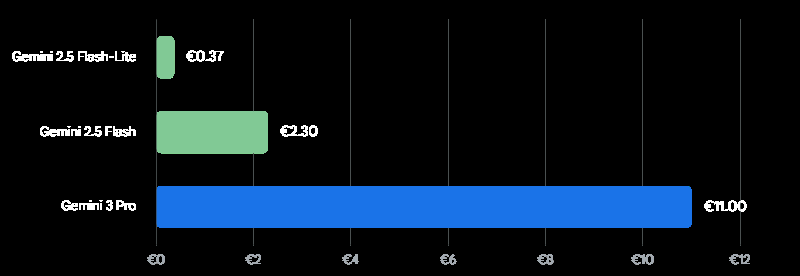
Prices are approximate Euro (€) equivalents for output tokens (prompts under 200k tokens). While the Pro models offer superior reasoning for complex content, the Flash variants provide exceptional cost-efficiency for high-volume, standardized pipeline generation.
To provide clarity on the economic landscape of Gemini API content automation, we must analyze the specific pricing tiers. Understanding these figures is vital for calculating the expected return on investment for your custom software development project.
| Gemini Model Tier | Primary Use Case | Approx. Input Cost (per 1M Tokens) | Approx. Output Cost (per 1M Tokens) |
| Gemini 2.5 Flash-Lite | Ultra-high volume, simple text manipulation, basic summarization. | €0.09 | €0.38 |
| Gemini 2.5 Flash | Standard blog posts, programmatic SEO, fast asynchronous tasks. | €0.28 | €2.37 |
| Gemini 3.0 Pro | Deep reasoning, complex instruction following, large document synthesis. | €1.90 | €11.40 |
| Gemini 3.1 Pro Preview | Cutting-edge logic, massive 1M token context, highly technical writing. | €1.90 | €11.40 |
Note: Prices represent prompts utilizing context windows under 200k tokens. Prompts exceeding 200k tokens generally double the input and output costs. Organizations can further reduce these costs by utilizing the Batch API, which often provides a 50% cost reduction for non-time-sensitive workloads.
Architecting the Automated Pipeline: Core Principles
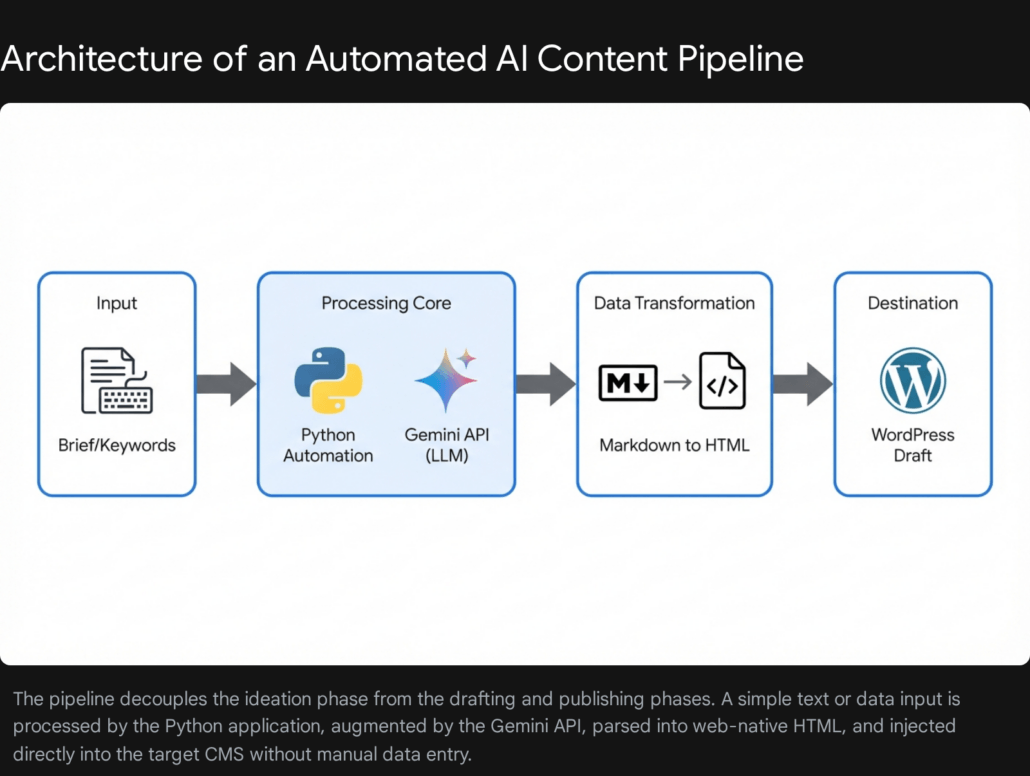
A robust, enterprise-grade automation pipeline is fundamentally not just a single, monolithic Python script; rather, it is a sequential orchestration of highly specialized, decoupled functions. Building a monolithic script that attempts to ingest data, prompt the language model, parse the response, and authenticate with a CMS all within a single blocked process will inevitably result in brittle code. Such systems fail catastrophically when unpredictable network latency occurs, when the API payload structure changes, or when rate limits are temporarily exceeded.
At Tool1.app, our engineering teams design these complex pipelines using modern modular architecture principles. This often involves treating the pipeline as a Directed Acyclic Graph, where tasks are broken down into manageable, interconnected nodes, ensuring proper sequencing and allowing for parallel processing where logical. The core sequential phases of a resilient pipeline include:
- Ingestion and System Instruction Configuration: Capturing the raw user topic, target search engine keywords, supporting documentation, and rigorously applying the overarching “System Instructions” that strictly define the artificial intelligence’s persona, boundaries, and output formatting constraints.
- LLM Execution and Resilient Retry Logic: Transmitting the compiled payload to the Gemini API securely over the network. This must be wrapped in exponential backoff logic to guarantee the pipeline survives temporary quota limits or minor network connectivity hiccups without crashing the entire batch job.
- Data Transformation and Sanitization (Markdown to HTML): Language models natively output structural formatting in Markdown. Conversely, Content Management System platforms natively speak and render HTML. A robust transformation layer is absolutely mandatory to ensure that headings, bulleted lists, hyperlinked text, and bold emphasis translate correctly for web browsers.
- CMS Authentication and Delivery: Authenticating securely with the destination platform and executing a formatted POST request via the CMS’s REST API. This step securely places the transformed content as a draft, ready for final human review.
Let us systematically explore the exact Python implementation of each of these critical phases, building a complete application from the ground up.
Phase 1: Environment Initialization and System Instructions
To begin constructing the pipeline, you must ensure your development environment is equipped with the correct and most modern Google Generative AI SDK. Google has recently transitioned developers to a unified SDK structure designed for both standard developer API access and enterprise Vertex AI access. This unification prevents the need for major code refactoring if a project scales from a small agency tool to a massive enterprise deployment.
You will need to install the following core Python libraries to support the end-to-end pipeline:
Bash
pip install google-genai tenacity requests markdown
The absolute foundation of high-quality automated content is the precise engineering of the SystemInstruction. Unlike a standard, simple user prompt (which might broadly command the model to “Write an article about artificial intelligence”), a system instruction operates at a higher foundational level. It sets the immutable rules of engagement for the language model. It permanently defines the expert persona, the structural formatting strictures, and the tonal guidelines that the model must adhere to, regardless of how brief or vague the specific user input might be.
Using Extensible Markup Language style tags within your system instructions is a highly effective, industry-standard prompt engineering technique. Enclosing distinct rules within <role>, <instructions>, and <constraints> tags helps the underlying model compartmentalize its operational rules and drastically reduces the chance of prompt drift over the course of generating thousands of words.
Python
import os
from google import genai
from google.genai import types

# Initialize the unified Gemini API client
# Security Best Practice: Ensure your environment variable GEMINI_API_KEY
# is set securely in your host environment, never hardcoded in the script.
client = genai.Client()

# Define the overarching System Instruction
# This string governs the immutable behavior and persona of the model
system_instruction_text = """
<role>
You are an elite B2B technical copywriter, software architect, and SEO specialist.
Your primary goal is to produce highly authoritative, engaging, and professional content
that demonstrates deep technical expertise while remaining accessible to business leaders.
</role>

<instructions>
1. Always structure your output meticulously with a compelling introduction, well-defined
   body paragraphs utilizing appropriate hierarchical headings, and a strong conclusive summary.
2. Maintain a professional, authoritative, and solution-oriented tone at all times.
3. Use standard Markdown formatting strictly for structural elements (e.g., ## for H2, ### for H3).
4. Never include generic filler text, conversational pleasantries (such as "Here is your requested article"),
   or concluding remarks outside the boundaries of the article content itself.
5. Prioritize density of information. Avoid fluff.
6. If explaining technical concepts, use clear analogies suitable for enterprise directors.
</instructions>

<constraints>
- Do not invent statistics or cite imaginary studies. If you lack specific data,
  speak in accurate general industry trends.
- Do not output HTML directly; output only clean Markdown.
</constraints>
"""
In addition to the system instructions, developers must configure the generation parameters, specifically the temperature. The temperature setting controls the randomness and creativity of the model’s output. For highly factual, structurally rigid B2B technical content, a lower temperature is often preferred to prevent the model from hallucinating or generating overly flowery prose. However, the Gemini 3 series documentation strongly recommends keeping the temperature at its default value of 1.0 for general tasks, warning that lowering it significantly may lead to unexpected looping behaviors or degraded reasoning performance. Therefore, adjusting temperature requires careful testing based on the specific model variant in use.
Phase 2: API Execution, Resilience, and Quota Management
When automating content at an enterprise scale, your Python script will inevitably encounter 429 Too Many Requests or Resource Exhaustion HTTP errors. These status codes are returned when your application hits its assigned API quota limits, whether that is a restriction on tokens per minute or total requests per minute. If your execution script does not gracefully handle these errors, a single rate-limit block will cause your entire automated batch job to crash, requiring manual intervention and restarting.
To build a truly bulletproof pipeline, software engineers must implement exponential backoff logic. We achieve this utilizing the highly regarded Python tenacity library. This logic dictates that if an API call fails due to a recognized transient network error or quota limit, the script will catch the exception, pause execution for a short, randomized duration, and attempt the call again. If it fails a second time, it will wait a slightly longer duration, increasing the delay exponentially up to a defined maximum threshold before finally giving up.


Here is how we integrate the Gemini API call with robust, production-ready retry logic:
Python
from tenacity import retry, wait_exponential, stop_after_attempt, retry_if_exception_type
from google.genai.errors import APIError

# We only want to trigger a retry sequence on specific API errors
# (like 429 Resource Exhausted or 503 Service Unavailable).
# We explicitly do not want to retry on a 400 Bad Request, because
# that indicates our payload syntax is fundamentally broken and will never succeed.
def is_retryable_error(exception):
    if isinstance(exception, APIError):
        # In a robust enterprise scenario, you would parse the exception code
        # to ensure it is specifically a 429 or 503 error before returning True.
        return True
    return False

# The Tenacity decorator defines the exact parameters of the backoff strategy.
# multiplier=2 means the wait time doubles after each failure.
# min=4 sets the minimum initial wait to 4 seconds.
# max=60 ensures the script never hangs for more than a minute per attempt.
@retry(
    retry=retry_if_exception_type(APIError),
    wait=wait_exponential(multiplier=2, min=4, max=60),
    stop=stop_after_attempt(5),
    reraise=True
)
def generate_article_content(topic_brief, target_keyword, model_name="gemini-3.1-pro-preview"):
    """
    Executes the secure call to the Gemini API to generate the article
    based on the provided brief. The entire function is wrapped in
    Tenacity decorators for highly resilient execution.
    """
    print(f"Initiating Gemini API generation for topic: {topic_brief}")

    # We configure the generation parameters, passing in our strict system instructions
    config = types.GenerateContentConfig(
        system_instruction=system_instruction_text,
        temperature=1.0, # Maintaining default 1.0 as recommended for Gemini 3 reasoning
    )

    # Constructing the dynamic user prompt combining the brief and the SEO target
    dynamic_prompt = (
        f"Write a comprehensive, highly detailed 2000-word blog post about the following topic: {topic_brief}. "
        f"Naturally integrate the focus SEO keyword '{target_keyword}' into the text at least three times, "
        f"including once in an H2 heading. Ensure the depth is exhaustive."
    )

    # Execute the API call synchronously
    response = client.models.generate_content(
        model=model_name,
        contents=dynamic_prompt,
        config=config
    )

    return response.text
In this architecture, tenacity acts as an invisible protective wrapper around the delicate network call. If the generate_content execution throws a quota exhaustion error because you have queued too many articles simultaneously, tenacity intercepts the failure, puts that specific execution thread to sleep for 4 seconds, and tries again. If it fails again, it waits 8 seconds, then 16, escalating up to a maximum of 60 seconds, and stopping entirely only after 5 consecutive failed attempts. This sophisticated engineering ensures your pipeline is both highly resilient to unstable network conditions and respectful of Google’s server load management.
Phase 3: Data Transformation: Markdown to HTML
A remarkably common architectural mistake in building API content pipelines is attempting to push the raw language model output directly into the database of a Content Management System. The Gemini API, by default, outputs text structurally formatted in Markdown. If you push raw Markdown text into a standard WordPress REST API content field, the CMS will not interpret it. It will render on the frontend as plain, unstyled text, exposing ugly hash symbols (##) and asterisks (**) to your readers, completely destroying readability and search engine optimization structure.
To bridge this crucial technical gap, the pipeline must include a dedicated data transformation layer that seamlessly converts Markdown into clean, semantic HTML before delivery. The standard Python markdown library is exceptionally well-suited and highly performant for this task.
Furthermore, it is critical to actively configure the Markdown converter to handle specific syntax extensions. Technical business-to-business content heavily relies on data tables and formatted code blocks. Standard markdown parsers ignore these unless explicitly instructed to process them.
Python
import markdown

def convert_markdown_to_html(md_text):
    """
    Converts raw Markdown payload from the Gemini API into semantic, web-ready HTML.
    Explicitly enables critical extensions for data tables and fenced code blocks
    which are essential for technical software development blogs.
    """
    html_output = markdown.markdown(
        md_text,
        extensions=['tables', 'fenced_code', 'nl2br', 'sane_lists']
    )
    return html_output
This seemingly simple, yet highly effective transformation function ensures that when your text payload finally arrives in the WordPress editor interface, the markdown <H2> tags render as proper semantic HTML headings, bulleted lists render accurately as <ul> blocks, and bold text is appropriately wrapped in <strong> tags. This preserves all the SEO hierarchy and readability benefits that the AI originally generated.
Phase 4: Automating CMS Delivery via WordPress REST API
The final critical leg of the automated pipeline involves securely placing the newly formatted HTML content directly into your publishing system. WordPress powers a massive portion of the enterprise web and features a highly robust, well-documented REST API natively out of the box.
To interface with the WordPress REST API securely, you must absolutely avoid using your primary administrator password. Instead, you must generate specific Application Passwords. Application Passwords can be generated directly in the WordPress administrative dashboard under your specific user profile settings. They allow external Python scripts to authenticate over secure Basic Authentication without ever exposing your primary, human-facing credentials to the script environment.
The precise REST API endpoint required to create a new post is a POST request to /wp-json/wp/v2/posts. We must pass a carefully constructed JSON payload containing the dynamic title, the transformed HTML content, and crucially, the post status.
It is a strict operational best practice to set the initial status to draft rather than publish. Automating the final publication step is highly risky. Setting the state to draft allows a human editorial director to review the AI-generated content, manually inject internal links to specific service pages, and attach a high-quality featured image before it goes live to the public internet.
Python
import requests
import json

def push_to_wordpress_draft(title, html_content, wp_domain, username, app_password, focus_keyword):
    """
    Authenticates securely with the WordPress REST API via Application Passwords
    and creates a new draft post populated with the AI content.
    """
    # Define the standard endpoint for WordPress post creation
    url = f"https://{wp_domain}/wp-json/wp/v2/posts"

    # Setup Basic Authentication tuple
    credentials = (username, app_password)

    # Construct the JSON payload adhering to the WordPress schema
    payload = {
        "title": title,
        "content": html_content,
        "status": "draft",
        "format": "standard",
        # In a fully integrated system, you can also pass categories, tags,
        # or custom meta fields (like Yoast SEO focus keywords) here.
        "meta": {
            "focus_keyword": focus_keyword
        }
    }

    # Define the HTTP headers
    headers = {
        "Content-Type": "application/json",
        "Accept": "application/json",
        "User-Agent": "Tool1-Automation-Pipeline/1.0"
    }

    try:
        # Execute the POST request
        response = requests.post(
            url,
            auth=credentials,
            json=payload,
            headers=headers,
            timeout=30 # Prevent the script from hanging indefinitely on network issues
        )

        # Raise an exception for bad HTTP status codes (e.g., 401 Unauthorized, 500 Server Error)
        response.raise_for_status()

        # Parse the JSON response to extract the newly created post ID for logging
        response_data = response.json()
        post_id = response_data.get('id')
        print(f"Success: Created WordPress draft. Post ID: {post_id}")
        return post_id

    except requests.exceptions.RequestException as e:
        print(f"Critical Failure: Unable to push payload to WordPress. Error details: {e}")
        return None
Orchestrating the Complete Content System
With the individual microservices built, tested, and secured, we can now orchestrate the entire workflow. A master controller function coordinates the flow of data from the initial user input brief, through the AI generation, into the formatting layer, and finally pushing the payload to the CMS.
Python
def execute_enterprise_content_pipeline(topic, target_keyword, wp_config):
    """
    The master orchestrator function that strings together generation,
    transformation, and delivery into a single automated command.
    """
    print(f"--- Starting Pipeline for: {topic} ---")

    # Phase 1 & 2: Generate Content via Resilient Gemini API Call
    print("Phase 1: Querying Gemini API for content generation...")
    # Utilizing the Flash model for speed in this specific example
    raw_markdown = generate_article_content(
        topic_brief=topic,
        target_keyword=target_keyword,
        model_name="gemini-2.5-flash"
    )

    if not raw_markdown:
        print("Pipeline aborted: Content generation failed.")
        return False

    # Phase 3: Transform Data Structure
    print("Phase 2: Converting raw Markdown structure to semantic HTML...")
    html_content = convert_markdown_to_html(raw_markdown)

    # Generate a dynamic, SEO-friendly title based on the requested topic
    dynamic_title = f"The Definitive Guide to {topic.title()} in 2026"

    # Phase 4: Push to CMS Database
    print(f"Phase 3: Initiating secure transfer to WordPress domain: {wp_config['domain']}...")
    post_id = push_to_wordpress_draft(
        title=dynamic_title,
        html_content=html_content,
        wp_domain=wp_config['domain'],
        username=wp_config['username'],
        app_password=wp_config['password'],
        focus_keyword=target_keyword
    )

    if post_id:
        print(f"--- Pipeline Execution Completed Successfully. Draft ID: {post_id} ---")
        return True
    else:
        print("--- Pipeline Execution Failed at CMS Integration Phase ---")
        return False

# Example execution trigger for a custom software agency:
#
# wp_config = {
#     "domain": "tool1.app",
#     "username": "api_automation_user",
#     "password": "abcd efgh ijkl mnop"
# }
# execute_enterprise_content_pipeline(
#     topic="Building scalable mobile applications with React Native",
#     target_keyword="scalable mobile applications",
#     wp_config=wp_config
# )
This precise orchestration creates a seamless, hands-free technical bridge between an abstract conceptual brief and a tangible, formatted digital asset sitting securely in your CMS, ready for final human editorial review.
Advanced Capabilities: Multimodality and Structured JSON Output
While the baseline pipeline described above handles text-to-text generation beautifully, the true, disruptive power of the Gemini API lies in its advanced multimodal and strictly structured output capabilities. Partnering with a specialized development agency like Tool1.app allows ambitious businesses to integrate these cutting-edge features into their custom software solutions, pushing automation far beyond simple blogging.
Processing Multimodal Content Inputs
The Gemini ecosystem is natively multimodal. This means the underlying architecture does not just understand text prompts; it understands images, complex audio waveforms, and high-definition video files directly. It processes these modalities simultaneously without relying on separate, error-prone transcription services or optical character recognition models in the middle of the pipeline.
Consider a workflow where your marketing team or executive leadership simply records a 45-minute video meeting discussing a new software product feature. Instead of passing a written text brief to the pipeline, the Python script uploads the raw video file directly to the Gemini API using the File API endpoints. Using the SDK, you can instruct the model to “Watch this entire product demonstration video, extract the core technical value propositions, identify the target audience mentioned, and write a comprehensive, formatted blog post explaining this feature.”
Gemini 3.0 Pro and 3.1 Pro are capable of processing incredibly massive files, including hour-long videos or hundreds of pages of PDF documentation, and synthesizing that vast visual and auditory information into high-quality written content. This creates a revolutionary pipeline where the “input” is simply natural human conversation or existing business documentation, and the “output” is a polished, ready-to-publish marketing asset.
Enforcing Strict JSON Output for Headless Architecture
In many advanced web deployment architectures—such as headless CMS setups utilizing Next.js, React, or custom mobile applications—you do not just want a massive, unstructured block of HTML injected into a database. You require highly structured data. You need metadata, SEO descriptions, distinct text block arrays, and author information neatly organized into separate fields so your frontend application can fetch and render it beautifully.
The Gemini API supports a feature known as “Controlled Generation,” allowing software engineers to force the model to output valid JSON that strictly adheres to a predefined schema. By setting the response_mime_type to application/json within the GenerateContentConfig, you mathematically eliminate the risk of the model returning conversational text or malformed strings that would break your application’s JSON parser.
To achieve this in Python, developers define a schema—often utilizing libraries like Pydantic—that details the exact keys and data types required. For example, you could define a schema requiring the model to return a JSON object containing keys for seo_title (string), meta_description (string under 160 characters), h1_header (string), and body_paragraphs (array of strings).
When the model generates the response, the pipeline safely parses this pristine JSON object and programmatically maps the values to specific Advanced Custom Fields (ACF) or metadata columns within your WordPress or custom database. This creates a deeply integrated, highly precise automation flow that satisfies the most rigorous enterprise data standards.
Pipeline Optimization: Context Caching and Data ETL
As organizations scale their Gemini API content automation, advanced architectural optimizations become necessary to control costs and manage data velocity. Two critical concepts in this domain are Context Caching and Extract, Transform, Load (ETL) principles for Large Language Models.
If your automated pipeline frequently relies on the same massive background documents—such as an extensive brand guideline PDF, a library of past high-performing articles to mimic style, or a massive technical product manual—sending these documents with every single API call is financially inefficient. The Gemini API offers a feature called Context Caching. By uploading the foundational documents to the cache, you pay a one-time storage fee per hour, and subsequent API calls that reference this cached data benefit from significantly reduced input token costs and much faster generation speeds. This is highly recommended for agencies enforcing strict, document-heavy brand voices across thousands of automated articles.
Furthermore, integrating large language models requires rethinking traditional data pipelines. As highlighted by industry data engineering experts, organizations must adopt modular architectures to handle the ETL process for LLMs. This means establishing distinct phases for extracting raw data (e.g., pulling support tickets via an API), transforming that data (stripping personal identifiable information, chunking it into semantic units), and loading it securely to the model. Utilizing tools like Apache Airflow or Kubernetes to manage these Directed Acyclic Graphs ensures that the data feeding your content pipeline is always accurate, compliant, and up-to-date.
Conclusion: Transform Your Content Operations Today
The systematic transition from manual drafting workflows to an automated, API-driven content pipeline represents a monumental shift in marketing efficiency and scalability. By integrating the deep reasoning power of the Gemini API with robust Python backend logic, exponential backoff resilience, and direct CMS connectivity, businesses can scale their output exponentially without a proportional increase in human overhead costs. The architecture outlined in this comprehensive guide—encompassing strategic prompt engineering, semantic data transformation, and secure REST API integration—provides the exact blueprint necessary for deploying a highly resilient enterprise system.
While the fundamental Python code and concepts are accessible to developers, building a true production-ready system that handles edge cases gracefully, integrates complex multimodal inputs, and conforms precisely to your unique brand guidelines requires specialized software architectural expertise. Attempting to manage API rate limits, secure credential storage, and complex JSON schemas without a dedicated engineering approach frequently leads to brittle systems that require more maintenance time than they actually save in manual labor.
Scale Your Marketing Efforts Effortlessly
Scaling your digital content operations should never mean sacrificing quality or overwhelming your internal marketing team with technical troubleshooting. Tool1.app can build a custom AI content pipeline tailored specifically to your agency’s unique workflows, CMS architecture, and brand voice. Whether you require high-throughput programmatic SEO pages powered by the rapid Gemini Flash models, or deeply analytical, multimodal thought-leadership generation utilizing the cutting-edge Gemini Pro series, our engineers deliver secure, scalable, and fully managed automation solutions. Contact Tool1.app today to discuss how we can engineer a custom software solution that turns your digital strategy into an automated, high-performing reality.






Leave a Reply
Want to join the discussion?Feel free to contribute!
Join the Discussion
To prevent spam and maintain a high-quality community, please log in or register to post a comment.