

Optimizing React Native App Size: Essential Tips for Startups
Table of Contents
- The Hidden Business Costs of a Bloated Mobile Application
- The Architectural Shift: Embracing the New Architecture and Hermes
- Auditing and Pruning the JavaScript Dependency Tree
- Code Splitting and Advanced Bundling Strategies
- Android-Specific Optimization: Mastering Gradle, R8, and ABIs
- iOS-Specific Optimization: Navigating the Post-Bitcode Era
- Asset and Media Compression Methodologies
- Establishing Automated CI/CD Guardrails
- Conclusion
- Show all
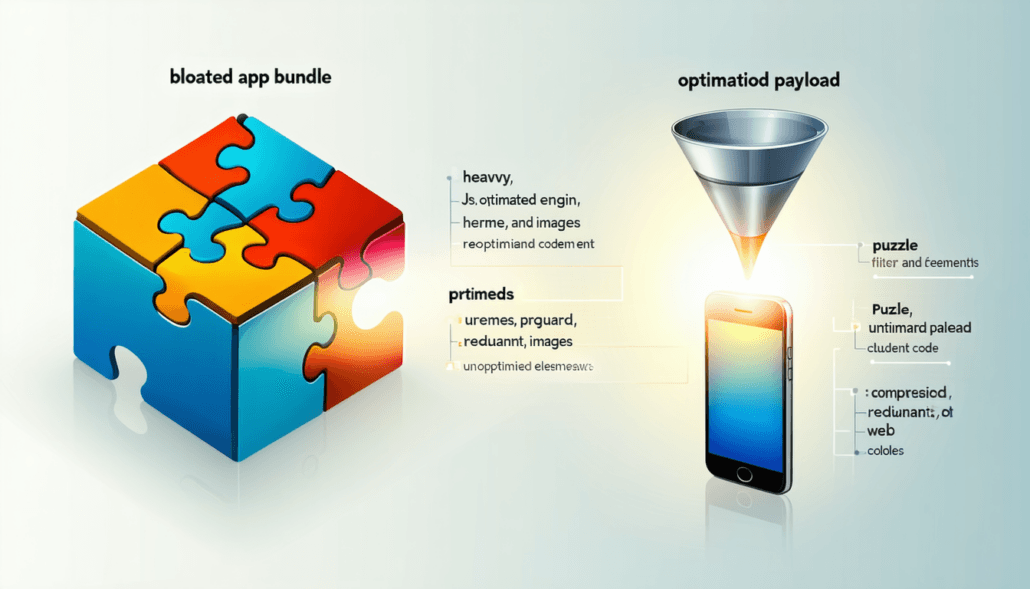
In the modern mobile application ecosystem, consumer patience is remarkably short, and the competition for device storage is fierce. When a startup invests heavily in marketing campaigns, the final and most critical hurdle between a clicked advertisement and a successfully acquired user is the application store download screen. At this precise juncture, the physical size of the mobile application becomes a silent conversion killer. Users staring at a download prompt for a bloated, oversized application while operating on a metered data plan or a slow cellular network will inevitably tap the cancel button. For engineering and product teams, learning how to reduce React Native app size is not merely a technical optimization; it is a fundamental business strategy that directly influences customer acquisition costs, user retention, and long-term profitability.
Startups face a unique challenge in this domain. React Native is an exceptionally powerful and popular framework that allows development teams to ship cross-platform applications rapidly using a single JavaScript codebase. However, this cross-platform flexibility comes with a structural cost. A default React Native application must bundle the JavaScript engine, the native bridge, platform-specific binaries, and a myriad of third-party Node.js dependencies. Without deliberate and rigorous optimization, this payload quickly snowballs into a massive executable file. For startups looking to maximize their financial runway and scale efficiently, delivering a lightweight, frictionless mobile experience is an absolute necessity.
The Hidden Business Costs of a Bloated Mobile Application
Before diving into the technical execution and code-level optimizations, it is crucial to understand the economic impact of application size. The global mobile app economy represents hundreds of billions of euros in consumer spending, with emerging markets driving the vast majority of new download volume. In these highly lucrative regions, premium device storage is a luxury, and high-speed internet connectivity is often unpredictable.
Behavioral statistics reveal a stark reality regarding digital commerce and user engagement. Consumers are highly motivated to use native applications, with conversion rates in mobile apps performing up to 157% higher than their mobile web counterparts. In specific verticals, such as travel and hospitality, the conversion rate jumps by an astonishing 220%. Furthermore, mobile app users demonstrate deeper engagement, viewing an average of 22 products per session compared to just 5.7 products on mobile browsers. This overwhelming data indicates that acquiring a dedicated mobile app user is one of the most profitable actions a startup can take.
However, the financial cost of acquiring that user is rising steadily. In mature European markets, the Cost Per Install (CPI) averages between €1.85 and €3.70, depending on the specific country and application category. In highly competitive markets like North America, the CPI can easily stretch between €2.30 and €4.60. When a startup allocates precious marketing euros to drive traffic to an app store listing, a large application size introduces immense friction into the acquisition funnel. Industry analytics have established a direct, mathematical correlation between payload size and abandonment: for every 6MB increase in the size of an application bundle, the install conversion rate drops by approximately 1%.
Consider the financial implications: if a startup launches a 100MB application instead of a highly optimized 40MB version, they are mathematically sacrificing roughly 10% of their acquired users at the very final stage of the funnel. For a business spending €50,000 on user acquisition campaigns, that represents €5,000 completely lost to loading bars and insufficient storage warnings. At Tool1.app, we have observed firsthand how implementing rigorous size reduction protocols can rescue marketing budgets and dramatically accelerate active user base growth. Therefore, engineering teams must treat payload size as a primary Key Performance Indicator from the very first development sprint.
The Architectural Shift: Embracing the New Architecture and Hermes
The most profound step a startup can take to reduce React Native app size and dramatically boost runtime performance is to leverage the framework’s modern foundational architecture. The React Native core team has entirely frozen the legacy architecture, replacing it with the New Architecture built upon Fabric (the concurrent rendering system), TurboModules (lazy-loaded native modules), and the JavaScript Interface (JSI).
Historically, React Native relied on an asynchronous JSON bridge to facilitate communication between the JavaScript realm and the native UI threads. This marshalling of data was slow, required serializing and deserializing payloads, and necessitated bundling extensive bridging code. The New Architecture uses JSI to allow JavaScript to hold direct, synchronous references to C++ host objects, completely eliminating the serialization overhead and streamlining the underlying binaries.
Coupled with this structural overhaul is the Hermes JavaScript engine. Originally introduced as an opt-in experimental feature, Hermes is now the default, purpose-built engine for React Native. Traditional JavaScript engines like V8 or JavaScriptCore (JSC) were designed for web browsers, where Just-In-Time (JIT) compilation is optimal for rapidly changing web pages. Mobile devices, however, are highly constrained by CPU power, memory availability, and battery life. Hermes takes a radically different approach by utilizing Ahead-Of-Time (AOT) compilation.
During the build process on your integration server, Hermes parses your JavaScript source code and compiles it into a highly optimized, pre-compiled bytecode file. This bytecode is significantly smaller than plain or minified JavaScript text, and it entirely removes the parsing burden from the user’s mobile device.
General Memory Usage


By shifting the compilation burden from runtime to build time via Ahead-Of-Time (AOT) bytecode generation, Hermes drastically cuts both the initial download payload and device memory pressure.
The implications for app size and application speed are staggering. Benchmarks demonstrate that transitioning from JavaScriptCore to Hermes reduces the JavaScript bundle size by approximately 33%, dropping from 12MB to 8MB in standardized testing scenarios. Furthermore, because the device does not need to parse raw JavaScript at runtime, cold startup times improve by up to 55%, and overall application RAM consumption drops by 26%. With the upcoming iterations of Hermes V1, the engine will bring further general improvements to virtual machine performance and native bytecode compilation.
To ensure your startup is reaping these essential benefits, developers must explicitly verify that Hermes and the New Architecture are enabled in the project configuration files.
For Android environments, navigate to the android/gradle.properties file and ensure the following core flags are active:
Properties
# Enable the Hermes JavaScript Engine
hermesEnabled=true
# Enable the New Architecture (Fabric, TurboModules)
newArchEnabled=true
For iOS environments, inspect your Podfile to confirm the engine is properly invoked during the dependency installation phase:
Ruby
use_react_native!(
  :path => config[:reactNativePath],
  :hermes_enabled => true,
  :fabric_enabled => true
)
By embracing Hermes and the New Architecture, startups can instantly shave megabytes off their application payload and deliver a modern, fluid user experience that rivals pure native Swift or Kotlin development.
Auditing and Pruning the JavaScript Dependency Tree
Every package installed via package managers like npm or Yarn carries a distinct file weight that is directly transferred to the end-user’s device. Unused, outdated, or excessively complex libraries are silent app bloaters that slowly degrade application performance over time. To effectively reduce React Native app size, engineering teams must adopt a ruthless, continuous approach to dependency management.
The initial step in this optimization process is establishing complete visibility. You cannot optimize an architecture that you cannot accurately measure. Developers should integrate the react-native-bundle-visualizer tool into their standard development workflow. By executing npx react-native-bundle-visualizer in the terminal, the tool generates an interactive HTML treemap of the entire JavaScript bundle. This graph highlights exactly which node modules and deeply nested dependencies are consuming the most space, categorized by their kilobyte footprint.
Often, this visualization reveals shocking code inefficiencies. A remarkably common culprit in React Native development is the inclusion of legacy date manipulation libraries. Many older codebases and tutorials default to importing moment.js. However, moment.js is notoriously heavy and fundamentally lacks native tree-shaking support. This means the entire library—including dozens of international locale and timezone files—is bundled into your application even if the code only utilizes a single, basic date formatting function. Swapping moment.js for a modern, highly modular alternative like dayjs or date-fns can immediately eradicate hundreds of kilobytes from the bundle without sacrificing any core functionality.
Similarly, UI component libraries and icon sets must be heavily scrutinized. Comprehensive UI libraries provide immense developer convenience during the rapid prototyping phase but carry massive production payloads. Startups should favor modular libraries that support tree-shaking, ensuring that only the specific buttons or inputs imported into the code are compiled into the final application. When dealing with iconography, developers should completely avoid bundling massive font files and instead utilize highly optimized SVG rendering. Using libraries like lucide-react-native ensures that icons scale perfectly without pixelation and can be bundled selectively, drastically reducing the overall asset footprint.
Furthermore, automated dependency tracking tools like depcheck should be executed regularly in the local environment and the CI/CD pipeline to identify “ghost” packages—libraries that are listed in the package.json but never actually imported into the codebase. Running a simple npm uninstall <package_name> on these obsolete libraries ensures the codebase remains lean, secure, and highly purposeful.
Code Splitting and Advanced Bundling Strategies
By default, React Native utilizes the Metro bundler, an incredibly fast tool designed by Meta that aggregates the entire application logic and all third-party dependencies into a single, monolithic JavaScript file. While Metro is exceptional for rapid local development and hot-reloading, it intentionally trades complex configurability for speed. Crucially, it lacks out-of-the-box support for advanced dead code elimination and code splitting.
For ambitious startups building large-scale applications or feature-heavy “super-apps,” loading the entire application architecture into device memory at startup is fundamentally inefficient. The modern solution is code splitting—the practice of breaking the monolithic codebase into smaller, modular chunks that are only downloaded and executed on-demand when the user navigates to a specific screen or unlocks a specific feature.
To achieve enterprise-grade code splitting in React Native, engineering teams are increasingly transitioning to Re.Pack. Re.Pack is a sophisticated, community-driven toolkit that wraps Webpack (and modern Rust-based bundlers like Rspack) to make them function seamlessly within the React Native ecosystem. It acts as a highly configurable drop-in replacement for Metro, unlocking the massive, mature ecosystem of Webpack plugins and custom loaders.
The primary advantage of Re.Pack is its first-class support for dynamic imports and Module Federation. With Module Federation, different engineering squads can build, test, and deploy isolated micro-frontends of the mobile app independently. In terms of strict size optimization, Re.Pack applies state-of-the-art tree-shaking algorithms that are far more aggressive than Metro’s standard minification. It traverses the dependency graph, stripping out unreferenced exports and dead code, thereby minimizing the final bundle dimensions. Additionally, by utilizing dynamic asynchronous imports, the initial application load remains incredibly lightweight, deferring the parsing of complex logic until the user actually requests it. At Tool1.app, implementing custom Webpack configurations via Re.Pack has been highly instrumental in keeping our enterprise-level mobile applications exceptionally snappy and responsive under heavy loads.
Android-Specific Optimization: Mastering Gradle, R8, and ABIs
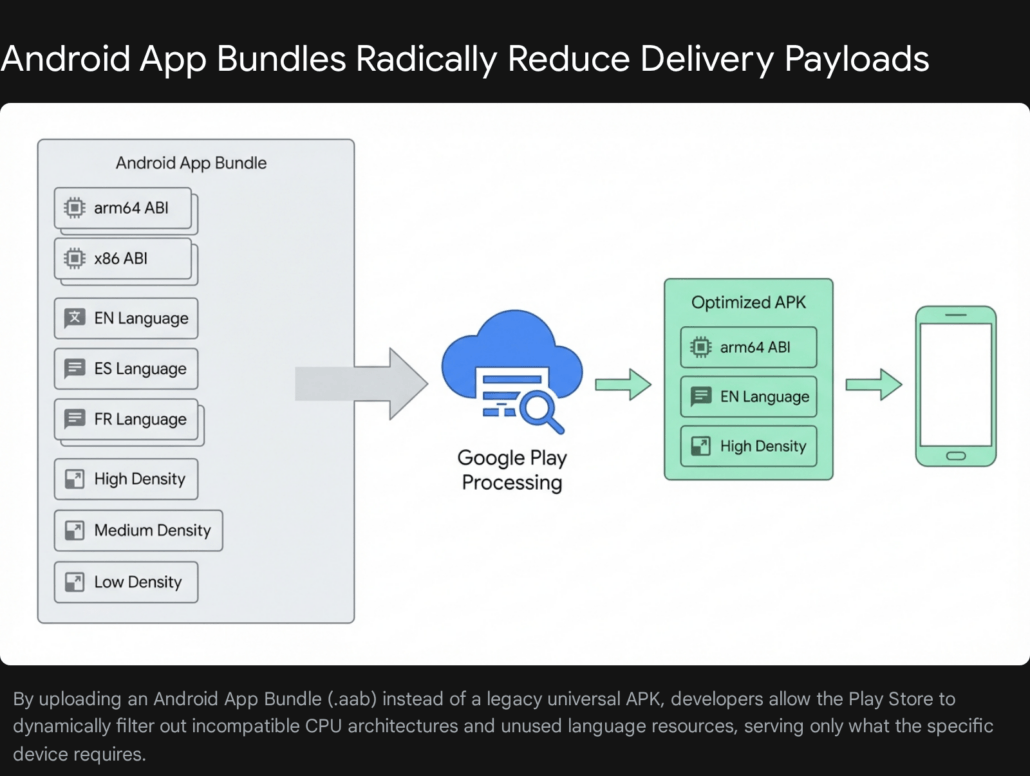
The Android device ecosystem is historically vast and heavily fragmented, featuring thousands of different device models, varying screen densities, and distinct CPU architectures. When you execute a standard release build in React Native, the compiler conservatively attempts to support this entire ecosystem by bundling resources, image sizes, and native C++ binaries for every conceivable device configuration into a single, universal APK file. This default behavior results in an unnecessarily massive executable. Startups must meticulously configure their Android build pipelines to generate highly targeted, stripped-down deliverables.
ABI Splitting and Architecture Targeting
Android hardware operates on various Application Binary Interfaces (ABIs), primarily including armeabi-v7a (older 32-bit devices), arm64-v8a (modern 64-bit devices), and x86/x86_64 (Intel-based hardware and emulators). By default, the React Native build system compiles separate native .so files for all of these architectures and packages them together.
If your startup’s application targets Android 10 and above by setting a minSdkVersion of 29, you can confidently drop support for legacy 32-bit architectures. All modern Android devices manufactured in recent years are fully 64-bit compliant, and the Google Play Store strictly mandates 64-bit architecture support. By explicitly instructing Gradle to only build for arm64-v8a, you can instantly slash the native library footprint by roughly 30% to 40%.
To implement this, modify the android/app/build.gradle file:


Gradle
def enableSeparateBuildPerCPUArchitecture = true

android {
    splits {
        abi {
            reset()
            enable enableSeparateBuildPerCPUArchitecture
            universalApk false
            include "arm64-v8a"
        }
    }
}
Setting universalApk false is a critical directive; it ensures the build system does not waste time generating a bloated fallback file containing all architectures. However, the most modern and effective approach is moving entirely away from standalone APKs to the Android App Bundle (.aab) format. Submitting an App Bundle allows the Google Play Store infrastructure to dynamically generate a tailor-made, microscopic APK for the specific end-user’s device at the exact moment of download.
ProGuard, R8, and Dead Code Stripping
Java and Kotlin codebases can become immensely bloated by third-party Android SDKs, advertising trackers, and analytics platforms. ProGuard, and its modern, highly performant Google successor R8, are sophisticated compilers integrated into the Android build system that shrink, optimize, and obfuscate Android bytecode. They analyze the execution paths of the application, identify classes, variables, and methods that are never explicitly called, and aggressively strip them out of the final package.
To activate this optimization, developers must enable minification and resource shrinking within the release build type in android/app/build.gradle:
Gradle
buildTypes {
    release {
        signingConfig signingConfigs.release
        debuggable false
        minifyEnabled true
        shrinkResources true
        crunchPngs true
        proguardFiles getDefaultProguardFile("proguard-android-optimize.txt"), "proguard-rules.pro"
    }
}
The shrinkResources true directive is highly powerful. It works in tandem with the R8 compiler to comb through the res/ directories, automatically deleting XML layouts, localized strings, and visual drawables that belong to code that was previously stripped. Additionally, crunchPngs true provides an extra layer of algorithmic compression to any remaining raster images.
However, React Native applications rely heavily on reflection to dynamically bridge JavaScript logic to native Android components. Overly aggressive ProGuard rules can inadvertently strip critical React Native core classes, leading to catastrophic runtime crashes. Therefore, a robust proguard-rules.pro file must be meticulously maintained to protect the Hermes engine, the JNI layer, and TurboModules from being optimized away.
Filtering Unused Language Resources
Major Android dependencies, such as Google Play Services or Firebase, bundle string translations and localization files for dozens of global languages. If your startup’s application is specifically targeted and only operates in English and French, bundling Arabic, Japanese, and German strings is a complete waste of data.
By defining the resConfigs property inside the defaultConfig block, Gradle will forcefully discard all unsupported language packages during the final build phase:
Gradle
defaultConfig {
    // Keep only the specified languages to reduce APK size
    resConfigs "en", "fr"
}
Implementing this single line of configuration routinely deletes several megabytes of useless XML files from the application package.
The 16KB Memory Page Size Mandate
A critical, looming architectural change for Android development is Google’s strict mandate regarding 16KB memory page sizes. Starting with Android 15, and heavily enforced on the Play Store moving into 2026, apps must be fully compatible with devices utilizing 16KB virtual memory pages, a significant upgrade from the traditional 4KB standard. This operating system shift significantly improves application launch speeds under extreme memory pressure and noticeably reduces hardware power draw.
However, React Native applications bundle uncompressed native shared libraries (.so files). If these C++ libraries are compiled and aligned with legacy 4KB boundaries, the Android dynamic linker will critically fail to load them on a new 16KB device, causing immediate, unrecoverable crashes.
To optimize for this architecture without bloating the app with uncompressed data workarounds, developers must ensure they are operating on React Native 0.77 or higher, which ships with native, out-of-the-box 16KB support for all core modules. Furthermore, the Android Gradle Plugin (AGP) must be updated to version 8.5.1 or higher. This modern version of AGP automatically handles the correct ZIP alignment of these uncompressed native libraries. Developers must verify that useLegacyPackaging = false is maintained in their Gradle configurations to prevent regression.
iOS-Specific Optimization: Navigating the Post-Bitcode Era
Optimizing Apple iOS applications requires a distinctly different set of strategies, primarily governed by Apple’s proprietary Xcode build system and the App Store Connect delivery mechanisms. It is vital to keep the iOS application under Apple’s 200MB cellular download limit; exceeding this forces users to connect to Wi-Fi to install the app, completely destroying impulse acquisition metrics.
Historically, the absolute golden rule of iOS optimization was enabling Bitcode. Bitcode was an intermediate representation of a compiled program that allowed Apple’s cloud servers to automatically re-optimize and recompile the application for specific, future device architectures without developer intervention. However, Apple has officially deprecated Bitcode across its entire ecosystem. Modern Xcode versions no longer build Bitcode by default, and submitting binaries containing Bitcode simply results in the data being stripped and ignored upon upload to App Store Connect.
In this modern, post-Bitcode era, the optimization focus must aggressively shift to rigorous App Thinning and meticulous Asset Management.
App Thinning is Apple’s sophisticated equivalent to Android’s App Bundles. It encompasses a process known as “Slicing,” where the App Store dynamically creates unique, highly targeted variants of the application tailored to the exact hardware specifications of the downloader’s device. For example, it will serve only high-resolution 3x images to an iPhone Pro Max, proactively stripping out the unnecessary 1x and 2x image assets that would otherwise waste storage space.
To fully benefit from the Slicing mechanism, startups must abandon traditional file-based image management in arbitrary directories and exclusively utilize Xcode Asset Catalogs (.xcassets). When images, colors, and binary data files are placed directly into an Asset Catalog, the Apple compiler can deeply optimize their compression and selectively package them during the Slicing process. If developers leave raw .png files floating in the standard project folders, they bypass the App Thinning process and will be distributed universally to every downloading device, severely inflating the final IPA size.
Furthermore, developers must actively enforce dead code stripping within the Xcode build settings. Ensure that the Deployment Postprocessing flag is set to Yes, and that Strip Linked Product is activated specifically in the Release build configuration. It is also vital to strip all debug symbols from the release binaries. Debug information—which can add tens of megabytes to a build—should be exported strictly as separate dSYM files. These dSYM files can then be uploaded directly to crash reporting tools like Sentry, rather than being shipped to the end user.
Asset and Media Compression Methodologies
Media files—including high-resolution images, complex icons, onboarding videos, and custom typography—frequently consume the largest percentage of a mobile application’s overall payload. While a pristine, brand-aligned UI design is highly important for user trust, serving unoptimized 4K raster images inside a small mobile viewport is negligent engineering that severely impacts the user experience.
The first line of defense is format modernization. Legacy image formats like JPEG and standard PNG should be systematically deprecated and replaced with next-generation web formats like WebP or AVIF. WebP provides superior lossless and lossy algorithmic compression, frequently reducing image file sizes by 50% to 70% with absolutely no discernible drop in visual fidelity to the human eye. Modern versions of React Native fully support the WebP format natively, making the transition seamless for the development team.
When raster images are unavoidable due to specific design constraints, they must be brutally compressed before they are allowed to enter the application bundle. Developers can implement automated hooks into the build pipeline using Node tools like imagemin-cli to forcefully crush static assets upon compilation. Alternatively, inside the application logic itself, libraries like react-native-compressor can compress user-uploaded media directly on the device before it is sent to the server. This library utilizes native compression algorithms remarkably similar to those used by WhatsApp, which keeps the app highly responsive during uploads and saves massive amounts of network bandwidth.
For static interface icons, logos, and vector illustrations, utilizing SVGs is mandatory. Rendering vector graphics mathematically ensures they scale flawlessly across all possible screen densities, from legacy iPhones to modern Android tablets, without adding any pixel weight to the bundle. However, a common trap is that complex SVGs exported directly from design tools like Figma or Adobe Illustrator often contain massive amounts of bloated metadata, hidden layers, and unnecessary XML nodes. Passing all vector art through an optimization tool like SVGO (SVG Optimizer) before importing them into the React Native codebase is a critical best practice to strip this invisible data bloat.
Lastly, engineering teams must consider architectural deferred loading. Does every high-definition onboarding video and interactive marketing graphic need to be packaged permanently inside the initial app store download? The answer is almost always no. Startups should heavily embrace On-Demand Resources on the Apple side and Play Feature Delivery on the Android side. Alternatively, a simpler solution is to host non-critical media assets securely on a fast Content Delivery Network (CDN). By configuring the application to fetch heavy assets asynchronously only when the user navigates to the corresponding screen, the initial install size remains microscopic, drastically reducing the psychological barrier to entry. At Tool1.app, we frequently architect robust backend integrations that feed mobile frontends dynamically, ensuring the core application logic remains incredibly lightweight and agile.
Establishing Automated CI/CD Guardrails
Technical optimization is not a one-time event completed prior to launch; it is a continuous, rigorous engineering discipline. React Native projects are organic, living codebases. As developers continuously push new features, import new external packages, and drag in new marketing assets, the application size will invariably creep upward over time.
To prevent this silent regression, startups must automate size monitoring within their Continuous Integration and Continuous Deployment (CI/CD) pipelines. Implementing tools like Expo Atlas or writing custom Github Actions can configure the server to act as a diagnostic X-ray machine for every single code pull request.
By executing the react-native-bundle-visualizer script or extracting the compiled APK/IPA size automatically during the cloud build phase, the pipeline can establish strict maximum size thresholds. If a developer attempts to merge a code branch that unexpectedly spikes the JavaScript bundle size by 2MB—perhaps by accidentally importing the entirety of a massive utility library instead of a single, required function—the continuous integration pipeline should instantly block the merge and alert the engineering team. The continuous integration pipelines we build at Tool1.app are designed specifically to catch these subtle bloat issues before they ever reach the production environment.
Maintaining a culture of performance requires systemic vigilance. Teams should adhere to a strict, automated checklist before cutting every release: verifying that the Hermes engine is actively compiling, ensuring ProGuard mapping and R8 rules are intact, auditing the dependency tree for deprecated libraries, and confirming that all Xcode asset catalogs are properly localized and populated.
Conclusion
In the ruthless, high-stakes economics of the mobile application market, startup success fundamentally hinges on minimizing user friction at every possible touchpoint. Every unoptimized megabyte added to your React Native application acts as a physical barrier between your product and your potential customer, actively increasing advertising acquisition costs and driving up install abandonment rates. By systematically dismantling the legacy bridge architecture, fully embracing the performance of the Hermes engine, enforcing aggressive Android R8 and iOS compiler optimizations, and treating media asset management with algorithmic precision, startups can consistently deliver lightning-fast, featherweight applications that users are excited to download and keep on their devices.
Executing technical optimization of this magnitude requires a deep, specialized understanding of mobile operating system infrastructure, advanced build pipelines, and JavaScript thread performance characteristics. If your internal engineering team is currently struggling to tame a bloated, sluggish application, or if you are preparing to launch a critical market MVP and need it perfectly architected from day one, securing expert guidance is an invaluable investment. We encourage you to contact the technical specialists at Tool1.app to discuss your custom software development and automated optimization needs. Our teams are highly equipped to analyze your existing architecture, strip away the developmental dead weight, and build intelligent, scalable solutions that drive real, measurable business growth.







Leave a Reply
Want to join the discussion?Feel free to contribute!
Join the Discussion
To prevent spam and maintain a high-quality community, please log in or register to post a comment.