

How to Set Up B2B Wholesale Pricing in WooCommerce
Table of Contents
- The State of European and Global B2B E-commerce
- The Foundational Disconnect: Retail vs. Wholesale Architecture
- Core Architectural Pillars of a Wholesale Store
- Evaluating Top Wholesale Plugins for WooCommerce
- Implementing Custom Pricing Logic via PHP
- Mastering B2B Tax Exemptions and VIES Validation
- Python Automations and ERP Integration for Enterprise Scale
- Performance Optimization for High-Volume B2B Catalogs
- Real-World Case Studies: The Impact of B2B Transformation
- Conclusion
- Show all

Strategic WooCommerce B2B Wholesale Setup: A Comprehensive Blueprint for Digital Transformation
The landscape of digital commerce is undergoing a profound and irreversible transformation. While consumer-facing online retail has dominated headlines and technological development for the past decade, the true financial engine of the digital economy lies in business-to-business transactions. Today, wholesale buyers, ranging from independent regional distributors to massive enterprise procurement departments, expect the exact same frictionless, intuitive, and self-service digital experiences they encounter in their personal retail shopping lives. The era of placing bulk orders via phone calls, fragmented email threads, or clunky spreadsheet attachments is rapidly closing. Modern buyers demand a seamless, dynamic, and highly personalized purchasing portal that reflects their negotiated contracts and specific logistical requirements.
For merchants utilizing the WordPress ecosystem, architecting a proper WooCommerce B2B wholesale setup is no longer an optional luxury; it is a critical infrastructure requirement for scaling operations, penetrating new markets, and protecting profit margins. However, out-of-the-box WooCommerce is explicitly designed and optimized for retail operations. Transitioning it into a high-performance, secure, and automated wholesale engine requires strategic structural modifications, advanced plugin architecture, deep integration with external systems, and often, bespoke programmatic interventions.
This exhaustive report explores the foundational pillars of B2B e-commerce on WooCommerce. It serves as an expert-level guide for business owners, chief technology officers, and technical decision-makers, navigating them through the complexities of role-based pricing strategies, compliance with intricate international tax regulations, critical plugin evaluations, and the deployment of advanced Python-driven automations to handle high-volume enterprise workflows.
The State of European and Global B2B E-commerce
Before diving into the technical architecture of a WooCommerce platform, it is crucial to understand the sheer economic momentum driving the adoption of dedicated B2B portals. Global sales in the B2B e-commerce sector reached an estimated €26.1 trillion recently and are aggressively projected to surge to an astronomical €57.8 trillion by the end of the decade. This trajectory reflects a compound annual growth rate of approximately 14.5%, signaling a massive shift in how global supply chains operate.
The European market is experiencing a parallel and equally explosive boom. Moving away from legacy Electronic Data Interchange systems, modern European enterprises are adopting agile, web-based e-commerce solutions at an unprecedented rate. The European B2B e-commerce sector, valued at approximately €1.0 trillion in 2023, is forecasted to reach over €3.11 trillion by 2030, growing at a remarkable rate of 17.6% annually. In robust manufacturing hubs like Germany, digital sales via online stores, closed customer portals, and corporate marketplaces already account for nearly €1.4 trillion in transaction volume.
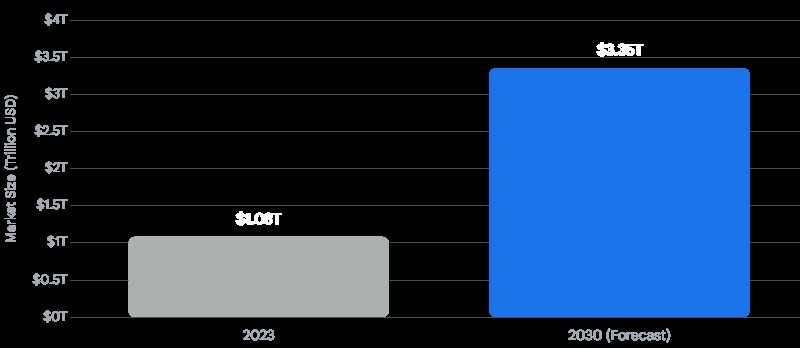
Statistical data further reveals the depth of this penetration. Recent metrics indicate that nearly half of all large enterprises in the European Union now conduct electronic sales, with the accommodation, food service, information and communication, and manufacturing sectors leading the transition. This exponential growth reveals a critical trend: digital sales are no longer restricted to simple office supplies or fast-moving consumer goods. Highly complex sectors, including heavy machinery, chemical distribution, custom precision electronics, and telecommunications, are actively investing in digital sales portals. To capture and retain this lucrative revenue, merchants must deploy platforms capable of handling negotiated contracts, custom product catalogs, intricate approval hierarchies, and massive data synchronization.
The Foundational Disconnect: Retail vs. Wholesale Architecture
Treating wholesale operations as a mere extension of a retail store is the most common and costly architectural mistake a business can make. A retail customer browses casually, compares aesthetic features, makes impulsive one-off purchases, and checks out using a standard credit card. In stark contrast, a B2B buyer operates under strict procurement guidelines. They already know exactly what they need, purchase in massive bulk, require pre-negotiated credit terms, and demand a frictionless, high-speed reordering process that integrates with their own internal accounting systems.
To bridge this fundamental gap, a professional WooCommerce B2B wholesale setup must be meticulously built upon a distinct set of functional pillars that rewire how the platform behaves.
Analyzing the Architectural Differences
| Feature Category | Standard Retail (B2C) | Enterprise Wholesale (B2B) |
| Pricing Strategy | Uniform, static pricing for all site visitors. Occasional global sales. | Dynamic, role-based pricing. Custom negotiated tiers, bulk volume discounts, and client-specific catalogs. |
| User Onboarding | Instant account creation requiring only an email and password. | Rigorous vetting process. Custom registration forms capturing VAT IDs, business licenses, and expected volume, followed by administrative approval. |
| Purchasing Interface | Visually heavy product pages. “Add to Cart” buttons optimized for single units. | High-velocity bulk order forms. Tabular interfaces allowing rapid SKU entry and multi-variation cart additions. |
| Payment Terms | Upfront payment via Credit Card, PayPal, or digital wallets. | Net-30, Net-60 credit terms, invoice generation, bank transfers, and purchase order (PO) number tracking. |
| Taxation | Standard consumer VAT or Sales Tax applied at checkout. | Complex tax exemptions, cross-border reverse charge mechanisms, and real-time VAT database validation. |
Core Architectural Pillars of a Wholesale Store
Transforming WooCommerce into a B2B powerhouse requires addressing the platform’s core mechanics. The following pillars form the foundation of a successful wholesale implementation.
User Roles and Strict Access Control
In a B2B environment, you must strictly control who sees what. The concept of universal visibility is entirely incompatible with wholesale strategy. This requires separating buyers into distinct hierarchical groups through custom WordPress user roles, such as Guest, Retail Customer, Verified Wholesaler, Regional Distributor, and VIP Partner.
A robust system will restrict certain products or entire categories to specific roles. For instance, replacement parts might only be visible to verified repair technicians, while consumer goods are visible to everyone. Furthermore, many wholesalers opt for a “Private Store” or “Catalog Mode” architecture. In this setup, unregistered guests can view products but cannot see prices or add items to a cart. Alternatively, the entire storefront can be hidden behind a login wall, ensuring that competitors cannot scrape your wholesale pricing data.
Advanced Registration and Onboarding Workflows
Unlike retail sign-ups where friction must be minimized, wholesale onboarding requires a deliberate, rigorous vetting process. Standard WooCommerce registration forms are woefully inadequate. They must be replaced or augmented with custom forms that capture essential business intelligence: legal company names, VAT or Tax identification numbers, billing addresses, industry types, and estimated annual purchase volumes.
This onboarding process typically involves an approval workflow. A sophisticated system might automatically grant access to low-tier wholesale accounts if the provided tax ID passes an automated background check, while holding enterprise-level applications in a pending state for manual administrative review. Integrating marketing automation tools during this phase is highly effective; an automated email sequence can welcome the prospective buyer, explain the approval timeline, and eventually notify them when their wholesale pricing tier has been unlocked.
Dynamic Tiered Pricing and Minimum Order Quantities
Volume is the lifeblood of wholesale trade. Store architectures must support progressive discount tiers, lowering the unit price dynamically as the cart quantity increases. For example, a product might cost €50 per unit, drop to €45 for quantities of 10-49, and drop further to €38 for quantities exceeding 50.
Furthermore, to protect profit margins and offset logistics costs, businesses must enforce Minimum Order Quantities (MOQs). These rules can be highly granular, applied at the individual product level (e.g., must buy at least 5 units of a specific SKU), the category level (e.g., must buy €500 worth of electronics), or the global cart level (e.g., checkout is disabled until the cart total reaches €1,000).
High-Velocity Purchasing Interfaces
Wholesale buyers despise traditional e-commerce pagination. They do not want to click into a single product, wait for the page to load, select a variation from a dropdown, type a quantity, add it to the cart, and navigate back to the main catalog to repeat the process fifty times.
Instead, B2B setups require bulk order forms. These are tabular, spreadsheet-like interfaces driven by AJAX that allow a buyer to search by SKU or keyword, view all product variations simultaneously, input quantities across dozens of items, and add everything to the cart with a single click. For recurring orders, features like “Requisition Lists” or “Saved Carts” are essential, allowing procurement officers to reorder their standard monthly inventory in seconds.
Evaluating Top Wholesale Plugins for WooCommerce
Because WooCommerce does not natively support these enterprise B2B features, merchants must integrate specialized software suites. Selecting the right foundational plugin is the most consequential decision in your B2B architecture. A cohesive, all-in-one platform or a tightly integrated modular suite eliminates the need for stringing together a dozen overlapping, conflicting plugins that ultimately degrade site speed and cause database conflicts.
B2BKing: The Comprehensive Enterprise Suite
B2BKing operates as an “everything under one roof” enterprise suite. Instead of just layering discounts over a retail front, it deeply modifies WooCommerce’s core behavior depending on the active user session. Retail customers experience a standard shopping flow, while authenticated B2B buyers unlock a completely different dimension of the site, complete with bulk order forms, custom price tiers, and quote negotiation systems.
From a financial perspective, B2BKing is highly competitive for the value it delivers. The Pro plan, which provides regular updates and premium support for up to three websites, is priced at approximately €235 annually. For development agencies or massive multi-brand enterprises, a Developer plan is available for unlimited sites at roughly €375 annually.
Its standout features include native European VAT validation via the VIES network, highly complex dynamic pricing rules, and a unique sub-account system. The sub-account feature is critical for large corporate clients, allowing a company to have multiple staff members who can build carts and draft orders, while a designated manager holds the authority to approve and finalize the purchase. It also offers deep integrations with multivendor plugins, making it ideal if you operate a B2B marketplace model.
Wholesale Suite: Modular Precision and Stability
Wholesale Suite takes a strategic modular approach, allowing merchants to install only the specific features they strictly need, thereby minimizing code bloat. The foundational bundle, which comprises the Wholesale Prices Premium, Wholesale Order Form, and Wholesale Lead Capture modules, starts at an accessible €280 for a one-year license.
Wholesale Suite is particularly renowned for its clean, conflict-free integration with WooCommerce’s native coupon systems and its incredibly intuitive setup interface. It excels in role-based pricing mapping, allowing merchants to set global percentage discounts across categories or enforce strict, fixed prices per individual product variation. The Lead Capture module simplifies the creation of wholesale registration forms with built-in approval queues, effectively solving the complex B2B onboarding challenge without requiring a single line of custom code.
Tiered Pricing and Lightweight Alternatives
For businesses that do not need a full B2B overhaul but simply want to offer volume discounts, specialized plugins like “Tiered Pricing Table for WooCommerce” offer focused functionality. These plugins automatically generate clean, responsive pricing tables on the product page, clearly showing the customer how much they save by increasing their quantity.
Another lightweight alternative is the “User Roles Based Price” extension from the official WooCommerce marketplace, priced at approximately €80 annually. It provides a simple accordion interface on the product edit screen, allowing managers to set a specific price for a specific user role without the overhead of quote requests or complex onboarding forms.
Plugin Feature Comparison Matrix
| Feature | B2BKing | Wholesale Suite | User Roles Based Price |
| Pricing Model (Approx. Annual) | €235 – €375 | €280 (Bundle) | €80 |
| Role-Based Pricing | Advanced (Rules & Fixed) | Advanced (Global & Fixed) | Basic (Fixed & Percentage) |
| Tiered Volume Discounts | Included natively | Requires Premium add-on | Not included natively |
| Custom Registration Forms | Built-in with approvals | Via Lead Capture Module | Not included |
| EU VAT VIES Validation | Built-in | Requires external integration | Not included |
| Sub-accounts for Teams | Yes | No | No |
| Bulk Order Forms | Yes | Via Order Form Module | No |
Both premium solutions provide incredible value, but the choice often comes down to internal operational processes. If your business requires highly complex quoting systems, corporate team accounts, and strict VAT handling out of the box, B2BKing often holds the edge. If your goal is to rapidly deploy reliable tiered pricing, clean registration flows, and lightning-fast bulk order forms with a very low learning curve, Wholesale Suite is exceptionally robust.
Implementing Custom Pricing Logic via PHP
While premium plugins handle global rules effectively, businesses with unique, ERP-driven pricing models or highly specific legacy logic often require custom programmatic solutions. Relying entirely on plugins for complex mathematical pricing formulas can sometimes lead to performance bottlenecks. Using WooCommerce’s internal WordPress hooks, developers can intercept the pricing logic directly at the server level before it ever renders to the user.
Below is a practical, expert-level example of how a developer might use PHP to dynamically alter a product’s price based on a specific custom user role (e.g., wholesale_partner). This snippet hooks into the woocommerce_product_get_price filter, effectively overriding the database price on the fly without permanently altering the product metadata.
PHP
/**
 * Apply a custom percentage discount for verified wholesale buyers programmatically.
 * This overrides the standard price display and cart calculation.
 */
add_filter( 'woocommerce_product_get_price', 'apply_custom_b2b_pricing_logic', 10, 2 );

function apply_custom_b2b_pricing_logic( $price, $product ) {
    // Return standard price immediately if the user is not logged in or if the price is empty
    if (! is_user_logged_in() |

| empty( $price ) ) {
        return $price;
    }

    $current_user = wp_get_current_user();

    // Check if the currently authenticated user possesses the specific B2B role
    if ( in_array( 'wholesale_partner', (array) $current_user->roles ) ) {

        // Define a 30% discount logic.
        // In a production enterprise environment, this multiplier could be fetched
        // dynamically from user meta or synchronized from an external ERP.
        $discount_margin = 0.30;

        // Calculate the new B2B price
        $discounted_price = $price - ( $price * $discount_margin );

        return $discounted_price;
    }

    // Default fallback to the standard retail price for all other roles
    return $price;
}
This method is incredibly lightweight and circumvents the need for heavy plugin overhead if your pricing model is strictly mathematical and consistent across the catalog. However, implementing custom PHP pricing requires careful management of server-side caching layers. If a page caching solution is not properly configured to bypass logged-in users, retail customers might accidentally be served a cached version of the wholesale prices.
Similarly, if you wish to enforce a strict “Catalog Mode” for unregistered users, hiding prices entirely, a streamlined PHP snippet can achieve this without installing an extra plugin:
PHP

/**
 * Hide prices and the "Add to Cart" button for guest users,
 * replacing them with a call to action to register.
 */
add_action( 'init', 'enforce_b2b_catalog_mode' );

function enforce_b2b_catalog_mode() {
    if (! is_user_logged_in() ) {
        // Remove add to cart buttons
        remove_action( 'woocommerce_after_shop_loop_item', 'woocommerce_template_loop_add_to_cart', 10 );
        remove_action( 'woocommerce_single_product_summary', 'woocommerce_template_single_add_to_cart', 30 );

        // Remove prices
        remove_action( 'woocommerce_after_shop_loop_item_title', 'woocommerce_template_loop_price', 10 );
        remove_action( 'woocommerce_single_product_summary', 'woocommerce_template_single_price', 10 );

        // Add a custom login message where the price used to be
        add_action( 'woocommerce_single_product_summary', 'display_b2b_login_prompt', 10 );
        add_action( 'woocommerce_after_shop_loop_item_title', 'display_b2b_login_prompt', 10 );
    }
}

function display_b2b_login_prompt() {
    echo '<p class="b2b-login-prompt"><strong>Please <a href="'. get_permalink( wc_get_page_id( 'myaccount' ) ). '">log in</a> to view wholesale pricing.</strong></p>';
}
Mastering B2B Tax Exemptions and VIES Validation
Handling taxation correctly is arguably the most legally critical and operationally complex aspect of operating a WooCommerce store, particularly within the European market. Cross-border B2B transactions within the European Union are generally subject to the “reverse charge” mechanism. Under this framework, if your business sells to a verified business entity located in another EU member state, you must apply a 0% VAT rate, effectively shifting the tax reporting and payment responsibility to the buyer in their local jurisdiction.
However, a merchant cannot simply trust a user who types a random sequence of numbers into a checkout field. To legally and compliantly apply a 0% VAT rate, you must validate the customer’s VAT number against the European Commission’s VAT Information Exchange System (VIES) database in real-time before finalizing the transaction.
Automated VIES Validation Workflows
Relying on manual validation disrupts the automated nature of digital e-commerce, severely slowing down order fulfillment and frustrating buyers who expect immediate invoice generation. A professional WooCommerce setup uses the VIES REST API to validate the number the precise moment it is entered into the checkout or registration form.
If the API returns a “VALID” response, the WooCommerce checkout engine should automatically deduct the tax from the cart total and permanently append the validated VAT number, company name, and official address to the final order metadata and PDF invoice. If the API returns “INVALID”, the system must deny the tax exemption.
A critical edge case in this architecture is handling VIES downtime. The European Commission’s servers frequently experience outages or high latency. A poorly coded validation script will cause the entire WooCommerce checkout page to hang indefinitely, resulting in lost sales. A professional implementation must include strict timeout protocols and graceful fallbacks. If VIES is unreachable, the system should ideally place the order on a mandatory administrative hold, allowing the merchant to verify the VAT manually once the service is restored, or alternatively, charge the standard VAT rate with a notice that it will be refunded upon manual validation.
Python Automations for Resilient Tax Verification
When standard plugins fall short, or when a business is building a highly decoupled, headless commerce architecture, specialized software development agencies step in to build resilient external microservices.
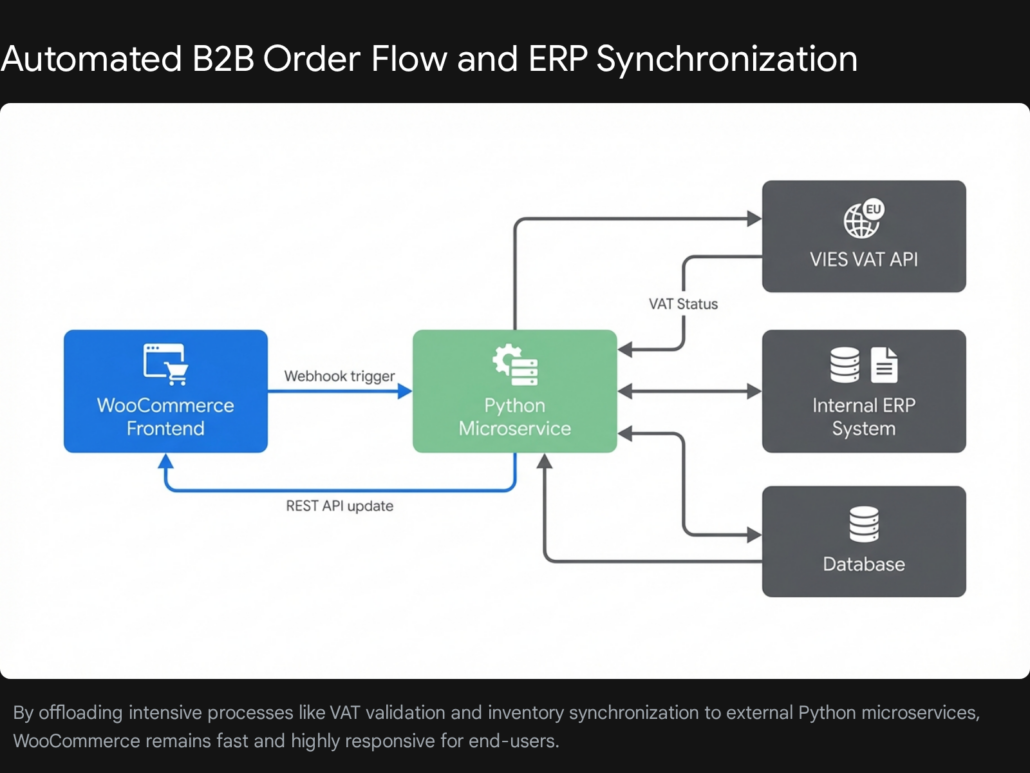
Agencies specializing in enterprise architecture, such as Tool1.app, frequently deploy Python microservices to handle these intensive background tasks. Below is a conceptual example of a Python automation logic that can be utilized in a custom backend service. This service can be triggered by a WooCommerce webhook to independently verify VAT statuses asynchronously, ensuring the main WordPress server is never bogged down by slow external API calls.
Python
import requests
import logging

def validate_eu_vat_vies(country_code, vat_number):
    """
    Validates an EU VAT number against the official VIES REST API.
    Includes timeout handling for resilient e-commerce operations.
    """
    # Construct the endpoint URL as defined by the European Commission
    api_endpoint = f"https://ec.europa.eu/taxation_customs/vies/rest-api/ms/{country_code}/vat/{vat_number}"

    try:
        # Implementing a strict 8-second timeout to prevent checkout process hanging
        # if this script is called synchronously.
        response = requests.get(api_endpoint, timeout=8)

        if response.status_code == 200:
            vies_data = response.json()
            is_valid = vies_data.get('isValid', False)

            if is_valid:
                company_name = vies_data.get('name', 'Unknown')
                logging.info(f"VAT Validation Successful: {country_code}{vat_number} - {company_name}")
                return {"status": "valid", "company": company_name}
            else:
                logging.warning(f"Invalid VAT Number provided: {country_code}{vat_number}")
                return {"status": "invalid"}
        else:
            logging.error(f"VIES API returned unexpected HTTP status: {response.status_code}")
            return {"status": "error", "message": "VIES Service Unavailable"}

    except requests.exceptions.Timeout:
        logging.error(f"VIES API Connection Timeout for {country_code}{vat_number}")
        # Return a specific timeout status to allow WooCommerce to trigger a fallback workflow
        return {"status": "timeout"}
    except requests.exceptions.RequestException as error:
        logging.error(f"VIES API Connection Error: {error}")
        return {"status": "error", "message": str(error)}
By decoupling this complex validation logic into an external Python service, businesses can process bulk VAT verifications, periodically re-check stored VAT numbers for validity, and cross-reference legacy client databases without utilizing a single cycle of the WordPress server’s PHP processing power.
Python Automations and ERP Integration for Enterprise Scale
A high-performing WooCommerce store is only as powerful as the back-office operations supporting it. When a wholesale portal successfully scales to hundreds of massive transactions a day, manual data entry becomes a critical financial liability. Relying on basic PHP and standard WordPress plugins to manage thousands of complex product variations, parse heavy XML supplier feeds, and handle continuous Enterprise Resource Planning (ERP) synchronizations will inevitably lead to database bloat, fatal memory errors, and catastrophic server crashes.
Extract, Transform, Load (ETL) Product Synchronization
Importing massive product feeds directly through standard WordPress plugins often results in PHP timeout errors. A far superior architectural approach involves building a Python-based ETL (Extract, Transform, Load) pipeline.
A scheduled Python script can run entirely independently of the web server. It can fetch raw supplier data via FTP, APIs, or even Google Sheets. The script then cleans and transforms the data—standardizing inconsistent product names, mapping vendor categories to WooCommerce taxonomies, parsing messy HTML descriptions, and calculating final wholesale margins based on raw cost. Finally, it pushes clean, perfectly formatted JSON payloads directly into WooCommerce via the WooCommerce REST API. Because Python handles the heavy computational processing off-site, the WordPress server remains entirely unaffected, ensuring the storefront stays lightning-fast for browsing buyers.
Inventory and ERP Synchronization
As your WooCommerce store expands, juggling inventory across multiple warehouses, retail storefronts, and B2B portals requires a centralized source of truth, typically an ERP system like SAP, NetSuite, or Microsoft Dynamics.
Partnering with specialized development teams like Tool1.app ensures that the synchronization between the ERP and WooCommerce remains secure, instantaneous, and logic-driven. A Python middleware service can subscribe to WooCommerce webhooks. When an order is placed, the middleware captures the payload, translates it into the specific format required by the ERP, and pushes the order details to the accounting department in real-time. Conversely, if stock levels drop in the physical warehouse, the ERP alerts the Python service, which instantly updates the WooCommerce REST API to prevent overselling.
Automated Unpaid Order Recovery Workflows
In the B2B world, immediate credit card payments are the exception, not the rule. Credit terms (such as Net-30 or Net-60) and manual bank transfers are highly common. This operational reality often results in a massive queue of “Pending Payment” orders sitting in the WooCommerce dashboard. Tracking these manually, drafting emails, and reconciling bank statements is a logistical nightmare that consumes hundreds of hours of administrative time.
Custom workflows can leverage Python to entirely automate this revenue recovery process. A script can query the WooCommerce database hourly for unpaid invoices. It can automatically generate polished PDF invoices and dispatch a sequence of timed email reminders (e.g., initial invoice, 24-hour reminder, 48-hour reminder, 7-day final notice). The emails can dynamically include multiple payment options, allowing the customer to click a link to pay via a secure gateway, or providing dynamic routing numbers for local bank transfers.
If an invoice remains unpaid past the strict credit threshold, the system can automatically revoke the buyer’s net-terms privileges, alter their user role back to a standard retail customer, and flag their account, protecting the merchant from continuous exposure to bad debt. Furthermore, integrating advanced AI and LLM solutions into these workflows can dynamically personalize the follow-up emails based on the client’s past purchase behavior and communication style, dramatically increasing the recovery rate of stranded wholesale revenue.
Performance Optimization for High-Volume B2B Catalogs
B2B catalogs are notoriously massive and inherently complex. A merchant might sell only 500 core products, but each product could have 50 unique variations based on size, industrial material, or packaging volume, resulting in a database managing 25,000 unique SKUs. Serving complex, role-based pricing matrices and dynamic volume discounts over a catalog this size requires aggressive performance optimization. Without it, the bulk order forms will lag, frustrating buyers and leading to cart abandonment.
Redefining the Caching Strategy
Caching is the act of storing a generated webpage as a static HTML file so the server does not have to execute complex PHP scripts and database queries for the next visitor. However, standard page caching fundamentally breaks role-based pricing. If a product page is cached while a VIP Wholesaler is viewing it, the next standard retail customer who visits the site might accidentally see—and successfully purchase at—the deeply discounted wholesale price.
To resolve this critical vulnerability, merchants must utilize dynamic caching strategies. Advanced caching mechanisms recognize the user’s logged-in session cookie and bypass the static HTML page cache, rendering the correct, dynamic price on the fly. However, bypassing the page cache places the load back on the server. To mitigate this performance hit, Object Caching becomes absolutely mandatory.
Experts at Tool1.app often implement aggressive caching strategies and database optimizations to ensure that large B2B catalogs load instantaneously. By utilizing an in-memory data structure store like Redis or Memcached, object caching stores the results of complex, repetitive database queries (like “What is the custom tiered pricing rule for this specific user role on this specific product?”) directly in RAM. When the page loads, WooCommerce retrieves the price from the lightning-fast RAM rather than forcing the MySQL database to recalculate the rules, allowing the dynamic page to render in milliseconds rather than seconds.
Minimizing Plugin Overhead and Database Bloat
Every plugin installed on a WooCommerce platform loads additional JavaScript and CSS files onto the front end and adds background queries to the database. For enterprise B2B setups, auditing and ruthlessly minimizing active plugins is crucial. Features that can be managed via clean, custom code snippets or offloaded entirely to external Python microservices should be moved out of the WordPress plugin ecosystem immediately.
Furthermore, maintaining rigorous database hygiene is vital. Over time, WooCommerce accumulates millions of rows of orphaned post metadata, expired transients, abandoned cart sessions, and revised post histories. Regularly scheduling automated database cleanup routines ensures that SQL queries related to complex B2B pricing logic execute efficiently, keeping the critical bulk order forms highly responsive. Removing WooCommerce’s default “Cart Fragments” script—which constantly updates the mini-cart via AJAX on every page load—is another essential optimization step for B2B stores where buyers are building massive carts over long sessions.
Real-World Case Studies: The Impact of B2B Transformation
The theoretical benefits of a highly optimized WooCommerce B2B wholesale setup translate into staggering real-world revenue growth when executed correctly. Analyzing successful implementations provides a clear roadmap for businesses looking to scale.
Consider the case of a national reseller of refurbished telecommunications equipment. Initially focused entirely on outbound telephone sales, the company faced a highly competitive landscape and needed to capture the growing digital market. Their product catalog was immense, featuring over 400 complex base phone systems that needed the ability to scale up to 10,000 distinct parts and accessories.
By migrating to a custom WooCommerce architecture, they successfully integrated a massive catalog with specific B2B features. They implemented accurate, flexible freight calculations for LTL (Less Than Truckload) shipping, integrated secure payment gateways for large volume transactions, and added the ability for wholesale buyers to select “blind shipments” (where the original supplier’s information is hidden from the final end-consumer, a critical feature for dropshippers and resellers). The result was a platform that not only streamlined their internal sales process but actively opened up entirely new revenue channels from smaller wholesale buyers they previously could not afford to service manually.
Similarly, enterprise giants like FoodServiceDirect.com manage mind-boggling catalogs of over 250,000 SKUs. While operating on custom headless commerce platforms, the architectural principles remain identical to an optimized WooCommerce setup: decouple heavy data processing from the front-end presentation, utilize robust microservices for inventory management, and present the user with a lightning-fast, highly personalized portal. When these elements align, a B2B platform ceases to be just a digital catalog; it becomes an automated, 24/7 sales team.
Conclusion
The transition from a standard consumer-facing retail storefront to a fully operational, high-performance WooCommerce B2B wholesale setup requires a fundamental shift in technical strategy and business logic. It is not merely a matter of installing a plugin to hide prices from public view or generating bulk discount coupons; it is about engineering a secure, deeply automated, and highly personalized digital procurement environment.
By implementing strict role-based access controls, deploying reliable extensions for dynamic tiered pricing, ensuring rigorous compliance with international tax regulations like EU VAT, and utilizing advanced Python microservices to manage the heavy lifting of ERP data synchronization, businesses can build an e-commerce engine capable of dominating the B2B space. The defining difference between an online store that constantly struggles with manual wholesale order entry and an enterprise platform that scales revenue effortlessly lies entirely in the quality of its underlying architecture and intelligent automation.
Build Your Enterprise B2B Engine Today
Want to add a highly profitable wholesale channel to your store without slowing down your retail operations or overwhelming your administrative staff? Let Tool1.app build your custom B2B platform. Our deep technical expertise in WooCommerce architecture, custom plugin development, high-speed Python automations, and complex ERP integrations ensures that your unique business logic translates flawlessly into a frictionless digital experience. Contact Tool1.app today to schedule a comprehensive technical consultation, and let us transform how your business transacts at scale.
SEO Data Appendices
- SEO Title: Strategic WooCommerce B2B Wholesale Setup Guide (2025)
- Meta Description: Discover how to architect a scalable WooCommerce B2B wholesale setup. Learn about tiered pricing, top plugins, EU VAT compliance, and Python ERP automation.
- Focus Keyword: WooCommerce B2B wholesale setup
- Blog Post Tags: woocommerce, b2b, wholesale, python, automation, erp integration, web development, ecommerce
- Page Slug: woocommerce-b2b-wholesale-setup-guide
- English image generation prompt: A professional, modern architectural diagram showing a high-tech e-commerce ecosystem. In the center, a glowing server node labeled “Python Automation” routes data smoothly between a left node representing a clean “WooCommerce Storefront” and right nodes representing “ERP Database” and “Logistics APIs”. The style should be minimalist, corporate, using shades of bright blue and green on a clean white background, resembling an enterprise software schematic.





Leave a Reply
Want to join the discussion?Feel free to contribute!
Join the Discussion
To prevent spam and maintain a high-quality community, please log in or register to post a comment.