

Advanced Caching for High-Traffic WordPress Sites: Redis vs. Memcached
Table of Contents
- The Anatomy of Database Bottlenecks in WordPress
- Understanding WordPress Object Caching
- The Role of Persistent Object Caching
- Deep Dive: Memcached
- Deep Dive: Redis
- Direct Comparison of Resource Usage and Performance
- The Business Value: ROI of High-Traffic Optimization
- Step-by-Step Implementation and Hardening Guide
- Architectural Resilience: Defeating the Cache Stampede
- The Future of Caching: The Shift to Valkey
- Conclusion: Secure Your Infrastructure with Expert Engineering
- Show all

For dynamic, high-traffic WordPress websites, the database is almost always the ultimate bottleneck. Unlike static brochure sites that can effortlessly serve pre-rendered HTML files from a Content Delivery Network, complex platforms rely on continuous, heavy database interactions. Every time a user adds an item to a WooCommerce cart, loads a personalized learning dashboard, or submits a forum post, the server must query the MySQL database. Under heavy traffic, these simultaneous queries will quickly exhaust server processing power and memory, leading to catastrophic slowdowns or complete downtime.
At Tool1.app, we specialize in architecting custom web applications and business efficiency solutions that perform flawlessly under extreme pressure. We frequently audit legacy platforms that are spending hundreds of euros on over-provisioned cloud hosting, yet still crashing during viral traffic surges. The solution to this architectural flaw is rarely throwing more raw computing power at the problem. Instead, the key to unlocking massive scalability and reducing infrastructure overhead lies in implementing a persistent object cache.
In this comprehensive engineering and business guide, we will explore the underlying mechanics of object caching, conduct a deep-dive technical comparison of Redis versus Memcached in WordPress environments, examine the financial return on investment for high-traffic optimization, and provide practical implementation strategies to protect your infrastructure from devastating cache stampedes.
The Anatomy of Database Bottlenecks in WordPress
To understand why external caching engines are an absolute necessity for enterprise platforms, one must first understand how WordPress handles data natively and where traditional optimization strategies fall short.
A common misconception among website administrators is that standard page caching is sufficient to handle massive traffic. Page caching works by saving the entire rendered HTML output of a web page and serving it to subsequent visitors. For anonymous visitors reading static blog posts, this is incredibly efficient. The request never touches PHP or the database; the web server simply delivers a static file.
However, page caching is entirely bypassed the moment a website becomes dynamic. When a user logs into a membership portal, places an item in a shopping cart, or interacts with personalized content, the server can no longer serve a generic cached page. The request must bypass the static cache, spin up a PHP worker, and execute dozens or even hundreds of database queries to assemble the unique page dynamically.
As a content management system, WordPress relies heavily on the wp_options table, the wp_postmeta table, and complex taxonomy queries. Without optimization, generating a single dynamic page might require identical queries to be executed repeatedly. When five hundred concurrent users attempt to check out during a flash sale, the server attempts to execute thousands of identical queries simultaneously. This leads to database table locks, CPU exhaustion, and eventually, a total system crash.
Understanding WordPress Object Caching
To mitigate repetitive database querying, WordPress features a built-in object caching system. Its purpose is to save the results of complex database queries, such as retrieving options or complex post relationships, into the server’s RAM. If the same data is needed again during the generation of that specific page, WordPress retrieves it from the lightning-fast RAM rather than executing another slow MySQL query.
This native system operates via functions like wp_cache_get() and wp_cache_set(). Furthermore, WordPress utilizes the Transients API to store temporary data, such as external API responses or complex query results, which also leverages this caching mechanism.
However, there is a critical limitation to the native WordPress object cache: it is strictly non-persistent. The cached data only lives for the duration of a single HTTP request. Once the page has finished rendering and the HTML is sent to the user’s browser, the memory is cleared. When the next user requests the same page a millisecond later, or when the user navigates to a new page, the entire database querying process starts over from scratch.
The Role of Persistent Object Caching
A persistent object caching solution bridges the gap left by the native WordPress cache. By integrating an external, independent in-memory key-value data store, the cached database queries are preserved across multiple page loads and across entirely different user sessions.
When a persistent cache is active, the first user who visits a dynamic page triggers the necessary database queries. The results are passed to the persistent cache engine. When the second, third, and ten-thousandth users visit the same dynamic views, WordPress intercepts the database request, checks the external memory store, and retrieves the fully assembled data payload in sub-milliseconds.
This acts as an impenetrable shield for your MySQL database. It drastically accelerates the WordPress administrative backend, speeds up dynamic interactions, and handles constant permission checks for membership sites without bringing the database server to a halt. To achieve this, the industry relies on two primary technologies: Memcached and Redis.
Deep Dive: Memcached
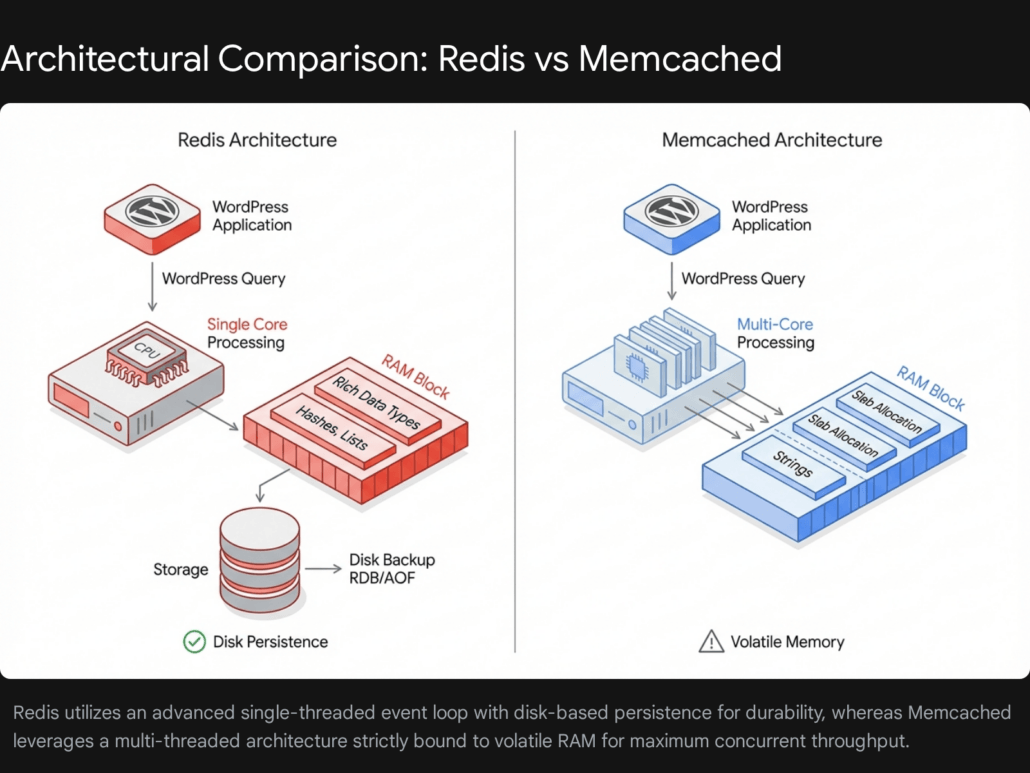
Memcached is the veteran of the high-speed caching world. Released over two decades ago, it was designed with a single, highly focused goal: caching small chunks of arbitrary data, primarily strings, as efficiently as possible. It is a pure key-value store that excels in utter simplicity and raw throughput.
Multi-Threaded Architecture
The most significant architectural advantage of Memcached is its native multi-threading capability. From its inception, Memcached was designed to distribute its workload across multiple CPU cores. In highly concurrent environments where the server is bombarded with tens of thousands of simultaneous read and write requests, Memcached scales vertically with incredible efficiency, capable of saturating modern multi-core processors to deliver maximum throughput.
Slab Allocation and Memory Management
Memcached manages RAM using a technique called slab allocation. Instead of dynamically allocating memory on the fly for every new object—a process that can lead to severe memory fragmentation over time—Memcached pre-allocates memory into distinct slabs of various predefined sizes. When WordPress sends an object to Memcached, the engine finds the smallest slab class that can fit the data and places it there.
This ensures highly predictable memory usage and rock-solid stability during long-running server uptimes, as fragmentation is virtually eliminated. However, it can result in minor memory waste if objects do not perfectly fit their assigned slab sizes.
Limitations of Volatility and Simple Data Structures
Memcached’s simplicity is also its primary constraint. The system is strictly volatile. It operates entirely in memory, meaning it has no concept of disk storage or persistence. If the Memcached daemon restarts, or if the server undergoes a reboot, the entire cache is instantly and permanently wiped. For a high-traffic site, this leads to a dangerous “cold start” penalty where the database must suddenly absorb a massive, unshielded wave of queries as the cache is slowly rebuilt from scratch.
Additionally, Memcached only natively supports simple strings. If WordPress needs to cache a complex PHP array or an object, that data must be serialized into a string before storage, and deserialized upon retrieval, adding a minor computational overhead to the PHP worker.
Deep Dive: Redis
Redis (Remote Dictionary Server) represents the modern evolution of in-memory caching. While it handles basic key-value caching effortlessly, its advanced feature set has elevated it from a simple cache to a comprehensive in-memory data structure server, making it the preferred choice for modern web application architecture.
Single-Threaded Event Loop and Speed
Historically, the primary distinction of Redis was its single-threaded execution model for processing commands. It processes read and write operations sequentially on a single CPU core. While this might sound like a disadvantage compared to Memcached’s multi-threading, the single thread is so highly optimized that it can easily handle hundreds of thousands of operations per second. For the vast majority of WordPress websites, even those at enterprise scale, this single-threaded throughput is more than sufficient.
Furthermore, modern versions of Redis have introduced multi-threaded I/O, which offloads the network reading and writing protocols to separate threads, largely mitigating any potential bottlenecks during heavy network traffic while maintaining the safety of single-threaded command execution.
Rich Data Types and Application Logic
Unlike Memcached, Redis natively supports complex data structures. It can store and manipulate Hashes, Lists, Sets, and Sorted Sets directly within the memory layer. This allows applications to perform atomic operations—such as appending an item to a list or incrementing a specific value within a hash—without needing to retrieve the entire object, modify it via PHP, and send it back to the cache. This drastically reduces network latency and computational overhead.
Disk Persistence and High Availability
The most critical advantage Redis holds over Memcached is data persistence. Through a combination of RDB (Redis Database Backup snapshots) and AOF (Append-Only File logs), Redis can asynchronously save its in-memory data to the physical storage disk.
If the server crashes, encounters a power failure, or undergoes scheduled maintenance, Redis will seamlessly read the backup files from the disk and load the data back into RAM upon startup. This completely eliminates the catastrophic cold-start penalty, protecting the backend database from sudden query surges upon reboot. Furthermore, Redis features native replication, clustering, and Sentinel configurations, allowing for highly available, auto-failing architectures that keep enterprise systems online.
Direct Comparison of Resource Usage and Performance
When evaluating Redis vs Memcached for WordPress environments, resource efficiency is a critical factor, particularly when sizing your cloud infrastructure. Both engines offer sub-millisecond latency, but their differing architectures result in unique resource consumption profiles.
Memory Footprint and Data Overhead
Memcached is slightly more memory-efficient on a strict per-key basis. A typical string object in Memcached requires approximately 60 bytes of overhead. Conversely, the exact same string object stored in Redis requires about 90 bytes of overhead. This disparity exists because Redis requires more complex internal pointers and memory structures to support its rich data types, even when only storing a basic string. If you are caching hundreds of millions of tiny objects, Memcached will consume marginally less overall RAM.
Eviction Policies and Reclaiming Memory
Despite the higher per-key overhead, Redis offers vastly superior memory management and eviction controls over the lifespan of a server. When the allocated RAM fills to its maximum capacity, the caching engine must decide which old data to delete (evict) to make room for new incoming data.
Redis provides highly granular eviction policies. The most common and effective configuration for WordPress is allkeys-lru (Least Recently Used), which intelligently identifies and evicts the oldest, least accessed keys across the entire dataset. Furthermore, Redis is capable of dynamically giving back unused memory to the operating system when the dataset shrinks.
Memcached, due to its slab allocation model, handles eviction differently. If one specific size class of objects fills its allocated slab, Memcached will evict older items from that specific slab, even if there is plenty of unused memory sitting idle in a different slab size category. Memcached also never returns memory to the operating system; once it claims its maximum allowed RAM, it reserves it permanently.
For developers and systems administrators at Tool1.app, we generally prefer the memory agility of Redis, as its robust eviction policies maintain a higher overall cache hit ratio during unpredictable traffic spikes.
Architectural Feature Comparison
The following table summarizes the primary technical differences between the two caching engines:
| Feature | Redis | Memcached |
| CPU Threading | Primarily Single-Threaded (Multi-threaded I/O in newer versions) | Natively Multi-Threaded across all cores |
| Memory Management | Dynamic allocation (Returns memory to OS) | Slab Allocation (Reserves maximum RAM permanently) |
| Data Structures | Strings, Hashes, Lists, Sets, Sorted Sets, Streams | Strings only |
| Memory Overhead | ~90 bytes per key | ~60 bytes per key |
| Persistence | Yes (RDB Snapshots and AOF Logs) | No (Completely volatile) |
| High Availability | Native Clustering and Sentinel Replication | Requires external client-side sharding logic |
The Business Value: ROI of High-Traffic Optimization
Investing in advanced object caching infrastructure is not merely a technical exercise; it drives highly measurable financial returns. When a website relies heavily on dynamic content, the performance of the database directly dictates the user experience.
Time to First Byte and Conversion Rates
In the e-commerce sector, the correlation between server response time—measured as Time to First Byte (TTFB)—and user drop-off is severe. When a customer adds an item to their cart, WordPress must dynamically generate the checkout page. Without object caching, this process can require well over 60 individual database queries to calculate shipping, taxes, inventory levels, and user meta-data. This can result in a TTFB of 2.5 to 4.5 seconds.
By implementing Redis, the vast majority of those queries are intercepted and bypassed. The complex calculations and data retrievals are pulled directly from RAM, slashing the TTFB down to 100 to 300 milliseconds. Real-world business data consistently demonstrates that shaving just a few seconds off dynamic page load times can decrease shopping cart abandonment rates by as much as 13% to 19%. By eliminating backend friction, transactions process faster, directly elevating top-line revenue without requiring any additional marketing spend.
Reducing Cloud Infrastructure Costs
An unoptimized WordPress site forces business owners to rely on the brute force of expensive server hardware. When a database is overwhelmed, the standard reaction is to upgrade to massive, compute-optimized cloud instances. It is common to see businesses spending upwards of €380 per month on heavy infrastructure (such as AWS c5.xlarge instances paired with dedicated managed relational databases) just to survive simultaneous traffic peaks of a few hundred users.
By optimizing the software layer and offloading up to 75% of the database load to an in-memory cache, the infrastructure requirements plummet dramatically. An application architecture properly tuned with Redis, PHP OPcache, and an efficient PHP-FPM configuration requires significantly less CPU overhead.
A high-performance setup deployed on a cost-effective cloud provider—such as a Hetzner or DigitalOcean virtual private server costing between €7.20 and €45.60 per month—can frequently out-perform an unoptimized €380 per month managed setup. Even fully managed premium hosting options that include built-in Redis orchestration generally range from €28 to €95 per month, yielding massive operational savings while drastically improving stability and scalability.
Step-by-Step Implementation and Hardening Guide
Implementing an enterprise-grade caching solution requires precise configurations at both the server level and the WordPress application layer. While many premium managed hosting platforms offer simple one-click toggle switches for object caching, achieving peak performance, security, and stability requires an understanding of manual deployment and hardening.
Server-Level Installation
First, the caching daemon must be installed on your Linux server, along with the corresponding PHP extension that allows WordPress to communicate directly with the memory store. The following steps outline the process for a standard Ubuntu environment.
To install Redis and the PHP Redis extension, execute the following commands:
Bash
sudo apt update
sudo apt install redis-server php-redis -y
If you opt for Memcached, the installation requires the daemon and the specific php-memcached PECL extension (ensure you use the extension with the “d” at the end, as the legacy php-memcache extension lacks modern features like CAS tokens and delayed gets):
Bash
sudo apt update
sudo apt install memcached php-memcached -y
Hardening and Tuning the Service
Once installed, you must secure and tune the service. For Redis, edit the main configuration file located at /etc/redis/redis.conf.


Security is paramount. In-memory databases are designed for speed, not network security, and should never be exposed to the public internet. Ensure Redis is strictly bound to the local loopback interface:
bind 127.0.0.1 ::1
Next, define a strict memory limit. If Redis is allowed to consume unlimited memory, it will eventually trigger an Out-Of-Memory kernel panic, which will crash your entire server. Set a safe cap based on your server’s available RAM, and implement the intelligent eviction policy discussed earlier:
maxmemory 256mb
maxmemory-policy allkeys-lru
To enable persistence, ensure the Append Only File and snapshot rules are active:
appendonly yes
appendfsync everysec
save 900 1
save 300 10
Restart the service to apply the configuration changes:
Bash
sudo systemctl restart redis-server
WordPress Application Configuration
With the server securely running, WordPress must be instructed to utilize the service. The most robust integration is achieved via a dedicated object cache drop-in file named object-cache.php. This file must be placed directly in the /wp-content/ directory. For Redis, this is typically handled seamlessly by installing a reputable plugin such as the “Redis Object Cache” plugin from the WordPress repository.
However, before activating the drop-in, you must define the connection parameters securely in your wp-config.php file to dictate data routing and prevent errors.
PHP
// Define the secure Redis connection parameters
define( 'WP_REDIS_HOST', '127.0.0.1' );
define( 'WP_REDIS_PORT', 6379 );
define( 'WP_REDIS_DATABASE', 0 );

// If you configured a password in redis.conf, define it here
define( 'WP_REDIS_PASSWORD', 'your_secure_redis_password_here' );
The Critical Importance of Multisite Prefixing
A catastrophic misstep many developers make is failing to define unique cache prefixes in shared environments. If you host multiple distinct WordPress installations on the same server, and they all connect to the same Redis instance without prefixing, they will suffer from cache collisions.
Because WordPress commonly uses standard database prefixes like wp_, Site A might cache its “siteurl” option under the exact same key name as Site B. The Redis backend cannot differentiate between the two, resulting in Site A randomly overwriting Site B’s data. This causes URL mix-ups, broken theme rendering, administrative lockouts, and severe security cross-contamination.
To prevent this, you must define a unique prefix and key salt for every single WordPress installation sharing the infrastructure:
PHP
// Critical for Security in Multisite or Shared Server Environments
define( 'WP_REDIS_PREFIX', 'unique_client_site_alpha_' );
define( 'WP_CACHE_KEY_SALT', 'unique_client_site_alpha_' );
By defining these unique constants, Redis neatly isolates and sandboxes the data strings, allowing dozens of high-traffic sites to safely and securely share a single highly-optimized caching engine without overlapping.
Architectural Resilience: Defeating the Cache Stampede
When building resilient web architectures at Tool1.app, simply installing and connecting Redis is not the finish line. We must engineer the application logic to survive extreme edge-case failures, the most dangerous of which is the “Cache Stampede,” also commonly referred to as the “Thundering Herd” or “Dog-piling” effect.
Understanding the Stampede Effect
A cache stampede occurs when a highly requested, computationally expensive piece of cached data reaches its Time-To-Live expiration.
Consider a viral news website that calculates a complex algorithm to display “Trending Related Articles.” Generating this list requires a heavy, multi-table database query that takes two seconds to execute. To optimize performance, the site caches the result in Redis with a Time-To-Live of one hour. For 59 minutes and 59 seconds, the site performs flawlessly, serving the pre-calculated list from memory.
However, at the exact millisecond the cache expires, the data vanishes from Redis. If the viral article currently has 500 concurrent readers loading the page, the next 500 simultaneous PHP requests will instantly check Redis, find the cache empty, and proceed to execute the fallback logic. All 500 PHP processes will simultaneously forward the exact same heavy SQL query to the MySQL database.
The database, entirely unprepared for 500 identical complex queries arriving at the same millisecond, experiences a massive CPU spike, locks its tables, exhausts its connection pool, and completely crashes the server.
Mitigating this phenomenon requires specific application-level engineering.
Mitigation Strategy: Expiration Jittering
The simplest defense against a stampede is preventing multiple identical keys or related data sets from expiring at the exact same time. “Jitter” introduces a randomized mathematical variance to the expiration time.
Instead of setting a hard 3600-second expiration for a piece of data, you apply a randomized variance of plus or minus ten percent.
PHP
function calculate_jittered_ttl( $base_ttl_seconds ) {
    $jitter_percentage = 0.10;
    $variance = $base_ttl_seconds * $jitter_percentage;

    // Add or subtract a random amount within the allowed variance window
    $random_shift = rand( 0, $variance ) * ( rand( 0, 1 )? 1 : -1 );

    return (int) ( $base_ttl_seconds + $random_shift );
}

// Usage when saving a transient to the object cache
$ttl = calculate_jittered_ttl( 3600 );
set_transient( 'heavy_algorithm_results', $complex_data, $ttl );
This ensures that even if you cache hundreds of items simultaneously, they will expire at slightly scattered intervals, effectively flattening the sudden regeneration load on the backend database.
Mitigation Strategy: Mutex Locking and Stale Data Serving
For mission-critical data under extreme traffic, advanced engineering requires a mutual exclusion (Mutex) locking mechanism.
When the cache expires, the very first PHP process to notice the missing data assumes responsibility for regenerating it. Before querying the database, it immediately sets a tiny, temporary “Lock Flag” inside Redis indicating that generation is in progress.
When the other 499 concurrent requests hit the server milliseconds later, they also see that the primary data is missing, but they check for the lock flag. Seeing the lock, they realize another process is already handling the database query. Instead of querying the database themselves, the application is programmed to gracefully serve the users slightly stale data (if a stale copy was preserved), or a lightweight fallback user interface, until the primary process finishes the heavy SQL query and updates the main cache.
This mechanism ensures that no matter how much traffic hits the server, only one single CPU thread ever queries the database for that specific dataset, perfectly insulating MySQL from the traffic surge.
Mitigation Strategy: Background Cron Regeneration
The absolute safest and most performant method for handling incredibly complex calculations is removing the generation process from the user’s HTTP request lifecycle entirely.
Instead of waiting for the cache to expire and forcing a user to trigger the regeneration, you set the cache to persist indefinitely. You then schedule a background task using wp-cron, or ideally a true server-side Linux cron job, to run at regular intervals.
This single, isolated background process executes the heavy SQL queries entirely behind the scenes, free from the pressure of user wait times, and quietly overwrites the Redis data with fresh information. Consequently, users only ever interact with the lightning-fast Redis layer. They never trigger a database query, resulting in zero blocking, zero slowdowns, and the complete elimination of stampede scenarios.
The Future of Caching: The Shift to Valkey
As we look toward the future of high-performance web architecture, the caching landscape is undergoing a massive, foundational shift. Historically, Redis was developed as open-source software and released under the highly permissive BSD license, which drove its universal adoption across the globe.
However, a recent transition shifted Redis away from its open-source roots to a dual-licensed model (incorporating RSALv2 and SSPLv1). This move heavily restricted commercial managed service providers and cloud vendors from offering Redis as a managed service without complex licensing agreements.
In response to this restriction, the open-source community and the Linux Foundation, backed by massive enterprise technology players including AWS, Google Cloud, Oracle, and Ericsson, launched a project called Valkey.
Valkey is a fully open-source fork of Redis version 7.2.4, maintaining the original permissive BSD license. For WordPress administrators, developers, and systems architects, Valkey acts as an exact, 100% compatible drop-in replacement. Every single command, data structure, and PHP extension that currently works with Redis functions flawlessly with Valkey without requiring a single line of code modification.
Furthermore, the Valkey project roadmap is heavily focused on optimizing multi-threaded execution capabilities. By embracing multi-threading for core operations, Valkey aims to rival Memcached’s primary historical advantage while retaining the rich data structures and persistence engine of Redis. For forward-thinking IT departments, evaluating Valkey for future high-traffic deployments is a strategic necessity to ensure long-term open-source compatibility and cutting-edge performance.
Conclusion: Secure Your Infrastructure with Expert Engineering
Implementing a persistent object cache is arguably the single most transformative upgrade you can make to a high-traffic, dynamic WordPress site. While Memcached continues to offer raw, multi-threaded speed for simple string-based workloads, the rich data structures, intelligent memory eviction policies, and crucial disk-persistence of Redis (and its open-source successor, Valkey) make it the undisputed choice for modern, complex web applications like WooCommerce stores and large-scale membership platforms.
However, as demonstrated by the existential threat of cache stampedes and the critical security nuances of multisite prefixing, enterprise caching is far from a simple plug-and-play solution. Simply turning on a caching plugin is not enough. It requires precise architectural planning, rigorous server-level tuning, and intelligent, bespoke application-level code to guarantee uptime during viral traffic events.
Ensure your site never goes down during a critical sales event or a massive traffic spike. Stop overpaying for inefficient, brute-force cloud hosting and start optimizing your software layer for true scalability. Talk to Tool1.app about advanced caching setups, custom web application development, and AI-driven business efficiency solutions to secure your digital infrastructure today.






Leave a Reply
Want to join the discussion?Feel free to contribute!
Join the Discussion
To prevent spam and maintain a high-quality community, please log in or register to post a comment.