

Achieving a 100/100 Core Web Vitals Score on WooCommerce
Table of Contents
- The Financial Architecture of Site Speed
- Decoding WooCommerce Core Web Vitals for Modern Commerce
- Eliminating Main-Thread Blocking Scripts to Conquer INP
- Mastering Largest Contentful Paint with Next-Generation Delivery
- Sanitizing the Database for Instantaneous Server Response
- Conclusion: Engineering a High-Conversion Store
- Show all

In the hyper-competitive landscape of modern e-commerce, the speed of your online store is no longer just a technical metric; it is a fundamental driver of revenue. As consumer expectations for instant gratification reach unprecedented highs, a fraction of a second in page latency can dictate whether a user completes a checkout or abandons their cart for a competitor. The European e-commerce market is projected to surpass €565 billion by 2029, driven by high mobile penetration and an increasing shift toward seamless, cross-border digital transactions. In this environment, capturing market share requires absolute technical excellence. For businesses operating on WordPress, achieving a flawless 100/100 Core Web Vitals score on WooCommerce represents the gold standard of digital performance.
However, out of the box, WooCommerce is a resource-intensive, dynamic platform. It requires constant communication with the server, relies heavily on complex database queries, and often utilizes heavy JavaScript payloads to render interactive product pages, dynamic pricing, and seamless checkouts. Standard caching plugins and basic optimization tactics are no longer sufficient to secure top-tier performance. To truly optimize WooCommerce Core Web Vitals, business owners and developers must look deeper into server-side processing, main-thread execution, and database architecture.
At Tool1.app, our software development agency frequently audits e-commerce platforms struggling with conversion drop-offs. We consistently find that poor site architecture, bloated databases, and render-blocking scripts are the primary culprits. This comprehensive guide details the advanced, practical methodologies required to completely eliminate performance bottlenecks and engineer a high-converting WooCommerce architecture.
The Financial Architecture of Site Speed
Before delving into code snippets and technical optimizations, it is critical to understand the financial stakes attached to website performance. Core Web Vitals are not arbitrary search engine requirements; they are precise measurements of user friction. When a product page takes too long to paint its primary image, or when a button click is delayed by invisible background processing, user trust evaporates.
Comprehensive data from real-world e-commerce sessions reveals a stark correlation between milliseconds of latency and millions in lost revenue. Studies analyzing tens of millions of user sessions across the retail and travel sectors have demonstrated that a mere 100-millisecond improvement in mobile site speed influences every step of the user journey. Such marginal improvements have been shown to increase retail conversions by over 8% and boost average order values by more than 9%.
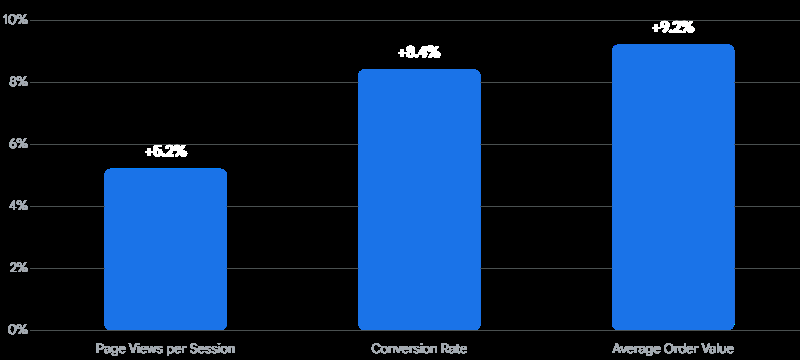
The drop-off is severe as load times increase. Data indicates that a blazing-fast site loading in one second boasts an e-commerce conversion rate up to two and a half times higher than a site taking five seconds to load. To illustrate this financially, consider a mid-sized European retailer selling a flagship product priced at €50. If 1,000 potential buyers visit the page, the difference between a highly optimized page and a sluggish one is staggering.
| Page Load Time | Average Conversion Rate | Projected Revenue per 1,000 Visitors (€50 AOV) | Revenue Lost to Latency |
| 1 Second | 3.05% | €1,525 | €0 (Baseline) |
| 2 Seconds | 1.68% | €840 | €685 |
| 3 Seconds | 1.12% | €560 | €965 |
| 4 Seconds | 0.93% | €465 | €1,060 |
As the table demonstrates, an e-commerce conversion rate decreases by an average of a third of a percent for every additional second it takes for a website to load. For a store generating thousands of visits daily, a one-second delay equates to hundreds of thousands of euros in lost annual revenue. Performance optimization is not an IT expense; it is a high-yield business investment.
Decoding WooCommerce Core Web Vitals for Modern Commerce
Search engines evaluate the user experience through a strict set of measurable signals known as Core Web Vitals. These metrics focus on three distinct pillars: loading speed, visual stability, and interactivity. To achieve a 100/100 score, you must optimize all three concurrently.
Largest Contentful Paint
Largest Contentful Paint (LCP) measures raw loading performance. It marks the exact moment the largest visual element in the viewport is fully rendered on the screen. For an e-commerce store, this is almost always the hero banner on the homepage or the primary product image on a product detail page. For a seamless user experience, your LCP must occur within 2.5 seconds of the page initiating the load sequence. In WooCommerce, poor LCP is almost universally caused by unoptimized, oversized product images, render-blocking stylesheets, or slow server response times (Time to First Byte).
Interaction to Next Paint
Interaction to Next Paint (INP) replaced First Input Delay as the definitive measure of website responsiveness. INP tracks the latency of all user interactions—such as clicks, taps, and keyboard inputs—throughout the entire lifespan of the page visit. It records the longest delay a user experiences when trying to engage with the site. A passing INP score must be strictly under 200 milliseconds at the 75th percentile of page loads.
For WooCommerce stores, INP is notoriously difficult to master. Dynamic features like category filters, variant selectors on product pages, and complex mega-menus require heavy JavaScript execution. When a user clicks a “Size: Medium” variant, and the browser’s main thread is congested with tracking scripts or inefficient code, the page freezes. The user receives no visual feedback that their click registered, causing frustration and a critical INP failure.
Cumulative Layout Shift
Cumulative Layout Shift (CLS) quantifies visual stability. It measures how much the page content shifts unexpectedly as assets load. A good CLS score is below 0.1. In WooCommerce, CLS violations typically occur when product images lack explicitly defined height and width dimensions, or when promotional banners and cookie notices dynamically inject themselves at the top of the Document Object Model (DOM). This pushes the main content—such as the “Add to Cart” button—downward just as the user attempts to click it, leading to accidental clicks and a fractured user experience.
Eliminating Main-Thread Blocking Scripts to Conquer INP
The most complex hurdle in optimizing WooCommerce Core Web Vitals is achieving an INP under 200 milliseconds. WooCommerce relies on a single-threaded PHP architecture and heavily utilizes JavaScript on the front end to provide interactive shopping experiences.
Browsers execute JavaScript on the “main thread,” which is the same thread responsible for parsing HTML, calculating CSS styles, and painting pixels to the screen. When the main thread is blocked by a long-running JavaScript task (defined as any task exceeding 50 milliseconds), the browser cannot respond to user inputs. If a user tries to open the mobile menu while the main thread is busy executing a tracking script, the menu will not open until the script finishes. This delay is exactly what INP measures.
The Cart Fragments API Bottleneck
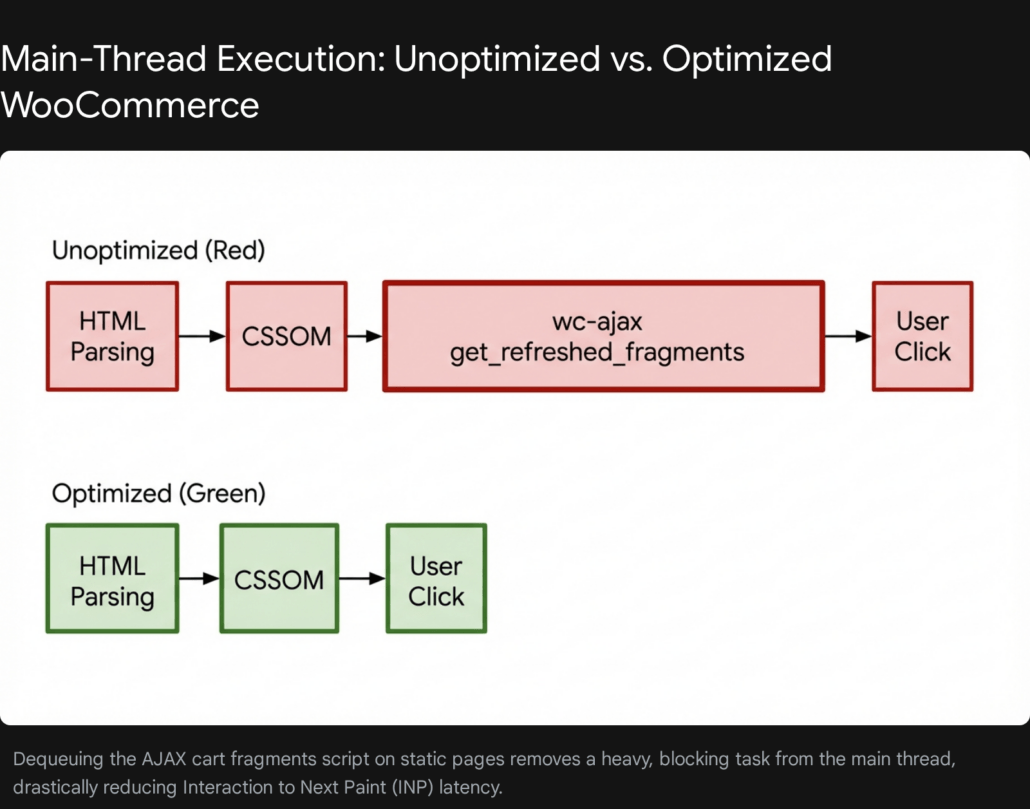
One of the most persistent performance drains in WooCommerce is the AJAX Cart Fragments request. Whenever a page loads, WooCommerce triggers an asynchronous script (?wc-ajax=get_refreshed_fragments) to check if the cart totals have changed and dynamically update the mini-cart widget in the header.
While useful on a product page where a user might be actively adding items, this script fires indiscriminately on every single page of your website—including static homepages, privacy policy pages, and blog posts where it serves absolutely no purpose. Because it is a dynamic AJAX request, it completely bypasses your server’s page cache. This forces the server to spin up a heavy PHP process and query the database simply to confirm the cart is empty. This monopolizes server resources, increases your Time to First Byte, and blocks the main browser thread, directly inflating both your INP and LCP times.
To resolve this, you must conditionally dequeue the cart fragments script so it only loads where absolutely necessary, such as the cart, checkout, and individual product pages. Here is the exact PHP implementation to place in your child theme’s functions.php file to eliminate this bottleneck on your static content:
PHP
/**
 * Dequeue WooCommerce Cart Fragments on static pages to improve INP and Server Response Time.
 */
add_action( 'wp_enqueue_scripts', 'optimize_woocommerce_cart_fragments', 11 );

function optimize_woocommerce_cart_fragments() {
    // Disable the cart fragments script on the front page and standard blog posts
    if ( is_front_page() |

| is_single() ) {
        wp_dequeue_script( 'wc-cart-fragments' );
    }
}
By implementing this surgical adjustment, you instantly free up the main thread on your highest-traffic landing pages. This allows the browser to prioritize painting the hero image and binding event listeners to your call-to-action buttons, ensuring the site feels instantly responsive.
Managing Third-Party Scripts and Heavy DOM Trees
E-commerce sites are notoriously reliant on third-party scripts. Marketing teams require analytics trackers, customer support teams need live chat widgets, and merchandising teams rely on dynamic pricing algorithms and personalized recommendation engines. Each of these external scripts competes aggressively for main-thread execution time.
To secure a passing INP, you must relentlessly audit your JavaScript payload. The most effective strategy is to delay the execution of non-critical third-party scripts until intentional user interaction occurs. For instance, a live chat widget should not initialize, download its heavy payload, and connect to its WebSocket during the initial page load. Instead, you should implement a “facade” pattern.
A facade is a lightweight, static HTML or SVG element that perfectly mimics the appearance of the actual third-party widget. Only when the user explicitly clicks the static icon does the heavy JavaScript payload fetch and execute. This strategy can be applied to chat widgets, embedded customer review carousels, and product demonstration videos.
Furthermore, mega-menus and complex product filters create massive Document Object Models (DOM). A large DOM forces the browser to calculate layout shifts and style recalculations across thousands of nodes every time a user interacts with the page. To mitigate this, simplify your product category pages. Use optimized pagination or intelligent infinite scrolling instead of rendering hundreds of products simultaneously. Ensure your product filtering plugins use efficient AJAX rendering that only updates the specific product grid, rather than triggering full page reflows that paralyze the main thread.
Mastering Largest Contentful Paint with Next-Generation Delivery
In a WooCommerce environment, the Largest Contentful Paint is almost universally tied to product imagery. High-quality visuals are essential for driving conversions, but serving unoptimized JPEGs or PNGs is a surefire way to fail Core Web Vitals. Traditional compression reduces file size but often introduces visible artifacts—a critical error in e-commerce, where product aesthetics directly drive purchasing decisions.


Adopting AVIF and WebP Architectures
To achieve rapid loading times without sacrificing visual fidelity, WooCommerce stores must transition to next-generation image formats, specifically WebP and AVIF. WebP lossy images are, on average, 25% to 34% smaller than comparable JPEGs at identical quality levels. AVIF, a newer format based on the AV1 video codec, offers even superior compression efficiency, yielding incredibly lightweight files that retain razor-sharp details.
By serving a 50KB AVIF hero image instead of a 250KB JPEG, you drastically reduce the network payload. This allows the browser to download and decode the asset in a fraction of the time, directly accelerating your LCP metric.
Implementation via the HTML5 Picture Element
A common mistake developers make is relying on JavaScript-based image replacement or heavy plugins to serve next-generation formats. This is an anti-pattern that harms performance, as the browser must wait for the JavaScript to execute before it knows which image to download. Instead, you must utilize the native HTML5 <picture> element to serve next-gen formats at the server level, while maintaining absolute fallback compatibility for older browsers.
At Tool1.app, when we architect custom websites and e-commerce platforms, we engineer robust server-side image processing pipelines. These pipelines automatically generate AVIF and WebP variants upon upload and inject the optimal markup without requiring manual intervention from store managers. Here is an example of how a highly optimized product hero image should be structured in your theme’s templates:
HTML
<picture>
  <source srcset="/wp-content/uploads/product-image.avif" type="image/avif">

  <source srcset="/wp-content/uploads/product-image.webp" type="image/webp">

  <img src="/wp-content/uploads/product-image.jpg"
       alt="Premium Leather Weekend Bag"
       width="800"
       height="800"
       fetchpriority="high"
       decoding="async">
</picture>
Crucial LCP Directives:
- Explicit Dimensions: Always declare explicit
widthandheightattributes on your<img>tags. This allows the browser to reserve the exact spatial footprint of the image before it even begins downloading. This practice entirely prevents the text below the image from jumping around, securing your CLS score. - Fetch Priority: Notice the
fetchpriority="high"attribute in the snippet above. This is a powerful directive that instructs the browser’s preload scanner to elevate this specific image to the absolute highest network priority. It guarantees that the LCP element is requested before secondary CSS or JavaScript files, minimizing the time it takes to render the main visual. - Never Lazy-Load the LCP Image: Lazy-loading is an excellent practice for images located below the fold. However, applying lazy-load scripts to your primary hero image will severely delay your LCP. The browser must first parse the HTML, load the lazy-load JavaScript library, execute it, and only then begin downloading the hero image. Always rigorously exclude the first viewport image from your lazy-loading configuration.
Sanitizing the Database for Instantaneous Server Response
A visually optimized frontend cannot compensate for a sluggish backend. The speed at which your server processes a request and begins sending data back to the browser is measured as Time to First Byte (TTFB). If your TTFB is slow, your LCP and INP will inherently be delayed, regardless of how well your images are optimized.
WooCommerce heavily relies on the underlying WordPress database architecture, specifically the wp_posts and wp_postmeta tables. Over time, as thousands of orders are placed, processed, and modified, and as plugins are installed and deleted, this database accumulates massive amounts of orphaned data, expired transients, and legacy logs.
When a customer navigates to a complex product category, WooCommerce queries the database to retrieve products, variations, prices, and stock statuses. If your wp_postmeta table is bloated with millions of irrelevant rows, these SQL queries take significantly longer to execute, crippling your server response time.
Eliminating Orphaned Metadata
Orphaned metadata is data that belongs to a post, product, or order that has been deleted, yet the meta-information remains stranded in the database. For example, if you delete a legacy product or uninstall a complex SEO plugin, the dozens of attributes associated with those items in the wp_postmeta table are often left behind. In large, mature WooCommerce stores, it is not uncommon to uncover hundreds of thousands of orphaned rows.
To sanitize your database and restore query speed, you must safely purge this data. Below are the precise SQL queries used to identify and delete orphaned postmeta.
Caution: Direct database manipulation carries inherent risks. Always create a complete database backup before executing direct SQL commands.
Step 1: Identify the Orphaned Data
SQL
-- List all orphan rows from the postmeta table by finding meta entries
-- that do not have a corresponding parent ID in the posts table.
SELECT * FROM wp_postmeta
LEFT JOIN wp_posts ON wp_posts.ID = wp_postmeta.post_id
WHERE wp_posts.ID IS NULL;
Step 2: Execute the Deletion
SQL
-- Delete all orphan rows from wp_postmeta safely
DELETE wp_postmeta FROM wp_postmeta
LEFT JOIN wp_posts ON wp_posts.ID = wp_postmeta.post_id
WHERE wp_posts.ID IS NULL;
Managing Transients and Legacy Order Tables
WooCommerce uses “transients” to store cached data temporarily in the database, such as complex API responses, compiled cart totals, or external shipping rate calculations. While intended to speed up the site by preventing repeated API calls, expired transients often fail to clear automatically, cluttering the wp_options table. A bloated options table slows down every single page load, as WordPress queries this table constantly. Regularly clearing WooCommerce transients via the built-in status tools, or via WP-CLI, is a mandatory maintenance task.
Furthermore, the architecture of WooCommerce has evolved. Historically, WooCommerce stored orders as custom post types within the same wp_posts table used for blog articles and pages. This created massive bottlenecks for high-volume stores. Modern WooCommerce implementations must utilize High-Performance Order Storage (HPOS).
HPOS moves order data out of the bloated default tables and into dedicated, highly indexed custom tables designed specifically for commerce data structures. Once HPOS is established and fully synced as the authoritative data store, you can safely run the wc hpos cleanup all command via the command line. This strips legacy order data from the old tables, radically reducing database overhead, accelerating checkout speeds, and safeguarding your backend against traffic spikes.
Maintaining this level of database hygiene manually is tedious and prone to error. At Tool1.app, we frequently develop custom Python automations for our enterprise clients. These highly secure scripts interface directly with the server environment, routinely executing exact database sanitization protocols and transient cleanups during off-peak hours to guarantee the database remains pristine, lightweight, and responsive year-round.
Conclusion: Engineering a High-Conversion Store
Scoring a perfect 100/100 on WooCommerce Core Web Vitals is not a milestone you achieve by simply installing an off-the-shelf caching plugin. It requires a holistic, engineering-first approach to web development and technical SEO. You must treat every byte of JavaScript as a liability, every image as a priority, and every database query as an opportunity for optimization.
By eliminating main-thread blocking scripts like the cart fragments AJAX call, adopting AVIF imagery through native HTML5 structures, and relentlessly pruning database bloat to lower your server response times, you transform a sluggish platform into a highly tuned sales engine. As the digital economy continues its rapid expansion, the stores that load instantly will capture the market. The data proves that consumer patience is non-existent. Buyers will happily spend their money with you, provided your technology does not get in their way.
Is a slow store hurting your sales, inflating your bounce rates, and driving your customers directly to your competitors? The intersection of speed and revenue has never been more critical. Stop losing money to unoptimized code, heavy themes, and bloated databases.
Ask Tool1.app for a comprehensive performance audit today. As a specialized software development agency, we engineer high-performance custom websites, AI/LLM solutions, and Python automations designed specifically for modern business efficiency. Contact Tool1.app to discuss how our expert development team can completely overhaul your WooCommerce architecture, secure your 100/100 Core Web Vitals score, and maximize your e-commerce conversion rates for the future.







Leave a Reply
Want to join the discussion?Feel free to contribute!
Join the Discussion
To prevent spam and maintain a high-quality community, please log in or register to post a comment.