

The 2026 Managed WordPress Hosting Showdown: WP Engine vs. Kinsta vs. Cloudways
Table of Contents
- The 2026 Server Architecture Landscape
- WP Engine: The Enterprise Fortress
- Kinsta: The Performance Powerhouse
- Cloudways: The Flexible Cloud Disruptor
- API Automation and Python Integration Ecosystems
- Real-World Performance Benchmarks in 2026
- Headless WordPress and API-First Strategies
- Agency Partner Programs and Reseller Margins
- Customer Support and Technical Resolution
- The Final Verdict: Which Host Wins in 2026?
- Ensure Your Infrastructure Matches Your Ambition
- Show all

Choosing the right infrastructure for a growing digital presence is a defining technical decision for modern enterprises. The era of simply renting generic server space is completely over. In 2026, web hosting is heavily focused on edge computing, artificial intelligence, automated scaling, and granular performance optimizations. For business owners, marketing directors, and technical leads, finding the best managed WordPress hosting 2026 has to offer is critical for maintaining high conversion rates, ensuring ironclad security, and scaling without friction.
At Tool1.app, we frequently audit, design, and migrate enterprise platforms, custom applications, and high-traffic eCommerce stores. We continuously benchmark the underlying infrastructure of the world’s leading hosting providers to ensure our clients receive maximum performance. Through rigorous load testing, API evaluations, and real-world deployment analytics, three industry titans consistently dominate the enterprise and agency conversation: WP Engine, Kinsta, and Cloudways.
This comprehensive report dismantles the marketing jargon to provide a deeply technical and business-focused analysis of these three platforms. We will explore their server architectures, pricing economics, automation capabilities, real-world performance benchmarks, and developer ecosystems to determine which platform truly deserves to power your digital operations.
The 2026 Server Architecture Landscape
Before dissecting the individual hosts, it is imperative to understand the baseline technological expectations for premium managed WordPress hosting in 2026. The architecture underlying your website dictates everything from your Core Web Vitals and search engine rankings to your server’s ability to handle sudden traffic spikes without throttling or crashing. A modern host must provide a specific stack of technologies to be considered viable for enterprise use.
The Dominance of NVMe Storage Solutions
Standard Solid State Drives (SSDs) and legacy spinning disks are no longer sufficient for database-heavy WordPress sites. The industry standard has definitively shifted to All-Flash NVMe (Non-Volatile Memory Express). To understand the impact, one must look at how the server processes data requests. Legacy storage relies on a single queue of commands, which creates a severe bottleneck when a high-traffic site requests hundreds of files simultaneously.
NVMe connects directly to the server’s PCIe lanes, allowing it to process up to 64,000 parallel data queues. For dynamic sites, this means the server can fetch high-resolution media, while simultaneously executing complex PHP scripts, and querying the MySQL database, resulting in near-zero hardware latency. This parallel processing is a prerequisite for running complex page builders, extensive WooCommerce product catalogs, and custom LMS (Learning Management System) platforms seamlessly.
The Impact of HTTP/3 and the QUIC Protocol
The transition to HTTP/3 and the QUIC protocol has revolutionized data delivery across the web. Previous HTTP iterations relied on the Transmission Control Protocol (TCP), which required multiple handshakes between the client and the server before data could be transferred. HTTP/3 utilizes the QUIC protocol, which is built on the User Datagram Protocol (UDP).
This shift provides zero round-trip time (0-RTT) connection resumption. For returning visitors, this translates to near-instantaneous page loads because the browser and server remember the encryption keys from previous sessions. Furthermore, HTTP/3 introduces multiplexed streams without blocking. If a user is on a lossy mobile network and one packet of data fails to arrive, legacy protocols would halt the entire page load until that packet was recovered. With multiplexing, independent elements load independently, preventing resource-heavy themes or scripts from causing cascade delays. A modern managed host must fully support HTTP/3 at the edge.
PHP 8.4 and Just-In-Time Compilation
With the widespread adoption of PHP 8.4 in late 2024 and its normalization into 2026, Just-In-Time (JIT) compilation has reached full maturity. WordPress relies heavily on PHP to dynamically generate HTML pages. Historically, PHP was an interpreted language, meaning the server translated the code into machine instructions every single time a page was requested.
JIT changes this paradigm by compiling parts of the code during runtime and caching the resulting machine code. This fundamentally accelerates how WordPress executes code. Managed hosts that proactively offer and optimize for PHP 8.4 see massive reductions in CPU overhead. For business owners, this translates directly to higher concurrency capabilities—allowing a WooCommerce store to process double the amount of simultaneous transactions during a flash sale without requiring a hardware upgrade.
Artificial Intelligence in Server Management
The integration of Artificial Intelligence into server management has shifted from a novelty to a necessity. Automated bot traffic now accounts for more than half of all web activity. Unverified AI crawlers scraping content for Large Language Models can impose a massive resource tax on servers, consuming bandwidth and CPU cycles that should be reserved for actual human customers.
Premium managed hosting platforms in 2026 leverage AI-powered threat intelligence and intelligent traffic management at the edge. By analyzing global attack patterns in real-time, these systems dynamically update Web Application Firewalls (WAF) to block malicious traffic and aggressively rate-limit abusive bots before they even touch the WordPress application layer. This proactive security approach is what separates true managed hosting from legacy VPS environments.
WP Engine: The Enterprise Fortress
WP Engine has long positioned itself as the premium, enterprise-grade choice for WordPress hosting. In 2026, their focus remains heavily weighted toward proactive security, AI-driven automation, and a highly restrictive but incredibly stable caching environment designed to eliminate downtime for high-stakes corporate websites.
Architecture and Proprietary EverCache Technology
WP Engine relies heavily on its proprietary EverCache technology. This caching layer is aggressively tuned specifically for WordPress, intercepting and serving hundreds of millions of requests before they ever demand resources from a PHP worker. While standard websites, corporate portfolios, and high-traffic blogs run exceptionally well on this architecture, highly dynamic sites—such as membership portals, forums, or active WooCommerce stores—can face challenges.
Dynamic requests inherently bypass the cache because the content is unique to the logged-in user. When EverCache is bypassed, WP Engine relies on isolated container resources built on Amazon Web Services (AWS) and Google Cloud. Their enterprise architecture is incredibly robust, offering single-node and dedicated cluster configurations. However, lower-tier shared plans can experience throttling if un-cached dynamic requests spike unpredictably, as the shared environment strictly governs resource allocation to prevent noisy neighbor issues.
AI-Powered Maintenance and Smart Plugin Manager
Where WP Engine truly shines in the 2026 landscape is its deep integration of Artificial Intelligence for site maintenance and security. Managing updates is one of the most tedious and risky aspects of running a WordPress site. Over 50% of WordPress vulnerabilities originate from outdated plugins and themes.
WP Engine solves this with their Smart Plugin Manager, which utilizes AI-driven Visual Regression Testing (VRT). When a plugin update is released, the system automatically creates a staging clone of your website. It applies the update, and then the AI runs automated visual and functional tests, comparing the resulting Document Object Model (DOM) and pixel rendering against the live site. If even a minor anomaly or broken layout is detected, the update is halted and rolled back autonomously, notifying the administrator. This feature drastically reduces the total cost of ownership by eliminating hours of manual quality assurance testing.
Advanced AI Search and Vector Databases
Traditional WordPress search relies on basic lexical matching, which is notoriously slow and inaccurate. WP Engine has rolled out Smart Search, an AI-powered vector search replacement. Instead of just looking for exact keyword matches, vector databases understand the semantic meaning and context of the search query.
This provides typographical tolerance (finding results even if the user misspells a word), semantic understanding, and faceted results. For an eCommerce store or a large publisher, serving highly relevant, personalized content via an AI recommendation engine can significantly boost engagement and conversion rates, all without requiring the business to integrate expensive third-party search tools like Algolia.
Pricing Economics and Resource Limits
WP Engine’s pricing is structured strictly around traffic tiers and storage capacity. It is critical to monitor these limits, as overage fees can accumulate if a site experiences unexpected viral traffic.
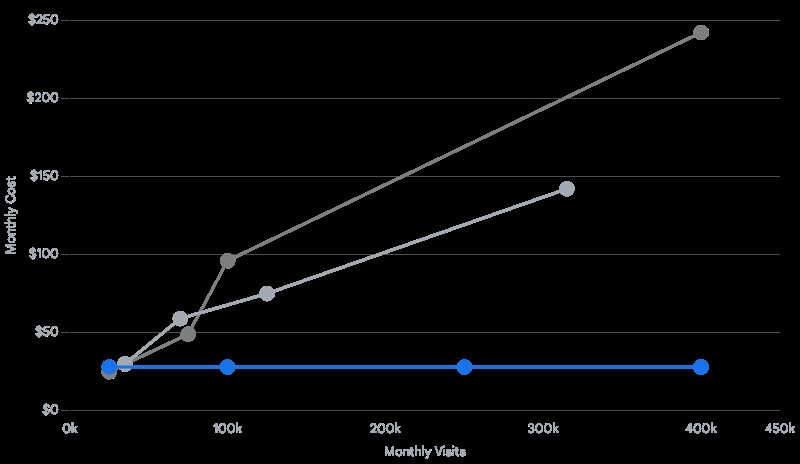
| Plan Tier | Estimated Monthly Cost | Included Sites | Monthly Visits Limit | Local Storage |
| Startup | €28.00 | 1 | 25,000 | 10 GB |
| Professional | €45.00 | 3 | 75,000 | 15 GB |
| Growth | €88.00 | 10 | 100,000 | 20 GB |
| Scale | €223.00 | 30 | 400,000 | 50 GB |
| Custom Core | €368.00+ | Custom | Scalable | Custom |
Note: Prices are approximate conversions to EURO (€) based on annual billing discounts.
The critical consideration with WP Engine is their definition of a “visit” and bandwidth caps. They track unique IP addresses over a 24-hour period. Furthermore, WP Engine heavily restricts certain plugins—particularly third-party caching and backup plugins—to prevent conflicts with their internal systems. While this ensures stability, it limits flexibility for advanced systems administrators who prefer custom configurations.
Provider Positioning and Technical Focus Matrix
| Provider | Primary Target Audience | Core Infrastructure | Key Proprietary Feature |
|---|---|---|---|
| WP Engine | Agencies and enterprises | Consolidated platform(Cloud provider not specified in source) | Smart Plugin Manager |
| Kinsta | Premium WordPress sites & growing businesses | Google Cloud Platform(Premium Infrastructure) | Edge Caching & APM Tool |
| Cloudways | Developers, agencies & flexible cloud setups | DigitalOcean, AWS, Google Cloud, or Vultr(Choice of provider) | Lightning Stack(NGINX + PHP-FPM) |
While all three provide managed WordPress hosting, their underlying infrastructure and target demographics differ significantly. Cloudways favors developers seeking flexibility, Kinsta targets high-performance edge delivery, and WP Engine focuses on heavily managed enterprise security.
Kinsta: The Performance Powerhouse
Kinsta operates on a fundamentally different philosophy than WP Engine. Instead of building a custom, highly restricted software ecosystem from the ground up, Kinsta harnesses the absolute highest-tier infrastructure available from the Google Cloud Platform and optimizes it specifically and exclusively for WordPress.
Google Cloud C2 VMs and Global Infrastructure
Every single site hosted on Kinsta, regardless of whether you are on the entry-level €32 plan or a €1,000 enterprise tier, is deployed on Google Cloud’s Compute-Optimized (C2) virtual machines. These machines offer the highest clock speeds available in Google’s entire hardware inventory, ensuring backend PHP execution is aggressively fast.
Furthermore, Kinsta provides access to 35 different data center locations globally. This allows businesses to geographically place their server hardware directly adjacent to their primary customer base, drastically reducing network latency before a Content Delivery Network (CDN) is even introduced into the equation.
Cloudflare Enterprise and Edge Caching
Coupled with premium hardware is Kinsta’s deep integration with Cloudflare Enterprise. While many standard hosts offer a basic CDN that caches images and CSS files, Kinsta utilizes true Edge Caching. This means the entire HTML payload of your WordPress pages is cached at over 260+ Points of Presence (PoPs) worldwide.
When a user in Tokyo requests a page hosted on a server in London, they do not wait for the data to travel across the globe. The fully constructed HTML page is delivered directly from a server in Tokyo. By serving the entire page from the edge, Time to First Byte (TTFB) is often slashed by over 50%, resulting in near-instantaneous load times that easily pass Google’s stringent Core Web Vitals assessments.
Application Performance Monitoring (APM)
For developers and technical teams, debugging a slow WordPress site can be a nightmare of trial and error. Kinsta solves this by including a bespoke Application Performance Monitoring (APM) tool built directly into their MyKinsta dashboard.
Unlike third-party tools like New Relic, which can be prohibitively expensive and complex to configure, Kinsta APM visually identifies performance bottlenecks with a single click. It breaks down the exact milliseconds spent on slow MySQL database queries, external API calls, and individual plugin execution times. This allows developers to instantly see that a specific SEO plugin or a bloated WooCommerce extension is causing a 400ms delay, empowering them to take immediate corrective action.
The PHP Worker Bottleneck for Dynamic Sites
Despite its massive power, Kinsta has a notable architectural constraint that businesses must be aware of: PHP workers. PHP workers determine how many simultaneous, un-cached requests a site can process at any given millisecond.
When a user visits a heavily cached blog post, zero PHP workers are utilized. However, when a user logs into a customer portal, adds an item to a WooCommerce cart, or processes a credit card payment, the cache is instantly bypassed. A PHP worker must then construct that dynamic page on the fly.
Kinsta tightly limits these workers based on your plan. For example, their entry-level plans provide only 2 to 4 workers per site. If your store goes viral and five customers attempt to check out simultaneously, the fifth customer will experience a delay or a 502 Bad Gateway error while waiting for a worker to become available. Scaling up requires moving to significantly more expensive plans to unlock more concurrent processing power.
Pricing Economics and Inclusions
Kinsta’s pricing reflects its premium infrastructure. While it may appear similar to WP Engine on the surface, the value derived from the included features is substantial.
| Plan Tier | Estimated Monthly Cost | Included Sites | Monthly Visits Limit | SSD Storage |
| Single 35k | €32.00 | 1 | 35,000 | 10 GB |
| WP 2 (Multi) | €64.00 | 2 | 70,000 | 20 GB |
| WP 5 | €105.00 | 5 | 125,000 | 30 GB |
| WP 10 | €207.00 | 10 | 315,000 | 40 GB |
| Agency 1 | €313.00 | 20 | 400,000 | 50 GB |
Note: Prices are approximate conversions to EURO (€) based on monthly billing rates with standard annual discounts applied.
Kinsta offers immense value by including unlimited free expert migrations, daily backups retained for 14 to 30 days, wildcard SSLs, and an incredibly intuitive custom dashboard (MyKinsta). Furthermore, they do not ban specific plugins, giving developers complete freedom over their tech stack.
Cloudways: The Flexible Cloud Disruptor
Cloudways disrupts the traditional managed hosting model by acting as a highly optimized, managed control panel sitting on top of unmanaged cloud infrastructure providers. Instead of Cloudways owning the hardware, users choose to deploy their servers on DigitalOcean, Amazon Web Services (AWS), or Google Cloud Engine (GCP). Cloudways handles the complex server configuration, security patching, and optimizations, allowing businesses to enjoy cloud power without needing a dedicated Linux systems administrator.
The Revolutionary Lightning Stack
In 2026, Cloudways transformed their platform performance with the widespread rollout of the “Lightning Stack.” Previously, Cloudways utilized a hybrid stack involving Apache, NGINX, and Varnish. While fast, Varnish could be notoriously difficult to configure for highly dynamic applications, often requiring complex exclusion rules to prevent eCommerce carts from caching incorrectly.
The Lightning Stack replaces this complexity with a pure, optimized combination of NGINX and PHP-FPM. By utilizing NGINX’s event-driven architecture, it handles concurrent requests infinitely better than traditional process-based servers. Independent benchmarks show the Lightning Stack serving up to 65% faster load times, specifically for un-cached requests, while consuming less memory and CPU. This architectural shift makes Cloudways exceptionally powerful for dynamic WordPress instances, LMS platforms, and complex eCommerce stores that traditionally struggle on heavily cached shared platforms.
Cloudways Autonomous: True Kubernetes Autoscaling
Historically, a major drawback of Cloudways (and traditional VPS hosting in general) was vertical scaling. Upgrading a server to handle more traffic required a brief period of downtime as the disk was cloned and rebooted onto a larger instance.
Cloudways Autonomous solves this entirely. Built on Google Kubernetes, this fully managed plan offers true, highly available autoscaling. If your website goes viral or experiences a massive, unexpected traffic spike from a marketing campaign, Cloudways Autonomous dynamically allocates additional pods and load balances the traffic instantly. There is no downtime, no manual server resizing, and no catastrophic failure. Once the traffic subsides, the system scales back down. This is enterprise-grade high availability made accessible to medium-sized businesses.


Resource-Based Pricing Economics
Cloudways offers arguably the best cost-to-performance ratio in the entire web hosting industry. Unlike WP Engine and Kinsta, the standard Cloudways flexible plans do not cap your monthly visits. You are paying for raw server resources (RAM, CPU, Storage) plus the Cloudways management fee.
| Cloud Provider | Plan Details | Estimated Monthly Cost | Visitor Limit | Bandwidth |
| DigitalOcean | Small (2GB RAM, 1 vCPU, 50GB NVMe) | €26.00 | Unlimited | 2 TB |
| DigitalOcean | Medium (4GB RAM, 2 vCPU, 80GB NVMe) | €50.00 | Unlimited | 4 TB |
| DigitalOcean | Large (8GB RAM, 4 vCPU, 160GB NVMe) | €91.00 | Unlimited | 5 TB |
| Autonomous | Growth (Autoscaling Kubernetes) | €92.00 | Unmetered | 150 GB |
Because there are no artificial limits on visitors, a properly optimized €50 Cloudways server can handle drastically more traffic than a similarly priced plan on competing platforms. As long as the server’s RAM and CPU are not exhausted, you will not be charged overage fees for going viral.
API Automation and Python Integration Ecosystems
In the modern development landscape, interacting with hosting infrastructure via a graphical user interface is increasingly obsolete. Operations at scale demand code. Agencies, enterprise development teams, and systems integrators require programmatic access to automate deployments, orchestrate backups, and scale resources seamlessly.
At Tool1.app, our engineering team specializes in building these exact types of Python automations to eliminate human error and accelerate delivery. We view a host’s API maturity as a critical deciding factor for business efficiency.
Kinsta REST API Integration
Kinsta has heavily invested in their REST API, exiting public beta to provide robust endpoints for comprehensive site management. Developers can generate custom API keys directly from the MyKinsta dashboard, assigning granular access controls based on user roles (Company Owner, Administrator, or Developer).
The Kinsta API allows for the automated creation of WordPress sites, flushing the Edge Cache post-deployment, managing staging environments, and retrieving analytics. Below is a practical Python script example demonstrating how to interface with the Kinsta API to retrieve site environments—a script highly useful for building custom, centralized auditing dashboards for an agency managing dozens of clients.
Python
import requests
import json

# Tool1.app - Kinsta API Automation Example
KINSTA_API_KEY = "your_secure_api_key_here"
COMPANY_ID = "your_company_id"
BASE_URL = "https://api.kinsta.com/v2"

headers = {
    "Authorization": f"Bearer {KINSTA_API_KEY}",
    "Content-Type": "application/json"
}

def get_kinsta_sites():
    """Fetches all WordPress sites associated with the Kinsta company account."""
    endpoint = f"{BASE_URL}/sites?company={COMPANY_ID}"

    try:
        response = requests.get(endpoint, headers=headers)
        response.raise_for_status()
        sites_data = response.json()

        print(f"Successfully retrieved {len(sites_data.get('company', {}).get('sites',))} sites.")
        for site in sites_data.get('company', {}).get('sites',):
            print(f"Site Name: {site.get('name')} | Environment ID: {site.get('id')}")

    except requests.exceptions.RequestException as e:
        print(f"Error fetching Kinsta sites: {e}")

if __name__ == "__main__":
    get_kinsta_sites()
This Python implementation allows a business to programmatically monitor their infrastructure portfolio, integrating directly into internal Slack notifications or custom billing software.
Cloudways Platform API V1
For deeper infrastructure automation, the Cloudways API V1 offers unparalleled control. Because Cloudways manages the raw server infrastructure, their API grants significantly deeper access than Kinsta’s application-level API. You can programmatically launch entirely new servers across different cloud providers, modify PHP configuration limits, trigger Git repository deployments, install SSL certificates, and orchestrate complex multisite architectures.
Authentication with Cloudways utilizes an OAuth flow, requiring the exchange of an email and API key for a short-lived access token, which is then passed in subsequent requests. This is a highly secure, industry-standard approach.
Python
import requests
import json

# Tool1.app - Cloudways Server Orchestration Example
EMAIL = "developer@tool1.app"
API_KEY = "your_cloudways_api_key"
BASE_URL = "https://api.cloudways.com/api/v1"

def authenticate_cloudways():
    """Retrieves an OAuth access token from Cloudways."""
    url = f"{BASE_URL}/oauth/access_token"
    payload = {
        "email": EMAIL,
        "api_key": API_KEY
    }

    response = requests.post(url, data=payload)
    if response.status_code == 200:
        return response.json().get("access_token")
    else:
        raise Exception("Failed to authenticate with Cloudways API.")

def launch_digitalocean_server(token):
    """Launches a new 2GB DigitalOcean server programmatically."""
    url = f"{BASE_URL}/server"
    headers = {
        "Authorization": f"Bearer {token}",
        "Accept": "application/json"
    }

    # Payload for a 2GB DO server on the NGINX Lightning Stack
    payload = {
        "cloud": "do",
        "region": "lon1", # London Datacenter
        "instance_type": "2GB",
        "application": "wordpress",
        "app_version": "latest",
        "server_label": "Automated-Production-Server",
        "project_id": "your_project_id"
    }

    response = requests.post(url, headers=headers, data=payload)
    print(f"Server Launch Status: {response.status_code}")
    print(json.dumps(response.json(), indent=2))

if __name__ == "__main__":
    token = authenticate_cloudways()
    # Execute server launch
    # launch_digitalocean_server(token)
With this script, our automation specialists at Tool1.app can spin up a fully optimized production server in minutes without touching a web browser, ensuring infrastructure parity across multiple client environments.
WP Engine WP-CLI and SSH Remote Management
WP Engine takes a slightly different approach, leaning heavily into WP-CLI (WordPress Command Line Interface) executed over secure SSH gateways rather than a traditional REST API for infrastructure manipulation.
By utilizing SSH aliases, developers can execute remote commands to manage plugins, flush the EverCache, or update user roles across multiple environments simultaneously. For example, a developer can run wp @prod plugin update --all from their local terminal, and the command executes securely on the WP Engine production server. While this is incredibly powerful for WordPress-specific operational tasks, it lacks the broader server-level orchestration capabilities found in the APIs of Kinsta and Cloudways.
Real-World Performance Benchmarks in 2026
Marketing claims regarding “blazing fast speed” are ubiquitous across the hosting industry. However, empirical data from independent 2026 performance benchmarks reveals distinct performance profiles based on how these providers allocate hardware and manage databases.
Database Query Speeds and Latency
WordPress relies fundamentally on MySQL or MariaDB database read and write speeds. Every dynamic action requires a database query. Interestingly, because premium managed hosts use complex, remote database clusters designed for high availability and failover (separating the database from the web server), their raw database latency can occasionally trail behind simpler, localized server setups.
In extensive 2026 testing simulating raw transaction speeds (writing 100 rows to the database), WP Engine often exhibits a latency of around 169 milliseconds. Kinsta, leveraging their highly localized GCP C2 compute nodes, averages a much faster 29 to 50 milliseconds.
Cloudways results vary wildly depending on the chosen cloud provider and whether the server is properly configured. A default, unoptimized Cloudways server can perform poorly (over 300ms). However, an optimized Cloudways DigitalOcean server utilizing the new Lightning Stack and local databases routinely outpaces all premium competitors, completing 100 write queries in under 75 milliseconds. This raw database speed is why developers heavily favor Cloudways for un-cached, database-heavy applications.
Frontend Delivery Metrics: LCP and TTFB
When evaluating core frontend metrics like Largest Contentful Paint (LCP) and Time to First Byte (TTFB), Kinsta’s Edge Caching provides a clear and dominant advantage for global audiences. By serving the HTML directly from the Cloudflare edge, Kinsta frequently achieves TTFB under 100ms globally, resulting in mobile performance scores that consistently beat the competition.
Cloudways with the Lightning Stack achieves comparable speeds on the backend, but fully matching Kinsta’s global edge delivery requires manually configuring the Cloudflare Enterprise add-on (an additional €4.60/month per domain).
WP Engine’s EverCache performs admirably in North America and Europe, often achieving 74ms TTFB in localized tests. However, TTFB can degrade in regions further from their core data centers unless businesses invest in their premium Global Edge Security add-on, which significantly increases the monthly cost.
| Hosting Provider | TTFB (Average) | Mobile LCP (Average) | Database Write Speed (100 rows) |
| Kinsta | 96ms | 5.8s | ~29ms |
| WP Engine | 74ms | 5.5s | 169ms |
| Cloudways (Optimized) | 126ms | 5.4s | 75ms |
Note: Data aggregated from independent 2026 performance benchmarking tools.
Headless WordPress and API-First Strategies
As the modern web moves rapidly toward decoupled architectures, the ability to host “Headless” WordPress is becoming a major differentiator. In a headless setup, the WordPress backend is used strictly for content management, serving data via a GraphQL or REST API to a modern, blazing-fast frontend framework like React, Vue, or Next.js.
WP Engine has invested massively in this space. They acquired Node.js hosting capabilities and built the “Atlas” platform, alongside developing the open-source Faust.js framework. This provides a seamless, all-in-one environment where both the PHP WordPress backend and the JavaScript frontend are hosted within the exact same ecosystem, drastically reducing API latency and deployment complexity.
Kinsta addresses the headless trend by offering dedicated “Application Hosting” alongside their traditional WordPress hosting. Developers can connect their GitHub repositories and deploy Node.js or Python frontends directly to Kinsta’s containers in minutes. By keeping the frontend application geographically close to the WordPress database on Google Cloud, Kinsta delivers exceptional headless performance.
Cloudways remains focused almost purely on PHP applications. While you can easily host the Headless WordPress backend on Cloudways, you will generally need to utilize a third-party service like Vercel, Netlify, or AWS Amplify to host your decoupled JavaScript frontend framework. This requires managing two separate hosting vendors, which may add administrative overhead for some teams.
Agency Partner Programs and Reseller Margins
For software development and digital marketing agencies, a hosting provider is not just a vendor; it is a strategic partner and a vital source of recurring revenue. All three providers offer lucrative Agency Partner Programs, but their structures cater to vastly different business models.
WP Engine Agency Partner Program
WP Engine offers the most robust co-marketing and lead-generation program in the industry. Agencies that achieve “Strategic” tier status (requiring roughly €4,600 in referred revenue) gain access to custom onboarding, direct access to WordPress engineers, and industry-leading commissions. They actively send leads to their top partners. However, because the base cost of WP Engine plans is high, the total cost passed on to the end client is substantial, making it best suited for agencies targeting enterprise clients with large budgets.
Kinsta Agency Partner Program
Kinsta’s program focuses on allowing agencies to resell hosting at significant margins while maintaining complete control over the environment. They offer up to 10% lifetime recurring commissions and a completely white-labeled WordPress admin experience. The white-labeling is highly appealing for agencies wanting to maintain brand supremacy with their clients, hiding the underlying Kinsta infrastructure from the client’s view while delivering top-tier performance.
Cloudways Agency Partner Program & Maverick Club
Cloudways is unequivocally the favorite for agencies prioritizing maximum profit margins and scale. Because of the resource-based pricing, an agency can rent a large 8GB or 16GB DigitalOcean server from Cloudways for €90 to €150 a month. Because there are no artificial limits, the agency can comfortably host 30 to 50 low-traffic client websites on that single server.
Reselling this space to clients at a standard €30 to €50 monthly maintenance retainer generates immense recurring profit. Furthermore, the Cloudways Maverick Club offers expansive learning resources, agency tools, and an exclusive community for growing agency owners to collaborate on business development strategies.
Customer Support and Technical Resolution
When a high-traffic website goes offline, every minute of downtime equals lost revenue. The quality of a host’s customer support is often the ultimate deciding factor for risk-averse businesses.
Kinsta operates entirely on an Intercom-based chat and ticketing system, boasting 24/7/365 availability. They do not offer phone support on any plan. While some traditional enterprise clients find the lack of a phone number concerning, Kinsta argues that their chat support is staffed entirely by Tier-3 WordPress developers. Wait times are typically under two minutes, and issues are resolved directly in the chat without being escalated through multiple tiers of basic support.
WP Engine takes a more traditional enterprise approach. While they offer 24/7 chat for all plan levels, they also provide 24/7 phone support for Growth plans and higher, along with dedicated ticket support for custom environments. WP Engine’s support team is legendary in the industry, having won multiple Stevie Awards for Customer Service, including the Global Customer Service Department of the Year. If being able to speak to a human on the phone during a crisis is a mandatory requirement for your business, WP Engine is the clear choice.
Cloudways offers 24/7/365 live chat support across all plans, which is highly efficient for general platform issues. However, because they act as a management layer over unmanaged cloud providers, highly complex server-level troubleshooting sometimes requires escalation. For businesses requiring guaranteed response times and proactive monitoring, Cloudways offers Premium Support add-ons that provide a dedicated account manager and a private Slack channel for immediate engineering access.
The Final Verdict: Which Host Wins in 2026?
There is no singular “best” host in the abstract; there is only the right host for your specific technical requirements, organizational risk tolerance, and development budget.
Choose WP Engine if: You are an enterprise corporation or large agency where proactive security, compliance, and guaranteed stability are the highest priorities. If you want AI handling your plugin updates to prevent breakage, and you have the budget to accept strict traffic limits and plugin restrictions, WP Engine is a fortress of stability.
Choose Kinsta if: You run a mission-critical WooCommerce store or a highly dynamic site that demands raw compute power. If you want the absolute fastest infrastructure available (Google C2 VMs) combined with effortless Edge Caching, and you do not want to act as a systems administrator, Kinsta is unparalleled in pure performance.
Choose Cloudways if: You want maximum performance per euro spent and desire total, unrestricted control over your server environment. The new Lightning Stack offers incredible speed for dynamic sites, and Cloudways Autonomous provides flawless Kubernetes scaling. It is the premier choice for developers, SaaS builders, and agencies managing large portfolios of client sites who want to maximize their reseller margins.
Ensure Your Infrastructure Matches Your Ambition
Selecting the underlying architecture for your digital platform is a decision that ripples through your SEO rankings, user experience, and bottom-line revenue. A poorly matched host will bottleneck your growth, artificially restrict your traffic, and frustrate your development team. Conversely, the right infrastructure acts as an invisible catalyst, allowing you to scale without friction.
Navigating traffic limits, configuring Edge Caching, implementing CI/CD deployment pipelines, and building automated server orchestration require specialized engineering expertise. You do not have to architect this critical foundation alone.
Not sure where to host your high-traffic site or how to optimize your current setup? Contact Tool1.app for expert infrastructure advice. Whether you need a seamless, zero-downtime migration, a custom headless WordPress build, or tailored Python automations to streamline your entire business operation, our engineering team is ready to architect a solution that guarantees peak performance and efficiency.








Leave a Reply
Want to join the discussion?Feel free to contribute!
Join the Discussion
To prevent spam and maintain a high-quality community, please log in or register to post a comment.