

Implementing GraphQL in NestJS: A Complete Starter Guide
Table of Contents
- The Evolution of API Architecture and the Business Case
- Architectural Foundations: Code-First vs. Schema-First
- Initiating the NestJS GraphQL Setup
- Designing the Domain Model and Database Layer
- Architecting Resolvers, Queries, and Services
- Mastering Field Resolvers and the N+1 Performance Bottleneck
- Securing the Production GraphQL API
- Advanced Error Handling and Exception Filters
- Rigorous Testing Strategies for GraphQL APIs
- Conclusion
- Show all

Modern enterprise applications demand unprecedented flexibility, speed, and precision in data delivery. As digital ecosystems grow increasingly complex, supporting diverse frontends from web dashboards to mobile applications and wearable devices, traditional API architectures often struggle to meet the performance and adaptability requirements of feature-rich interfaces. The transition from Representational State Transfer (REST) to GraphQL represents a fundamental shift in how applications communicate, moving away from rigid, server-defined endpoints toward a highly dynamic, client-driven querying model.
For organizations building scalable backend infrastructure, pairing GraphQL with a robust, strictly typed framework is absolutely critical. NestJS has rapidly emerged as the premier Node.js framework for this exact purpose, offering deep integration with Apollo Server and a brilliant architecture that unifies database models, business logic, and API schemas into a single, cohesive source of truth.
This comprehensive guide details the complete NestJS GraphQL setup, exploring the business value of the technology, the architectural patterns required for production-ready applications, advanced performance optimizations, and critical security best practices. Agencies such as Tool1.app frequently recommend this precise technology stack for businesses seeking to modernize their data fetching layers, eliminate accrued technical debt, and accelerate the delivery of robust cross-platform applications.
The Evolution of API Architecture and the Business Case
Before diving into the technical implementation details, it is essential to understand the strategic and financial drivers behind the adoption of GraphQL. Application Programming Interface (API) architecture decisions significantly impact application performance, development velocity, and the underlying infrastructure costs of operating a digital business.
The Limitations of REST in Modern Ecosystems
REST APIs operate on a resource-based, stateless design that has provided a dependable standard for over a decade. In a RESTful architecture, data is exposed through fixed endpoints that return predetermined data structures. While straightforward, this design philosophy introduces severe inefficiencies when applied to complex, data-rich modern applications.
If a mobile application requires only a user’s name and profile avatar to render a navigation bar, but the standard /users/:id endpoint returns the entire user profile—including heavy metadata, user preferences, and extensive transaction history—the application suffers from over-fetching. Over-fetching wastes mobile bandwidth, drains end-user device batteries, and unnecessarily increases server egress costs.
Conversely, under-fetching occurs when a single endpoint does not provide enough data to render a specific view, forcing the client application to make multiple sequential network requests. For instance, rendering an e-commerce dashboard might require fetching a user, then fetching their recent orders, and then fetching the product details for each order. Each sequential request introduces a round-trip network delay, resulting in a sluggish user experience and lower conversion rates.
The Strategic Shift to Client-Driven Queries
GraphQL solves both over-fetching and under-fetching by exposing a single endpoint that accepts precise, highly structured queries. Clients dictate the exact shape, depth, and structure of the data they receive. If the mobile app only needs a name and an avatar, it requests exactly those two fields, and the server computes and returns nothing else.
Industry benchmarks indicate that for complex, multi-resource queries, GraphQL typically reduces total bandwidth consumption by thirty to fifty percent compared to equivalent REST architectures. By replacing three to five sequential REST calls with a single aggregated GraphQL request, organizations can effectively eliminate multiple round-trip network delays, providing a significantly faster perceived load time for the end user.
Financial Implications and Return on Investment
While GraphQL provides immense flexibility, it does shift the computational burden to the server. Query parsing, validation, and resolution in GraphQL can increase backend CPU utilization by twenty to thirty-five percent compared to the straightforward request-response cycle of a simple REST endpoint. In fact, for extremely simple, single-resource queries, REST often outperforms GraphQL by fifteen to twenty-five percent due to its lower overhead.
However, when operating at an enterprise scale, optimizing network latency bottlenecks and reducing bandwidth payload translates directly into improved user retention. For businesses processing millions of requests daily, transitioning to a consolidated GraphQL gateway can yield operational cost savings scaling from €20,000 to over €60,000 annually by simplifying infrastructure orchestration, reducing the volume of internal microservice chatter, and lowering cloud provider egress fees.
Performance Benchmarks: GraphQL vs. REST for Complex Queries
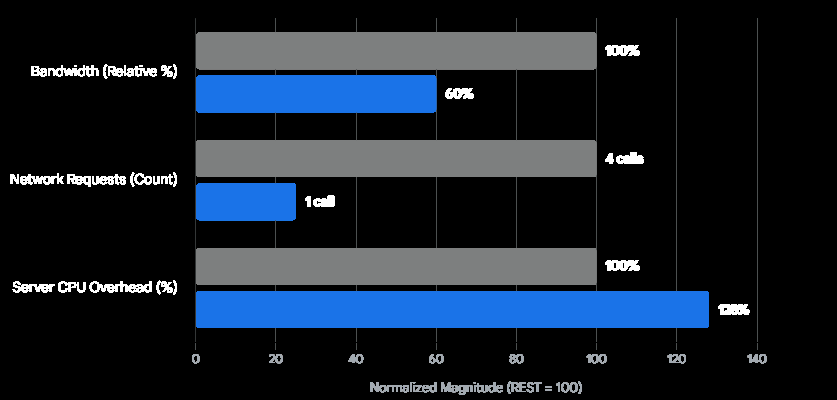
For multi-resource data fetching, GraphQL significantly reduces total bandwidth and round-trip network requests, despite a slight increase in initial server CPU overhead for query parsing.
Backend for Frontend (BFF) and Development Velocity
In environments with diverse client applications, managing multiple REST API versions or maintaining separate response transformers for web and mobile development quickly becomes a severe maintenance burden. Developers must create a new endpoint or update an existing one every time a frontend requirement changes, creating API versioning nightmares and potentially disrupting service.
GraphQL acts as an optimal Backend for Frontend (BFF). It allows the backend engineering team to expose a comprehensive graph of all available business entities. Frontend teams can then independently write queries tailored to their specific interface constraints without requiring backend modifications. This decoupling dramatically accelerates feature delivery. Organizations leveraging these architectures report massive productivity boosts, with teams able to iterate on user interfaces without being blocked by backend deployment cycles.
Architectural Foundations: Code-First vs. Schema-First
When undertaking a NestJS GraphQL setup, developers are presented with two distinct architectural paradigms for building applications: the Schema-First approach and the Code-First approach. Understanding the profound differences between these methodologies is the first critical step in architecting a maintainable enterprise application.
The Schema-First Approach
In the Schema-First approach, the absolute source of truth for the API is the GraphQL Schema Definition Language (SDL) file. Developers manually write the schema, defining types, queries, and mutations in a language-agnostic format. Once the schema is written, the NestJS framework automatically generates TypeScript definitions, interfaces, or classes based on that SDL to ensure type safety within the backend codebase.
While the SDL format is excellent for cross-platform team communication—allowing frontend developers, backend engineers, and product managers to agree on the data contract before any code is written—it introduces significant friction into the Node.js development lifecycle. Developers are forced into constant context switching between writing TypeScript logic and manually updating GraphQL syntax files. If a new field is added to a database model, the developer must update the database entity, update the GraphQL SDL file, and regenerate the TypeScript types. This redundancy slows down development and increases the surface area for human error.
The Code-First Approach
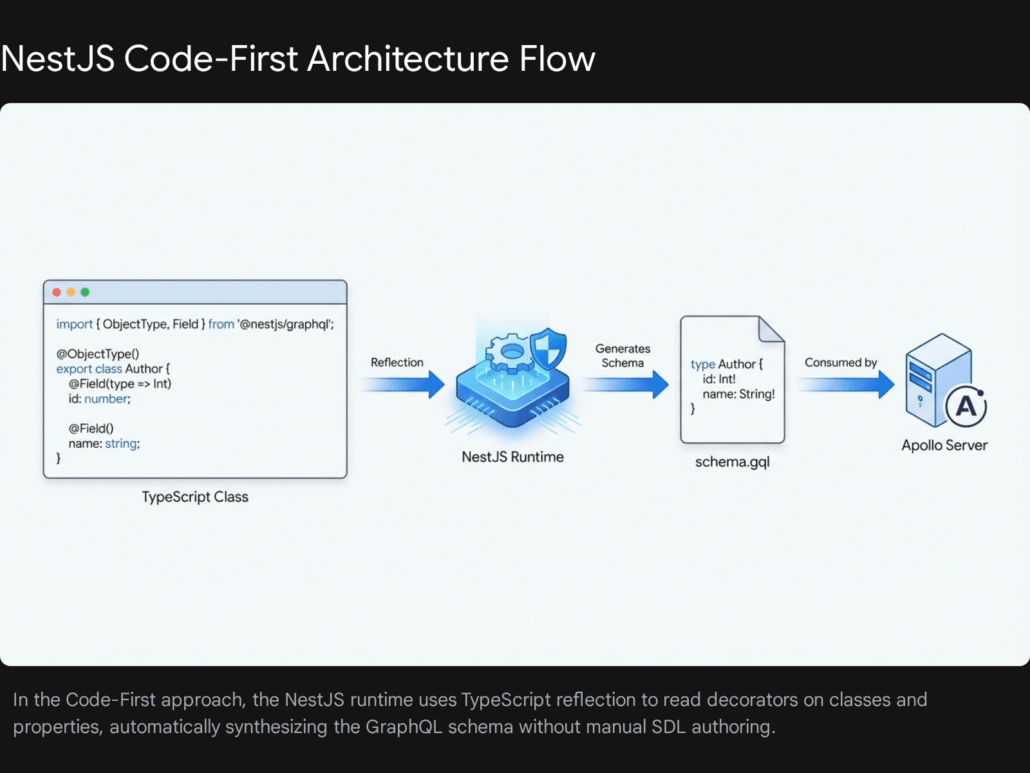
The Code-First approach completely flips this paradigm, prioritizing developer experience and code maintainability. In this methodology, developers do not write GraphQL SDL by hand. Instead, they use standard TypeScript classes decorated with specific framework annotations. At runtime, the NestJS GraphQL package reads the metadata defined through these decorators and automatically generates the complete GraphQL schema file.
This approach is overwhelmingly preferred in modern software engineering because it keeps the developer strictly within the TypeScript ecosystem. It allows data entities to be reused seamlessly between the database Object-Relational Mapping (ORM) layer and the API delivery layer. A single TypeScript class can serve as both the database table definition and the GraphQL object type, drastically reducing redundant boilerplate code.
For software development agencies focused on rapid, type-safe, and highly maintainable delivery, such as Tool1.app, the Code-First approach is the definitive standard for architecting modern backends.
| Feature | Schema-First Approach | Code-First Approach |
| Source of Truth | GraphQL SDL (.graphql files) | TypeScript Classes & Decorators |
| Workflow | Write Schema -> Generate Types -> Write Code | Write Code -> Auto-Generate Schema |
| Context Switching | High (Switching between SDL and TypeScript) | Low (Pure TypeScript ecosystem) |
| Boilerplate | High (Duplication of models and schemas) | Low (Classes serve dual purposes) |
| Best Use Case | Large, multi-language corporate environments | Rapid, full-stack TypeScript teams |
Initiating the NestJS GraphQL Setup
To begin integrating GraphQL into a NestJS project, specific dependencies must be installed. NestJS acts as a powerful abstraction layer, meaning the underlying GraphQL server can be powered by either Apollo Server (the established industry standard) or Mercurius (a high-performance alternative optimized for the Fastify web framework). For the vast majority of enterprise applications, the default Express and Apollo integration provides the most robust ecosystem, community support, and tooling.
Installation and Dependency Management
The foundational packages required to establish the GraphQL environment include the NestJS GraphQL module itself, the Apollo driver, the Apollo server engine, and the core GraphQL runtime library. Executing the following command via the Node Package Manager provisions the necessary dependencies:
Bash
npm install @nestjs/graphql @nestjs/apollo @apollo/server graphql
It is crucial to ensure version compatibility. Modern NestJS implementations utilize Apollo Server v4, which requires the updated integration packages. Legacy applications migrating from Apollo Server v2 or v3 must carefully manage their package versions to prevent breaking changes in request context handling and plugin architecture.
Global Module Configuration
Once the required packages are successfully installed, the GraphQL module must be initialized within the root AppModule of the NestJS application. By importing GraphQLModule.forRoot(), the application configures the global Apollo Server instance and integrates it deeply into the NestJS Dependency Injection container.
In a Code-First architecture, the autoSchemaFile property is the single most critical configuration setting. It dictates precisely where the framework should generate the physical .gql schema file based on the TypeScript decorators found scattered throughout the application modules.
TypeScript
import { Module } from '@nestjs/common';
import { GraphQLModule } from '@nestjs/graphql';
import { ApolloDriver, ApolloDriverConfig } from '@nestjs/apollo';
import { join } from 'path';
import { ProjectsModule } from './projects/projects.module';
import { TasksModule } from './tasks/tasks.module';

@Module({
  imports:,
})
export class AppModule {}
Setting the playground: true property enables the interactive GraphQL IDE (historically known as GraphQL Playground, and more recently transitioning to Apollo Sandbox) at the default /graphql route. This provides an immediate, graphical interface for developers to execute queries, test mutations, and browse the auto-generated API documentation during the development lifecycle.
Setting autoSchemaFile: true as a boolean value generates the schema dynamically in memory without creating a physical file. However, specifying a physical path using the join() function is universally preferred in professional environments. Writing the schema to a physical file allows the development team to track schema changes meticulously in version control systems like Git, facilitating easier code reviews and detecting unintended API breaking changes. The sortSchema: true parameter ensures that the generated file is alphabetically sorted, preventing arbitrary git conflicts when multiple developers add fields simultaneously.
Designing the Domain Model and Database Layer
With the GraphQL server active and listening, the next phase involves defining the internal data structures and connecting them to a persistent database. To build a truly scalable application, planning the database architecture in tandem with the API layer is essential to avoid major refactoring later in the product lifecycle.
In the Code-First approach, data models are constructed using standard TypeScript classes annotated with the @ObjectType() decorator. When using an Object-Relational Mapper (ORM) like TypeORM alongside a robust database like PostgreSQL, developers can achieve an incredibly elegant architecture by combining database decorators and GraphQL decorators on the exact same class.
Consider a real-world business use case: building a comprehensive task management and project tracking system. The Task entity needs to be stored in the PostgreSQL database and subsequently exposed to the GraphQL API for the frontend clients to consume.
Creating the Unified Entity
Each property within the class that should be stored as a column in the database is decorated with TypeORM’s @Column() decorator. Simultaneously, each property that should be queryable via the API is decorated with the GraphQL @Field() decorator.
TypeScript
import { ObjectType, Field, ID, Int } from '@nestjs/graphql';
import { Entity, PrimaryGeneratedColumn, Column, CreateDateColumn, UpdateDateColumn, ManyToOne } from 'typeorm';
import { Project } from '../projects/models/project.model';

@ObjectType({ description: 'A distinct unit of work within a larger project' })
@Entity('tasks')
export class Task {
  @Field(() => ID, { description: 'The unique UUID for the task' })
  @PrimaryGeneratedColumn('uuid')
  id: string;

  @Field({ description: 'The primary headline or title of the task' })
  @Column({ type: 'varchar', length: 255 })
  title: string;

  @Field({ nullable: true, description: 'Detailed HTML or Markdown description' })
  @Column({ type: 'text', nullable: true })
  description?: string;

  @Field(() => Boolean)
  @Column({ type: 'boolean', default: false })
  isCompleted: boolean;

  @Field(() => Int, { description: 'Priority level from 1 (Lowest) to 5 (Highest)' })
  @Column({ type: 'int', default: 3 })
  priorityLevel: number;

  @Field(() => String)
  @Column({ type: 'uuid' })
  projectId: string;

  @Field(() => Project, { description: 'The parent project this task belongs to' })
  @ManyToOne(() => Project, project => project.tasks)
  project: Project;

  @Field()
  @CreateDateColumn()
  createdAt: Date;

  @Field()
  @UpdateDateColumn()
  updatedAt: Date;
}
Type Inference and Explicit Declarations
NestJS relies heavily on TypeScript’s advanced reflection capabilities to infer the GraphQL type based on the underlying TypeScript type. For example, declaring title: string automatically translates into a GraphQL String scalar in the generated schema.
However, TypeScript inherently does not differentiate between integers and floating-point numbers at runtime; both are simply evaluated as the number type. Therefore, developers must explicitly declare GraphQL numerical types using the arrow function syntax, such as @Field(() => Int) or @Field(() => Float). Similarly, the specific GraphQL ID type must be explicitly declared to differentiate it from a standard string, ensuring frontend caching clients (like Apollo Client) can correctly index the entities.
Adding the description property within the decorator options injects semantic documentation directly into the generated GraphQL schema. This practice is highly beneficial, as frontend developers exploring the API via the playground will see these descriptions as tooltips, serving as self-generating, always-accurate API documentation.
Production Database Considerations
While development environments often use the ORM’s synchronize: true feature to automatically update the database tables whenever an entity changes, this practice is strictly prohibited in production. To maintain a production-ready application, synchronization must be disabled. Instead, engineering teams must implement structured database migrations. Migrations provide a controlled, trackable, and reversible methodology for updating the database schema, ensuring data integrity across large-scale deployments.
Architecting Resolvers, Queries, and Services
In traditional REST architectures, Controllers are responsible for receiving incoming HTTP requests, routing them to specific service functions, and returning formatted JSON responses. In a NestJS GraphQL setup, this entire responsibility is delegated to Resolvers. A resolver acts as the translation layer, mapping a specific GraphQL operation—whether it is a query, a mutation, or a real-time subscription—to the underlying business logic, dictating exactly how data is fetched from or written to the database.
Resolvers rely entirely on NestJS’s powerful Inversion of Control (IoC) container and Dependency Injection system. The resolver injects the necessary service classes (which house the core business logic and database repository interactions) through its constructor.
Implementing Data Queries
A Query in GraphQL is utilized to fetch data without causing side effects, analogous to a standard GET request in REST. The @Query() decorator designates a specific class method as a GraphQL query resolver.
TypeScript
import { Resolver, Query, Args, ID } from '@nestjs/graphql';
import { Task } from './models/task.model';
import { TasksService } from './tasks.service';
import { NotFoundException } from '@nestjs/common';

@Resolver(() => Task)
export class TasksResolver {
  constructor(private readonly tasksService: TasksService) {}

  @Query(() =>, { name: 'getAllTasks', description: 'Retrieve all tasks in the system' })
  async getTasks(): Promise<Task> {
    return this.tasksService.findAll();
  }

  @Query(() => Task, { name: 'getTaskById' })
  async getTaskById(
    @Args('id', { type: () => ID }) id: string,
  ): Promise<Task> {
    const task = await this.tasksService.findById(id);
    if (!task) {
      throw new NotFoundException(`Task with UUID ${id} could not be located.`);
    }
    return task;
  }
}
The @Args() decorator is critical for extracting the exact arguments passed by the client application within the GraphQL query payload. The first parameter dictates the name of the argument as it will visibly appear in the public GraphQL schema, while the options object enforces type safety.
Implementing Mutations and Data Transfer Objects (DTOs)
Mutations are responsible for manipulating data, serving the identical purpose of POST, PUT, PATCH, and DELETE requests in REST methodologies. The @Mutation() decorator designates a method for these data modification operations.
To ensure robust input validation and to prevent malicious or malformed data from entering the business layer, complex mutations should utilize dedicated Input Types rather than relying on a long, unwieldy list of individual inline arguments. In the Code-First approach, Input Types are architected using the @InputType() decorator.
Furthermore, combining @InputType() with the widely used class-validator library enables developers to enforce strict data integrity rules directly at the API boundary layer.
TypeScript
import { InputType, Field, Int } from '@nestjs/graphql';
import { IsNotEmpty, IsString, MinLength, MaxLength, IsOptional, Min, Max, IsUUID } from 'class-validator';

@InputType()
export class CreateTaskInput {
  @Field()
  @IsNotEmpty({ message: 'A task title is strictly required.' })
  @IsString()
  @MinLength(5)
  @MaxLength(100)
  title: string;

  @Field({ nullable: true })
  @IsOptional()
  @IsString()
  description?: string;

  @Field(() => Int, { defaultValue: 3 })
  @Min(1)
  @Max(5)
  priorityLevel: number;

  @Field(() => String)
  @IsUUID('4')
  projectId: string;
}
This heavily validated Data Transfer Object (DTO) is then injected seamlessly into the mutation resolver:


TypeScript
import { Mutation, Args } from '@nestjs/graphql';

@Resolver(() => Task)
export class TasksResolver {
  //... previously defined constructor and queries...

  @Mutation(() => Task, { description: 'Create a new task under a specific project' })
  async createTask(
    @Args('input') input: CreateTaskInput,
  ): Promise<Task> {
    return this.tasksService.create(input);
  }

  @Mutation(() => Boolean, { description: 'Permanently remove a task by its ID' })
  async deleteTask(
    @Args('id', { type: () => ID }) id: string,
  ): Promise<boolean> {
    return this.tasksService.delete(id);
  }
}
For enterprises developing mission-critical data pipelines, implementing strict input validation at the GraphQL API gateway level is a non-negotiable requirement. By utilizing @InputType() in conjunction with NestJS’s global ValidationPipe, malformed client requests are automatically intercepted and rejected with detailed error messages before they ever consume cycles in the underlying business logic layer. Agencies like Tool1.app embed these exact validation patterns into every microservice to guarantee absolute data hygiene.
Mastering Field Resolvers and the N+1 Performance Bottleneck
One of the most theoretically elegant, yet practically dangerous, features of GraphQL is its inherent ability to traverse deep relational graphs seamlessly. A client application can execute a query to fetch a Project, and nested deeply within that same request, fetch all of the project’s associated Task records.
In NestJS, this relational resolution is achieved using the @ResolveField() decorator. If the Project entity contains a tasks property, the ProjectResolver must define precisely how to resolve that specific array of data by extracting the parent Project object using the @Parent() decorator.
TypeScript
import { ResolveField, Parent, Resolver } from '@nestjs/graphql';
import { Project } from './models/project.model';
import { Task } from '../tasks/models/task.model';
import { TasksService } from '../tasks/tasks.service';

@Resolver(() => Project)
export class ProjectResolver {
  constructor(private readonly tasksService: TasksService) {}

  @ResolveField(() =>, { name: 'tasks' })
  async getProjectTasks(@Parent() project: Project): Promise<Task> {
    // Fetches all tasks where the projectId strictly matches the parent project's UUID
    return this.tasksService.findByProjectId(project.id);
  }
}
Understanding the Devastating N+1 Problem
While the @ResolveField() implementation appears clean and logical, it introduces the notorious “N+1 Problem”—which stands as the single most significant performance bottleneck and scalability killer in naive GraphQL API implementations.
Consider a scenario where a frontend dashboard executes a query to fetch the top 50 recently active projects, and nested within that query, it requests the associated tasks for each project.
The GraphQL execution engine operates iteratively. It will first execute 1 database query to fetch the array of 50 projects (the “1” in N+1). Then, for each individual project within that array of 50, the execution engine will invoke the @ResolveField() method. This results in the server executing 50 separate, sequential database queries to fetch the tasks for each project one by one (the “N” in N+1).
Consequently, a single, innocent-looking GraphQL API request generates 51 distinct queries against the PostgreSQL database. Under moderate load, this architectural flaw will instantly saturate the database connection pool, skyrocket latency, and ultimately grind the entire backend infrastructure to a catastrophic halt. Server infrastructure costs can escalate by thousands of Euros (€) due to the massive waste of computational overhead simply establishing and tearing down database connections.
Implementing DataLoader for Intelligent Query Batching
To neutralize this extreme performance liability, professional NestJS applications leverage the DataLoader pattern, a utility originally pioneered by Facebook. A DataLoader operates as an intelligent batching and short-term caching mechanism localized to a single HTTP request.
Instead of executing queries immediately when a resolver requests data, the DataLoader pauses and collects all individual requests for data (e.g., “fetch tasks for project A,” “fetch tasks for project B,” “fetch tasks for project C”) over a single tick of the Node.js event loop. It then dispatches a single, highly optimized batched query to the database utilizing an IN clause (e.g., SELECT * FROM tasks WHERE project_id IN ('A', 'B', 'C')).
To implement this sophisticated architecture in NestJS, developers create a dedicated dataloader service. Because DataLoaders must cache data strictly per-request to prevent unauthorized data leakage between different users, the service is often injected utilizing NestJS’s request-scoped providers, or instantiated dynamically within the GraphQL context.
TypeScript
import { Injectable, Scope } from '@nestjs/common';
import * as DataLoader from 'dataloader';
import { TasksService } from './tasks.service';
import { Task } from './models/task.model';

@Injectable({ scope: Scope.REQUEST })
export class TasksLoader {
  constructor(private readonly tasksService: TasksService) {}

  public readonly batchTasksByProjectId = new DataLoader<string, Task>(
    async (projectIds: readonly string) => {
      // 1. Fetch ALL tasks for the provided array of project IDs in one single optimized query
      const tasks = await this.tasksService.findTasksByProjectIds(projectIds as string);

      // 2. Map the results back to the original array of IDs to guarantee order matching
      const tasksMap = new Map<string, Task>();

      tasks.forEach(task => {
        const projectTasks = tasksMap.get(task.projectId) ||;
        projectTasks.push(task);
        tasksMap.set(task.projectId, projectTasks);
      });

      // 3. Return an array of arrays, strictly corresponding to the input projectIds array
      return projectIds.map(projectId => tasksMap.get(projectId) ||);
    }
  );
}
The field resolver is subsequently updated to utilize the batching loader instead of calling the database service directly, fundamentally resolving the N+1 dilemma.
TypeScript
  @ResolveField(() =>, { name: 'tasks' })
  async getProjectTasks(
    @Parent() project: Project,
    @Context('tasksLoader') tasksLoader: TasksLoader
  ): Promise<Task> {
    return tasksLoader.batchTasksByProjectId.load(project.id);
  }
Integrating DataLoaders transforms a massive performance liability into a highly optimized, infinitely scalable architecture. In enterprise systems engineered by specialized agencies like Tool1.app, solving the N+1 problem through comprehensive DataLoader integration is a mandatory architectural requirement before any application is permitted to reach production status.
Securing the Production GraphQL API
Because GraphQL exposes a single, highly flexible endpoint to the client, it entirely bypasses the traditional endpoint-based security paradigms inherent in REST architectures. In REST, rate limiting is applied easily per endpoint. In GraphQL, a single request to the /graphql endpoint could theoretically represent thousands of complex operations.
A malicious actor, or even a poorly written frontend client, could easily construct a deeply nested, exponentially expanding query designed specifically to exhaust server memory, max out CPU cycles, and cause a targeted Denial of Service (DoS) attack against the backend infrastructure. Therefore, aggressive security countermeasures must be applied directly at the query parser and execution layer.
Disabling Introspection in Production
Introspection is a powerful GraphQL feature that allows clients to query the server for detailed information about the schema itself—revealing every available type, query, mutation, and argument. While this is absolutely vital for development environments (as it powers interactive tools like Apollo Sandbox), it poses a severe security risk in production by essentially handing potential attackers a complete map of the API surface area.
Introspection should be dynamically disabled based on the deployment environment variables to ensure maximum security.
TypeScript
GraphQLModule.forRoot<ApolloDriverConfig>({
  driver: ApolloDriver,
  autoSchemaFile: join(process.cwd(), 'src/schema.gql'),
  introspection: process.env.NODE_ENV!== 'production',
  playground: process.env.NODE_ENV!== 'production',
}),
Depth and Complexity Limiting with GraphQL Armor
To actively prevent DoS attacks orchestrated via deep relational nesting (for example, querying a project, then its tasks, then the creator of those tasks, then the creator’s other projects, infinitely looping until the server crashes), the API must enforce mathematical constraints on incoming requests.
The graphql-armor package, developed by Escape Technologies, is widely adopted in the NestJS ecosystem for injecting comprehensive, production-grade security layers automatically. GraphQL Armor provides immediate protection against common attack vectors by establishing rigid default thresholds for query execution.
- Depth Limiting: This mechanism restricts exactly how deeply nested a query can be. If the maximum depth limit is configured to 5, and a client submits a query nesting to 6 relational levels, the server outright rejects the request before execution even begins, saving precious compute resources.
- Cost Limiting / Query Complexity Analysis: Depth limiting alone is insufficient, as a wide but shallow query can still cause damage. Cost limiting assigns a mathematical “cost” to each field in the schema. A simple scalar field (like a boolean) might cost 1 point, while a heavy database relation (like fetching an array of tasks) might cost 10 points. If the total calculated cost of the incoming query exceeds the maximum allowed computational budget, the server aborts the request.
- Alias Limiting: This defends against “Batching Attacks” where an attacker utilizes GraphQL aliases to request the exact same expensive field hundreds of times simultaneously in a single network query, attempting to bypass standard rate limiters.
Integrating graphql-armor into the NestJS GraphQL configuration provides an instant, robust defensive posture that meets enterprise security standards.
TypeScript
import { Module } from '@nestjs/common';
import { GraphQLModule } from '@nestjs/graphql';
import { ApolloDriver, ApolloDriverConfig } from '@nestjs/apollo';
import { ApolloArmor } from '@escape.tech/graphql-armor';

// Initialize Armor with custom thresholds tailored to the application's needs
const armor = new ApolloArmor({
  maxDepth: {
    n: 6, // Block queries nested deeper than 6 relational levels
  },
  costLimit: {
    maxCost: 2500, // Reject overly complex queries exceeding the compute budget
  },
  maxAliases: {
    n: 10, // Prevent alias batching attacks
  }
});

@Module({
  imports:,
})
export class AppModule {}
Advanced Error Handling and Exception Filters
Architecting error handling in GraphQL diverges significantly from standard HTTP REST patterns. In a REST API, an error typically results in a specific HTTP status code being returned to the client (e.g., returning a 404 Not Found when a record is missing, or a 400 Bad Request for validation failures).
In the GraphQL paradigm, the HTTP status code returned to the client is almost universally 200 OK, even if the entire query failed fundamentally. The errors are instead packaged inside an errors array alongside the data object within the JSON response payload.
Leveraging Built-in HTTP Exceptions
Despite this vast architectural difference, NestJS brilliantly bridges the gap. The framework automatically maps its standard, built-in HTTP exceptions into correctly formatted GraphQL errors. If a resolver throws a standard NotFoundException, the NestJS GraphQLModule gracefully intercepts it and structures it correctly for the Apollo Client or Relay frontend to consume.
TypeScript
import { NotFoundException } from '@nestjs/common';

@Query(() => Task)
async getTask(@Args('id') id: string) {
  const task = await this.tasksService.findById(id);
  if (!task) {
    // NestJS automatically formats this exception into a GraphQL error object
    throw new NotFoundException(`The requested Task with UUID ${id} was not found.`);
  }
  return task;
}
Implementing Custom Business Exceptions
For enterprise-grade applications, utilizing generic HTTP errors often lacks the precise granularity required by complex frontend clients to display accurate UI notifications. Best practices dictate creating custom exception classes that extend the base HttpException (or specific errors like BadRequestException). This methodology centralizes error messaging, ensures absolute consistency across the entire API, and allows developers to attach custom error codes.
TypeScript
import { BadRequestException } from '@nestjs/common';

export class InvalidTaskTransitionException extends BadRequestException {
  constructor(currentStatus: string, targetStatus: string) {
    super(`Business Rule Violation: Cannot transition task directly from ${currentStatus} to ${targetStatus}.`);
  }
}
Constructing Global Exception Filters for Database Errors
When integrating a NestJS GraphQL application with persistent databases like PostgreSQL via TypeORM, database constraint violations (such as attempting to insert a duplicate email triggering a unique key conflict) often surface ungracefully as generic unhandled internal server errors (HTTP 500). This obscures the true nature of the error from the client and clutters the server logs.
To manage this gracefully, backend engineers must implement Global Exception Filters that specifically catch lower-level database driver errors and translate them into sanitized, client-friendly GraphQL exceptions.
TypeScript
import { Catch, ArgumentsHost, HttpException, HttpStatus } from '@nestjs/common';
import { BaseExceptionFilter } from '@nestjs/core';
import { GqlArgumentsHost } from '@nestjs/graphql';
import { QueryFailedError } from 'typeorm';

@Catch(QueryFailedError)
export class DatabaseExceptionFilter extends BaseExceptionFilter {
  catch(exception: QueryFailedError, host: ArgumentsHost) {
    const gqlHost = GqlArgumentsHost.create(host);

    // Determine if the current execution context is GraphQL
    if (gqlHost.getInfo()) {

      // Example: Catching PostgreSQL Unique Violation (Error Code 23505)
      if ((exception as any).code === '23505') {
        const customError = new HttpException(
          'A record with this unique identifier already exists in the system.',
          HttpStatus.CONFLICT,
        );
        // Throw the mapped HTTP exception which NestJS will format for GraphQL
        throw customError;
      }

      // Fallback for other unhandled database errors
      const genericError = new HttpException(
        'An unexpected database constraint was violated.',
        HttpStatus.INTERNAL_SERVER_ERROR,
      );
      throw genericError;
    }

    // If not in a GraphQL context, fallback to the default HTTP handler
    super.catch(exception, host);
  }
}
Balancing clean, readable code with highly detailed logging is critical for debugging large distributed systems. Using global exception filters prevents repetitive try/catch blocks from polluting the core business logic, while centralizing the precise formatting, sanitization, and logging of error payloads.
| Error Handling Strategy | Implementation Method | Primary Benefit |
| Standard Validation | class-validator + @InputType | Rejects malformed input instantly before resolver execution. |
| Business Logic Errors | Custom classes extending HttpException | Provides clear, domain-specific feedback to frontend clients. |
| Database Constraints | Global @Catch(QueryFailedError) Filter | Prevents leaking sensitive SQL structures to the client while handling duplicates. |
Rigorous Testing Strategies for GraphQL APIs
Reliability at scale requires exhaustive, automated testing protocols. NestJS inherently promotes development best practices by integrating seamlessly with Jest (for unit testing in isolation) and Supertest (for complete end-to-end integration testing) out of the box. Building a test suite for a GraphQL API requires verifying both the individual resolver logic and the global schema execution pipeline.
Unit Testing Resolvers in Isolation
Unit testing a GraphQL resolver is structurally identical to unit testing a standard NestJS Controller. Because the resolver leverages constructor-based dependency injection, developers can easily instantiate the resolver within a localized testing module and provide mocked implementations of the underlying services. This ensures the tests are exceptionally fast and do not rely on a live database connection.
TypeScript
import { Test, TestingModule } from '@nestjs/testing';
import { TasksResolver } from './tasks.resolver';
import { TasksService } from './tasks.service';

describe('TasksResolver Unit Tests', () => {
  let resolver: TasksResolver;

  // Create a robust mock of the underlying service
  const mockTasksService = {
    findAll: jest.fn(() =>),
    findById: jest.fn((id: string) => ({
      id, title: 'Mocked Fetch', isCompleted: true, priorityLevel: 1
    })),
  };

  beforeEach(async () => {
    // Compile the isolated testing module
    const module: TestingModule = await Test.createTestingModule({
      providers:,
    }).compile();

    resolver = module.get<TasksResolver>(TasksResolver);
  });

  it('should successfully return an array of scheduled tasks', async () => {
    const result = await resolver.getTasks();
    expect(result.length).toBe(1);
    expect(result.title).toBe('Test Task Alpha');
    expect(mockTasksService.findAll).toHaveBeenCalledTimes(1);
  });
});
End-to-End (E2E) Testing with Supertest
While unit tests are excellent for verifying localized business logic, they cannot guarantee that the GraphQL schema is valid or that the decorators are configured correctly. End-to-End (E2E) tests validate the entire GraphQL request lifecycle: from schema validation and query parsing by Apollo Server, through the NestJS guards and interceptors, into the resolver, down to the actual database service, and finally returning the correctly shaped JSON payload.
With Supertest, developers send raw HTTP POST requests directly to the /graphql endpoint, passing the GraphQL query string as part of the JSON payload body. This perfectly simulates how a frontend client like Apollo Client or URQL interacts with the server.
TypeScript
import { INestApplication } from '@nestjs/common';
import { Test, TestingModule } from '@nestjs/testing';
import * as request from 'supertest';
import { AppModule } from './../src/app.module';

describe('GraphQL API E2E Integration Suite', () => {
  let app: INestApplication;

  beforeAll(async () => {
    // Initialize the entire application including the GraphQL Module
    const moduleFixture: TestingModule = await Test.createTestingModule({
      imports: [AppModule],
    }).compile();

    app = moduleFixture.createNestApplication();
    await app.init();
  });

  afterAll(async () => {
    // Gracefully shut down the application to release database connections
    await app.close();
  });

  it('should correctly execute a query and fetch task fields', () => {
    // Define the exact GraphQL query payload
    const query = `
      query {
        getAllTasks {
          id
          title
          isCompleted
          priorityLevel
        }
      }
    `;

    return request(app.getHttpServer())
     .post('/graphql')
     .send({ query })
     .expect(200)
     .expect((res) => {
        // Assert that the data object exists and the response shape is correct
        expect(res.body.errors).toBeUndefined();
        expect(res.body.data.getAllTasks).toBeDefined();
        expect(Array.isArray(res.body.data.getAllTasks)).toBeTruthy();

        if (res.body.data.getAllTasks.length > 0) {
           expect(res.body.data.getAllTasks).toHaveProperty('title');
           expect(res.body.data.getAllTasks).toHaveProperty('priorityLevel');
        }
      });
  });
});
E2E tests guarantee that the Code-First schema accurately reflects the intended structure and that the integration between the various NestJS layers operates flawlessly. Furthermore, in professional Continuous Integration (CI) pipelines, it is considered a strict best practice to execute a teardown script after each E2E test suite execution that completely truncates the test database tables, preventing test pollution and ensuring idempotent test runs.
Conclusion
Transitioning to a GraphQL architecture fundamentally upgrades and modernizes how data is queried, optimized, and delivered across a diverse application ecosystem. By aggressively embracing the NestJS GraphQL setup using the Code-First approach, engineering teams can build highly robust, strongly typed, and entirely self-documenting APIs without the crippling friction of maintaining separate schema definition files. The unification of TypeScript classes, TypeORM entities, and GraphQL object types creates a developer experience that drastically accelerates time-to-market.
However, while the theoretical power and flexibility of GraphQL are immense, successfully deploying it into a high-traffic production environment requires significant strategic foresight. Merely setting up the module is insufficient. Implementing sophisticated DataLoader patterns to neutralize the devastating N+1 database problem, enforcing strict query depth and complexity limits with specialized tools like GraphQL Armor, and building structured global exception filters to sanitize database errors are not optional enhancements—they are absolute structural necessities for operating high-performing, secure systems.
For organizations seeking rapid feature deployment and infinitely scalable performance, Tool1.app leverages these exact enterprise-grade patterns to orchestrate robust backend architectures that drive complex web applications, dynamic mobile frontends, and AI-driven automation tools. By adopting the precise configurations, architectural patterns, and rigorous testing strategies detailed in this guide, forward-thinking businesses can dramatically reduce their network latency overhead, substantially optimize their cloud infrastructure costs, and deliver superior, hyper-responsive user experiences.
Need a flexible, infinitely scalable API architecture for your next major platform? Tool1.app can architect, optimize, and build your custom GraphQL backend today.
SEO Data Appendices
- SEO Title: Implementing GraphQL in NestJS: A Complete Starter Guide
- Meta Description: Master the NestJS GraphQL setup using the Code-First approach. Learn to build scalable APIs, resolve the N+1 problem, implement security, and handle errors.
- Focus Keyword: NestJS GraphQL setup
- Blog Post Tags: nestjs, graphql, typescript, backend development, api, apollo server
- Page Slug: nestjs-graphql-setup-code-first-guide
- English image generation prompt: A high-tech, abstract digital illustration showing nodes connecting in a graph structure, representing a dynamic GraphQL API, glowing in deep blue and purple over a dark background with subtle code elements woven into the geometry.








Leave a Reply
Want to join the discussion?Feel free to contribute!
Join the Discussion
To prevent spam and maintain a high-quality community, please log in or register to post a comment.