

The Renaissance of Python Automation: A 2026 Strategic Report on Five Critical Libraries
Table of Contents
- The Automation Paradigm Shift of 2026
- DrissionPage: The Stealth Operator
- Hamilton: The Dataflow Orchestrator
- FastStream: The Event-Driven Backbone
- Docling: The Unstructured Data Alchemist
- PydanticAI: The Agentic Brain
- The Integrated Workflow: The Tool1.app Standard
- Conclusion: The Engineering Mindset
- Show all

The Automation Paradigm Shift of 2026
The landscape of enterprise automation has undergone a fundamental transformation in the last thirty-six months. As of February 2026, the era of brittle, imperative scripting—characterized by unmaintainable “spaghetti code,” fragile web scrapers that break with every UI update, and opaque data pipelines—is rapidly fading. In its place, a new paradigm of Engineering-Grade Automation has emerged. This report investigates this shift, identifying a suite of five advanced libraries that are redefining how enterprises build, scale, and maintain automated workflows.
This research posits that the modern automation stack is no longer defined solely by generic legacy tools like Selenium, Pandas, or basic requests libraries. While these tools laid the foundation, they struggle to meet the exigencies of the current digital environment. The modern stack is driven by specialized, high-performance libraries that address the specific complexities of the AI era: stealthy browser interaction that evades sophisticated anti-bot systems, declarative dataflow management that ensures lineage and auditability, asynchronous event streaming for real-time responsiveness, multimodal document understanding that unlocks dark data, and type-safe agentic orchestration that turns Large Language Models (LLMs) from novelties into reliable business actors.
We have identified three primary drivers necessitating this architectural shift:
- The Rise of the Defensive Web: Modern web applications are no longer static HTML repositories. They are dynamic, heavily obfuscated, and protected by increasingly sophisticated anti-bot systems that leverage behavioral heuristics, TLS fingerprinting, and canvas inspection. Simple HTTP clients are blocked instantly, and traditional browser automation tools like Selenium emit detectable signals that flag them as non-human traffic immediately.
- The Data Lineage and Quality Crisis: As data pipelines grow in complexity to feed hungry AI models, the “imperative” style of transformation (e.g., standard Pandas scripts) creates “black boxes” where dependencies are hidden inside function bodies. Debugging a pipeline with dozens of transformation steps becomes impossible without clear, declarative lineage—a problem that macro-orchestrators like Airflow manage at the task level but fail to solve at the code level.
- The Agentic Demand for Determinism: The explosion of LLMs has created a demand for “Agents”—autonomous software that can perceive, reason, and act. However, the stochastic nature of these models poses a massive risk to enterprise reliability. Building reliable agents requires more than just prompt engineering; it requires robust, type-safe control flows that can guarantee valid outputs, a requirement that loose typing systems and early experimental frameworks failed to meet.
This report provides a comprehensive analysis of DrissionPage, Hamilton, FastStream, Docling, and PydanticAI. These tools represent the “missing link” in the Python ecosystem—libraries that seasoned architects utilize to build resilient systems, yet often escape the radar of generalist developers.
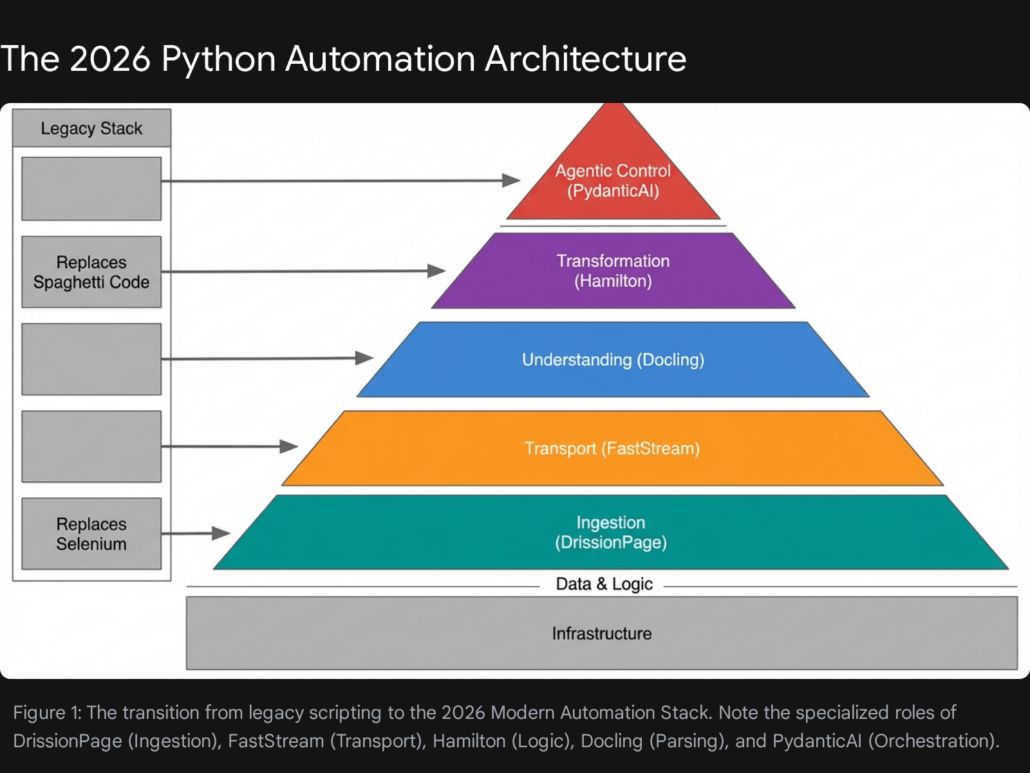
The architecture depicted above illustrates a move away from “fire and forget” scripts toward systems that are self-documenting, event-driven, and capable of handling unstructured ambiguity with strict structural rigor.
DrissionPage: The Stealth Operator
Beyond Selenium and Playwright
In the domain of web automation, a quiet revolution has occurred. For years, Selenium was the undisputed standard, followed by the rise of Puppeteer and Playwright. However, by 2026, these tools confront a critical limitation in data acquisition contexts: they are architected primarily for testing, not stealth. Their reliance on the WebDriver protocol emits signals—such as the navigator.webdriver flag and specific variable leaks—that are glaringly obvious to modern anti-bot systems like Cloudflare, Akamai, and Datadome.
Enter DrissionPage.
The Philosophy: Dual-Mode Architecture
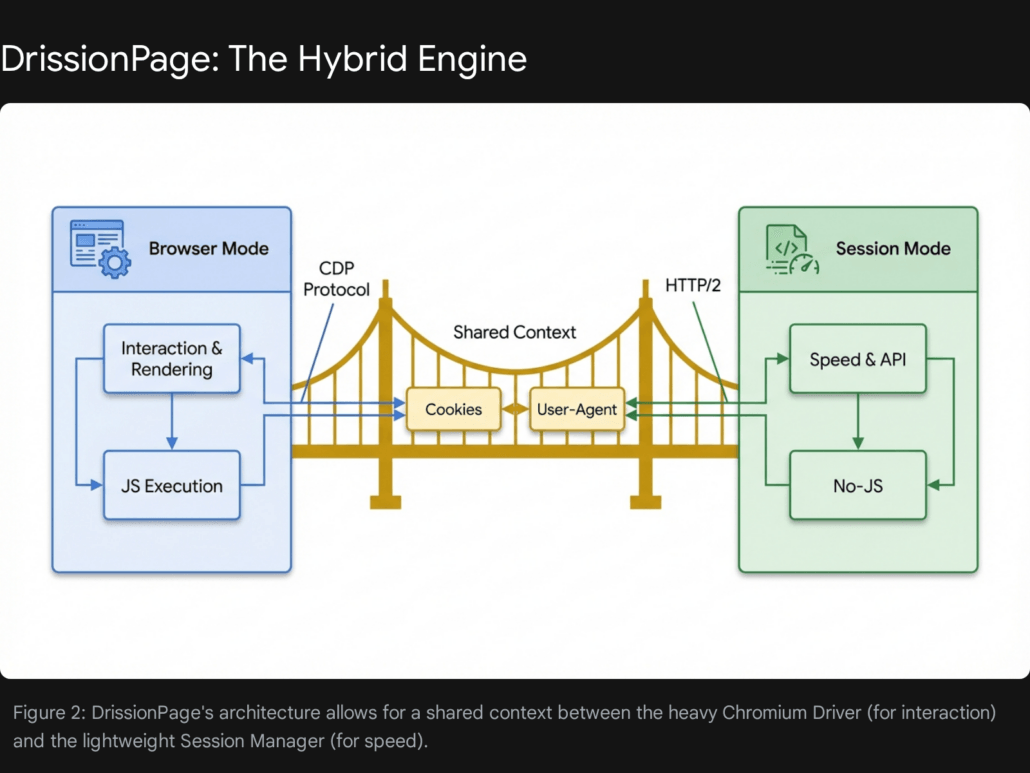
DrissionPage distinguishes itself through a unique architectural decision: it integrates a Chromium controller and a requests-based session manager into a single, seamless API. This “Dual-Mode” capability allows developers to switch contexts instantly, a feature lacking in traditional frameworks.
- Chromium Mode: This mode controls a browser instance, similar to Selenium, but communicates directly via the Chrome DevTools Protocol (CDP). This bypasses the easily detectable WebDriver protocol entirely, allowing for “human-like” interaction patterns that are far more difficult to fingerprint. It supports native handling of shadow DOMs and cross-origin iframes without the complex context-switching required by Selenium.
- Session Mode: For operations where JavaScript rendering is unnecessary, DrissionPage utilizes a high-performance HTTP client (built on
requestsorhttpx). This allows for raw speed—often 50x to 100x faster than browser automation—when scraping API endpoints or static content.
The strategic advantage lies in the integration. A developer can use Chromium Mode to navigate a complex login sequence, solve a CAPTCHA (potentially using an integration like CapSolver), and then instantly transfer the session state (cookies, local storage, headers) to Session Mode to harvest data at high velocity.
Key Technical Advantages
The library offers several technical advantages that make it superior for 2026 workflows:
- WebDriver-Free Control: Unlike Selenium, which relies on a
chromedriverexecutable that acts as a middleware and leaks automation flags, DrissionPage’s CDP approach is natively stealthier. It allows intrinsic manipulation of browser fingerprints and can easily mask its identity without the heavy patching often required in other frameworks. - Network Packet Listening: DrissionPage includes built-in capabilities to listen to network packets in real-time. This is a significant advancement for scraping strategies. Instead of parsing the HTML DOM—which is liable to change with every frontend update—developers can simply intercept the JSON response from the server’s internal API as it arrives. This “API-first” scraping is far more resilient.
- Unified Element Handling: One of the most persistent pain points in Selenium is handling elements within
<iframe>tags or Shadow DOMs. DrissionPage abstracts this complexity entirely; it treats iframe elements as regular elements, allowing searches across the entire page hierarchy without manual context switching.
Comparative Analysis: DrissionPage vs. The Field
To understand the positioning of DrissionPage, it is instructive to compare it against the established giants of the field.
| Feature | DrissionPage | Selenium | Playwright | Requests/BeautifulSoup |
| Primary Mechanism | CDP + HTTP Client | WebDriver | CDP / WebSocket | HTTP Client |
| Stealth / Anti-Bot | High (Native CDP) | Low (Needs plugins) | Medium (Needs stealth plugins) | N/A (Static only) |
| Context Switching | Seamless (Browser <-> Session) | Difficult (Manual Cookie Mgmt) | Difficult (Separate Contexts) | N/A |
| Speed | Very High (Session Mode) | Low (Browser Overhead) | Medium (Browser Overhead) | Very High |
| Iframe Handling | Automatic / Transparent | Manual Switching | Manual Switching | N/A |
| Packet Interception | Native / Built-in | Complex (Requires Proxy) | Native | N/A |
Business Use Case: Competitor Intelligence Platform
The Challenge: A retail analytics firm requires a system to monitor pricing on a major e-commerce platform to adjust their own pricing strategies dynamically. The target site utilizes aggressive anti-bot technology that blocks standard requests and detects Selenium instances immediately. Furthermore, the critical pricing data is loaded dynamically via XHR (XML HTTP Request) only after the initial page load, making static analysis impossible.
The DrissionPage Solution:
Leveraging DrissionPage, the automation script executes a sophisticated workflow:
- Initialization: Launches a browser instance in “Headless New” mode to navigate to the product page, effectively passing the initial anti-bot fingerprints.
- Interception: Instead of waiting for the DOM to render, the script starts listening for the specific XHR packet containing the pricing JSON.
- Extraction: It intercepts that packet directly, extracting the clean JSON data.
- Acceleration: For subsequent pagination or category traversal, it switches to Session Mode, using the authentication tokens and cookies acquired in step 1 to crawl thousands of items in seconds.
Production Code Implementation
The following code demonstrates a robust implementation of this pattern. Note the seamless transition and the use of packet listening—features that would require complex workarounds in legacy frameworks.
Python
from DrissionPage import ChromiumPage, ChromiumOptions
import time

def scrape_stealthy_pricing(target_url):
    """
    Scrapes pricing data by intercepting network packets,
    bypassing DOM parsing for higher stability and stealth.
    """
    # Configure browser options for maximum stealth
    co = ChromiumOptions()
    co.set_argument('--no-sandbox')
    # 'headless=new' is a modern Chrome feature that is far less detectable
    # than the traditional headless mode.
    co.set_argument('--headless=new')
    co.set_pref('profile.default_content_settings.popups', 0)

    # Initialize the Page object (Dual-mode capable)
    page = ChromiumPage(addr_or_opts=co)

    try:
        # Start listening for the specific API packet containing price data
        # This is more robust than waiting for a CSS selector because
        # visual layouts change often, but API schemas rarely do.
        page.listen.start('api/product/pricing')

        # Navigate to the target
        page.get(target_url)

        # Wait for the packet to be captured (timeout 10s)
        # This blocks execution efficiently until the data is on the wire.
        packet = page.listen.wait(timeout=10)

        if packet:
            # Direct JSON extraction - no HTML parsing needed
            response_data = packet.response.body

            # Using.get() for safety against missing keys
            price = response_data.get('price', {}).get('current')
            stock = response_data.get('inventory', {}).get('status')

            print(f"Captured Price: {price} | Stock: {stock}")

            # OPTIONAL: Switch to Session Mode for related products
            # This copies cookies automatically
            # session_mode_page = page.change_mode()
            # related_data = session_mode_page.get(".../api/related").json()

            return {'price': price, 'stock': stock}
        else:
            print("Pricing packet not found.")
            return None

    except Exception as e:
        print(f"An error occurred: {str(e)}")
    finally:
        # Cleanup is essential to prevent zombie processes
        page.quit()

# Example Usage
# scrape_stealthy_pricing("https://example-ecommerce.com/product/12345")
Strategic Implication for Tool1.app Clients: For clients requiring high-fidelity web data extraction, Tool1.app leverages DrissionPage to build scrapers that are significantly more resilient to layout changes. By targeting the underlying data layer (network packets) rather than the presentation layer (HTML DOM), we reduce maintenance costs by an estimated 40-60% compared to traditional Selenium-based approaches. This methodology shifts the focus from “screen scraping” to “API reverse-engineering,” a more durable form of data acquisition.
Hamilton: The Dataflow Orchestrator
Taming the Spaghetti of Data Engineering
As automation workflows mature, they invariably involve complex data transformations. A common anti-pattern in data science and engineering is the “Pandas Giant Script”—a single, monolithic Python file or Jupyter Notebook containing hundreds of lines of imperative dataframe operations (e.g., df['new_col'] = df['old_col'] * 0.5).
These scripts suffer from significant engineering deficits:
- Testability: Unit testing a single transformation step is impossible without running the entire script to generate the intermediate state.
- Documentation: Business logic is buried within implementation details, making it opaque to new developers or stakeholders.
- Validation: Data lineage is implicit. Understanding how a final metric was derived requires tracing variable names manually through the code.
Hamilton, an open-source micro-framework, solves these issues by enforcing a paradigm shift: Transforms are Functions.
The Philosophy: Declarative Directed Acyclic Graphs (DAGs)
Hamilton requires developers to write every data transformation as a standard Python function. The arguments of the function define its dependencies, and the name of the function defines its output. This declarative approach decouples the definition of the logic from its execution.
Hamilton parses these functions to build a Directed Acyclic Graph (DAG) of execution. It automatically handles the order of operations, memory management, and execution planning. The developer focuses solely on the “what,” while Hamilton handles the “how”.
Key Technical Advantages
- Automatic Lineage & Visualization: Because dependencies are strictly declared in function signatures, Hamilton can automatically generate a visual map of the data pipeline. This provides immediate transparency into how data flows from raw inputs to final metrics, a feature often requiring expensive external catalogs in other stacks.
- Granular Unit Testing: Since every step is a pure function, it is trivial to write unit tests for specific pieces of business logic (e.g., “Is the ‘net_profit’ calculation correct?”) without needing to load or mock the entire dataset. This encourages a Test-Driven Development (TDD) approach in data engineering.
- Lazy Execution & Efficiency: Hamilton optimizes execution by only computing the nodes necessary to produce the requested output. If a user only requests
column_A, Hamilton will not waste resources computingcolumn_B, even if they exist in the same module. This selective execution is particularly valuable for large feature sets.
Visualizing the Dependency Graph
To better understand how Hamilton constructs its execution plan, consider the relationship between inputs and computed outputs.
- Inputs:
Spend(Series),Signups(Series) - Transformation 1:
avg_3wk_spend(Depends onSpend) - Transformation 2:
acquisition_cost(Depends onavg_3wk_spendandSignups)
The resulting structure is a clear dependency tree:
| Node Name | Type | Dependencies | Description |
| Spend | Input | None | Raw marketing spend data. |
| Signups | Input | None | Raw user signup counts. |
| avg_3wk_spend | Function | Spend | Rolling 3-week average of spend. |
| acquisition_cost | Function | avg_3wk_spend, Signups | Efficiency metric: Cost per signup. |
This table represents the logical graph that Hamilton constructs. In a legacy script, these relationships would be hidden in sequential lines of code. In Hamilton, they are explicit structural elements.
Business Use Case: Financial Forecasting Pipeline
The Challenge: A fintech client creates weekly revenue forecasts using a complex model involving seasonality, churn rates, and acquisition costs. The current process relies on a 2,000-line Jupyter Notebook that is manually executed. When a forecast figure appears anomalous, auditing the calculation chain to find the root cause takes senior analysts hours of forensic debugging.
The Hamilton Solution: By refactoring the notebook into Hamilton modules, the team creates a library of verified financial formulas. The pipeline becomes a graph where every intermediate step (e.g., rolling_average_churn, seasonal_adjustment_factor) is a named, inspectable, and testable node. This allows the team to ask questions like “Show me the value of seasonal_adjustment_factor for row 45″ instantly, without re-running the whole model.
Production Code Implementation
Notice how the acquisition_cost function declares its dependency on avg_3wk_spend simply by naming it as an argument. Hamilton handles the wiring.
Python
import pandas as pd
from hamilton import driver

# --- Define the Business Logic (typically in a file like my_logic.py) ---

def avg_3wk_spend(spend: pd.Series) -> pd.Series:
    """
    Calculates the rolling 3-week average spend.
    Hamilton treats the argument 'spend' as a dependency requirement.
    """
    return spend.rolling(3).mean()

def acquisition_cost(avg_3wk_spend: pd.Series, signups: pd.Series) -> pd.Series:
    """
    Calculates cost per signup.
    Dependencies:
      - 'avg_3wk_spend' (computed by the function above)
      - 'signups' (provided as raw input)
    Hamilton automatically resolves the execution order:
    It knows it MUST run avg_3wk_spend before it runs this function.
    """
    return avg_3wk_spend / signups

# --- Execute the Pipeline (run_pipeline.py) ---

def run_forecast():
    # Initial Data context - This acts as the 'Source' nodes of the graph
    initial_data = {
        "spend": pd.Series(),
        "signups": pd.Series()
    }

    # Initialize Hamilton Driver with the logic module
    # In a real app, you would import the module: import my_logic
    # For this snippet, we simulate the module structure.
    import sys
    import types
    logic_module = types.ModuleType("logic")
    logic_module.avg_3wk_spend = avg_3wk_spend
    logic_module.acquisition_cost = acquisition_cost

    # Build the Driver - The Orchestrator
    dr = driver.Builder().with_modules(logic_module).build()

    # Execute: Request only the final columns we need
    # Hamilton determines the sub-graph required to produce ONLY 'acquisition_cost'
    results = dr.execute(
        final_vars=["acquisition_cost"],
        inputs=initial_data
    )

    print("Optimization Results:")
    print(results)

    # Visualization (Optional):
    # dr.display_all_functions('pipeline.dot')
    # This would generate a graphviz file showing the DAG.

# run_forecast()
Implementation Note for Tool1.app: At Tool1.app, we strongly recommend Hamilton for clients struggling with “Notebook Fatigue.” It serves as the critical bridge between Data Science experimentation and Data Engineering production. By enforcing this structure early, we ensure that the experimental logic deployed in 2026 remains understandable, maintainable, and modifiable well into the future. It transforms data transformations from “scripts” into “assets”.
FastStream: The Event-Driven Backbone
Microservices Made Simple
In 2026, enterprise automation is rarely a single monolithic process. It is a symphony of distributed services communicating asynchronously. The standard for this communication is message queues—technologies like Kafka, RabbitMQ, and NATS.
Historically, working with Kafka in Python was fraught with friction. Libraries like confluent-kafka or pika (for RabbitMQ) are low-level, imperatively designed, and require extensive boilerplate code to handle connection pooling, serialization, error handling, and consumer group management. This high barrier to entry often discouraged Python teams from adopting event-driven architectures.
FastStream fundamentally changes this dynamic by bringing the developer experience (DX) of FastAPI to the world of event streaming.


The Philosophy: One API, Any Broker
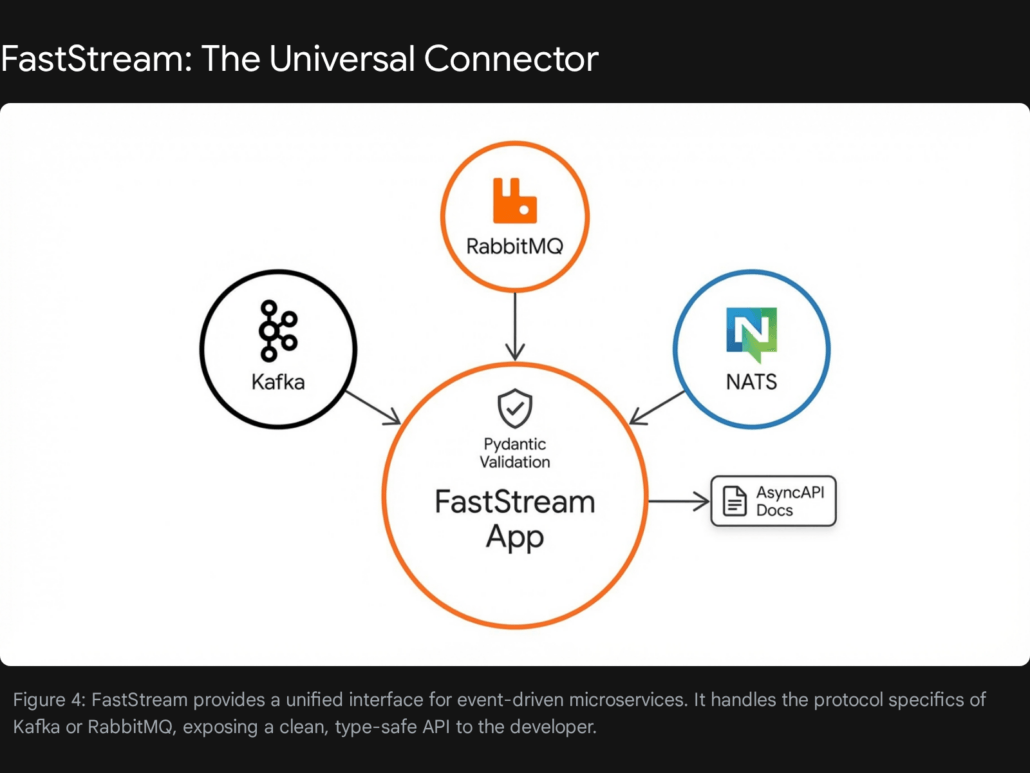
FastStream offers a unified, high-level API that works seamlessly across Kafka, RabbitMQ, Redis, and NATS. It utilizes Python decorators (e.g., @broker.subscriber) to define how messages should be processed, abstracting away the underlying protocol complexities.
Crucially, it leans heavily on Pydantic for data validation. If a message arrives that does not match the expected schema, FastStream handles the rejection or error logging automatically, preventing corrupt data from poisoning downstream systems. This “schema-first” approach aligns perfectly with modern data governance requirements.
Key Technical Advantages
- Framework Agnostic & Integration: FastStream integrates effortlessly with HTTP frameworks like FastAPI. This allows developers to build “Hybrid Services” that can handle both synchronous HTTP requests (e.g., from a user dashboard) and asynchronous Event Streams (e.g., from backend workers) within the same application context and memory space.
- Automatic AsyncAPI Documentation: Just as FastAPI generates Swagger/OpenAPI UI for REST APIs, FastStream generates AsyncAPI documentation. This is a massive boon for team collaboration; other developers can inspect a live, auto-generated reference of exactly what message formats a service publishes and consumes, eliminating the “hidden contract” problem of event-driven systems.
- Built-in Testing Infrastructure: FastStream ships with a robust in-memory test broker. This allows developers to write comprehensive unit and integration tests for their consumers and producers without needing to spin up a heavy Kafka cluster in Docker containers. This dramatically accelerates the CI/CD feedback loop.
Business Use Case: Real-Time IoT Processing
The Challenge: A logistics company manages a fleet of thousands of delivery trucks. Each truck is equipped with GPS trackers that transmit location and telemetry data every second. The company needs to ingest this high-velocity stream, validate the data (discarding corrupt packets), and trigger real-time alerts if a truck deviates from its assigned route or exceeds speed limits.
The FastStream Solution:
Using FastStream with a Kafka broker, the engineering team builds a dedicated consumer service. A Pydantic model is defined to ensure that only valid GPS coordinates (latitude/longitude within valid ranges) are processed. The @broker.subscriber decorator makes the routing logic readable and easy to maintain, while the underlying library manages the Kafka consumer group rebalancing and offset commits.
Production Code Implementation
This example demonstrates a Kafka consumer that validates incoming data against a strict GPSUpdate schema.
Python
from faststream import FastStream
from faststream.kafka import KafkaBroker
from pydantic import BaseModel, Field, PositiveFloat
import asyncio

# 1. Define the Data Schema (Validation Layer)
# Using Pydantic to enforce strict data quality at the ingestion point.
class GPSUpdate(BaseModel):
    truck_id: str
    lat: float = Field(..., ge=-90, le=90, description="Latitude")
    lng: float = Field(..., ge=-180, le=180, description="Longitude")
    speed: PositiveFloat = Field(..., description="Speed in km/h")

# 2. Configure the Broker
# This connects to a local Kafka instance.
broker = KafkaBroker("localhost:9092")
app = FastStream(broker)

# 3. Define the Subscriber (Consumer)
# The decorator routes messages from 'truck-location-events' to this function.
@broker.subscriber("truck-location-events")
async def handle_location(msg: GPSUpdate):
    """
    Process truck location updates.
    FastStream automatically parses the JSON body and validates it against GPSUpdate.
    If the data is invalid, this function is not called, and an error is logged.
    """
    print(f"Received update for {msg.truck_id}")

    # Business Logic: Speeding Check
    if msg.speed > 100.0:
        print(f"ALERT: Truck {msg.truck_id} is speeding at {msg.speed} km/h!")
        # Trigger alert notification (e.g., send to Slack/PagerDuty)

    # Simulate saving to a Time-Series Database
    # await database.insert_telemetry(msg)

    return {"status": "processed", "truck": msg.truck_id}

# 4. Define a Publisher (for Testing/Simulation)
# This hook runs after the app starts, simulating a device sending data.
@app.after_startup
async def test_publish():
    print("Publishing simulation data...")
    # Publish a test message
    await broker.publish(
        GPSUpdate(truck_id="T-100", lat=40.7128, lng=-74.0060, speed=105.5),
        topic="truck-location-events"
    )
Strategic Insight: FastStream acts as the architectural “glue” that allows Tool1.app to build scalable, event-driven systems for clients. By decoupling the business logic from the specific message broker implementation, we future-proof our clients’ infrastructure. If a client decides to migrate from RabbitMQ to Kafka or NATS in the future, the core application logic remains virtually untouched, protecting the engineering investment.
Docling: The Unstructured Data Alchemist
Unlocking the Dark Data of the Enterprise
A staggering amount of enterprise value is locked in “Dark Data”—unstructured formats like PDFs, scanned invoices, Word documents, and slide decks. In the age of LLMs, the ability to feed this data into Retrieval-Augmented Generation (RAG) systems is a critical competitive advantage.
Traditional tools (PyPDF2, Tesseract, Unstructured.io) are often brittle. They tend to treat documents as simple streams of text, losing critical layout information, garbling tables, and failing to recognize the semantic difference between a header, a footer, and a body paragraph. This leads to the “Garbage In, Garbage Out” problem in RAG systems.
Docling, developed by IBM Research, represents the state-of-the-art solution for this challenge.
The Philosophy: Document Layout Analysis (DLA)
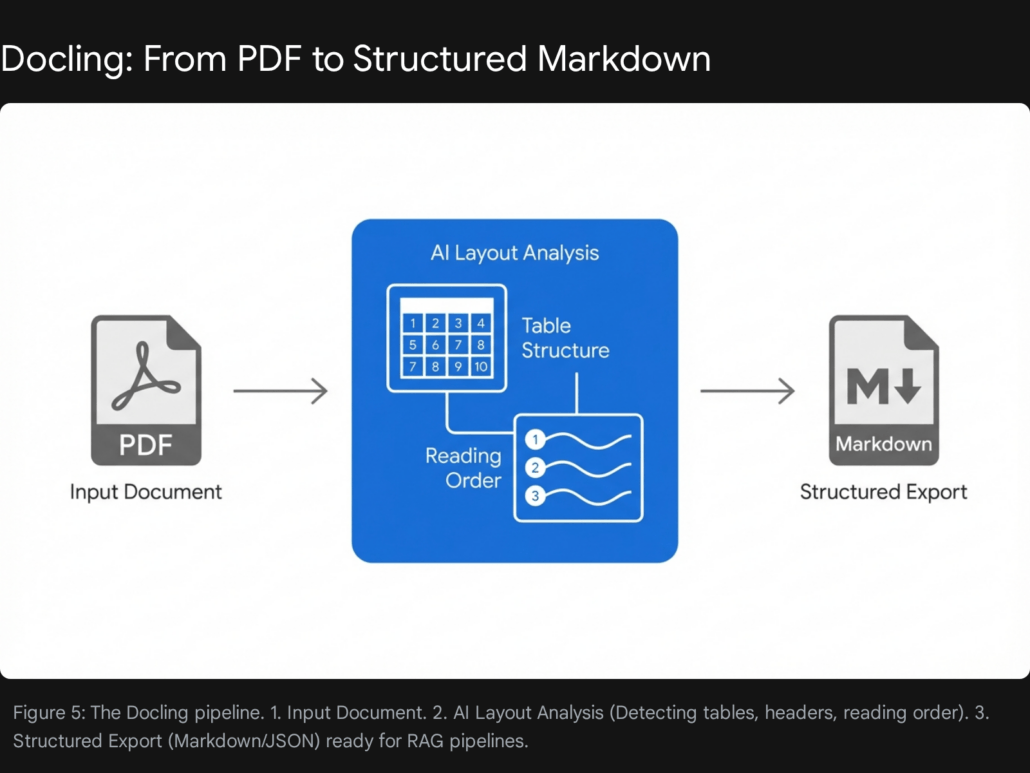
Docling distinguishes itself by not merely “reading text,” but “understanding documents.” It utilizes advanced AI models (such as the Heron model) to perform comprehensive Document Layout Analysis (DLA). It identifies and reconstructs:
- Reading Order: Crucial for multi-column PDFs where simple text extraction often merges columns incoherently.
- Table Structures: It reconstructs the semantic structure of tables (rows, columns, headers), rather than outputting a mess of tab-separated text. This is vital for LLMs to answer quantitative questions.
- Visual Elements: It detects charts and images, preserving their context.
- Metadata: It extracts titles, authors, and references automatically.
Crucially, it converts this complex understanding into a clean, structured format (Markdown or JSON) that is perfectly optimized for LLM context windows.
Key Technical Advantages
- Multimodal Parsing: Docling is not limited to text. It can extract and describe images within the document, making it suitable for Multimodal LLMs (e.g., GPT-4o or Claude 3.5). It supports parsing of Web Video Text Tracks (WebVTT) and audio files via ASR, broadening its scope beyond just office documents.
- Table Intelligence: Docling’s ability to reconstruct table topology is a standout feature. Most parsers fail on complex nested tables, but Docling preserves the cell relationships, allowing an LLM to accurately query data points like “What was the Q3 revenue in the table on page 4?”.
- Local & Secure Execution: Unlike cloud-based API solutions (like Amazon Textract or Google Document AI), Docling is designed to run entirely locally or in air-gapped container environments. This is a non-negotiable requirement for clients in highly regulated sectors like Finance, Healthcare, and Defense.
5.3 Business Use Case: Automating Legal Contract Review
The Challenge: A multinational legal firm needs to review thousands of legacy vendor contracts to identify specific liability clauses and insurance requirements. The documents vary wildly in format—some are digital PDFs, some are scanned images, and some have complex tables of liability caps that standard OCR tools fail to interpret correctly.
The Docling Solution: Docling is deployed as the ingestion engine for the firm’s RAG pipeline. It processes the PDFs, performing OCR where necessary, and outputs a structured Markdown file for each contract. This Markdown preserves the document hierarchy (headers vs. body text) and table structures. An LLM agent can then “read” this structured Markdown and answer specific questions about liability caps with high accuracy, reducing manual review time by 80%.
Production Code Implementation
The following code illustrates how to convert a complex PDF into clean Markdown using Docling’s Python API.
Python
from docling.document_converter import DocumentConverter

def convert_contract_for_rag(file_path):
    """
    Converts a complex PDF contract into structured Markdown
    optimized for LLM context windows.
    """
    print(f"Processing document: {file_path}")

    # Initialize converter (loads default models locally)
    # This setup ensures data never leaves the secure environment.
    converter = DocumentConverter()

    # Convert the source file
    # This handles OCR, Layout Analysis, and Table Extraction automatically
    result = converter.convert(file_path)

    # Export to Markdown
    # Markdown is preferred over plain text because it preserves
    # headers (#) and tables (| Col | Col |), which provides
    # essential semantic cues to the downstream LLM.
    markdown_content = result.document.export_to_markdown()

    # Optional: Extract specific elements like tables for structured analysis
    # tables = [t.export_to_dataframe() for t in result.document.tables]

    return markdown_content

# Example Usage
# clean_text = convert_contract_for_rag("./contracts/vendor_agreement_2026.pdf")
# print(clean_text[:500])
Implementation Note for Tool1.app: Tool1.app integrates Docling into our proprietary RAG pipelines. By ensuring high-quality input data (“Garbage In, Garbage Out”), we significantly reduce hallucinations in the downstream AI agents we build for our clients. The move to Docling has effectively solved the “PDF Table Problem” that plagued earlier generations of document processing.
PydanticAI: The Agentic Brain
Agentic Workflows with Engineering Rigor
By 2026, the initial hype around “Autonomous Agents” has settled into a phase of pragmatic implementation. Early frameworks (like the initial versions of AutoGen or LangChain) were powerful but prone to infinite loops, hallucinations, and unstructured outputs. They were excellent for prototyping but often lacked the reliability required for production deployment.
PydanticAI has emerged as the professional standard for building enterprise-grade agents. Developed by the team behind Pydantic—the validation library that powers a vast portion of the Python ecosystem—it introduces Type Safety and Validation to Agentic AI.
The Philosophy: Type-Safe Reasoning
PydanticAI treats an interaction with an LLM not as a chat, but as a function call that returns a typed object.
- Validation First: Developers define the output schema using standard Pydantic models (e.g.,
class CustomerSupportResult(BaseModel):...). PydanticAI forces the LLM to conform to this schema. If the LLM generates a string where an integer is required, PydanticAI (via its integration with model providers) will automatically reprompt the model with the validation error, effectively “teaching” it to correct itself in real-time. - Stateless Dependency Injection: It includes a robust system for injecting dependencies (such as database connections, user contexts, or API clients) into the agent’s tools. This ensures that agent code remains stateless and easily testable, a common failing in other state-heavy frameworks.
Key Technical Advantages
- Durable Execution: PydanticAI supports “durable” workflows. If an agent is in the middle of a multi-step reasoning process and the server crashes, the state can be persisted and resumed. This is critical for long-running business processes that may span minutes or hours.
- Model Agnosticism: The library works seamlessly with major providers (OpenAI, Anthropic, Gemini) and local models (via Ollama or Groq). This allows businesses to switch models based on cost/performance tradeoffs without rewriting their agent logic.
- Deep Observability: PydanticAI ships with deep integration for Logfire, an observability platform. This allows developers to trace exactly why an agent decided to call a specific tool, what the input was, and what the tool returned, providing “X-ray vision” into the agent’s reasoning process.
The Agentic Validation Loop
The robustness of PydanticAI comes from its execution loop, which differs significantly from a standard chatbot.
- Input: User provides a query.
- Reasoning: The LLM analyzes the query and decides to call a Tool or provide a Final Answer.
- Tool Execution: If a tool is called, PydanticAI executes the Python function.
- Schema Validation: The output from the LLM is validated against the defined
ResultType. - Auto-Correction: If validation fails (e.g., missing field, wrong type), the error is fed back to the LLM for a retry.
- Success: Only a valid, structured object is returned to the application.
Business Use Case: The “Tier 1” Support Agent
The Challenge: A SaaS company wants to automate 50% of its customer support tickets. The agent must be able to check a user’s account status in the database and issue a refund if eligible. Crucially, it must NEVER hallucinate a refund policy or promise a refund it cannot technically process.
The PydanticAI Solution: The agent is defined with strict tools (get_user_status, process_refund). The process_refund tool is protected by dependency injection (requiring a valid database session). The output of the agent is enforced to be a structured TicketResolution object, ensuring the CRM system can parse and log the result programmatically.
Production Code Implementation
Python
from pydantic_ai import Agent, RunContext
from pydantic import BaseModel
from dataclasses import dataclass

# 1. Define Dependencies (Statelessness)
# These are injected at runtime, making the agent testable.
@dataclass
class SupportDeps:
    db_connection: object
    user_id: int

# 2. Define Output Schema (Type Safety)
# The agent MUST return this structure. No free text allowed.
class RefundResult(BaseModel):
    success: bool
    amount: float
    reason: str

# 3. Define the Agent
support_agent = Agent(
    'openai:gpt-4o',
    deps_type=SupportDeps,
    result_type=RefundResult,
    instructions="You are a billing support agent. Only issue refunds if the user is eligible."
)

# 4. Define Tools (Capabilities)
@support_agent.tool
async def check_eligibility(ctx: RunContext) -> bool:
    """Checks database to see if user is eligible for refund."""
    # Access the injected dependency
    print(f"Checking eligibility for User {ctx.deps.user_id}...")
    # Logic: query ctx.deps.db_connection...
    return True

@support_agent.tool
async def process_refund(ctx: RunContext, amount: float) -> str:
    """Executes the refund transaction."""
    print(f"Processing refund of ${amount} for User {ctx.deps.user_id}...")
    return "Transaction ID: TXN-12345"

# 5. Run the Agent
async def run_support_interaction():
    # Context setup
    deps = SupportDeps(db_connection="DB_CONN_STR", user_id=99)

    # The agent will reason, call tools, and MUST return a RefundResult object
    # If the LLM tries to return plain text, PydanticAI intercepts and retries.
    result = await support_agent.run(
        "I was double charged $50. Please refund me.",
        deps=deps
    )

    print(f"Final Decision: {result.data.reason}")
    print(f"Refund Amount: ${result.data.amount}")

# await run_support_interaction()
Strategic Insight: At Tool1.app, we have mandated PydanticAI for all client-facing agent development. The “Fail Fast” validation loop has saved us countless hours of debugging vague LLM outputs. It transforms the probabilistic nature of AI into deterministic business logic.
The Integrated Workflow: The Tool1.app Standard
The true power of these libraries is unlocked not when they are used in isolation, but when they are combined into a cohesive pipeline. This is the Tool1.app Standard Automation Architecture we deploy for enterprise clients in 2026.
The “Data Factory” Blueprint
Imagine a system designed to Automate Competitive Intelligence and Strategic Planning. Here is how the five libraries collaborate to achieve this:
| Stage | Library | Role & Action |
| 1. Ingestion | DrissionPage | Stealthily navigates competitor portals, intercepts pricing APIs, and downloads annual reports (PDFs) without triggering anti-bot blocks. |
| 2. Parsing | Docling | Ingests the downloaded Annual Reports. It extracts tables of financial performance and converts the strategic commentary into clean Markdown, preserving layout context. |
| 3. Transport | FastStream | Publishes the extracted data (Pricing Data + Report Markdown) to a Kafka topic competitor-data-events. This decouples the slow scraping process from the high-speed analysis. |
| 4. Processing | Hamilton | Subscribes to the Kafka topic. A Hamilton DAG calculates key metrics (e.g., “Price Variance vs. Industry Average”). It merges the pricing data with the financial data from the report to create a unified dataset. |
| 5. Action | PydanticAI | An Analyst Agent receives the processed metrics. It uses tools to query historical data and then generates a structured StrategicRecommendation report for the CEO. |
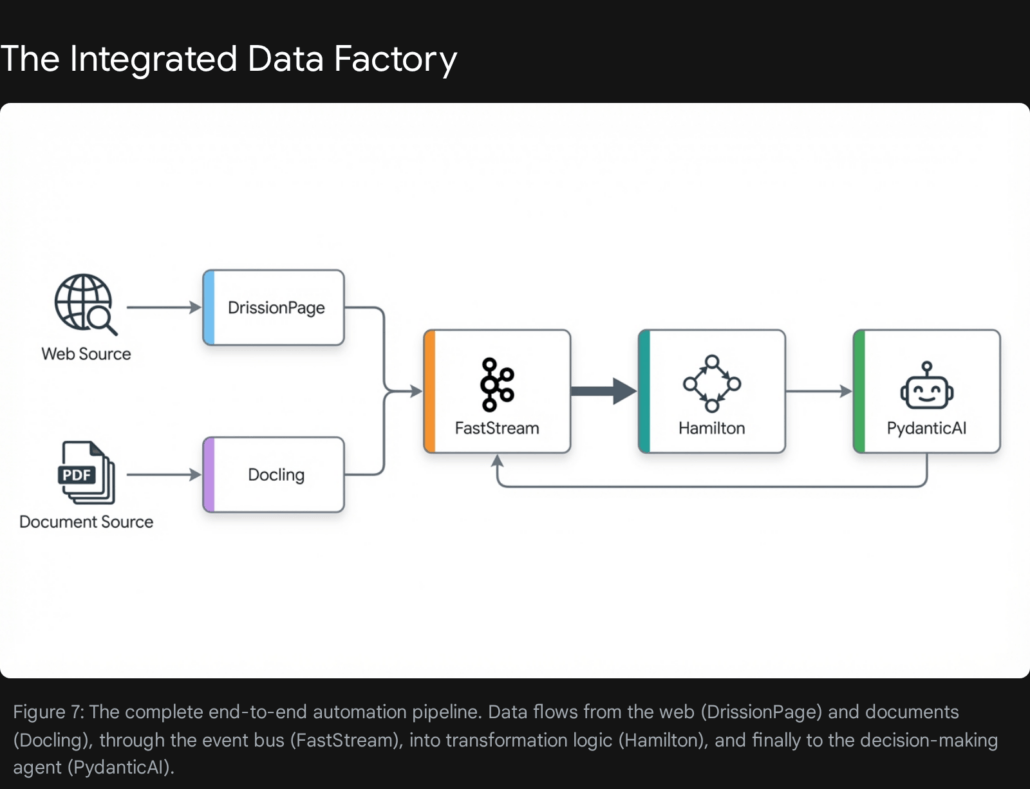
This integrated approach ensures that every stage of the pipeline is specialized, scalable, and resilient. It replaces the “monolithic script” with a distributed system of best-in-class components.
Conclusion: The Engineering Mindset
The tools highlighted in this report—DrissionPage, Hamilton, FastStream, Docling, and PydanticAI—represent a maturation of the Python ecosystem. They are not merely “libraries”; they are frameworks for correctness.
- DrissionPage acknowledges that the modern web is hostile and adapts with stealth and protocol-level control.
- Hamilton acknowledges that data logic is inherently complex and adapts with graph theory and declarative lineage.
- FastStream acknowledges that systems are distributed and adapts with unified, type-safe protocols.
- Docling acknowledges that real-world data is messy and unstructured, adapting with multimodal AI understanding.
- PydanticAI acknowledges that LLMs are powerful but unpredictable, adapting with strict validation and control loops.
For organizations looking to lead in 2026, the path forward is clear: move beyond brittle scripts. Adopt tools that enforce structure, lineage, and type safety.
Tool1.app stands ready to assist in this transition. As a specialized software development agency, we do not just write code; we architect automation systems that leverage these cutting-edge libraries to deliver robust, scalable, and auditable business value. The future of automation is not about writing more code. It is about writing better code, using the unfair advantages that these next-generation libraries provide.








Leave a Reply
Want to join the discussion?Feel free to contribute!
Join the Discussion
To prevent spam and maintain a high-quality community, please log in or register to post a comment.