

Automating Social Media Scheduling via Python and Official APIs
Table of Contents
- The Financial Imperative: Eradicating SaaS Subscriptions Through Custom Infrastructure
- Cumulative 3-Year TCO: Enterprise SaaS vs. Custom Automation
- Architecting the Solution: The Dominance of Python in Business Automation
- Demystifying the X (Twitter) API v2 Landscape in 2026
- Navigating the Complexities of the LinkedIn Posts API for B2B Dominance
- Execution Orchestration: Evaluating Python schedule vs. Linux cron
- Production-Ready Best Practices for Maximum Automation Resilience
- Conclusion: Securing Total Ownership of Your Marketing Infrastructure
- Show all

A Blueprint for Enterprise Infrastructure
In the hyper-connected, relentlessly fast-paced digital economy of 2026, maintaining a consistent, engaging, and data-driven presence across multiple social media platforms is no longer merely an optional marketing tactic; it is a foundational driver of brand visibility, customer acquisition, and revenue generation. For marketing agencies, enterprise teams, and ambitious brands, the operational overhead of managing dozens of accounts, scheduling hundreds of weekly posts, and analyzing cross-platform engagement can quickly become an unmanageable logistical bottleneck. Historically, the default corporate solution to this operational challenge has been to license third-party Software-as-a-Service (SaaS) management platforms. However, as subscription fees rapidly escalate and proprietary platform algorithms increasingly demand bespoke, high-velocity content strategies, a significant paradigm shift is occurring across the enterprise landscape. Forward-thinking organizations are aggressively pivoting toward custom Python social media automation to reclaim absolute ownership of their digital data, eliminate exorbitant recurring licensing costs, and build technological workflows tailored precisely to their unique operational architecture.
Building a custom scheduling ecosystem appeals directly to businesses looking to bypass expensive, rigid third-party tools in favor of flexible, infinitely scalable infrastructure. By leveraging the power of Python alongside the official application programming interfaces (APIs) provided by networks like X (formerly Twitter) and LinkedIn, development teams can engineer sophisticated automation pipelines that integrate seamlessly with internal Content Management Systems (CMS), proprietary customer databases, and advanced AI-driven generative tools. At Tool1.app, we consistently witness the transformative, compounding impact that proprietary automation solutions have on a company’s bottom line and operational agility. This exhaustive technical and strategic guide explores the profound financial advantages of custom software development, unpacks the granular technical intricacies of authenticating and posting via the latest X and LinkedIn APIs, and establishes production-ready scheduling and logging best practices required to operate a resilient, enterprise-grade automation framework.
The Financial Imperative: Eradicating SaaS Subscriptions Through Custom Infrastructure
The strategic decision to transition an organization from off-the-shelf SaaS products to a bespoke Python social media automation ecosystem is fundamentally rooted in maximizing return on investment (ROI) and minimizing the total cost of ownership (TCO) over a multi-year horizon. While third-party platforms offer the undeniable allure of immediate plug-and-play functionality, their pricing models are explicitly designed to penalize enterprise scale, aggressively monetizing user seats, connected accounts, and advanced feature access.
A rigorous financial analysis of the top-tier social media management platforms operating in the 2026 market reveals steeply tiered, restrictive pricing structures. For example, Hootsuite’s entry-level Standard plan currently costs €199 per user per month, a tier that strictly limits the user to a mere 10 social profiles. For growing marketing teams that require collaborative approval workflows, advanced analytics, and unlimited social accounts, Hootsuite forces an upgrade to their Advanced tier, which carries a staggering cost of €429 per user per month. Similarly, Sprout Social’s entry-level Standard plan demands approximately €179 per seat per month (converted from their $199 USD pricing), while their Advanced tier, which unlocks essential automation and API integrations, reaches approximately €359 per seat per month (converted from $399 USD). Even platforms historically known for budget-friendly options, such as Buffer, employ per-channel pricing models that rapidly accumulate costs; while Buffer charges approximately €5.50 per channel per month on its Essentials plan, activating their collaborative Team features pushes the cost to roughly €11 per channel per month, which quickly becomes prohibitive for agencies managing large client portfolios.
To contextualize this compounding financial burden, consider a mid-sized digital marketing agency with a dedicated operational team of five social media managers requiring mid-to-high-tier access to manage client assets. Utilizing Hootsuite’s Advanced plan at €429 per user, the agency faces a mandatory, recurring monthly expense of €2,145, translating directly to a fixed annual operational expenditure (OPEX) of €25,740. Over a standard three-year strategic planning horizon, this equates to over €77,000 incinerated purely on software licensing fees. Crucially, this massive expenditure does not grant the agency any proprietary ownership over the underlying technology, the data infrastructure, or the intellectual property driving their workflows.
Conversely, investing capital in custom Python social media automation fundamentally flips the corporate financial model from a continuous operational expense drain to the creation of a capitalized, owned asset (CAPEX). While the initial development cost of architecting and building a bespoke scheduling tool requires a higher upfront investment—often ranging between €10,000 and €25,000 depending on the depth of the architecture and the integration of advanced AI generative workflows—the long-term financial trajectory is vastly superior. Custom software completely eliminates predatory seat-based subscription penalties, allowing the agency to scale its user base, internal teams, and connected client accounts infinitely without ever triggering higher vendor pricing tiers.
Furthermore, proprietary software systems provide absolute data sovereignty, permitting deep, customized integration with unique internal CRM workflows, and the agility to adapt immediately to new API endpoints without waiting for a third-party vendor to prioritize features on their product roadmap. Comprehensive market research from 2026 indicates that organizations actively deploying customized, Python-driven automated business processes generate an average ROI of 240% within the first six to nine months of deployment, with exceptionally optimized system implementations frequently paying for their entire development cost well before the first year concludes. By taking control of the technological stack, businesses are no longer renters of their operational capacity; they become owners of a highly efficient, scalable engine of growth.
Cumulative 3-Year TCO: Enterprise SaaS vs. Custom Automation
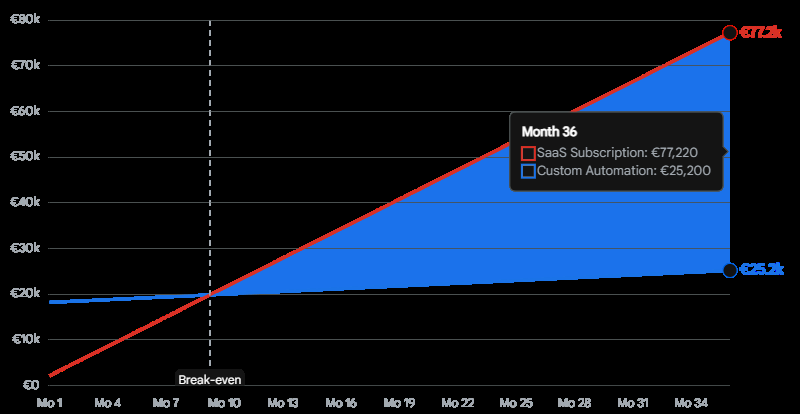
For a 5-person team, premium SaaS solutions (averaging €2,145/month) quickly outpace the upfront investment of a custom Python scheduler. The break-even point typically occurs between months 8 and 12, after which custom software yields pure ROI.
Architecting the Solution: The Dominance of Python in Business Automation
Before delving into the specific network APIs, it is crucial to understand why Python has emerged as the undisputed enterprise standard for building custom social media automation frameworks. Python’s architectural philosophy prioritizes readability, rapid development, and seamless integration across disparate systems. The language possesses a remarkably mature, battle-tested ecosystem of third-party libraries—such as requests for robust HTTP networking, tweepy for specialized Twitter/X API interactions, and advanced scheduling libraries like APScheduler and schedule.
At Tool1.app, we specialize in leveraging these Python capabilities not just to build simple posting scripts, but to engineer comprehensive AI and LLM (Large Language Model) solutions that sit upstream of the social media output. Python acts as the perfect connective tissue, allowing an application to query a database for trending topics, pass those topics to an LLM like OpenAI or Google Gemini for dynamic content generation, format the resulting text, attach relevant media, and flawlessly dispatch the complete payload to the social media APIs. This level of end-to-end, intelligent automation is simply unachievable within the rigid confines of standard SaaS interfaces. By utilizing Python, businesses transform their social media strategy from a manual, human-labor-intensive chore into an automated, programmatic pipeline capable of operating at massive scale.
Demystifying the X (Twitter) API v2 Landscape in 2026
Building a resilient, reliable scheduling engine begins with a profound mastery of the official application programming interfaces (APIs) provided by the target networks. X (formerly Twitter) has undergone sweeping architectural, philosophical, and pricing revisions over recent years, aggressively transitioning developers from the legacy v1.1 endpoints to the modernized, payload-efficient API v2 structures. Understanding these changes is paramount for developing software that will not fail in production.
Authentication Mechanics and Rigid Pricing Tiers
Before a single line of Python code can be written, developers must provision an application within the X Developer Portal and secure the necessary cryptographic credentials. In 2026, X operates on a highly rigid, heavily monetized tiered access model. The Free Tier, while technically costing €0, is exceptionally restrictive; it permits only 500 write operations (posts) per calendar month and severely limits read access to public data, rendering it functionally useless for anything beyond basic prototyping. For any functional, scalable business automation, the Basic Tier—priced at approximately €90 per month (converted from the $100 USD rate)—is the absolute minimum viable entry point, granting an allowance of 50,000 write requests and 10,000 read requests monthly.
Authentication for automated posting—which constitutes write operations executed on behalf of a specific user account—requires the implementation of either OAuth 1.0a User Context or OAuth 2.0 Authorization Code cryptographic flows. While OAuth 2.0 Bearer Tokens are simpler to implement, they are strictly isolated to read-only access for public data. To programmatically create a post, your software must utilize the Consumer Key, Consumer Secret, Access Token, and Access Token Secret associated directly with your approved developer application.
The Media Upload Paradigm: Engineering a Hybrid Approach
A critical, often-misunderstood nuance of developing Python social media automation for X in 2026 involves the complex handling of media payloads, specifically images and videos. While the v2 API has been established as the definitive standard for creating text-based posts, managing threads, and interacting with core data, the specific network endpoint responsible for uploading raw media binaries has historically remained tethered to the legacy v1.1 architecture.
To successfully post an image alongside a text tweet, the automation script must execute a highly specific, synchronized two-step hybrid workflow:
- The Binary Upload Phase: Authenticate via the API v1.1 endpoint to upload the raw image file. Upon successful reception of the binary data, X’s servers generate and return a unique, numeric
media_id. - The Publishing Phase: Immediately authenticate via the API v2 endpoint to craft the actual textual tweet payload, explicitly attaching the previously generated
media_idto the request to bind the image to the text.
Developers must be acutely aware that media uploaded via the API is highly volatile by default; it is retained within X’s server infrastructure for a maximum of only 24 hours. Attempting to attach an expired or orphaned media_id to a scheduled post will result in an immediate validation error, halting the automation sequence. Therefore, the media uploading sequence and the subsequent post creation must be engineered to occur sequentially at the exact moment of scheduled execution.
Technical Implementation: Posting to X utilizing Python and Tweepy
Within the Python ecosystem, the tweepy library remains the undisputed gold standard for interacting with the X API, gracefully abstracting much of the complex OAuth cryptographic signing, session management, and HTTP header formatting. Below is a robust, production-ready implementation demonstrating the hybrid v1.1 and v2 workflow required for posting rich media content reliably.
Python
import os
import tweepy
import logging

# Initialize a dedicated logger for the X automation module
logger = logging.getLogger("social_automation.x_poster")

def execute_x_broadcast(text_content: str, image_path: str = None) -> str:
    """
    Authenticates with the X platform using credentials sourced from secure environment variables.
    Uploads media payloads via the legacy v1.1 API (if provided) and publishes the final tweet via the modern v2 API.
    """
    # Securely load cryptographic credentials from the server environment
    consumer_key = os.getenv("X_API_KEY")
    consumer_secret = os.getenv("X_API_SECRET")
    access_token = os.getenv("X_ACCESS_TOKEN")
    access_token_secret = os.getenv("X_ACCESS_TOKEN_SECRET")

    # Validate credential presence to prevent silent authentication failures
    if not all([consumer_key, consumer_secret, access_token, access_token_secret]):
        logger.error("Critical Failure: Missing X API credentials in environment variables.")
        raise ValueError("Incomplete X API authentication credentials.")

    # Phase 1: Initialize the v1.1 Client (Strictly utilized for Media Binary Uploads)
    auth_v1 = tweepy.OAuth1UserHandler(consumer_key, consumer_secret)
    auth_v1.set_access_token(access_token, access_token_secret)
    api_v1 = tweepy.API(auth_v1)

    # Phase 2: Initialize the v2 Client (Utilized for Core Tweet Creation and Payload Construction)
    client_v2 = tweepy.Client(
        consumer_key=consumer_key,
        consumer_secret=consumer_secret,
        access_token=access_token,
        access_token_secret=access_token_secret
    )

    media_ids =

    try:
        # Execute Media Upload Sequence if a valid image path is provided
        if image_path and os.path.exists(image_path):
            logger.info(f"Initiating media upload sequence for file: {image_path}")
            # The media_upload method handles the multipart/form-data encoding automatically
            media = api_v1.media_upload(filename=image_path)
            media_ids.append(media.media_id)
            logger.debug(f"Media binary transferred successfully. Assigned Media ID: {media.media_id}")

        # Execute Tweet Publishing Sequence
        logger.info("Constructing and transmitting tweet payload via v2 API endpoints.")

        if media_ids:
            # Bind the uploaded media to the text payload
            response = client_v2.create_tweet(text=text_content, media_ids=media_ids)
        else:
            # Transmit a text-only payload
            response = client_v2.create_tweet(text=text_content)

        tweet_id = response.data['id']
        logger.info(f"Broadcast successful. Assigned Tweet ID: {tweet_id}")
        return tweet_id

    except tweepy.TweepyException as api_error:
        # Catch specific API errors (e.g., rate limits, invalid tokens)
        logger.error(f"X API Exception encountered during execution: {api_error}")
        raise
    except Exception as system_error:
        # Catch local system errors (e.g., file not found, network timeouts)
        logger.error(f"Unexpected systemic failure during broadcast: {system_error}")
        raise
In this sophisticated architecture, explicit error handling is paramount. By catching specific tweepy.TweepyException occurrences, the application prevents unexpected network latency timeouts, invalid media formats, or missing permission scopes from silently killing the overarching automation schedule. The script securely isolates authentication tokens away from the codebase, adhering to modern DevSecOps standards.
Navigating the Complexities of the LinkedIn Posts API for B2B Dominance
While X commands the real-time public square, for Business-to-Business (B2B) marketing, enterprise sales, and corporate thought leadership, LinkedIn is the undisputed sovereign territory. The platform is currently enforcing a mandatory architectural transition, driving developers toward its modernized Posts API. This new interface officially deprecates the older, fragmented ugcPosts and Shares APIs, offering developers a unified, cohesive JSON schema capable of handling text, images, native video, and multi-image documents.
OAuth 2.0 Authorization and the Necessity of Programmatic Refresh Tokens
Unlike X’s static, non-expiring access tokens, LinkedIn’s security model enforces a highly stringent, security-focused OAuth 2.0 3-legged authorization flow. To operate successfully, an automation application must request explicit, granular permission scopes from the user—namely w_organization_social for the authority to publish to corporate company pages, and w_member_social for the authority to publish to personal executive profiles.
Crucially, standard LinkedIn access tokens are short-lived, expiring entirely after 60 days. For a hands-off, continuous Python social media automation system, relying on a human operator to manually authenticate and regenerate tokens every two months fundamentally defeats the purpose of autonomous software. To resolve this critical bottleneck, enterprise developers must implement Programmatic Refresh Tokens.
By successfully exchanging the initial authorization code during the application’s setup phase, the developer receives both a standard access_token and a highly valuable refresh_token. A production-grade automation script must be engineered to autonomously monitor token validity and programmatically exchange the refresh_token for a fresh access_token before the 60-day window collapses. This is achieved by executing an automated POST request to the https://www.linkedin.com/oauth/v2/accessToken endpoint, explicitly setting the grant_type parameter to refresh_token.
Versioned Request Headers and the Granular Asset Registration Pipeline
The LinkedIn API ecosystem is tightly versioned to prevent breaking changes from disrupting enterprise integrations. Every single HTTP request dispatched to the platform must include the Linkedin-Version header formatted meticulously as YYYYMM (e.g., 202601), acting in tandem with the mandatory X-Restli-Protocol-Version: 2.0.0 structural header. Failure to inject these exact headers into the HTTP request results in immediate, unceremonious rejection by the API gateway.
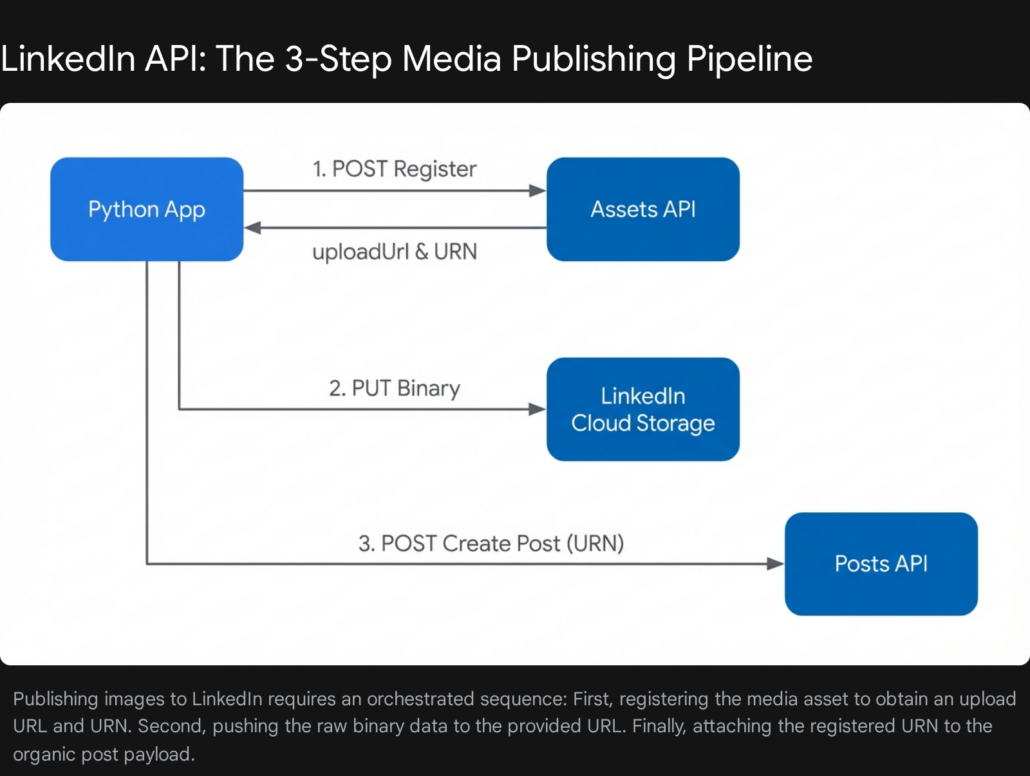
Publishing an image-based post to LinkedIn is notoriously complex, requiring an intricately synchronized, three-step REST API pipeline that drastically diverges from simple payload submissions:


- Asset Registration: The script must send a preliminary request to the Assets API to officially declare the intent to upload an image. The API authenticates the request and responds with a unique, temporary
uploadUrland a permanentassetUniform Resource Name (URN). - Binary Data Transfer: The script must execute a raw HTTP
PUTrequest targeting the provideduploadUrl, injecting the raw binary image bytes directly into the payload body, explicitly avoiding standard JSON formatting for this specific step. - Payload Publishing: Finally, the script constructs the final organic post payload targeting the Posts API, referencing the established
assetURN deep within the JSON schema to bind the uploaded image to the corporate text.
Technical Implementation: Orchestrating the LinkedIn Posts API
The following Python script, designed for enterprise deployment, leverages the ubiquitous requests library to flawlessly orchestrate the highly complex asset registration, binary upload, and payload posting flow demanded by LinkedIn’s modern architecture.
Python
import os
import requests
import json
import logging

# Initialize a dedicated logger for the LinkedIn automation module
logger = logging.getLogger("social_automation.linkedin_poster")

def execute_linkedin_broadcast(text_content: str, author_urn: str, image_path: str = None) -> str:
    """
    Publishes an organic post to LinkedIn utilizing the strictly versioned Posts API.
    Autonomously handles the intricate 3-step image upload pipeline if an image_path is provided.
    Expected author_urn format: 'urn:li:organization:12345678' or 'urn:li:person:abc123xyz'
    """
    access_token = os.getenv("LINKEDIN_ACCESS_TOKEN")
    # API versions iterate frequently; ensuring alignment with the current supported version is critical
    api_version = "202601"

    # Establish baseline headers required for all LinkedIn network requests
    base_headers = {
        "Authorization": f"Bearer {access_token}",
        "X-Restli-Protocol-Version": "2.0.0",
        "Linkedin-Version": api_version
    }

    media_asset_urn = None

    try:
        # Phase 1 & 2: Asset Registration and Raw Binary Transfer
        if image_path and os.path.exists(image_path):
            logger.info("Initiating image asset registration via LinkedIn Assets API...")

            register_url = "https://api.linkedin.com/v2/assets?action=registerUpload"
            register_payload = {
                "registerUploadRequest": {
                    "recipes":,
                    "owner": author_urn,
                    "serviceRelationships":
                }
            }

            # Dispatch the registration request and assert HTTP success
            reg_response = requests.post(register_url, headers=base_headers, json=register_payload)
            reg_response.raise_for_status()

            # Extract the critical URN and temporary upload URL from the response payload
            data = reg_response.json()
            media_asset_urn = data["value"]["asset"]
            upload_url = data["value"]["uploadMechanism"]["uploadUrl"]

            logger.info(f"Asset successfully registered. Assigned URN: {media_asset_urn}. Commencing binary upload...")

            # Read the local image file in binary mode and execute the PUT request
            with open(image_path, "rb") as file:
                image_data = file.read()

            # CRITICAL: The PUT request requires the Bearer token but strictly prohibits JSON content-type headers
            upload_headers = {"Authorization": f"Bearer {access_token}"}
            upload_response = requests.put(upload_url, headers=upload_headers, data=image_data)
            upload_response.raise_for_status()
            logger.debug("Binary media payload transferred to LinkedIn cloud storage successfully.")

        # Phase 3: Construct and Dispatch the Final Organic Post Payload
        logger.info("Constructing the final Posts API organic payload.")
        post_url = "https://api.linkedin.com/rest/posts"

        # Define the strict schema required by the Posts API
        post_payload = {
            "author": author_urn,
            "commentary": text_content,
            "visibility": "PUBLIC",
            "distribution": {
                "feedDistribution": "MAIN_FEED",
                "targetEntities":,
                "thirdPartyDistributionChannels":
            },
            "lifecycleState": "PUBLISHED",
            "isReshareDisabledByAuthor": False
        }

        # Dynamically inject the media schema block if a binary asset was successfully processed
        if media_asset_urn:
            post_payload["content"] = {
                "media": {
                    "altText": "Automated media attachment provisioned via custom infrastructure",
                    "id": media_asset_urn
                }
            }

        # Append the JSON content-type header for the final textual POST request
        post_headers = base_headers.copy()
        post_headers = "application/json"

        final_response = requests.post(post_url, headers=post_headers, data=json.dumps(post_payload))
        final_response.raise_for_status()

        # LinkedIn uniquely returns the resulting Post ID strictly within the HTTP response headers
        post_id = final_response.headers.get("x-restli-id", "Unknown ID")
        logger.info(f"LinkedIn broadcast executed successfully. Generated Post ID: {post_id}")
        return post_id

    except requests.exceptions.RequestException as network_error:
        logger.error(f"Critical HTTP Request failure during LinkedIn orchestration: {network_error}")
        if network_error.response is not None:
            # Log the exact diagnostic error message returned by LinkedIn's servers
            logger.error(f"Diagnostic Response Payload: {network_error.response.text}")
        raise
By encapsulating this intense payload logic into distinct, modular functional blocks, enterprise engineering teams—such as those at Tool1.app—can seamlessly integrate this script into broader, highly sophisticated content pipelines. This modularity allows the system to autonomously ingest dynamically generated copy from advanced Large Language Models, cross-reference scheduling databases, dynamically render analytical charts via data visualization libraries, and pass those fresh assets directly as the image_path variable, resulting in a fully autonomous marketing apparatus.
Execution Orchestration: Evaluating Python schedule vs. Linux cron
A meticulously crafted Python script capable of interacting with complex REST APIs is, essentially, only a dormant, static tool until it is integrated into a robust, relentless scheduling framework. The choice of the orchestration layer is arguably the single most defining factor in an automated system’s long-term reliability, fault tolerance, and operational resilience. When deploying Python social media automation within hostile production environments, engineering teams must critically evaluate the systemic trade-offs between utilizing Python’s native schedule library and relying on operating system-level cron daemons.
The Lightweight Agility of the Python schedule Library
The highly popular schedule Python package provides developers the ability to define periodic execution rules using an incredibly elegant, human-readable syntax directly within the runtime environment. It requires absolutely no system-level administrative privileges, negates the need to interact with external Linux configuration files, and is fundamentally cross-platform, functioning identically across Windows Server, macOS, and Linux cloud environments.
Python
import schedule
import time
import logging

def job_enterprise_broadcast():
    logging.info("Executing synchronized multi-platform marketing broadcast...")
    # System calls to execute_x_broadcast() and execute_linkedin_broadcast() are invoked here

# Highly intuitive, fluent syntax definitions for periodic execution
schedule.every().day.at("08:30").do(job_enterprise_broadcast)
schedule.every().monday.at("12:00").do(job_enterprise_broadcast)

if __name__ == "__main__":
    logging.info("Initializing Python Autonomous Scheduler Daemon...")
    while True:
        # The while loop constantly checks the schedule registry to trigger pending jobs
        schedule.run_pending()
        time.sleep(60)
Business Context and Critical Limitations: While the fluent syntax is highly appealing for rapid prototyping, the fundamental architectural vulnerability of the schedule library is its total reliance on a continuous, uninterrupted Python process. Because it operates entirely within the application layer, it possesses absolutely no native persistence mechanisms or external state memory. If the application encounters an unhandled exception, suffers a memory leak, or if the host server experiences an unexpected reboot, the Python scheduler immediately dies. Consequently, all scheduled jobs cease, missed executions are not remembered, and the schedule state is entirely wiped upon system restart.
Partnering with an experienced development agency like Tool1.app ensures that if application-layer schedulers like schedule or APScheduler are utilized, they are aggressively insulated by robust external process managers like Linux systemd or integrated into Docker container orchestrations with strict restart policies to aggressively mitigate catastrophic process failure.
The Industrial, Unyielding Reliability of Linux cron
For mission-critical production automation where missed broadcasts equal lost revenue, the traditional Unix-based cron utility remains the undisputed champion of operational reliability. Unlike schedule, cron operates as a low-level background daemon, completely decoupled from the Python runtime environment. If a specific execution of a Python script crashes violently due to an unhandled API timeout or a malformed data payload, the cron daemon remains blissfully unaffected; it will dutifully spawn a fresh, clean execution environment and trigger the script again at the precise arrival of the next designated interval. Furthermore, it consumes zero memory overhead regarding the specific task when the target script is not actively running, ensuring optimal server resource allocation.
However, when deploying sophisticated Python scripts via cron, developers must adhere strictly to environmental engineering best practices to prevent silent, invisible failures. The cron daemon operates within a highly stripped-down shell environment, devoid of standard environmental variables, and frequently executes from a different working directory than an interactive terminal session.
To absolutely guarantee successful execution, crontab entries must utilize fully qualified, absolute file paths for both the Python executable—specifically targeting the isolated binary located within the project’s virtual environment (venv)—and the target execution script. Furthermore, output streams (both stdout and standard error stderr) must be explicitly redirected to a dedicated, rotating log file to capture the execution artifacts necessary for debugging.
A production-grade crontab configuration driving an enterprise social media bot adheres to the following structure:
Bash
# Execute the enterprise social media payload every weekday (Monday-Friday) precisely at 14:00 server time
0 14 * * 1-5 /opt/enterprise_automation/venv/bin/python /opt/enterprise_automation/src/publisher.py >> /var/log/enterprise_automation/cron_execution.log 2>&1
By intentionally bypassing fragile Python-level while-loops in favor of battle-tested OS-level daemons, organizations fundamentally eliminate the risk of a single script error or memory leak taking down the entire scheduling architecture. For standardized, interval-based financial reporting, data syncing, or daily marketing broadcasts, cron remains the superior, resilient engineering choice.
Production-Ready Best Practices for Maximum Automation Resilience
Automating a handful of posts from a developer’s local machine is a relatively trivial coding exercise; deploying an enterprise-grade automation suite that functions flawlessly, unattended, on remote cloud infrastructure requires aggressive defensive programming, meticulous logging protocols, and proactive error handling architecture.
Mastering Log Rotation to Prevent System Failure
When an automated script is executing autonomously multiple times per hour, standard print() statements or basic sequential file logging will rapidly bloat storage drives. In extreme cases, unmanaged log files will consume 100% of available disk space, precipitating catastrophic server failure. Professional Python social media automation relies heavily on the advanced capabilities of the built-in logging module, specifically the implementation of the RotatingFileHandler.
This specific handler class enforces strict, byte-level file size limits. Once a log file breaches the defined threshold, the handler automatically archives the file, rotates the active stream to a fresh file, and relentlessly purges the oldest historical iterations. This structural guarantee ensures that the application’s log directory never exceeds a predefined footprint, allowing the automation to run indefinitely without manual maintenance.
Python
import logging
from logging.handlers import RotatingFileHandler

# Configure the primary logger for the automation framework
logger = logging.getLogger("enterprise_social_automation")
logger.setLevel(logging.INFO)

# Deploy a RotatingFileHandler: Enforce a strict Max 5MB per file, retaining only the last 3 historical archives
handler = RotatingFileHandler(
    filename='/var/log/enterprise_social_automation/app.log',
    maxBytes=5_000_000,
    backupCount=3
)

# Standardize the log format string for rapid parsing by external observability platforms (e.g., Datadog, Splunk)
formatter = logging.Formatter('[%(asctime)s] %(levelname)s [%(module)s.%(funcName)s] %(message)s')
handler.setFormatter(formatter)
logger.addHandler(handler)

logger.info("Enterprise automation framework initialized securely with rotating logs.")
Structured, highly formatted logging ensures that when an external API payload is rejected, the engineering team has instant, precise access to the exact timestamp, the failing Python module, and the complete stack trace required for swift, surgical remediation.
Navigating API Throttling and HTTP 429 Responses
Social network APIs are aggressively protected by complex rate-limiting algorithms to prevent automated abuse, protect infrastructure stability, and force enterprise users into paid tiers. Both LinkedIn and X enforce strict volumetric quotas based on granular rolling time windows (e.g., maximum requests per 15 minutes, overlaid with a broader 24-hour global application limit).
When a hyper-active automation script inevitably exceeds these mathematical thresholds, the target API will aggressively reject the payload, returning an HTTP 429 (Too Many Requests) status code. A brittle, amateur automation script will immediately crash upon receiving a 429 response. A production-ready enterprise script, however, fully anticipates it.
When utilizing wrapper libraries like Tweepy, developers can instruct the client object to automatically suspend execution until the rate limit window successfully resets by instantiating the core API object with the parameter wait_on_rate_limit=True. Conversely, when interacting directly with raw REST endpoints via the requests library (as demonstrated in the LinkedIn architecture), development teams must manually engineer robust exponential backoff algorithms. This defensive programming involves wrapping network calls in try/except blocks to capture the HTTP 429 exception, programmatically extracting the x-ratelimit-reset variable from the response headers to calculate the precise duration of the timeout, forcing the execution thread to pause via time.sleep(), and gracefully retrying the payload once the penalty window officially expires.
Conclusion: Securing Total Ownership of Your Marketing Infrastructure
The strategic transition from off-the-shelf SaaS scheduling platforms to custom-built Python automation represents a critical maturation in an organization’s digital operational maturity. By engineering software that interfaces directly with the official APIs of dominant networks like X and LinkedIn, forward-thinking businesses systematically strip away layers of unnecessary subscription costs, regain absolute, uncompromising control over their proprietary data, and unlock the transformative ability to engineer hyper-specific, AI-driven marketing workflows that generic, mass-market tools simply cannot accommodate. While the initial integration process requires expert navigation of complex cryptographic authentication protocols, granular asset registration schemas, and robust server-side execution scheduling, the resulting bespoke architecture operates as a fully autonomous, high-ROI engine of perpetual growth.
Want to completely own your marketing tools, unlock unprecedented operational efficiency, and permanently escape the relentless cycle of escalating software subscription fees? Tool1.app possesses the deep engineering expertise required to build custom automation scripts, integrate advanced Large Language Models, and architect proprietary scheduling platforms tailored exactly to your brand’s unique operational needs. Contact the engineers at Tool1.app today to schedule a comprehensive technical consultation and rapidly accelerate your company’s digital transformation.








Leave a Reply
Want to join the discussion?Feel free to contribute!
Join the Discussion
To prevent spam and maintain a high-quality community, please log in or register to post a comment.