

Finding and Fixing Memory Leaks in Node.js Applications
Table of Contents
- The Mechanics of V8 Garbage Collection
- What Constitutes a Memory Leak in a Garbage-Collected Language?
- Architectural Patterns That Cause Memory Leaks
- Systematic Node.js Memory Leak Detection and Profiling
- Production Application Performance Monitoring (APM)
- Advanced V8 Memory Tuning and Mitigations
- Conclusion
- Show all

Modern web applications process more data, integrate with more third-party services, and handle higher concurrent user loads than ever before in the history of software engineering. Consequently, effective memory management has become a foundational pillar of backend performance and reliability. When a Node.js application is plagued by memory leaks, the symptoms are universally disruptive and financially damaging: slowly degrading response times, sudden and inexplicable CPU spikes, and inevitable application crashes triggered by Out of Memory errors.
For businesses relying on multi-tenant, business-critical software, these crashes translate directly to lost revenue, degraded user experience, and bloated cloud infrastructure bills. The problem is compounded in microservice architectures, where a single misbehaving Node.js service can trigger a cascading failure across the entire system. Mastering Node.js memory leak detection is an essential skill for developers, system architects, and DevOps engineers maintaining complex or legacy applications.
At Tool1.app, we frequently audit enterprise applications and build high-performance custom software, and we consistently see memory mismanagement as the primary root cause of backend instability. This comprehensive report explores the deep mechanics of memory management in the V8 JavaScript engine, details the most common architectural patterns that cause memory leaks with concrete code examples, and provides a systematic, real-world approach to identifying, isolating, and resolving these issues using industry-standard profiling and monitoring tools.
The Mechanics of V8 Garbage Collection
To truly understand how memory leaks occur and how to fix them, one must first understand how Node.js handles memory allocation at the compiler level. Node.js runs on the V8 JavaScript engine, the same high-performance open-source engine that powers the Google Chrome browser. V8 abstracts direct memory management away from the developer, relying on an automated Garbage Collection mechanism to reclaim memory that is no longer in use by the application.
A running Node.js program is represented through a specific space allocated in the system’s memory, known as the Resident Set. The Resident Set is divided into several segments, including the Code segment (where the actual compiled instructions live), the Stack (which contains primitive value types like integers and booleans, as well as pointers referencing objects), and the Heap. The Heap is the largest and most dynamic segment of memory, where reference types like objects, arrays, strings, and closures are stored. When we discuss memory leaks in Node.js, we are almost exclusively talking about the Heap.
V8 uses a Generational Garbage Collection strategy. This system is based on the empirically proven “Generational Hypothesis,” which states that most objects die young, while those that survive a few garbage collection cycles will likely live forever. Consequently, V8 divides its memory heap into two primary operational segments: the New Space and the Old Space.
The New Space and the Scavenge Algorithm
When your code allocates memory—such as declaring a variable inside a route handler, creating a temporary object, or mapping an array to format an API response—that data is initially placed in the New Space, often referred to as the Nursery. The New Space is intentionally kept small, typically ranging between one and eight megabytes depending on the system architecture and Node.js version. Because most objects created in JavaScript are temporary and tied to short-lived function scopes, the New Space fills up rapidly.
When the New Space reaches its capacity, V8 triggers a Minor Garbage Collection, also known as a Scavenge. The Scavenge algorithm is exceptionally fast and efficient. It pauses the application briefly, checks which objects in the New Space are still reachable (meaning they are still referenced by active code), and moves those surviving objects to a separate, clean area of the New Space. Everything else—the unreachable garbage—is simply left behind and the memory space is marked as available for new allocations. Because this process only examines a tiny fraction of the total memory and primarily deals with dead objects, it executes in a fraction of a millisecond and does not cause noticeable performance degradation.
The Old Space and the Mark-Sweep Algorithm
Objects that survive multiple Scavenge cycles in the New Space are deemed long-lived and are eventually promoted to the Old Space. This segment holds persistent data, such as database connection pools, global application configurations, persistent websocket sessions, and in-memory caches. The Old Space is vast, capable of growing to several gigabytes. Because of its massive size, running a Scavenge-style copy operation here would be computationally disastrous.
Instead, V8 manages the Old Space using a Mark-Sweep algorithm, which constitutes a Major Garbage Collection. A Major GC is a “stop-the-world” event, meaning the single-threaded Node.js event loop is completely halted while the garbage collector does its work. During the Mark phase, V8 starts at the root of the application (the global object and current call stack) and recursively traverses the entire object graph, marking every object it can reach as alive. During the Sweep phase, it scans the heap linearly and reclaims the memory occupied by any object that was not marked.
If your Old Space becomes bloated with leaked data, the garbage collector will work overtime, running the Mark-Sweep algorithm with increasing frequency in a desperate attempt to free up space. This excessive GC activity blocks the event loop, causing severe application latency, high CPU utilization, and eventually an application crash when the maximum heap size is breached.
What Constitutes a Memory Leak in a Garbage-Collected Language?
In unmanaged, lower-level languages like C or C++, a memory leak occurs when a developer explicitly allocates a block of memory using a command like malloc and subsequently forgets to free it using free. The memory simply becomes a void, inaccessible to the program but still claimed by the operating system. In a garbage-collected environment like JavaScript, the paradigm is entirely different. A memory leak in Node.js happens strictly through unintentional retention.
A Node.js memory leak is an orphan block of memory on the Heap that is no longer needed by the application’s business logic, but cannot be reclaimed by the garbage collector because a lingering, forgotten reference to it still exists somewhere in the active code. The V8 garbage collector is highly optimized, but it is not clairvoyant; it cannot deduce the developer’s intent. As long as V8 can trace a logical path of references from the global root down to an object, it must assume the application still needs that object and will preserve it indefinitely.
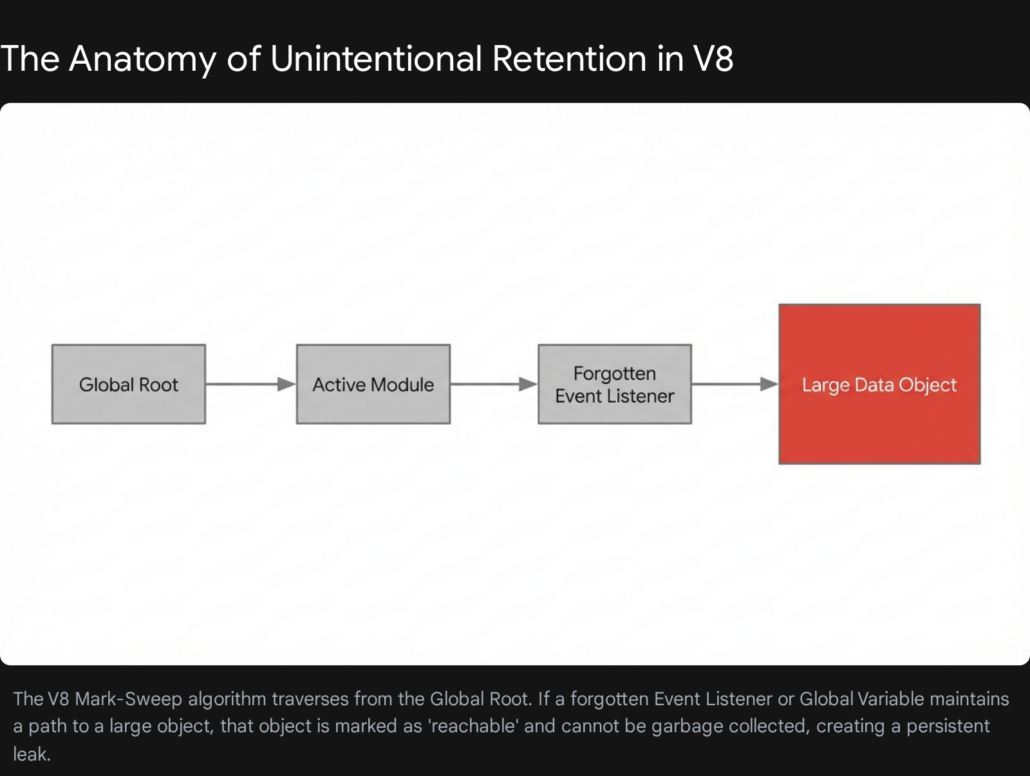
This concept of reachability is the absolute core of debugging Node.js memory performance. The goal of leak detection is to find objects that have a high “Distance” from the root—meaning they are buried deep in your application’s logic—but are still anchored to the root by an accidental chain of variable assignments, event listeners, or closures.
Architectural Patterns That Cause Memory Leaks
To effectively practice Node.js memory leak detection, developers must recognize the specific architectural patterns and coding habits that naturally lead to unintentional retention. Below is an exhaustive examination of the most frequent culprits encountered in production environments, complete with structural explanations and remediation strategies.
Accidental Global Variables and Unbounded Caches
Global variables are the natural enemies of garbage collection. Because they are attached directly to the root of the application, anything they reference will never be swept away by the Mark-Sweep algorithm. In modern Node.js development using strict mode, accidentally declaring a global variable by omitting const, let, or var is less common, but the intentional misuse of global scope remains a massive problem.
A frequent anti-pattern observed during codebase audits is the implementation of an unbounded in-memory cache using a standard JavaScript object or array. Developers often create module-level arrays to store user session data, configuration objects, or API responses to speed up subsequent requests.
JavaScript
const userSessionCache =;

function authenticateUser(userPayload) {
    userSessionCache.push(userPayload);
    return true;
}
In the example above, every time a user authenticates, their payload is pushed into the userSessionCache array. Over days or weeks of continuous server uptime, this array grows infinitely. Because the array is declared at the module level, the garbage collector cannot touch it. The server will eventually consume all available heap memory and crash.
If an application architecture strictly requires in-memory caching, the solution is to enforce rigorous eviction policies, such as a Least Recently Used mechanism, or to utilize native JavaScript structures designed for memory safety, namely WeakMap or WeakSet. A WeakMap holds “weak” references to its keys. If there are no other references to the object used as the key anywhere else in the application, the garbage collector will automatically remove the key-value pair from the WeakMap, seamlessly preventing the leak.
JavaScript
const userMetadataCache = new WeakMap();

function cacheUserMetadata(userObject, temporaryMetadata) {
    userMetadataCache.set(userObject, temporaryMetadata);
}
With this implementation, when the userObject is destroyed after the HTTP request concludes, the associated metadata in the userMetadataCache is automatically flagged for garbage collection.
The Closure Trap and Retained Lexical Environments
JavaScript is fundamentally a functional programming language, and it heavily utilizes closures. A closure is a function that remembers the variables and environment in which it was created, even after the outer function has finished executing. Closures are incredibly powerful for maintaining state and handling asynchronous callbacks, but they are a notorious source of memory leaks because they can silently hold onto massive amounts of memory.
When an inner function is retained—for instance, if it is returned from a parent function or passed as a callback to a long-running interval—the entire lexical scope of the parent function is also retained. This means that every single variable declared in the outer function is kept alive in the heap, regardless of whether the inner function actually uses it.
A classic illustration of this mechanism was famously documented by developers working on the Meteor framework. Consider a scenario where a function repeatedly replaces an object, but a closure inadvertently captures the old version of the object.
JavaScript
let theThing = null;

const replaceThing = function () {
    const originalThing = theThing;

    const unused = function () {
        if (originalThing) console.log("hi");
    };

    theThing = {
        longString: new Array(1000000).join('*'),
        someMethod: function () {
            console.log("Method called");
        }
    };
};

setInterval(replaceThing, 1000);
In this code, every time replaceThing is called, a new giant string is created and assigned to theThing. Simultaneously, the local variable originalThing takes a reference to the previous version of theThing. The unused function creates a closure that references originalThing. Even though unused is never actually called, the mere fact that it exists within the same lexical environment as someMethod means they share the same context. Because theThing.someMethod is a global reference (via theThing), the shared lexical environment is kept alive. Consequently, originalThing is kept alive, creating an infinite chain of giant strings retained in memory.
The architectural fix for closure leaks is to actively nullify large data structures at the end of a function scope if they are no longer required, breaking the reference chain and allowing the garbage collector to reclaim the memory. Modifying the previous example by adding originalThing = null; at the end of the replaceThing function instantly resolves the leak.
Event Emitters and Unremoved Listeners
Node.js is inherently event-driven, relying heavily on the native EventEmitter class to handle asynchronous data flows. A highly pervasive memory leak occurs when developers attach event listeners to long-lived objects but fail to deregister them when they are no longer needed.
Under the hood, an EventEmitter is essentially a mapping of event names to arrays of listener functions. When you call emitter.on('data', callback), Node.js literally pushes your callback function into an internal array. When the event fires, it iterates through the array and executes each function. If you attach a listener to a persistent object—such as a global HTTP server instance, an active database connection, or a persistent websocket—that listener will remain in memory until the server is shut down.
JavaScript
const globalDatabaseConnection = require('./db');

app.get('/api/users', (req, res) => {
    globalDatabaseConnection.on('queryComplete', (data) => {
        res.json(data);
    });
    globalDatabaseConnection.execute('SELECT * FROM users');
});
In the flawed implementation above, every single incoming HTTP request adds a new anonymous callback function to the globalDatabaseConnection event array. Furthermore, because this callback references the res (response) object, every historical HTTP response object is kept alive in memory forever. Under even moderate traffic, this array will grow to contain millions of functions, bringing the server to its knees.
Node.js actively attempts to warn developers about this specific pattern by emitting a MaxListenersExceededWarning to the console whenever more than ten listeners are added to a single event. While developers sometimes hastily silence this warning by calling setMaxListeners(0), doing so simply masks a critical memory leak.
The correct approach is to always manage the lifecycle of event listeners. If an event only needs to be handled once, use the emitter.once() method, which automatically unregisters the listener after its first invocation. For recurring events, ensure that you explicitly call emitter.removeListener() or emitter.off() inside a teardown block or when the client connection terminates.
Unclosed Network and Database Connections
Integrating third-party services and external databases requires careful lifecycle management. At Tool1.app, when we conduct performance audits on struggling legacy systems, we frequently discover severe memory bloat caused by unclosed gRPC connections, Redis clients, or SQL database drivers.
If backend code instantiates a new database client or connection pool inside a route handler instead of reusing a global singleton instance, the application will hemorrhage memory. Each individual connection holds underlying TCP sockets, active data buffers, and internal event listeners in the heap. Because the external database server keeps the connection open waiting for traffic, the Node.js garbage collector cannot clean up the client object.
Over time, the Node.js process will crash from a combination of memory exhaustion and operating system file descriptor limits. The architectural mandate here is absolute: always establish database connection pools and external service clients during the application’s startup phase, export them as singletons, and reuse them across all incoming requests.
Stream Piping and Buffer Accumulation
Node.js Streams are incredibly efficient for processing large datasets, such as video files or massive CSV exports, because they move data in small, manageable chunks rather than loading entire multi-gigabyte files into RAM simultaneously. However, Readable and Writable streams must be managed meticulously to prevent buffer leaks.
A common scenario involves piping a readable stream directly to a writable stream, such as streaming a file to an HTTP response using readableStream.pipe(response). By default, if the readable stream finishes successfully, it will automatically call end() on the writable stream. However, if the readable stream encounters an error midway through the transfer—such as the underlying file being deleted or a network interruption—the writable stream is not automatically closed.


The unclosed destination stream, along with all the data chunks currently sitting in its internal memory buffers, remains locked in the heap indefinitely. To prevent this, developers must implement comprehensive error handling on all stream pipelines, ensuring that .destroy() is explicitly called on all participating streams if an error event is emitted anywhere in the chain. Modern Node.js versions provide the stream.pipeline() utility, which manages these error states and teardowns automatically, representing a significant upgrade over the traditional .pipe() method.
Detached DOM Trees in Server-Side Rendering
With the prevalence of Server-Side Rendering frameworks and the extensive use of headless browser automation tools like Puppeteer or JSDOM for web scraping, Node.js applications frequently manipulate complex HTML structures directly on the backend. This introduces a unique category of memory leak known as the Detached DOM Tree.
A Detached DOM leak occurs when an HTML node is removed from the active Document Object Model, but a JavaScript variable still holds an active reference to it. Because DOM elements are structured internally as doubly-linked trees—meaning every node has pointers to its parent, its children, and its siblings—referencing a single detached element inadvertently keeps the entire historical DOM tree locked in the V8 heap.
For example, if a web scraping script extracts a single paragraph <p> tag and stores it in an array for later processing, but the parent <html> document is subsequently destroyed and replaced, the garbage collector cannot delete the old document. The single reference to the paragraph node mandates that its parent <div>, its parent <body>, and every other sibling node remain accessible in memory. When performing heavy DOM manipulation in Node.js, developers must extract only the necessary primitive text or data attributes, and explicitly nullify any references to the actual DOM node objects before moving on to the next task.
Systematic Node.js Memory Leak Detection and Profiling
Identifying that an application has a memory leak is relatively easy; pinpointing the exact line of code responsible requires shifting from reactive guesswork to proactive, data-driven profiling. When a system experiences unexpected CPU spikes, slow response times, or Out of Memory crashes, engineers must analyze the V8 heap directly.
Establishing the Baseline with Native Tools
Before diving into complex external profiling interfaces, it is crucial to establish a behavioral baseline using the native process.memoryUsage() method provided by Node.js. This function returns an object containing precise metrics regarding the current memory state of the process.
| Metric | Definition | Troubleshooting Value |
| rss (Resident Set Size) | The total memory allocated for the process execution, including all C++ and JavaScript objects and code. | Provides the absolute ceiling of memory consumption. If RSS hits system limits, the process dies. |
| heapTotal | The total size of the allocated V8 heap. | Indicates how much memory V8 has requested from the OS for dynamic JavaScript objects. |
| heapUsed | The actual amount of memory currently occupied by active JavaScript objects. | The most critical metric for leak detection. A continuously climbing heapUsed value indicates a leak. |
| external | Memory usage of C++ objects bound to JavaScript objects. | Useful for debugging leaks involving native modules, buffers, or specialized cryptographic libraries. |
| arrayBuffers | Memory allocated specifically for Buffer objects and ArrayBuffer instances. | Spikes here indicate unclosed streams or massive binary file manipulations. |
By writing a simple utility function that logs these metrics to a file or monitoring system every ten seconds, engineers can visualize the memory curve. A healthy application will show a jagged line that rises and falls within a consistent horizontal band as garbage collection occurs. An application with a memory leak will exhibit a “sawtooth” pattern that steadily climbs upward over time, never returning to its original baseline.
Utilizing Chrome DevTools and Heap Snapshots
The absolute gold standard for Node.js memory leak detection is capturing and inspecting heap snapshots. Because Node.js and Google Chrome share the underlying V8 engine, developers can leverage Chrome’s incredibly powerful built-in developer tools to debug backend Node.js code natively.
The process of finding a leak requires a methodical approach known as the Three-Snapshot Technique. This method isolates the specific objects that are failing to be garbage collected during a specific operation.
Step 1: Start the Application with the Inspector Flag
To allow Chrome to connect to the backend process, the Node.js application must be started with the debugging flag enabled. In a local development or secure staging environment, run the process using node --inspect server.js. This opens a websocket port that the V8 inspector protocol can use to transmit data.
Step 2: Connect the Chrome Profiler
Open the Google Chrome browser and navigate to the internal URL chrome://inspect. The browser will scan for active debugging ports, and the Node.js process will appear under the “Remote Target” section. Clicking the “inspect” link will open a dedicated DevTools window specifically attached to the backend server.
Step 3: Take the Baseline Snapshot
Navigate to the “Memory” tab within the DevTools window. Ensure the “Heap snapshot” option is selected and click the “Take snapshot” button. The engine will pause briefly, traverse the entire heap, and generate a complete inventory of every object currently in memory. This first snapshot represents the application at rest.
Step 4: Replicate the Application Load
Execute the sequence of actions that are suspected of causing the memory leak. If the leak is associated with a specific API route, use a load-testing script to send several hundred or thousand requests to that endpoint. If the leak is tied to a background cron job, manually trigger the job execution multiple times.
Step 5: Take the Second Snapshot
Once the load test is complete, return to DevTools and click “Take snapshot” a second time. This snapshot captures the state of the heap when the application is holding all the necessary operational data to handle the heavy traffic.
Step 6: Clear the Load and Take the Final Snapshot
Wait a few moments for the simulated traffic to fully resolve, allowing any asynchronous operations to finish. Then, trigger a third and final snapshot. Taking a snapshot automatically forces a Major Garbage Collection cycle before recording the data. Therefore, anything that is captured in Snapshot 3 that was not present in Snapshot 1 represents memory that could not be swept away.
Analyzing the Snapshot Delta
With three snapshots loaded, the analytical work begins. Change the view filter at the top of the DevTools interface from “Summary” to “Comparison”, and configure it to compare Snapshot 3 against Snapshot 1. This action filters out the normal operational baseline of the framework and highlights exclusively the objects that were allocated during the load test and never cleaned up.
The interface will present a detailed list of constructors and object types. Sort this data by the “Size Delta” or “# New” columns to bring the most severe offenders to the top. As you review the list, it is vital to understand the difference between two critical metrics displayed in the profiler:
- Shallow Size: This represents the size of memory held by the object itself. For an array, this is just the memory required for the array structure, not the objects contained within it.
- Retained Size: This is the crucial metric. It represents the total amount of memory that would be freed if the object itself, along with all exclusive dependent objects it references, were deleted. A tiny closure object might have a negligible Shallow Size, but if it holds a reference to a multi-megabyte dataset, its Retained Size will be massive.
When investigating suspicious entries—such as thousands of lingering Socket objects, string fragments, or instances of a custom class from the application codebase—clicking on an item will populate the Retainers panel at the bottom of the screen.
The Retainers view is the ultimate diagnostic tool. It displays the exact chain of variable references keeping that specific object alive, starting from the object itself and tracing all the way back up to the Global Root. By reading the Retainers tree from top to bottom, an engineer can pinpoint the exact variable name, array, or event listener that is hoarding the memory, transforming a mysterious application crash into a precise, fixable line of code.
Production Application Performance Monitoring (APM)
While manual heap snapshots are unparalleled for deep debugging in local or staging environments, they are largely impractical for production use. Taking a heap snapshot freezes the event loop entirely; performing this on a live production server under heavy user load will result in dropped connections and severe service degradation. Furthermore, manual profiling is inherently reactive—it happens only after a problem has been noticed.
To maintain enterprise-grade reliability, engineering teams must implement continuous, automated oversight using Application Performance Monitoring (APM) tools. Modern APM platforms install lightweight agents alongside the Node.js process, continuously tracking memory allocation, correlating it with CPU metrics and database query times, and triggering proactive alerts long before memory bloat reaches the critical Out of Memory threshold.
Selecting the appropriate APM solution depends heavily on the specific architecture of the application, the scale of the deployment, and the organization’s budgeting constraints. Below is a detailed comparison of industry-leading APM solutions capable of deep Node.js profiling, with pricing structures localized for European enterprise consideration.
| APM Provider | Core Differentiators & Node.js Capabilities | Estimated Base Pricing (Euro) |
| New Relic | Offers a highly transparent, usage-based pricing model and an all-in-one platform approach. Excellent for rapid time-to-value, providing full-stack visibility, distributed tracing, and out-of-the-box Node.js memory dashboards without complex configuration. | First 100 GB/month ingested is free. Standard data ingestion costs approximately €0.37/GB thereafter. Storing data strictly in the EU data center adds a premium of roughly €0.05/GB. |
| Dynatrace | Built for massive, complex enterprise architectures. Features the proprietary “Davis AI” engine for autonomous root-cause analysis, which correlates memory spikes directly to specific code deployments or infrastructure changes. | Full-stack monitoring starts at approximately €64 per month per 8 GB host. Infrastructure-only observability tiers begin at roughly €27 per month per host. |
| Datadog | Features a highly modular setup with over 600 out-of-the-box integrations. Superb interface for building custom dashboards that overlay Node.js heap metrics directly on top of specific API endpoint latency graphs and log outputs. | Pricing is typically tiered per host, per month. Comprehensive APM features require specific plan upgrades, often starting around €30 per host, scaling upward based on log retention requirements. |
| AppSignal | Exceptionally developer-centric and tailored specifically for Node.js, Ruby, and Elixir ecosystems. Provides deeply granular insights into V8 garbage collection cycles, heap sizes, and slow queries with a very gentle learning curve. | Highly accessible entry point starting at roughly €18 per month per application, scaling predictably with total traffic and request volume. |
| Elastic APM | An open-source routing option that integrates flawlessly with existing Elasticsearch, Logstash, and Kibana (ELK) stacks. Highly flexible, allowing teams to retain total control over data sovereignty by hosting on-premises. | Free to use the open-source agent; costs are entirely bound to the underlying infrastructure required to host and store the telemetry data. Managed cloud tiers are available. |
Our engineering team at Tool1.app frequently configures, integrates, and optimizes these APM suites for clients transitioning to microservice architectures. A critical aspect of APM deployment is ensuring that alert thresholds are accurately tuned to respect V8’s natural garbage collection cycles. Alerting on every minor spike in the New Space creates severe alert fatigue; alerts must be configured to trigger only when the baseline of the Old Space consistently increases over sequential moving averages.
Advanced V8 Memory Tuning and Mitigations
In certain enterprise scenarios, an application might not be strictly leaking memory, but rather operating with a highly inefficient memory footprint that legitimately exceeds the engine’s default limitations. Historically, Node.js limited the V8 heap to roughly 1.5 gigabytes on 64-bit systems. While modern versions of Node.js attempt to adapt dynamically to available system memory, developers can manually fine-tune these hard limits using command-line flags.
The most common tuning parameter is the --max-old-space-size flag, which allows operators to explicitly define the ceiling for the Old Space segment in megabytes. For example, starting an application with the command node --max-old-space-size=4096 server.js grants the Node.js process 4 GB of heap memory.
Increasing the old space size is frequently used as an emergency stopgap. If a production server is crashing every two hours due to a slow memory leak, doubling the available memory might extend the server’s uptime to four hours, providing the engineering team vital breathing room to profile the code and develop a proper patch without enduring constant downtime. However, it must be understood that adjusting this flag is not a cure for an underlying leak; a true memory leak will eventually consume 8 GB of RAM just as inevitably as it consumed 1.5 GB. Furthermore, allowing the heap to grow massive means that when a Major Garbage Collection cycle finally does occur, the stop-the-world pause will be significantly longer, potentially causing network timeouts.
Developers can also manipulate the garbage collector directly using the --expose-gc flag. Starting a process with node --expose-gc server.js makes the global.gc() function available within the application code, allowing the developer to force a garbage collection cycle programmatically.
While manual garbage collection is a useful hack for specialized scenarios—such as clearing memory immediately after a massive, once-a-day background data transformation script finishes its work—it is heavily discouraged in production web servers. Forcing a garbage collection arbitrarily disrupts the highly optimized heuristic algorithms within V8, forces the event loop to halt unnecessarily, and severely degrades the overall throughput and response time of the application. The V8 engine is engineered to manage memory highly efficiently on its own, provided the developer does not obstruct it with retained references.
Conclusion
Memory leaks in Node.js applications are rarely the result of inherent flaws within the runtime or the V8 engine; rather, they are the natural byproduct of the JavaScript language’s heavy reliance on asynchronous callbacks, persistent closures, and long-lived event emitters. As applications scale to handle enterprise-level traffic and data volumes, the financial and operational costs of unoptimized memory management become impossible to ignore.
By deeply understanding the internal mechanics of how the V8 engine promotes memory from the volatile New Space to the persistent Old Space, engineering teams can design architectures that naturally facilitate efficient garbage collection. When leaks inevitably occur, utilizing Chrome DevTools to trace Retainers through comparative heap snapshots transforms an opaque crash into a highly visible, actionable bug. Pairing these diagnostic techniques with robust APM monitoring ensures that infrastructure remains stable, performant, and cost-effective.
Clients often ask us at Tool1.app to rescue legacy backend systems that suffer from mysterious daily crashes and degrading performance. The solution is rarely to throw more expensive hardware at the problem. It is always rooted in the methodical profiling and remediation techniques outlined above—replacing unbounded historical arrays with memory-safe WeakMaps, meticulously managing database connection lifecycles, and ensuring that asynchronous streams are cleanly destroyed upon error.
Ready to Optimize Your Backend Performance?
Struggling with unexpected server crashes, sluggish API response times, or skyrocketing cloud hosting bills due to inefficient code? Tool1.app’s backend engineering experts can deep-dive into your codebase to debug, profile, and optimize your Node.js applications. From advanced memory leak detection and architecture refactoring to implementing custom enterprise APM solutions and building high-efficiency Python and AI automations, we ensure your software scales flawlessly under pressure. Contact Tool1.app today to discuss your custom software development and performance auditing needs, and turn your backend infrastructure into a competitive advantage.







Leave a Reply
Want to join the discussion?Feel free to contribute!
Join the Discussion
To prevent spam and maintain a high-quality community, please log in or register to post a comment.