

Creating a Real-Time Business Dashboard with Python and Streamlit
Table of Contents

Architecting Real-Time Business Intelligence: A Comprehensive Guide to the Python Streamlit Dashboard
Modern business agility relies on the instantaneous translation of raw data into actionable intelligence. However, the traditional landscape of Business Intelligence (BI) is fraught with bottlenecks. Data teams spend weeks configuring rigid enterprise software, business leaders wait days for custom reports, and organizations bleed capital on per-user licensing fees. The demand for rapid, bespoke internal tools has driven a massive paradigm shift toward code-first, open-source frameworks. At the forefront of this revolution is the Python Streamlit dashboard.
Streamlit has rapidly evolved from a rapid-prototyping utility for data scientists into a production-grade framework capable of hosting complex, real-time enterprise applications. By bridging the gap between deep backend data processing and intuitive frontend user interfaces without requiring extensive JavaScript or CSS expertise, Streamlit enables the rapid deployment of scalable, interactive dashboards.
This comprehensive report explores the strategic financial advantages of custom dashboard development, details high-value business use cases, and provides an exhaustive, expert-level technical guide to architecting, optimizing, and deploying a real-time Python Streamlit dashboard connected to a live database. Whether you are aiming to track live inventory, automate financial reporting, or integrate advanced artificial intelligence, understanding the architecture of a Python Streamlit dashboard is critical for the modern enterprise.
The Strategic and Financial Case for Custom BI
For years, organizations have defaulted to proprietary, closed-ecosystem BI platforms like Microsoft Power BI, Tableau, or Qlik. While these tools offer robust out-of-the-box visualization capabilities, they introduce significant long-term friction in the form of vendor lock-in, inflexible feature sets, and compounding subscription costs. Industry data reveals a startling reality: a vast majority of traditional BI implementations fail to deliver a tangible return on investment within their first year, largely due to poor user adoption and the inability to answer ad-hoc, hyper-specific business questions without IT intervention.
The Total Cost of Ownership Crisis
The financial architecture of traditional BI relies heavily on per-user licensing. A standard enterprise tier often demands a base platform fee coupled with individual licenses ranging from €13 to €70 per user per month. For a mid-sized organization requiring access for hundreds of employees, a platform like Power BI or Tableau can easily generate recurring operational expenditures of €570 to €1,500 monthly merely for basic user access and standard reporting. Furthermore, advanced features such as predictive analytics, AI copilots, or embedded analytics often require expensive tier upgrades that drastically inflate the budget.
Conversely, migrating to a custom Python Streamlit dashboard fundamentally alters the Total Cost of Ownership (TCO). The financial model shifts from a recurring operational expenditure (OpEx) tied to headcount, to a localized capital expenditure (CapEx) for initial development, followed by negligible infrastructure costs.
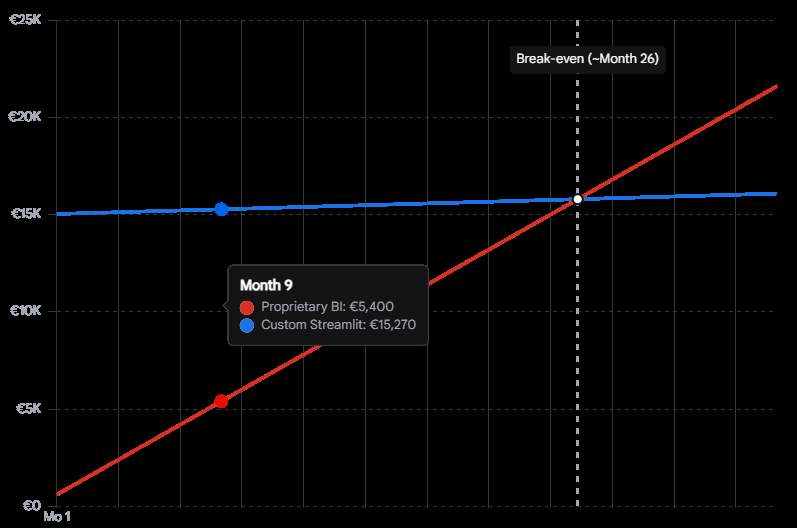
While custom software development requires an initial capital investment, the elimination of per-user licensing results in significant long-term cost savings, with infrastructure maintenance remaining relatively flat regardless of user scale.
The infrastructure cost to host a containerized Streamlit application on cloud platforms such as AWS, Azure, or specialized services is typically less than €28 monthly, regardless of whether ten or ten thousand users access the platform. When partnering with an expert agency, the initial development cost—which ranges based on complexity from €23,750 for an MVP to upwards of €95,000 for enterprise integration—pays for itself rapidly by eliminating the perpetual bleed of license fees.
Evaluating the Landscape: Framework Comparisons
To truly understand the value of a Python Streamlit dashboard, one must evaluate it against both legacy BI tools and contemporary Python frameworks like Plotly Dash.
| Feature / Capability | Proprietary BI (Power BI / Tableau) | Plotly Dash | Python Streamlit Dashboard |
| Primary Audience | Data Analysts, Non-technical users (drag-and-drop) | Advanced Data Engineers, Frontend Developers | Data Scientists, Python Developers, Business Analysts |
| Learning Curve | Low for basic use; High for complex DAX/Calculations | Steep (requires knowledge of React/Flask callbacks) | Very Low (pure Python scripting, top-to-bottom execution) |
| Cost Structure | High OpEx (per-user monthly licenses €13-€70+) | Low OpEx (open-source), High initial CapEx for complex dev | Low OpEx (open-source), Moderate CapEx for rapid dev |
| Customization | Highly restricted to vendor ecosystem and visuals | Extremely flexible, full CSS/HTML control | Highly flexible, easy custom components and theming |
| Data Write-Back | Very difficult, often requires premium third-party tools | Native via Python backend | Native via Python backend (direct to SQL/APIs) |
While Plotly Dash offers granular control over complex, event-driven callbacks, it requires a much deeper understanding of web architecture and routing. Streamlit’s top-to-bottom execution model allows developers to treat the UI as a simple script. This dramatically accelerates the development lifecycle. What might take a month to build in Dash or require a dedicated team to engineer around Power BI’s limitations can often be deployed as a functioning Python Streamlit dashboard in a matter of days.
Flexibility and Feature Independence
Beyond cost, proprietary BI tools struggle with hyper-specific business logic. Extracting data out of these ecosystems or building complex, multi-step workflows (such as writing data back to a database directly from the dashboard to update a CRM) often requires cumbersome workarounds.
A Python Streamlit dashboard provides absolute sovereignty over the application architecture. Developers can implement Custom Row-Level Security (RLS) without upgrading to a “Premium” tier, integrate bespoke machine learning models, trigger third-party API alerts (like Slack webhooks or automated emails), and write customized PDF generation scripts directly on the server. The open-source nature of Python ensures that if a library exists for a specific analytical task, it can be integrated into the dashboard immediately, insulating the business from vendor roadmaps.
High-Impact Business Use Cases
The versatility of Python allows Streamlit to penetrate deeply into various business units, automating workflows that previously relied on fragile, interconnected spreadsheets. A custom Python Streamlit dashboard shines brightest when solving specific, high-friction operational challenges.
Automated Financial Reporting and Optimization
Financial departments face intense operational burdens generating quarterly solvency reports, budget reconciliations, and cash flow forecasts. Traditional workflows involve exporting CSV files from accounting software, running complex Excel macros, and manually copying charts into presentation decks. This approach is highly susceptible to human error and consumes hundreds of hours annually.
A Python Streamlit dashboard automates this entire pipeline. By directly connecting to the Enterprise Resource Planning (ERP) database, the application can instantly execute data aggregation, apply complex financial formulas using libraries like Pandas or NumPy, and render interactive profit and loss statements. Decision-makers can adjust slider widgets to simulate market downturns, supply chain disruptions, or operational cost increases, watching the forecasted Earnings Before Interest, Taxes, Depreciation, and Amortization (EBITDA) update in real-time. Furthermore, computer vision libraries can even be integrated to automate the ingestion and analysis of scanned bank statements, bypassing manual data entry entirely.
Real-Time Inventory and Supply Chain Management
For retail and manufacturing sectors, precise stock visibility is the lifeblood of operations. A frequent operational bottleneck is the latency between warehouse scanning systems and executive reporting suites. Streamlit excels in rendering real-time inventory tracking applications that close this latency gap.
By polling warehouse APIs or connecting to a live SQL database, the dashboard can present real-time stock levels. Heatmaps can highlight warehouses nearing critical capacity, while gauge charts and automated alert thresholds can instantly identify SKUs that have fallen below reorder minimums. Because Streamlit applications are mobile-responsive by default, warehouse managers can access these vital Key Performance Indicators (KPIs) directly from tablet devices on the warehouse floor. They can immediately log adjustments, process returns, or trigger procurement sequences directly through the dashboard’s interface, writing the data back to the central system instantly.
Generative AI and Conversational Analytics
With the meteoric rise of Large Language Models (LLMs), business leaders are demanding conversational interfaces for their corporate data. Traditional BI platforms are slowly rolling out “copilot” features, but these are often restricted to the vendor’s ecosystem, carry heavy premium costs, and raise severe data privacy concerns.
Streamlit has become the undisputed framework of choice for building bespoke AI applications. By combining Streamlit with frameworks like LangChain, LlamaIndex, or PandasAI, organizations can build natural language querying interfaces directly over their data lakes. A non-technical marketing executive can simply type into a Streamlit chat interface, “Show me the revenue breakdown by region for the last quarter compared to ad spend,” and the application will instantly translate the natural language into a secure SQL query, execute it against the data warehouse, and render a dynamic chart.
We at Tool1.app frequently leverage Streamlit to deploy these custom AI/LLM solutions. Our focus is on ensuring these tools interface directly with secure, proprietary company data without leaking sensitive information to public AI models, empowering teams to operate with augmented intelligence safely and efficiently.
Centralized Marketing Operations
Marketers today are drowning in fragmented data across Google Ads, Meta, HubSpot, and Salesforce. Trying to manually consolidate this into a cohesive Return on Ad Spend (ROAS) narrative is nearly impossible. A custom Python Streamlit dashboard acts as the central command center, pulling from dozens of APIs into a single, unified view. Instead of relying on vanity metrics, teams can configure the dashboard to calculate complex attribution models, enabling faster, data-driven decisions on where to allocate the next Euro of marketing spend.
Architecting the Application: A Technical Blueprint
Moving from concept to a production-grade Python Streamlit dashboard requires disciplined software engineering practices. While Streamlit’s beauty lies in its simplicity, deploying it in an enterprise environment requires careful attention to project structure, database security, performance optimization, and UI design. This section details the end-to-end construction of a real-time dashboard, focusing on modern best practices.
1. Professional Project Structure and Modular Design
While Streamlit allows developers to build an app in a single file for rapid prototyping, enterprise applications require strict modularity to ensure maintainability, testability, and scalability. As an application grows to encompass multiple pages and complex logic, a monolithic file becomes unmanageable. A professional project layout segregates data logic, user interface components, styling, and tests.
A modern 2026 enterprise Streamlit project should resemble the following structure:
business_dashboard/
├──.streamlit/
│ ├── config.toml # Theming, UI layout defaults, and server configuration
│ └── secrets.toml # Secure credentials (never committed to version control)
├── src/
│ ├── init.py
│ ├── data_loader.py # Database connection pooling and querying logic
│ └── processing.py # Business logic, aggregations, and Pandas/Polars transformations
├── ui/
│ ├── init.py
│ ├── components.py # Reusable metric cards, custom HTML/CSS, and chart functions
│ └── navigation.py # Multi-page routing and session state handling
├── pages/
│ ├── 01_financials.py # Sub-page for financial metrics
│ └── 02_inventory.py # Sub-page for logistics tracking
├── tests/
│ ├── test_app.py # Pytest integration using the Streamlit AppTest framework


├── app.py # Main application entry point and landing page
├── requirements.txt # Python dependencies
└── Dockerfile # Containerization instructions for deployment
This structure ensures that the presentation layer (app.py and files within pages/) remains clean and declarative, while the heavy computational lifting is abstracted away into the src/ modules.
2. Secure Database Connectivity
The foundation of any business dashboard is its data source. For this blueprint, the architecture utilizes a remote PostgreSQL database, though the principles apply equally to Snowflake, BigQuery, or MySQL. Security is paramount; hardcoding database credentials into application scripts is a critical vulnerability. Streamlit provides a secure, built-in secrets management system via the .streamlit/secrets.toml file.
Inside secrets.toml (which must be added to .gitignore):
Ini, TOML
[postgres]
host = "db.internal-server.eu"
port = 5432
dbname = "enterprise_analytics"
user = "dashboard_service_account"
password = "super_secure_password_string"
The database connection is then instantiated within src/data_loader.py. Utilizing SQLAlchemy ensures robust connection pooling, which is critical when multiple users access the Python Streamlit dashboard simultaneously. Without pooling, concurrent users could exhaust the database’s maximum connection limits, leading to application crashes.
Python
import streamlit as st
import pandas as pd
from sqlalchemy import create_engine
from sqlalchemy.engine import Engine

@st.cache_resource
def init_connection() -> Engine:
    """Initializes a cached database connection engine."""
    db_info = st.secrets["postgres"]
    db_url = f"postgresql://{db_info['user']}:{db_info['password']}@{db_info['host']}:{db_info['port']}/{db_info['dbname']}"
    return create_engine(db_url)

@st.cache_data(ttl=600)
def fetch_sales_data(query: str) -> pd.DataFrame:
    """Fetches data and caches the result for 10 minutes to reduce DB load."""
    engine = init_connection()
    with engine.connect() as conn:
        df = pd.read_sql(query, conn)
    return df
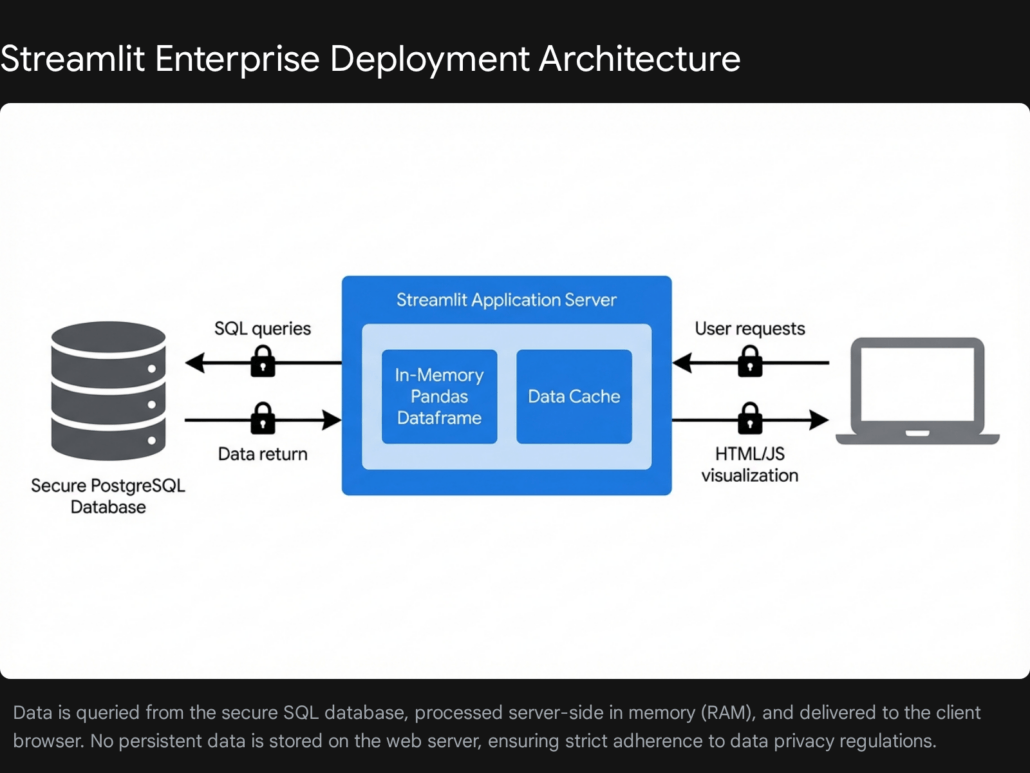
Understanding the caching decorators is vital for performance. The @st.cache_resource decorator ensures the database engine is only created once per application lifecycle and shared across all user sessions, preventing connection exhaustion. The @st.cache_data(ttl=600) decorator is applied to the data retrieval function, caching the tabular results for 600 seconds (10 minutes). When a second user logs into the dashboard within that window, Streamlit bypasses the database entirely and serves the data directly from the server’s RAM. This architectural pattern drastically reduces database queries, ensuring the dashboard loads instantaneously for subsequent users and reducing compute costs on cloud data warehouses.
3. Handling High-Volume Data: The Million-Row Challenge
As datasets scale beyond one million rows, standard operations using the pandas library can become a severe performance bottleneck. A dashboard that takes ten seconds to load will suffer from poor user adoption. To maintain sub-second rendering times in enterprise environments, developers must optimize the data layer.
First, raw CSV files should be abandoned in favor of Parquet files. Parquet is a highly compressed, columnar storage format that drastically reduces file size and I/O read times. Second, for backend processing within the Python Streamlit dashboard, migrating from pandas to Polars provides a massive performance leap. Polars utilizes lazy evaluation, query optimization, and multi-threading, allowing it to process millions of rows exponentially faster than pandas.
Streamlit’s native data rendering components have expanded to seamlessly accept Polars DataFrames and PyArrow tables. By configuring the frontend data grid to utilize lazy loading (where data is only fetched as the user scrolls), developers ensure that the UI rendering engine does not impede backend computation, keeping the application highly responsive regardless of dataset size.
4. Designing the User Interface and High-Performance Visualizations
A business dashboard must prioritize clarity, hierarchy, and immediate insight. The main app.py file dictates the visual layout and user interactions.
Python
import streamlit as st
import plotly.express as px
from src.data_loader import fetch_sales_data

# Configure the page for maximum screen real estate
st.set_page_config(page_title="Global Sales Command Center", layout="wide")

st.title("Enterprise Sales Dashboard")
st.markdown("Real-time monitoring of global revenue and inventory metrics.")

# Load Data
query = "SELECT date, region, product_category, revenue, units_sold FROM aggregate_sales"
df = fetch_sales_data(query)

# Sidebar Filters for User Interaction
st.sidebar.header("Filter Parameters")
selected_region = st.sidebar.multiselect(
    "Select Region",
    options=df['region'].unique(),
    default=df['region'].unique()
)

# Apply Filters dynamically
filtered_df = df[df['region'].isin(selected_region)]

# Calculate Top-level KPIs
total_revenue = filtered_df['revenue'].sum()
avg_order_value = filtered_df['revenue'].sum() / filtered_df['units_sold'].sum()

# Render Hero Metrics using Columns
col1, col2, col3 = st.columns(3)
col1.metric("Total Revenue", f"€{total_revenue:,.2f}", delta="4.5%")
col2.metric("Avg Order Value", f"€{avg_order_value:,.2f}", delta="-1.2%")
col3.metric("Total Units", f"{filtered_df['units_sold'].sum():,}")

# Render Interactive Data Visualization
st.subheader("Revenue Trajectory")
fig = px.line(
    filtered_df.groupby('date')['revenue'].sum().reset_index(),
    x='date',
    y='revenue',
    template="plotly_white",
    color_discrete_sequence=["#1A73E8"]
)
st.plotly_chart(fig, use_container_width=True)
This layout employs a wide configuration, utilizing st.columns to present top-level KPIs (Hero Metrics) immediately upon load, providing executives with an instant pulse on the business.
For charting, while Streamlit offers native st.line_chart and st.bar_chart functions, integrating plotly.express or Altair provides the highly interactive, zoomable, and hover-enabled charts that end-users expect from premium BI tools.
When it comes to rendering large, explorable tables, standard HTML tables are insufficient. Developers should leverage custom components like streamlit-aggrid. AgGrid is a powerful JavaScript data grid that, when wrapped for Streamlit, allows users to filter, group, pin columns, and execute Excel-like pivots directly within the browser.
Mastering State Management Across Multiple Pages
One of the historical challenges of building a Python Streamlit dashboard was maintaining user selections as they navigated between different pages. If a user filtered data to view “European Sales” on the main page, that context was often lost when they clicked over to the “Inventory Insights” page.
This is solved through advanced use of st.session_state. Session state acts as a persistent dictionary that survives the top-to-bottom script reruns inherent to Streamlit’s architecture. By storing widget values and user preferences in st.session_state, developers can ensure a seamless, stateful experience across the entire application, making the dashboard feel like a cohesive Single Page Application (SPA).
5. Implementing Real-Time Data Streaming with Fragments
Historically, updating a Streamlit dashboard required a full top-to-bottom rerun of the entire Python script. If an application contained complex machine learning models or heavy database queries, real-time updates were computationally prohibitive and resulted in visual flickering that ruined the user experience.
The introduction of fragment execution fundamentally resolves this limitation. By utilizing the @st.fragment decorator, developers can isolate a specific function to rerun independently of the main application. This is the cornerstone of building a true real-time Python Streamlit dashboard.
Python
import streamlit as st
import numpy as np
from datetime import datetime

@st.fragment(run_every="5s")
def render_live_inventory():
    """Fetches and displays live inventory levels every 5 seconds without reloading the whole page."""
    # Simulate a live database ping
    live_stock = np.random.randint(50, 500)
    current_time = datetime.now().strftime("%H:%M:%S")

    st.subheader("Live Warehouse Stock: SKU-8842")
    st.metric("Units Available", live_stock)
    st.caption(f"Last updated: {current_time}")

    # Trigger logic for external alerts via webhook
    if live_stock < 100:
        st.error("Stock levels critical. Automated procurement sequence initiated.")

st.title("Warehouse Operations Command")
st.write("The components below update in real-time while the rest of the application remains static. You can interact with other forms without interruption.")

# Call the fragment function
render_live_inventory()

# A separate, unaffected input form
with st.form("manual_entry"):
    st.text_input("Log manual stock adjustment")
    st.form_submit_button("Submit")
By defining run_every="5s", the specific chart or metric card wrapped in the fragment will automatically poll the database and update its UI every five seconds. Crucially, the user’s interaction with other widgets—such as typing in the search bar or filling out the manual entry form—remains completely uninterrupted. The form will not clear itself out when the data refreshes. This functionality makes Streamlit highly suitable for high-frequency trading floors, IoT sensor monitoring dashboards, and live supply chain logistics.
Enterprise Deployment, Security, and Governance
Building the application locally is only the first phase. Deploying a Python Streamlit dashboard securely within a corporate network requires stringent governance, robust authentication, and strict compliance measures.
Advanced Authentication and Single Sign-On (SSO)
A public URL is entirely insufficient for sensitive business data. Applications must be restricted strictly to authorized personnel. Streamlit supports deep integration with modern Identity Providers (IdPs) via OpenID Connect (OIDC) and OAuth 2.0 protocols.
Organizations utilizing Microsoft Entra ID (formerly Azure AD), Google Workspace, or Auth0 can integrate enterprise Single Sign-On (SSO). The native st.login() and st.user commands allow the application to seamlessly redirect the user to the corporate login portal and capture the identity cookie upon successful authentication.
Python
import streamlit as st

# Check if the user is authenticated via the corporate IdP
if not st.user.is_logged_in:
    st.warning("Please log in to access the Enterprise Dashboard.")
    st.login()
    st.stop()

st.success(f"Welcome back, {st.user.email}")
This mechanism enables not only authentication (verifying identity) but also strict Row-Level Security (RLS). Once a user authenticates, the application inspects their department or managerial clearance level and dynamically rewrites the backend SQL queries. This ensures that a regional manager in Germany only sees European sales data, while the global CEO sees the entire dataset, all from the exact same dashboard deployment.
API Integration and the ASGI Architecture
As an application scales, it must integrate seamlessly with the broader organizational digital infrastructure. Recent core updates to the framework have introduced experimental ASGI-compatible entry points via st.App.
This is a revolutionary shift. It allows a Python Streamlit dashboard to be mounted directly alongside high-performance web frameworks like FastAPI or Starlette. Through this architecture, the server can handle traditional REST API endpoint requests (for machine-to-machine communication, such as a separate service requesting the latest calculated metrics) while simultaneously serving the interactive frontend UI to human operators on the same port and domain. This unified deployment model significantly reduces infrastructure complexity for DevOps teams.
GDPR Compliance and Data Security Sovereignty
For European enterprises, compliance with the General Data Protection Regulation (GDPR) dictates technology choices. Proprietary cloud-based BI tools often raise severe compliance red flags regarding data residency, telemetry collection, and cross-border data transfers to US-based servers.
A custom Python Streamlit dashboard mitigates these risks entirely through deployment sovereignty. Because the application can be containerized using Docker, it can be deployed directly into an organization’s Virtual Private Cloud (VPC) or on-premises servers located strictly within the European Union.
Furthermore, the architectural execution model of Streamlit inherently promotes high data security. Data pulled from the database resides entirely in the server’s ephemeral memory (RAM). When a user session ends, the browser tab is closed, or the container shuts down, that specific instance of the data is destroyed. No raw data is persistently written to disk on the application server unless explicitly programmed to do so via file export functions. This ephemeral state drastically reduces the attack surface for potential data breaches.
Ensuring absolute security and GDPR compliance is paramount in the European market. Development agencies like Tool1.app specialize in ensuring that every custom application deployed adheres to these strict residency, encryption, and memory-handling standards, safeguarding your corporate assets.
Quality Assurance: Automated Testing in CI/CD
Enterprise software requires reliability; a broken dashboard can lead to catastrophic business decisions. Relying on manual clicks to ensure a dashboard functions correctly before a production release is an unscalable artifact of the past. The introduction of the AppTest framework allows developers to write automated integration tests utilizing pytest, treating the UI exactly like standard backend code.
Python
from streamlit.testing.v1 import AppTest

def test_sales_dashboard_filters():
    """Simulates a user interacting with the dashboard to ensure metrics update correctly."""
    at = AppTest.from_file("app.py")

    # Inject mock secrets for testing environment
    at.secrets["postgres"] = {"user": "test", "password": "123", "host": "localhost"}
    at.run()

    # Ensure no exceptions were raised during the initial load
    assert not at.exception

    # Simulate user changing the region multiselect to 'Europe'
    at.multiselect("Select Region").set_value(["Europe"]).run()

    # Assert that the KPI metric card correctly displays the filtered value
    assert at.metric(0).label == "Total Revenue"
    assert at.metric(0).value == "€4,250,000.00"
Integrating these automated tests into a Continuous Integration/Continuous Deployment (CI/CD) pipeline ensures that any changes to the data structure, SQL queries, or UI code are rigorously validated. If a change breaks the logic, the automated pipeline halts the deployment, ensuring that only verified, highly stable dashboards are published to business stakeholders.
Transforming Data into Definitive Action
The era of navigating disjointed spreadsheets, fighting with inflexible proprietary software, and waiting on bottlenecked IT data teams is concluding. The Python Streamlit dashboard represents a critical evolution in Business Intelligence. It offers an unparalleled combination of rapid development speed, infinite customization, and absolute independence from predatory vendor licensing models.
By leveraging robust database connection pooling, in-memory processing frameworks like Polars, and real-time fragment execution, organizations can deploy enterprise-grade, GDPR-compliant analytical command centers that actively drive operational efficiency. Whether you are looking to automate complex financial reporting cycles, track global logistics in real-time, or provide a secure, conversational AI interface to proprietary corporate data, custom software engineering unlocks analytics capabilities that off-the-shelf software simply cannot match. Organizations looking to scale their data visibility and protect their bottom line must look beyond standard BI platforms and embrace code-first solutions.
Stop wrestling with messy spreadsheets and rigid, expensive BI tools. Let Tool1.app build custom data dashboards for your team. Contact us today to discuss your project requirements and discover how our expert Python automations and AI/LLM solutions can turn your raw data into a definitive competitive advantage.








Leave a Reply
Want to join the discussion?Feel free to contribute!
Join the Discussion
To prevent spam and maintain a high-quality community, please log in or register to post a comment.