

How to Build a Custom Web Scraper with Python and BeautifulSoup
Table of Contents
- Data as a Competitive Advantage: How to Build a Custom Web Scraper with Python and BeautifulSoup
- The Hidden Costs of Manual Data Extraction
- Calculating the Return on Investment for Automation
- High-ROI Business Use Cases for Web Scraping
- The Web Scraping Tech Stack: Why Python and BeautifulSoup?
- Step-by-Step Tutorial: Building a Custom Web Scraper
- Advanced Web Scraping: Scaling Operations to Millions of Pages
- The 2026 Legal Landscape: GDPR Compliance in Europe
- Transform Your Data Strategy Today
- Show all
Data as a Competitive Advantage: How to Build a Custom Web Scraper with Python and BeautifulSoup
In the modern digital economy, data is the ultimate currency. Whether an enterprise is tracking competitor pricing, aggregating real estate listings, monitoring market sentiment, or generating high-quality B2B leads, the ability to extract and process web data at scale fundamentally defines market leadership. However, the internet is not built for seamless data extraction. Critical business information is trapped in unstructured HTML, hidden behind complex dynamic rendering, and protected by increasingly sophisticated anti-bot systems.
For businesses looking to transition from slow, error-prone manual data entry to automated, real-time intelligence, custom software solutions provide the definitive answer. Mastering Python web scraping BeautifulSoup techniques allows organizations to transform the chaotic, unstructured web into clean, structured, and actionable databases.
This comprehensive technical and strategic report explores the profound financial impact of automated data extraction, details the highest-ROI business use cases for the current market, and provides an exhaustive, step-by-step technical tutorial on building a production-grade web scraper. Furthermore, it addresses the advanced engineering requirements for evading modern bot detection and navigating the stringent 2026 European GDPR compliance landscape.
The Hidden Costs of Manual Data Extraction
Many organizations remain bogged down by manual data collection workflows, fundamentally misunderstanding the true financial burden these processes create. A business analyst copy-pasting competitor prices or a data entry clerk manually logging real estate figures into a spreadsheet might initially seem like a low-tech, economical solution. In reality, manual processes are weighted with concealed costs that sabotage long-term profitability and scalability.
To understand the financial necessity of automation, one must objectively analyze the actual cost of manual labor across Europe. The base salary for a data entry clerk varies significantly by region but remains a substantial and continuous overhead. In Germany, the average median base salary for this role is currently €51,800 annually. In France, salaries range from €26,832 up to €40,000 depending on seniority and specific location metrics like the Parisian market. In Ireland, the average ranges from €30,000 to €35,000. These figures only represent base compensation, entirely excluding the overhead of benefits, taxes, equipment, and training.
Beyond base salaries, manual data entry carries an inherent, unavoidable risk: human error. The typical error rate for manual data entry is roughly 1%. While 1% may sound minimal, when an enterprise handles hundreds of thousands of records, that margin translates directly to missed opportunities, compliance breaches, or catastrophic financial mistakes. Industry quality control models often cite the established “1-10-100 rule” of Total Quality Management: preventing an error costs €1, correcting an error after it occurs costs €10, and an uncontrolled error that causes a downstream system failure costs the enterprise €100.
Furthermore, manual processing fundamentally lacks scalability. A human operator might process a complex document or extract a web page’s data points in 10 minutes; an automated script executes the exact same task in milliseconds. When evaluating processing times, a human can typically handle 5 to 6 complex documents per hour, whereas automated extraction scales limitlessly. This severe limitation on throughput means that as the business grows, labor costs must increase linearly, directly eating into profit margins.
At Tool1.app, we frequently consult with business owners who are overwhelmed by data collection bottlenecks. By replacing manual workflows with custom automated scraping scripts, businesses not only cut their immediate operational costs but also free up their human talent to focus on high-value analysis and strategic decision-making rather than repetitive data entry.
Cumulative Cost Comparison: Manual Data Entry vs. Automated Web Scraping
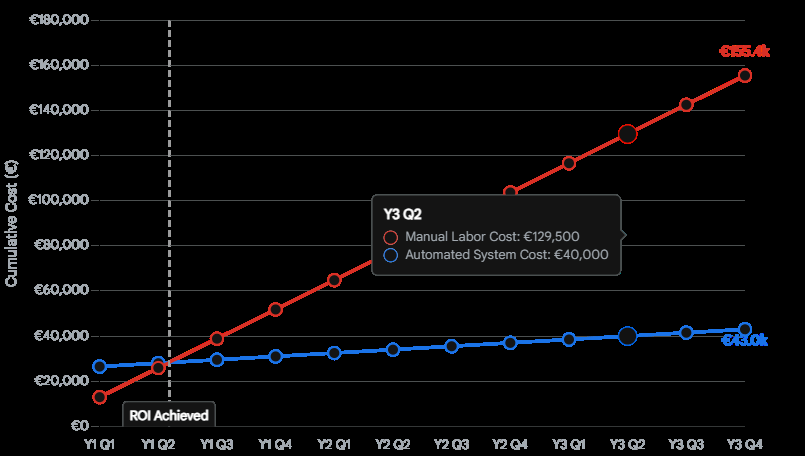
While custom automation requires an upfront investment, the cumulative operational costs fall dramatically below manual data entry within the first year, leading to massive long-term savings.
Calculating the Return on Investment for Automation
Transitioning to automated web scraping is a capital expenditure that yields a highly predictable and lucrative Return on Investment (ROI). The core formula for assessing this is simple: ROI is calculated by dividing the net savings (the cost of manual processing minus the cost of automation) by the total initial investment.
Recent empirical studies highlight the staggering differential between these methodologies. In a large-scale enterprise test comparing traditional manual testing and data validation against AI-native automation, the manual workflow projected an annual cost of roughly €5,550,000. The implementation of automated systems reduced this operational cost to roughly €770,000, representing an 86% reduction in expenses. Over a three-year period, the total savings exceeded €14,000,000.
Even for smaller-scale operations, the metrics are highly compelling. Processing data manually from invoices, public records, or web directories costs an estimated €9.20 to €18.40 per document in labor. Automated data extraction drops this cost to between €1.80 and €4.60 per document.
| Operational Metric | Manual Data Extraction | Automated Web Scraping | Net Improvement |
| Average Cost Per Record | €9.20 – €18.40 | €1.80 – €4.60 | ~75% Cost Reduction |
| Processing Speed | 5 – 6 records / hour | 30,000+ records / hour | Exponential Scaling |
| Error Rate | 1% – 4% (Subject to fatigue) | <0.1% (Strictly rule-based) | ~90% Error Reduction |
| Time per Comprehensive Report | 200 – 400 hours | 20 – 40 hours | 90% Faster Delivery |
| Audit Trail and Compliance | Fragmented, heavily reliant on human logs | Cryptographically timestamped, complete logs | Enterprise-Grade Compliance |
The payback period—the time required to recoup the initial custom development investment—typically ranges from 6 to 12 months, after which the system generates pure operational profit by eliminating labor costs.
High-ROI Business Use Cases for Web Scraping
The ability to extract, understand, and act on web data defines which organizations will maintain market leadership. Before examining the technical code, it is vital to understand the strategic, revenue-generating applications of Python web scraping BeautifulSoup across various industries.
Competitive Pricing and E-Commerce Monitoring
Price remains one of the most dynamic and crucial factors in online retail. E-commerce businesses lose thousands of euros daily to competitors who offer marginally better prices, launch promotional discounts faster, or maintain better stock availability. Automated web scraping solves this by systematically tracking competitor pricing across global marketplaces like Amazon, regional giants, and independent online storefronts. By feeding scraped pricing data into internal dynamic pricing engines, retailers can automatically adjust their own prices in real-time. This guarantees they remain competitive while maximizing profit margins, effectively transforming the business into a proactive market leader rather than a reactive follower.
Lead Generation and Sales Intelligence
Sales teams waste countless high-value hours conducting manual research, relying on cold calls, and struggling with empty or unqualified sales pipelines. Web scraping fundamentally alters the B2B sales motion by automating the generation of highly targeted lead lists. Custom Python scrapers can extract contact information, company executive details, and operational metrics from corporate websites, job boards, and business directories. Beyond simple contact details, advanced scraping enables “lead enrichment”—gathering contextual data about a company’s recent technology adoption, funding news, or hiring trends to deeply personalize outbound outreach and drastically increase conversion rates.
Real Estate Market Aggregation
The real estate market moves incredibly fast, and relying on delayed, manual data collection translates directly to missed lucrative deals and lost capital. Web scraping empowers real estate investors, brokerages, and property technology (PropTech) firms to aggregate listings from multiple, fragmented property portals worldwide. By extracting granular data—such as historical pricing, hyper-local property values, precise location intelligence, and time-on-market metrics—investors can build predictive algorithmic models. These models allow them to spot undervalued neighborhoods, forecast seasonal occupancy trends, and execute investments before the broader market reacts.
Market Trend and Sentiment Analysis
Historically, comprehensive market research required expensive focus groups, slow surveys, and immense logistical overhead. Today, raw, unfiltered consumer sentiment is broadcast publicly every second across review platforms, forums, social media, and news outlets. Scraping customer reviews allows businesses to perform automated natural language processing and sentiment analysis. This uncovers exactly what customers love or despise about a specific product or a competitor’s offering, directly informing future product development, mitigating brand risk, and identifying emerging market trends before they fully materialize.
The Web Scraping Tech Stack: Why Python and BeautifulSoup?
When engineering a custom web scraper, the technology choices a development team makes dictate the ultimate speed, reliability, and scalability of the entire data pipeline. Python has unequivocally cemented its place as the premier programming language for data extraction. Its highly readable syntax, robust object-oriented features, and massive ecosystem of specialized, open-source libraries make it the industry standard.
Within the Python ecosystem, extracting data from a static website generally requires two distinct components: an HTTP client to communicate with the target server and fetch the raw webpage, and an HTML parser to traverse the code and extract the relevant text.
For fetching the raw data, the requests library is the universally accepted standard. It handles complex HTTP verbs, manages session cookies, and allows developers to inject custom headers seamlessly, which is vital for mimicking legitimate browser traffic. For the parsing phase, professional developers overwhelmingly rely on Beautiful Soup (specifically beautifulsoup4).
Utilizing a Python web scraping BeautifulSoup architecture is the optimal strategy for several distinct reasons:
- Extreme Flexibility with Broken HTML: The internet is notoriously messy, filled with broken tags, unclosed elements, and invalid HTML. While strict XML parsers will immediately crash when encountering this “tag soup,” BeautifulSoup is incredibly lenient and forgiving. It intelligently builds a functional parse tree even out of heavily degraded markup, ensuring your scraper does not fail due to a webmaster’s typo.
- Intuitive Navigation API: BeautifulSoup provides simple, human-readable methods for navigating the complex Document Object Model (DOM) tree. It allows developers to search for elements by HTML tags, CSS classes, IDs, or specific attributes without needing to write highly complex, fragile regular expressions.
- Parser Agnosticism: BeautifulSoup itself is not a parser; rather, it sits on top of existing parsers, providing a unified API. This is a critical architectural advantage. While Python includes a built-in
html.parser, developers can seamlessly swap the underlying engine to match their performance needs.
Comparing Underlying Parsers for BeautifulSoup
To maximize the performance of a Python web scraping BeautifulSoup script, one must choose the correct underlying parser. The three primary options are html.parser, lxml, and html5lib.
| Parser Engine | Advantages | Disadvantages | Benchmark Speed (10,000 pages) |
lxml | Blisteringly fast, highly lenient, excellent for large-scale enterprise scraping. | Requires external C dependencies to be installed on the host machine. | ~0.65 seconds |
html.parser | Batteries included (built into Python core), decent speed, zero external dependencies required. | Moderately lenient, significantly slower than lxml for massive datasets. | ~11.79 seconds |
html5lib | Parses pages exactly as a modern web browser would, creating perfectly valid HTML5 trees. | Extremely slow, highly resource-intensive, requires external Python dependencies. | ~22.35 seconds |
As demonstrated by the benchmark data, while BeautifulSoup abstracts the complexity, utilizing lxml as the backend engine provides an unparalleled speed advantage, executing tasks roughly 18 times faster than the standard library and 34 times faster than html5lib. For any production-grade system designed to process high volumes of data, lxml is the mandatory choice.
Step-by-Step Tutorial: Building a Custom Web Scraper
To demonstrate the immense practical application of these tools, we will engineer a robust Python script from scratch. This tutorial will cover fetching a webpage, parsing the HTML to extract complex product data, handling potential missing values, and exporting the clean, structured data into a highly usable CSV file.
Step #1: Setting Up the Environment
Before writing any operational code, the environment must be configured. Ensure Python 3.8 or higher is installed on your system. You will need to install the core scraping libraries, the optimized parser, and a data manipulation library. Open your terminal and execute the following command:
Bash
pip install requests beautifulsoup4 lxml pandas
Note: While Python includes a standard csv module, we are installing pandas. Pandas provides a substantially cleaner, highly efficient way to manage tabular data arrays and export them flawlessly, setting a strong foundation for future data science applications.
Step #2: Inspecting the Target Website Structure
The prerequisite to any web scraping initiative is a deep understanding of the target website’s architectural structure. Open the target URL in a modern web browser (such as Chrome or Firefox). Right-click on the specific data point you wish to extract—for instance, a product’s price—and select “Inspect” or “Inspect Element”.


This action opens the browser’s Developer Tools, revealing the raw DOM. You must identify the specific HTML tags and CSS class attributes that encapsulate your desired data. For this tutorial, assume that every product on our target e-commerce page is wrapped in a container <div class="product-card">, the product name is located inside an <h2 class="title">, and the price is held within a <span class="price">.
Step #3: Fetching the HTML Content with Requests
We begin the script by importing our necessary libraries and utilizing requests to download the raw webpage content.
It is a critical engineering best practice to include a custom User-Agent within the HTTP headers. By default, the requests library identifies itself transparently as a Python script (e.g., python-requests/2.32.3). The vast majority of modern web servers and basic firewalls will instantly reject this bot-like traffic. Supplying a well-formed User-Agent string ensures your request mimics a legitimate user browsing via Chrome or Safari.
Python
import requests
from bs4 import BeautifulSoup
import pandas as pd

# Define the target URL for extraction
url = "https://example.com/products"

# Define headers to mimic a legitimate web browser and bypass basic filters
headers = {
    "User-Agent": "Mozilla/5.0 (Windows NT 10.0; Win64; x64) AppleWebKit/537.36 (KHTML, like Gecko) Chrome/120.0.0.0 Safari/537.36",
    "Accept-Language": "en-US,en;q=0.9",
    "Accept": "text/html,application/xhtml+xml,application/xml;q=0.9,image/webp,*/*;q=0.8"
}

# Implement robust network error handling
try:
    # Set a strict timeout to prevent infinite hanging on dead servers
    response = requests.get(url, headers=headers, timeout=15)

    # raise_for_status() throws an HTTPError if the response code is 4xx or 5xx
    response.raise_for_status()

    # Store the raw HTML string
    html_content = response.text
    print("Webpage successfully fetched.")

except requests.exceptions.RequestException as e:
    print(f"A critical network error occurred during fetching: {e}")
    html_content = None
Step #4: Parsing the HTML with BeautifulSoup
Once the raw HTML string is successfully acquired, we pass it into BeautifulSoup alongside our parser of choice, lxml. We then utilize traversal methods to isolate the specific data nodes.
While BeautifulSoup offers the find() and find_all() methods—which are excellent for simple, single-tag searches—professional scrapers frequently rely on the select() and select_one() methods. These methods allow developers to utilize complex CSS selectors, which can often be copied directly from the browser’s developer tools, allowing for highly precise targeting of nested elements.
Python
if html_content:
    # Initialize BeautifulSoup with the high-performance lxml parser
    soup = BeautifulSoup(html_content, "lxml")

    # Initialize an empty array to store our structured dictionaries
    scraped_data =

    # Isolate all product container elements on the page
    # select() returns a list of all matching elements
    product_cards = soup.select(".product-card")

    for card in product_cards:
        # 1. Extract the product name
        # select_one() returns the first matching element, or None if missing
        name_element = card.select_one(".title")
        # Extract text and strip surrounding whitespace. Provide a fallback if None.
        name = name_element.get_text(strip=True) if name_element else "Unknown Product"

        # 2. Extract the price
        price_element = card.select_one(".price")
        price = price_element.get_text(strip=True) if price_element else "0.00"

        # 3. Extract a hyperlink attribute (e.g., href from an <a> tag)
        link_element = card.select_one("a")
        # Use.get() to safely extract attribute values
        link = link_element.get("href") if link_element else ""

        # Construct full absolute URL if the scraped link is relative
        full_url = f"https://example.com{link}" if link.startswith("/") else link

        # Append the fully structured data to our array
        scraped_data.append({
            "Product Name": name,
            "Price": price,
            "Product URL": full_url
        })

    print(f"Successfully parsed and extracted {len(scraped_data)} product records.")
Step #5: Exporting Clean Data to a CSV File
Data locked within a terminal output provides zero utility to a business operations team. To achieve actionable intelligence, the extracted data must be exported into a universally structured format.
Utilizing the pandas library makes this process incredibly elegant. It seamlessly converts lists of Python dictionaries into a high-performance DataFrame, allowing for immediate data cleaning (such as stripping currency symbols or converting string types to floats) prior to final export.
Python
    if scraped_data:
        # Convert the array of dictionaries into a Pandas DataFrame
        df = pd.DataFrame(scraped_data)

        # Optional Data Cleaning: Remove Euro symbols and convert price to float for mathematical analysis
        # df['Price'] = df['Price'].str.replace('€', '').str.replace(',', '').astype(float)

        # Define the export path
        export_filename = "competitor_products_analysis.csv"

        # Export to CSV. index=False ensures we do not write row numbers to the file
        df.to_csv(export_filename, index=False, encoding='utf-8')

        print(f"Data pipeline complete. File successfully saved to {export_filename}")
    else:
        print("Data extraction failed. No records were found to export.")
This specific code template provides a highly reliable, easily adaptable foundation for fundamental data extraction tasks. However, real-world web scraping in an enterprise environment requires navigating and solving significantly more complex architectural challenges.
Advanced Web Scraping: Scaling Operations to Millions of Pages
Basic scripts work flawlessly for extracting data from a single, simple, statically rendered webpage. Yet, when enterprise requirements demand the daily monitoring of 500,000 product pages, or the extraction of data from highly secured, dynamically generated websites, the engineering complexity increases exponentially.
Handling Pagination at Scale
The most valuable datasets are almost never contained on a single page; they are split across hundreds or thousands of paginated views. A professional scraper cannot be manually pointed at every single page; it must autonomously navigate pagination structures.
This is typically architected by creating a recursive function or an infinite while loop that searches the parsed HTML for a “Next Page” <link> or button anchor. If the button exists, the script programmatically extracts the underlying href URL, updates the target variable, and executes the fetching and scraping functions again, continuing until the “Next Page” element returns a None value.
For massive, enterprise-scale datasets where strict pagination limits exist (for example, a website that forces a hard stop at page 100 regardless of the total query results), developers must utilize recursive filtering algorithms. This involves dynamically subdividing broad search queries—such as splitting a category by specific date ranges or alphabetical parameters—to generate smaller, non-overlapping subsets of data, ensuring every single record is systematically captured without ever hitting the website’s artificial pagination ceiling.
Furthermore, scaling requires separating I/O-bound tasks (fetching pages) from CPU-bound tasks (parsing with BeautifulSoup). Advanced architectures achieve this by utilizing the asyncio library alongside HTTP clients like httpx or aiohttp to make thousands of concurrent network requests, while offloading the heavy HTML parsing to Python multiprocessing pools across multiple CPU cores.
Defeating Cloudflare and Advanced Anti-Bot Firewalls
In 2026, web scraping is a highly technical arms race. Currently, over 20% of all active websites sit behind Cloudflare or similar sophisticated Web Application Firewalls (WAF). These bot management systems do not simply look at User-Agents; they deploy aggressive, multi-tiered fingerprinting techniques. They analyze IP address reputation, scrutinize Transport Layer Security (TLS) handshake signatures, evaluate HTTP/2 multiplexing anomalies, and monitor behavioral patterns to ascertain whether the incoming request is generated by a human or an automated Python script.
If a standard Python script utilizing the requests library attempts to access a Cloudflare-protected site, it will almost instantly be met with a 403 Forbidden error or a Turnstile CAPTCHA challenge. The requests library lacks the underlying browser-like capabilities required to pass these cryptographic checks.
To bypass these enterprise-grade protections, custom scrapers must implement advanced evasion techniques:
- Residential Proxy Rotation: To circumvent aggressive IP-based rate limiting and geographical blocking, scripts must route traffic through vast networks of residential or mobile IP addresses, constantly rotating the origin point of the request.
- TLS and HTTP/2 Fingerprint Spoofing: Standard libraries must be replaced with specialized tools like
curl_cffior dedicated anti-detect frameworks that perfectly mimic the exact TLS signatures and cipher suites of standard Chrome or Firefox browsers. - Headless Browser Execution: For websites that rely entirely on client-side rendering—where data is dynamically loaded via complex JavaScript frameworks like React or Angular after the initial connection—the raw HTML fetched by standard HTTP clients will be completely empty. In these scenarios, developers must integrate tools like Playwright, SeleniumBase UC Mode, or Nodriver to fully execute the JavaScript payloads, wait for the DOM to populate, and then pass the fully rendered HTML back to BeautifulSoup for extraction.
Architecting and maintaining these complex evasion systems is where custom software development from an agency like Tool1.app becomes indispensable. Managing proxy rotation logic, handling asynchronous parallel requests, and ensuring scripts can seamlessly bypass evolving CAPTCHA systems requires deep, continuous engineering expertise.
The 2026 Legal Landscape: GDPR Compliance in Europe
Perhaps the most critical evolution in the web scraping ecosystem is not technical, but legal. The tightening of regulatory frameworks, specifically regarding GDPR compliance in Europe, means that web scraping is no longer merely a technical challenge; it is a high-stakes legal and financial minefield.
European Data Protection Authorities (DPAs) have escalated their enforcement actions, explicitly targeting the methodologies utilized in large-scale data collection. The financial penalties for non-compliance are severe, capable of reaching €20 million or 4% of a company’s global annual revenue.
Recent enforcement actions set a terrifying precedent for negligent operators. The Italian DPA levied a massive €20 million fine against Clearview AI, while the Dutch DPA issued an unprecedented €30.5 million penalty against the same entity. In France, the CNIL fined the B2B lead generation company KASPR €240,000. The core violation across these monumental cases was identical: the processing of personal data—scraped continuously from public websites—without establishing a valid legal basis under Article 6 of the GDPR.
Regulators have made an unambiguous ruling: the fact that data is publicly accessible on the internet does not grant a blanket, lawful right to scrape, aggregate, and process it for a new commercial purpose. The legality of scraping hinges entirely on the concept of “contextual integrity” and the “reasonable expectations” of the data subject.
To operate a Python web scraping BeautifulSoup architecture legally within Europe in 2026, businesses must strictly internalize a “compliance-by-design” framework:
- Establish Legitimate Interest (Article 6): Acquiring direct, explicit consent from thousands of individuals for large-scale web scraping is logistically impossible. Therefore, businesses must rely on “Legitimate Interest” as their lawful basis. This absolute requirement mandates that companies conduct and formally document a Legitimate Interest Assessment (LIA). The LIA must decisively prove that the data collection is strictly necessary for a specific business purpose and that this purpose does not override the fundamental privacy rights and expectations of the individuals whose data is being collected.
- Strict Data Minimization: Developers must program their scrapers to extract only the highly specific data points definitively required for the documented business purpose. Grabbing an entire page’s content or scraping irrelevant sensitive data categories “just in case” is a direct violation of GDPR data minimization principles.
- Respecting Technical Signals (
robots.txt): Historically, therobots.txtfile was viewed as a polite gentleman’s agreement among webmasters. Today, regulatory bodies like France’s CNIL view it as a binding technical directive. Ignoring a explicitDisallowdirective is now considered a flagrant violation of user expectations and constitutes a strong legal signal of unfair processing, heavily counting against a company during a regulatory audit. - The Duty to Inform (Article 14): If an organization scrapes personal contact data—such as email addresses, LinkedIn profiles, or phone numbers—to generate B2B leads, Article 14 of the GDPR mandates a strict timeline. The scraping entity must explicitly inform the data subject within a maximum of one month that their data has been collected, identify the source of the collection, and provide an immediate mechanism to opt-out of further processing.
Navigating this treacherous legal maze is just as critical as writing functional Python code. This is exactly why Tool1.app integrates rigorous compliance-by-design principles into every single data extraction pipeline we engineer. An improperly built scraper is not just a technical failure; it represents a massive, potentially company-ending financial liability.
Transform Your Data Strategy Today
Relying on outdated, manual data collection methodologies severely restricts business growth, perpetually inflates operational costs, and leaves organizations highly vulnerable to faster, more automated competitors. Mastering Python web scraping BeautifulSoup techniques is the definitive key to unlocking real-time market intelligence, optimizing dynamic pricing structures, and filling corporate sales pipelines autonomously.
However, successfully transitioning from a basic, localized Python script to a highly scalable, GDPR-compliant, anti-bot-evading enterprise data pipeline requires specialized, continuous technical architecture. Organizations require resilient systems that execute reliably in the cloud, sanitize unstructured data dynamically, handle asynchronous workloads, and integrate flawlessly into existing CRM platforms or strategic business intelligence dashboards.
Need large-scale data extraction or intelligent workflow automation? Tool1.app creates robust, automated Python scraping solutions meticulously tailored to your exact business requirements and regulatory constraints. Stop wasting valuable human capital and financial resources on manual data entry, and start treating web data as your most powerful competitive advantage. Contact Tool1.app today to schedule a comprehensive technical consultation and discover precisely how custom automation software can radically revolutionize your daily operations.
{
  "seo_title": "How to Build a Custom Web Scraper with Python & BeautifulSoup",
  "meta_description": "Learn how to build a custom web scraper using Python and BeautifulSoup. Discover step-by-step code tutorials, 2026 business use cases, and advanced GDPR compliance.",
  "focus_keyword": "Python web scraping BeautifulSoup",
  "blog_post_tags": "python, web scraping, beautifulsoup, automation, data extraction, gdpr compliance, software development",
  "page_slug": "build-custom-web-scraper-python-beautifulsoup",
  "image_generation_prompt": "A modern, high-tech flat vector illustration showing a glowing Python logo and a magnifying glass analyzing complex lines of HTML code on a dark blue computer screen. To the right, glowing streams of organized data flow into a clean, structured database icon. The overall style is professional, corporate, and technical, using a color palette of deep navy blue, bright cyan, and clean white, suitable for a B2B software agency blog header."
}







Leave a Reply
Want to join the discussion?Feel free to contribute!
Join the Discussion
To prevent spam and maintain a high-quality community, please log in or register to post a comment.