

Automating Employee Onboarding Workflows with Python Scripts
Table of Contents
- The Business Case and Financial ROI of HR Automation
- Architecting a Modular Onboarding Pipeline
- Step #1: Establishing Robust Data Validation with Pydantic
- Step #2: Automating IT Provisioning via APIs
- Step #3: Generating Standardized PDF Welcome Documents
- Step #4: Enhancing the Experience with AI Personalization
- Step #5: Synchronizing Data to the HR Portal via API
- Navigating Security, Privacy, and GDPR Compliance
- Infrastructure Economics: Local vs. Serverless Execution
- Common Pitfalls and How to Avoid Them
- Transitioning from Administration to Strategy
- Reclaim Your Time with Custom HR Automation
- Show all

First impressions are irreversible. For a new employee, the onboarding experience sets the definitive tone for their entire tenure at a company. Yet, many organizations continue to rely on manual, disjointed processes to welcome new talent. Human resources professionals frequently find themselves burdened by administrative friction, navigating a labyrinth of spreadsheets, chasing down signatures, and manually provisioning IT accounts. This rudimentary approach not only creates delays but also leaves new hires feeling disoriented and disconnected during their critical first weeks.
The financial implications of this inefficiency are substantial. Industry data from the Society for Human Resource Management indicates that the average cost of searching for and onboarding a new candidate ranges from €7,000 to €26,000 in hard costs, including digital job board fees and processing expenses. Furthermore, the baseline average cost per hire has steadily risen, climbing from approximately €3,850 in 2019 to over €4,400 in 2023. Beyond recruitment, poor onboarding directly impacts retention; an alarming 70% of new hires decide whether a job is the right fit within their first month, and nearly 29% make that decision within their first week. When companies fail to provide a seamless integration, they risk losing top talent before those employees even have a chance to settle in, triggering a costly cycle of rehiring.
To combat this, forward-thinking organizations are turning to technical solutions to streamline their human capital management. If your goal is to automate HR tasks Python emerges as the ultimate technological equalizer. As a versatile, highly readable, and immensely powerful programming language, Python can seamlessly glue together disparate systems—from IT directories to payroll software. Research compiled by Brandon Hall Group demonstrates that organizations with strong, automated onboarding processes achieve 82% better retention and 70% faster productivity gains.
At Tool1.app, we frequently consult with growing enterprises that are drowning in HR paperwork. By implementing custom Python integrations, we help them transition from manual data entry to intelligent, zero-touch provisioning. This comprehensive guide will explore how to architect and implement an automated employee onboarding workflow using Python, covering data validation, IT account creation, dynamic PDF document generation, and direct synchronization with core HR platforms.
The Business Case and Financial ROI of HR Automation
Before diving into code and system architecture, it is essential to understand the measurable return on investment (ROI) that automation delivers. HR automation is not merely about convenience; it is a strategic maneuver that yields hard-dollar savings.
Research shows that manual HR tasks—such as payroll processing, benefits enrollment, and onboarding—consume approximately 30% of an HR team’s total budget. Studies analyzing the micro-costs of administrative work by EY estimate that a single manual data entry made by an HR professional costs an average of €4.50 in labor time. Furthermore, routine HR tasks carry even higher costs: €10.95 for HR to search for employee information, and €19.40 to create a payroll record. When a new hire requires their data to be entered into an Applicant Tracking System (ATS), an IT directory, an email server, a payroll system, and a benefits portal, the costs compound exponentially.
By utilizing Python scripts to orchestrate these workflows, businesses unlock several transformative benefits:
Faster Time-to-Productivity: Automating workflows eliminates administrative bottlenecks. IT accounts are provisioned instantly, and training materials are delivered on day one, allowing employees to start contributing to the company’s goals much sooner. Gartner reports that successful onboarding strategies increase employee performance by 15%. Error Reduction: Manual data entry is highly susceptible to human error. A misspelled surname in an email address or an incorrect tax ID in a payroll system can cause significant compliance and operational headaches. Programmatic data transfer ensures fidelity and consistency across all platforms. Enhanced Employee Experience: Today’s workforce expects digital, consumer-grade experiences. An automated, frictionless onboarding journey demonstrates organizational competence and respect for the employee’s time, significantly boosting early engagement. Strategic HR Reallocation: Freeing HR professionals from the monotony of repetitive tasks allows them to pivot toward high-value initiatives, such as culture building, complex employee relations, and talent development.
Architecting a Modular Onboarding Pipeline
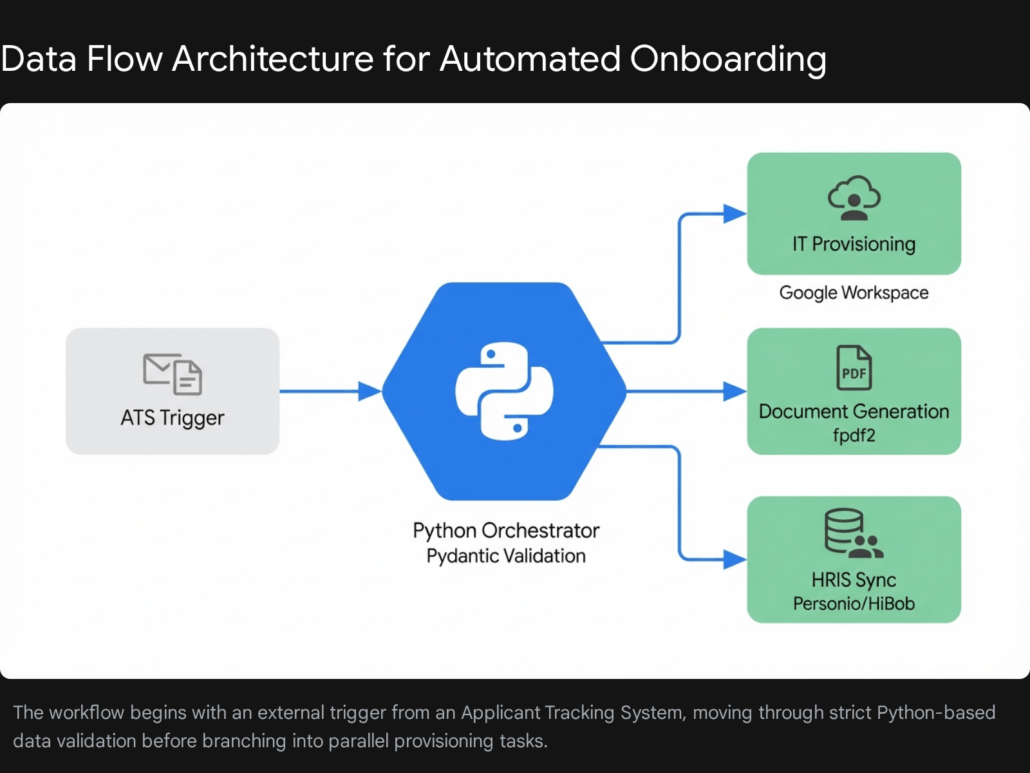
When designing an automation solution, maintaining a modular orchestration architecture is paramount. A monolithic script that attempts to execute all onboarding tasks linearly becomes brittle and difficult to maintain. Instead, the workflow should be broken down into discrete, manageable services orchestrated by a central Python application.
The ideal data flow follows a sequential pattern rooted in the separation of concerns. First, a trigger event occurs, such as a candidate being marked as “Hired” in an ATS like Greenhouse or Workable. This sends a web payload to the Python application. Second, the application rigorously validates and sanitizes the incoming data. Third, the orchestrator triggers a series of API calls: creating the user in the company’s IT directory, generating digital welcome documents, drafting a personalized welcome email using AI, and finally, pushing the normalized data into the central HR Information System (HRIS). Proper orchestration handles API rate limits, orchestrates retries upon failure, and provides real-time monitoring.
Step #1: Establishing Robust Data Validation with Pydantic
Real-world HR data is notoriously messy. Names contain unexpected characters, dates arrive in conflicting formats, and phone numbers are rarely standardized. If unvalidated data is passed directly into an automated pipeline, it will inevitably cause API failures downstream. As the engineering team at Tool1.app often recommends, implementing a strict validation layer is the non-negotiable first step of any data orchestration project.
Pydantic is Python’s most popular data validation library. It utilizes Python’s type hints to validate data, serialize objects, and manage settings. By defining a strict data model, you ensure that every piece of information entering your workflow conforms exactly to your expectations, coercing types automatically where possible.
Consider the following implementation of an employee data model. This script uses Pydantic to enforce data types, validate email formats, and standardize incoming identifiers.
Python
from datetime import date
from pydantic import BaseModel, EmailStr, Field, field_validator
import re

class NewEmployee(BaseModel):
    first_name: str = Field(..., min_length=1)
    last_name: str = Field(..., min_length=1)
    personal_email: EmailStr
    department: str
    job_title: str
    start_date: date
    phone_number: str

    @field_validator('first_name', 'last_name')
    def sanitize_names(cls, v):
        # Strip whitespace and title-case the names
        return v.strip().title()

    @field_validator('phone_number')
    def validate_phone(cls, v):
        # Remove any non-numeric characters for standardization
        cleaned = re.sub(r'D', '', v)
        if len(cleaned) < 10:
            raise ValueError('Phone number must contain at least 10 digits')
        return cleaned

    @property
    def company_email(self) -> str:
        # Generate a standard corporate email address
        clean_first = re.sub(r'[^a-zA-Z]', '', self.first_name).lower()
        clean_last = re.sub(r'[^a-zA-Z]', '', self.last_name).lower()
        return f"{clean_first}.{clean_last}@tool1.app"
In this model, the @field_validator decorators act as security checkpoints. If an ATS sends a name in all lowercase letters or a phone number formatted with varying dashes and parentheses, Pydantic automatically cleans and standardizes the strings. Furthermore, the model dynamically generates the employee’s new corporate email address based on their sanitized name, ensuring formatting consistency across the organization. If the data fails validation, Pydantic raises a comprehensive error detailing exactly which fields are non-compliant, allowing the script to gracefully halt and notify an administrator rather than failing silently halfway through the onboarding process.
Step #2: Automating IT Provisioning via APIs
Once the employee data is validated, the first operational requirement is establishing their digital identity. For most modern enterprises, this means creating an account in either Google Workspace or Microsoft 365. Automating this step eliminates the need for IT administrators to manually navigate admin consoles, type in user details, and generate temporary passwords.
Provisioning a Google Workspace Account
To programmatically create a user in Google Workspace, you must interact with the Google Admin SDK Directory API. This requires setting up a Google Cloud Project, enabling the Admin SDK, creating a Service Account, and configuring Domain-Wide Delegation in the Google Workspace Admin console so the script can impersonate a super administrator.
Once the authentication credentials are secured in a JSON file, the Python script can utilize the google-api-python-client library to push the new user payload.
Python
from google.oauth2 import service_account
from googleapiclient.discovery import build
import secrets
import string

def generate_secure_password(length=16):
    alphabet = string.ascii_letters + string.digits + string.punctuation
    return ''.join(secrets.choice(alphabet) for i in range(length))

def create_google_workspace_user(employee: NewEmployee):
    SCOPES = ['https://www.googleapis.com/auth/admin.directory.user']
    SERVICE_ACCOUNT_FILE = 'credentials.json'
    ADMIN_EMAIL = 'admin@yourdomain.com'

    # Authenticate using domain-wide delegation
    creds = service_account.Credentials.from_service_account_file(
        SERVICE_ACCOUNT_FILE, scopes=SCOPES)
    delegated_creds = creds.with_subject(ADMIN_EMAIL)

    service = build('admin', 'directory_v1', credentials=delegated_creds)

    temp_password = generate_secure_password()

    user_info = {
        "primaryEmail": employee.company_email,
        "name": {
            "givenName": employee.first_name,
            "familyName": employee.last_name
        },
        "password": temp_password,
        "changePasswordAtNextLogin": True,
        "organizations":
    }

    try:
        user = service.users().insert(body=user_info).execute()
        print(f"Successfully provisioned Google Workspace account for {employee.company_email}")
        return temp_password
    except Exception as e:
        print(f"Failed to create user: {str(e)}")
        # Logic to handle HTTP 409 Conflict if user already exists
        return None
This function not only creates the user but also utilizes Python’s built-in secrets module to generate a cryptographically secure temporary password. By setting changePasswordAtNextLogin to True , the script enforces enterprise security best practices, ensuring that the IT department never permanently holds the user’s credentials.
Provisioning a Microsoft 365 Account
For organizations utilizing Microsoft infrastructure, the approach is fundamentally similar but leverages the Microsoft Graph API. After registering an application in Microsoft Entra ID (formerly Azure AD) and obtaining the necessary Application Permissions —specifically User.ReadWrite.All or Directory.ReadWrite.All depending on the environment—a Python script can construct a POST request to the Graph API endpoints.
The payload for Microsoft Graph requires specifying a passwordProfile and assigning a userPrincipalName mapped to a verified domain within the tenant. Additionally, the accountEnabled boolean must be explicitly set to true. Both the Google and Microsoft APIs return a comprehensive JSON response confirming the account creation , which your orchestrator script can log for audit and compliance purposes. It is also important to note that federated users created via this API are forced to sign in every 12 hours by default, an element that can be adjusted via token lifetime exceptions.
Step #3: Generating Standardized PDF Welcome Documents
Despite the shift toward digital workflows, structured documentation remains a cornerstone of the onboarding process. Employees expect to receive official welcome letters, benefits summaries, and policy acknowledgments. Generating these documents manually by duplicating Word templates is incredibly inefficient and prone to formatting errors.
Python excels at document generation through lightweight libraries such as fpdf2. As a dependency-free library ported from PHP, fpdf2 allows developers to programmatically draw text, images, and shapes onto a blank PDF canvas, creating pixel-perfect corporate documents that are automatically populated with the new hire’s data. It offers advanced features like Unicode (UTF-8) font embedding, table creation, and HTML to PDF conversions.
Python


from fpdf import FPDF

class WelcomeLetterPDF(FPDF):
    def header(self):
        # Insert corporate logo and header styling
        # self.image('corporate_logo.png', 10, 8, 33)
        self.set_font('helvetica', 'B', 15)
        self.cell(80)
        self.cell(30, 10, 'Official Welcome Document', border=0, align='C')
        self.ln(20)

    def footer(self):
        # Standard corporate footer with pagination
        self.set_y(-15)
        self.set_font('helvetica', 'I', 8)
        self.cell(0, 10, f'Page {self.page_no()}', 0, 0, 'C')

def generate_welcome_pdf(employee: NewEmployee):
    pdf = WelcomeLetterPDF()
    pdf.add_page()
    pdf.set_font('helvetica', size=12)

    # Constructing the document body
    date_str = date.today().strftime("%B %d, %Y")

    content = (
        f"Date: {date_str}nn"
        f"Dear {employee.first_name} {employee.last_name},nn"
        f"We are thrilled to officially welcome you to the team as our new {employee.job_title} "
        f"within the {employee.department} department.nn"
        f"Your official start date is scheduled for {employee.start_date.strftime('%B %d, %Y')}. "
        f"Enclosed within this digital package, you will find comprehensive guides regarding "
        f"company policies, your new IT credentials, and an itinerary for your first week.nn"
        f"Your new corporate email address is: {employee.company_email}nn"
        f"We look forward to achieving great things together.nn"
        f"Sincerely,n"
        f"The Human Resources Team"
    )

    pdf.multi_cell(0, 10, content)
    file_name = f"Welcome_Letter_{employee.last_name}_{employee.first_name}.pdf"
    pdf.output(file_name)
    return file_name
The power of this approach lies in its scalability. If your company processes fifty new hires a month, this script generates fifty distinctly personalized, perfectly formatted PDFs in a matter of seconds. Through our custom software development services at Tool1.app, we have seen clients combine fpdf2 with HTML-to-PDF converters like WeasyPrint or headless browsers via Playwright to transform complex, heavily styled web templates directly into compliance-ready PDF packets that match strict corporate branding guidelines.
Step #4: Enhancing the Experience with AI Personalization
While standard templates are efficient, they often lack warmth. The modern onboarding experience can be significantly elevated by integrating Large Language Models (LLMs) into the Python workflow. Instead of sending a robotic, boilerplate email containing the PDF and IT credentials, you can utilize the OpenAI API to dynamically generate a personalized welcome message based on the employee’s specific role and department.
By passing a structured prompt to an LLM, the system can output highly contextualized communication. For instance, a software engineer might receive an email highlighting the company’s tech stack and an invitation to join the engineering Slack channels, while a sales representative might receive a message focusing on the upcoming quarterly kickoff and CRM training schedules.
Python
from openai import OpenAI

def draft_welcome_email(employee: NewEmployee) -> str:
    client = OpenAI(api_key="your_environment_variable_here")

    prompt = (
        f"Draft a warm, professional welcome email for a new hire named {employee.first_name}. "
        f"They are joining the {employee.department} department as a {employee.job_title}. "
        f"Mention their start date is {employee.start_date}. Keep the tone enthusiastic but corporate. "
        f"Do not include placeholders, output the final email text directly."
    )

    response = client.chat.completions.create(
        model="gpt-4",
        messages=,
        temperature=0.7
    )

    return response.choices.message.content
This integration represents a paradigm shift. It demonstrates how routine administrative tasks can be infused with highly personalized, human-centric touchpoints through careful automation. The generated email body, combined with the temporary IT credentials and attached PDF document, can then be programmatically dispatched via a transactional email service like SendGrid, Amazon SES, or directly via the Microsoft Graph/Google APIs.
Step #5: Synchronizing Data to the HR Portal via API
The final, and arguably most critical, component of the automated workflow is ensuring that the central HR Information System is perfectly synchronized. The HRIS serves as the single source of truth for payroll, performance management, and organizational hierarchy. Disconnected systems lead to shadow data, where the IT directory reflects one reality and the HR platform reflects another.
Modern HR platforms such as Personio, BambooHR, and HiBob provide robust RESTful APIs designed specifically for integration. Pushing the validated employee data into these systems typically involves authenticating via OAuth 2.0 or an API key, formatting the data into a specific JSON schema, and executing a POST request.
Example: Syncing with the Personio API
Personio, a prominent HR platform in Europe, utilizes an OAuth 2.0 authentication flow. To create a new employee, you must first exchange a Client ID and Client Secret for an access token, and then POST the employee data to the /v2/persons endpoint.
Python
import requests

def sync_to_personio(employee: NewEmployee, client_id: str, client_secret: str):
    auth_url = "https://api.personio.de/v2/auth/token"

    # Step 1: Obtain OAuth Access Token
    auth_response = requests.post(auth_url, data={
        "grant_type": "client_credentials",
        "client_id": client_id,
        "client_secret": client_secret
    }, headers={"accept": "application/json"})

    if auth_response.status_code!= 200:
        raise Exception("Failed to authenticate with Personio API")

    access_token = auth_response.json().get("access_token")

    # Step 2: Push Employee Data
    persons_url = "https://api.personio.de/v2/persons"

    payload = {
        "first_name": employee.first_name,
        "last_name": employee.last_name,
        "email": employee.company_email,
        "gender": "UNKNOWN", # Standardized fallback if not collected
        "employments": [
            {
                "hire_date": employee.start_date.isoformat(),
                "position": employee.job_title,
                "department": employee.department
            }
        ]
    }

    headers = {
        "accept": "application/json",
        "content-type": "application/json",
        "Authorization": f"Bearer {access_token}"
    }

    response = requests.post(persons_url, json=payload, headers=headers)

    if response.status_code == 201:
        print("Employee successfully synchronized to Personio.")
        return response.json()
    else:
        print(f"Sync failed: {response.text}")
        return None
When integrating with these platforms, it is crucial to consult the respective API documentation regarding mandatory fields. For instance, the HiBob API requires the email, firstName, surname, and specific objects within a work table (specifically site and startDate) to create a profile. BambooHR relies on HTTP Basic Authentication using an API key and accepts payloads via their /api/v1/employees/directory endpoint.
By centralizing the data push through Python, you ensure that every platform—from IT to HR to Payroll—is updated simultaneously, completely eliminating the lag time and data fragmentation that plague manual onboarding.
Navigating Security, Privacy, and GDPR Compliance
When building integrations that handle Personally Identifiable Information (PII) such as names, personal email addresses, and phone numbers, security and compliance cannot be an afterthought. In European markets, adherence to the General Data Protection Regulation (GDPR) is a strict legal requirement. Automating HR workflows actually enhances compliance by reducing the number of human touchpoints where data could be inadvertently exposed, mishandled, or left on unsecured physical desks.
Secret Management and Environment Variables
Never hardcode API keys, client secrets, or administrative passwords directly into your Python scripts. Hardcoded secrets are easily exposed if the codebase is committed to a version control repository. The industry standard is to utilize environment variables. Libraries such as python-dotenv allow you to store sensitive credentials in a local .env file during development and inject them into the application’s environment at runtime. In production environments, these should be managed by dedicated secret managers, such as AWS Secrets Manager or Google Cloud Secret Manager.
Data Minimization and Legal Safeguards
Under Article 6 of the GDPR, organizations must establish a lawful basis for processing personal data and practice data minimization—only processing the data strictly necessary for the intended purpose. Python scripts enforce this by design. Unlike an HR employee who might download an entire spreadsheet of candidate data to find one email address, an API integration only queries and transmits the exact payload required. Furthermore, when APIs utilize HTTPS protocols, all employee data is securely encrypted in transit, fulfilling the regulatory requirement for strong cybersecurity measures.
Automated pipelines also simplify the process of granting data subject requests. When an employee exercises their “right to erasure” or “right to access” under GDPR, a centralized, programmatic system makes it far easier to locate and modify their records compared to hunting through siloed spreadsheets and paper files.
Infrastructure Economics: Local vs. Serverless Execution
When deploying these Python scripts, organizations must decide between maintaining local infrastructure, deploying containers, or utilizing serverless cloud functions. For event-driven, intermittent tasks like employee onboarding, Serverless architecture is vastly superior.
Platforms like AWS Lambda or Google Cloud Functions allow you to deploy your Python scripts without managing any underlying servers. The script only runs when triggered by an external event, such as an incoming webhook from your ATS. Furthermore, the financial economics of serverless computing are highly advantageous for intermittent HR tasks.
Serverless Execution Cost Comparison for Automation Scripts
| Feature | AWS Lambda | Google Cloud Functions |
|---|---|---|
| Free Tier Limits | 1M free requestsper month400,000 GB-secondsof compute time per month | 2M free requestsper month180,000 vCPU-seconds&360,000 GB-secondsper month |
| Compute Pricing | $0.0000166667per GB-second(Includes CPU and memory) | $0.00002400per vCPU-second (CPU)$0.00000250per GB-second (memory)$0.40per 1M requests |
| Additional Charges | $0.09per GB outbound data transfer | $0.12per GB outbound data transfer |
Serverless architectures like AWS Lambda and Google Cloud Functions charge strictly based on execution time and memory allocation. Both platforms offer generous free tiers that easily cover the execution volume required for standard enterprise HR onboarding workflows, rendering the hosting costs virtually negligible.
In AWS Lambda, compute pricing is heavily fractionated. Pricing is calculated based on the number of requests and the duration it takes for the code to execute, rounded up to the nearest millisecond. At approximately €0.000015 per GB-second, and with a generous free tier of one million requests per month, the costs are minimal. Google Cloud Functions operates similarly, charging around €0.000022 per vCPU-second and €0.000002 per GB-second, while offering a free tier of two million requests.
This means that running a comprehensive onboarding script that takes a few seconds to validate data, call APIs, and generate PDFs will cost a fraction of a cent per new hire. By offloading execution to the cloud, you ensure scalability, high availability, and built-in logging mechanisms to track the success or failure of your workflow runs without the overhead of maintaining a virtual machine.
Common Pitfalls and How to Avoid Them
While the technological capabilities of Python are vast, digital transformation initiatives frequently stumble due to organizational missteps. When implementing HR automation, experts warn against several common pitfalls:
Automating Broken Processes: One of the most critical mistakes companies make is attempting to automate a highly inefficient or convoluted workflow. If your current onboarding process requires five unnecessary layers of managerial approval, writing a Python script to execute those five layers merely speeds up a broken system. Streamline and optimize the logical flow of your processes before writing a single line of code. Ignoring the Human Touch: Automation should handle the repetitive, administrative burdens, but it cannot replace the necessity of human connection. While AI can draft an introductory email and an API can provision a laptop, establishing culture and providing mentorship require human interaction. Over-automation that feels overly robotic can isolate new hires and increase early turnover. Failing to Secure Employee Buy-In: Resistance to change is a natural human reaction. If HR teams feel that automation tools are implemented to threaten their job security rather than assist them, adoption will fail. It is crucial to clearly communicate that automation is a strategic tool designed to free up their time for higher-level, strategic contributions.
Transitioning from Administration to Strategy
The landscape of human resources is undergoing a fundamental shift. The administrative burdens of the past are rapidly becoming the automated workflows of the present. By leveraging Python to orchestrate the onboarding journey, companies eliminate friction, drastically reduce operational costs, and secure their sensitive employee data behind robust validation layers.
More importantly, automating these foundational processes respects the time and dignity of both the HR staff and the new employee. An IT account provisioned instantly, an accurate payroll profile configured flawlessly, and a personalized welcome letter generated seamlessly communicate organizational excellence. It signals to new hires that they have joined a company that values efficiency and innovation.
Reclaim Your Time with Custom HR Automation
The hidden costs of manual data entry, administrative delays, and disconnected systems are quietly draining your company’s resources and negatively impacting your employee experience. You do not have to settle for inefficient, paper-based workflows in a digital age. Save hours of manual admin work. Let Tool1.app automate your company’s business processes. Reach out to our expert development team at Tool1.app today to discuss how a tailored Python automation pipeline can transform your HR operations, integrate seamlessly with your existing tech stack, and scale effortlessly with your growing business.








Leave a Reply
Want to join the discussion?Feel free to contribute!
Join the Discussion
To prevent spam and maintain a high-quality community, please log in or register to post a comment.