

Automating Complex PDF Data Extraction using Python and Vision Models: A Comprehensive Research Report
Table of Contents
- The End of the OCR Era
- The Economics of VLM Extractio
- The Technical Stack: Building the "Tool1.app" Engine
- Technical Implementation: A Step-by-Step Guide
- Advanced Use Cases: Where Simple Extraction Fail
- Architecture & Scalability: Moving to Production
- Quality Assurance & Human-in-the-Loop (HITL)
- Compliance & Security: GDPR and HIPAA
- Future Trends: From Extraction to Agents
- Conclusion
- Show all

The End of the OCR Era
For over three decades, the promise of the “paperless office” has been thwarted by a single, persistent bottleneck: the inability of computers to truly read documents. We have digitized everything, scanning billions of pages into PDF format, yet the data within them remains trapped—entombed in pixels, inaccessible to the SQL databases and APIs that run modern enterprise.
At Tool1.app, we have spent years wrestling with this problem. We have written thousands of lines of regular expressions (Regex) to catch invoice numbers that drift three pixels to the left. We have trained custom Tesseract models that break whenever a vendor changes their font. We have utilized expensive, proprietary “Intelligent Document Processing” (IDP) suites that promise the world but fail on a coffee-stained receipt.
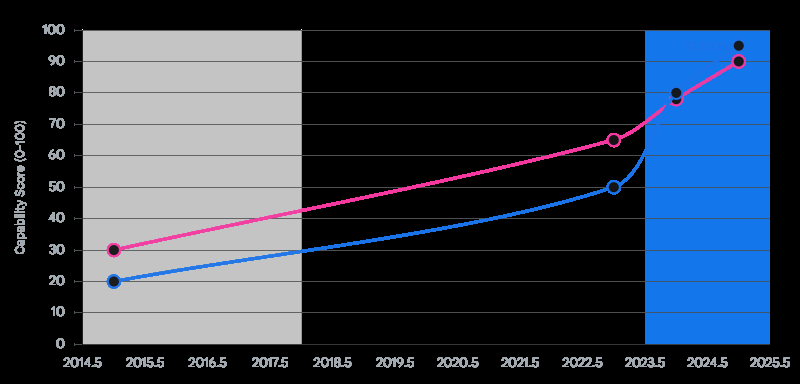
The era of brittle, template-based extraction is over. We are currently witnessing a paradigm shift driven by the emergence of Vision Language Models (VLMs). These are not merely “better OCR” engines; they represent a fundamental change in how machines process visual information. Unlike traditional Optical Character Recognition (OCR), which mechanically translates pixel clusters into characters without understanding, VLMs like Google’s Gemini 1.5 Flash, Gemini 2.0 Flash, and OpenAI’s GPT-4o possess semantic visual reasoning. They do not just see text; they see context. They understand that a number at the bottom of a column is a “total” not because of its coordinates, but because of its spatial relationship to the line items above it.
This report serves as the definitive technical manual for software engineers, data scientists, and technical leaders who wish to automate PDF extraction using Python and these new vision capabilities. We will dismantle the old workflows, construct a new “Vision-First” architecture, and provide the production-grade code necessary to deploy these systems at scale.
The Legacy Bottleneck
To appreciate the solution, we must diagnose the failure of the incumbents. Traditional pipelines typically look like this:
- OCR Layer (e.g., Tesseract, AWS Textract): Converts images to raw text and bounding boxes.
- Layout Analysis: Heuristic algorithms try to group text into paragraphs, tables, or columns based on whitespace.
- Extraction Logic: Python scripts use Regex or coordinate-based rules (e.g., “Find the word ‘Total’ and take the number 50 pixels to the right”) to parse data.
This approach is fragile. If a scanned document is rotated by 2 degrees, the coordinates shift. If a table has invisible borders, the layout analyzer fails. Maintaining these rules for hundreds of different vendor templates becomes a full-time engineering crisis. This is the “Technical Debt Trap” of document processing.
The VLM Breakthrough
VLMs bypass the layout analysis and rule-writing stages entirely. When we pass an image of a document to a model like Gemini 2.0 Flash, the model processes the image holistically. It encodes the visual features (lines, bold text, handwriting, logos) into the same semantic space as the text.
This allows us to write prompts like: “Extract the invoice number. If it is handwritten in the margin, prioritize that over the printed number.” The model executes this reasoning visually, just as a human would. This capability—multimodal reasoning—is what allows us to automate complex PDF extraction with Python in ways that were impossible just two years ago.
The Economics of VLM Extractio
A primary objection to using Large Language Models (LLMs) for high-volume data processing has historically been cost. In 2023, processing a single page with GPT-4 Vision could cost upwards of $0.04. For a logistics company processing 100,000 bills of lading per month, this would amount to $4,000 in API costs alone—often exceeding the cost of offshore manual data entry.
However, the landscape has shifted dramatically in the 2024-2026 period. We have entered the era of the “Flash” class models—highly efficient, lower-parameter models optimized for high-throughput tasks like extraction.
The “Race to Zero” in Token Costs
The introduction of Google’s Gemini 1.5 Flash and Gemini 2.0 Flash has democratized VLM extraction.
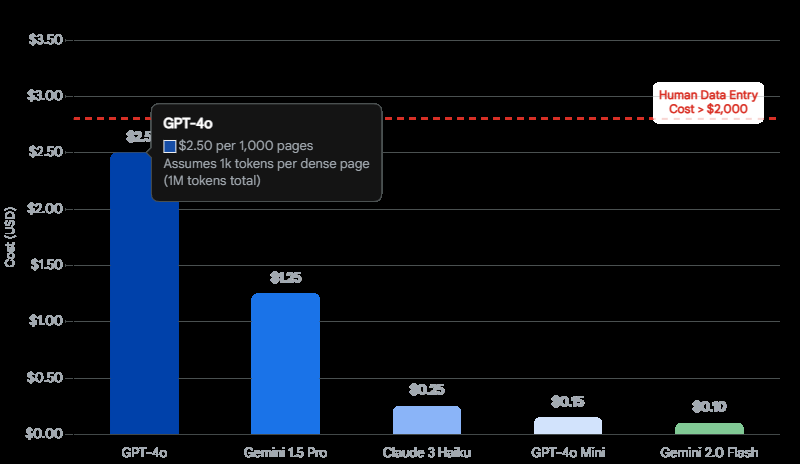
- Gemini 2.0 Flash pricing has reached lows of $0.10 per million input tokens.
- To put this in perspective: A standard letter-sized PDF page, when converted to an image at adequate resolution (e.g., 1024×1024 pixels), consumes roughly 258 to 1,000 tokens depending on the specific tokenization of the vision encoder.
- At ~1,000 tokens per page, 1 million tokens equals 1,000 pages.
- Therefore, the cost to “read” a page with state-of-the-art vision is approximately $0.0001 per page.
This effectively drives the marginal cost of intelligence to zero for this use case. It is now significantly cheaper to have an AI read a page than to pay a human even one second of minimum wage.
GPT-4o vs. Gemini: The Trade-off
While Google leads on price, OpenAI’s GPT-4o remains a heavyweight contender.
- GPT-4o Pricing: At roughly $2.50 per million input tokens, it is approximately 25x more expensive than Gemini 2.0 Flash.
- The Utility Gap: For 90% of documents (standard invoices, forms, receipts), Gemini Flash provides accuracy indistinguishable from GPT-4o. The visual fidelity and instruction following are sufficient.
- When to Pay the Premium: We recommend GPT-4o (or Anthropic’s Claude 3.5 Sonnet) for use cases requiring intense reasoning or extremely poor quality inputs. For example, deciphering faint, historical handwriting or interpreting complex engineering diagrams where the model must “deduce” the function of a component based on visual symbology.
ROI Calculation
For a Tool1.app client implementing this solution, the ROI is often realized within the first month.
- Manual Entry: A human operator might process 20 complex invoices per hour. At $20/hour (fully loaded), that is $1.00 per invoice.
- VLM Automation: Using Python + Gemini Flash, the compute + API cost is <$0.01 per invoice. Even adding a “Human in the Loop” (HITL) review for 10% of low-confidence documents, the blended cost drops to ~$0.11 per invoice.
- Speed: Machines work 24/7 with infinite concurrency. A backlog of 5,000 documents that would take a human team weeks can be cleared in minutes.
The Technical Stack: Building the “Tool1.app” Engine
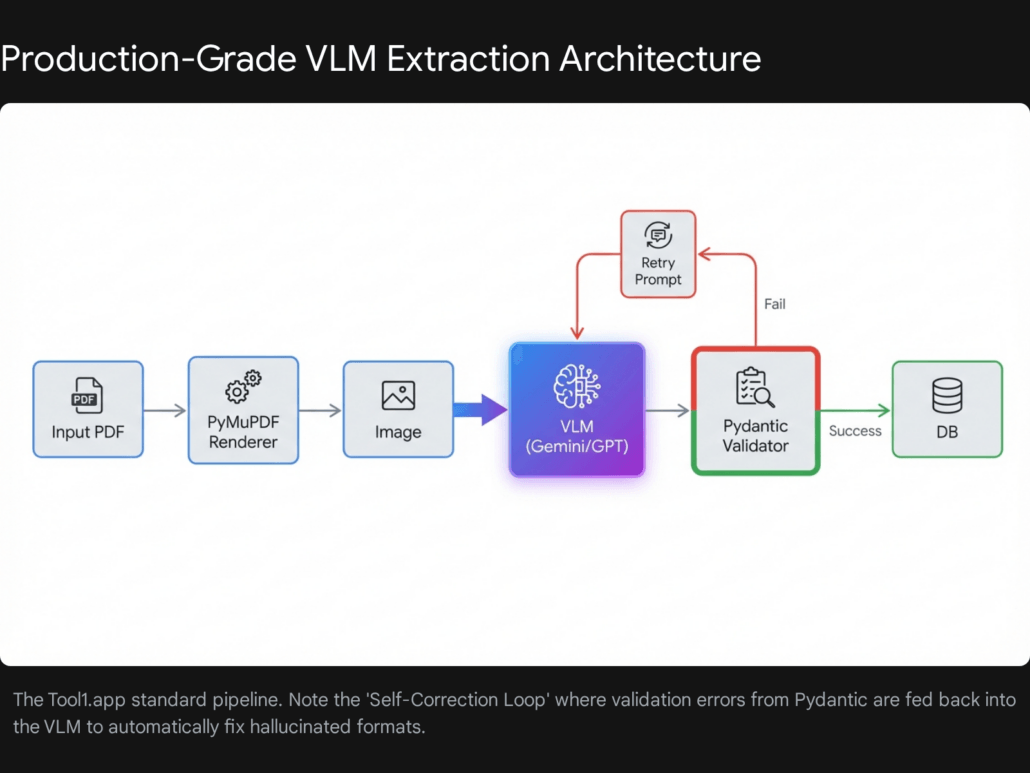
To build a system that is robust enough for enterprise data, we cannot simply write a script that calls an API and hopes for the best. We need a production-grade stack that handles ingestion, rendering, processing, and validation. Here is the reference architecture we use at Tool1.app.
The Core Components
Our stack is built on Python, leveraging its rich ecosystem for data manipulation and API integration.
1. Ingestion & Rendering: PyMuPDF (fitz)
Before a VLM can “see” a PDF, it must be converted into an image. We standardize on PyMuPDF (the Python binding for MuPDF).
- Performance: Benchmarks show PyMuPDF renders pages in ~800ms compared to 10s+ for
pdf2image(which relies on Poppler). Speed is critical when processing millions of pages. - Fidelity: It allows precise control over the transformation matrix, enabling us to set the exact DPI (Dots Per Inch) of the output image. This is crucial—too low, and the VLM misses decimal points; too high, and we waste tokens and hit file size limits.
2. The Semantic Brain: Gemini 1.5/2.0 Flash & GPT-4o
We maintain a “Model Router” design.
- Default Route: Gemini 2.0 Flash for 95% of standard traffic (Invoices, Receipts, Forms).
- Fallback/Complex Route: GPT-4o or Claude 3.5 Sonnet for documents that fail validation or require handwriting analysis.
3. The Guardrails: Pydantic & Instructor
This is the secret sauce. VLMs are probabilistic—they can “hallucinate” data. We need them to be deterministic.
- Pydantic: Allows us to define rigorous data schemas in Python. We don’t just ask for “Date”; we ask for a string that matches the Regex
^d{4}-d{2}-d{2}$. - Instructor: A library that patches the OpenAI/Google clients to handle the “function calling” or “structured output” modes. It manages the complexities of forcing the model to output valid JSON that matches our Pydantic schema. If the model outputs invalid JSON, Instructor can automatically feed the error back to the model and ask for a correction.
Technical Implementation: A Step-by-Step Guide
In this section, we will walk through the code required to build this pipeline. We will simulate a real-world scenario: Extracting line-item data from mixed-format Logistics Invoices.
Environment Setup
First, ensure your Python environment is ready. We recommend Python 3.10+ for better type hinting support.
Bash
pip install pymupdf instructor openai google-generativeai pydantic pillow tenacity
Step #1: High-Fidelity Rendering
The quality of the extraction is directly dependent on the quality of the input image. We need to render the PDF pages into high-resolution images encoded as Base64 strings.
The “Goldilocks” Resolution: Through extensive testing at Tool1.app, we have found that 300 DPI is the sweet spot.
- OpenAI GPT-4o Limitation: Note that OpenAI often resizes images so the shortest side is 768px. Sending a 4000px image is wasteful because they will downscale it, potentially introducing artifacts.
- Gemini Advantage: Gemini handles higher resolutions (up to ~3000px) more gracefully, making it superior for dense documents.
Here is our robust rendering function using pymupdf (fitz):
Python


import fitz  # PyMuPDF
import base64
from PIL import Image
import io
from typing import List

def pdf_to_base64_images(pdf_path: str, zoom_x: float = 2.0, zoom_y: float = 2.0) -> List[str]:
    """
    Converts a PDF into a list of base64 encoded strings.

    Args:
        pdf_path: Path to the PDF file.
        zoom_x, zoom_y: Scaling factors. 2.0 roughly doubles resolution (72 -> 144 DPI).
                        For 300 DPI, we typically use zoom factors around 4.16 (300/72).

    Returns:
        List of base64 encoded image strings.
    """
    # 300 DPI calculation: 300 / 72 (default PDF point size) = 4.166
    target_zoom = 300 / 72
    mat = fitz.Matrix(target_zoom, target_zoom)

    doc = fitz.open(pdf_path)
    images =

    for page_num in range(len(doc)):
        page = doc.load_page(page_num)

        # Render to pixmap with high resolution
        pix = page.get_pixmap(matrix=mat, alpha=False)

        # Convert to standard PNG bytes
        img_data = pix.tobytes("png")

        # Optimize with PIL if necessary (optional compression)
        # img = Image.open(io.BytesIO(img_data))
        # buffer = io.BytesIO()
        # img.save(buffer, format="PNG", optimize=True)
        # img_data = buffer.getvalue()

        # Encode to base64
        base64_str = base64.b64encode(img_data).decode("utf-8")
        images.append(base64_str)

    doc.close()
    return images
Step #2: Defining the Strict Schema
This is where we define the “contract” for our data. Using pydantic, we can enforce types, descriptions, and even validation rules.
Python
from pydantic import BaseModel, Field, validator
from typing import List, Optional
import datetime

class LineItem(BaseModel):
    description: str = Field(..., description="Full description of the good or service")
    quantity: float = Field(..., description="Count of units")
    unit_price: float = Field(..., description="Price per individual unit")
    total: float = Field(..., description="Total line item amount (quantity * unit price)")

    @validator('total')
    def check_math(cls, v, values):
        """Self-correcting validator: ensure math checks out roughly."""
        if 'quantity' in values and 'unit_price' in values:
            calc = values['quantity'] * values['unit_price']
            # Allow for small rounding errors
            if abs(v - calc) > 0.05:
                # In a real system, we might flag this or log a warning
                pass
        return v

class InvoiceSchema(BaseModel):
    vendor_name: str = Field(..., description="Name of the vendor issuing the invoice")
    invoice_number: str = Field(..., description="Unique invoice identifier")
    date: str = Field(..., description="Invoice date in YYYY-MM-DD format")
    line_items: List[LineItem] = Field(..., description="List of all billable items")
    subtotal: float = Field(..., description="Sum of line items before tax")
    tax_amount: float = Field(0.0, description="Total tax amount")
    grand_total: float = Field(..., description="Final total amount due")
    currency: str = Field("USD", description="Currency code (USD, EUR, GBP, etc.)")

    class Config:
        # This helps the LLM understand we want strict adherence
        description = "Schema for extracting structured data from logistics invoices."
Step #3: The Orchestrator (Using Instructor)
Now we wire it all together. We will use instructor to manage the interaction with the VLM. This example uses OpenAI’s client structure, which instructor patches, but can easily be adapted for Gemini via the google-generativeai SDK or by using instructor‘s provider agnostic features.
Python
import instructor
from openai import OpenAI
import os
from tenacity import retry, stop_after_attempt, wait_exponential

# Initialize client patched with instructor
# Ensure OPENAI_API_KEY is set in environment variables
client = instructor.from_provider(OpenAI())

@retry(stop=stop_after_attempt(3), wait=wait_exponential(multiplier=1, min=2, max=10))
def extract_invoice_data(base64_image: str) -> InvoiceSchema:
    """
    Extracts invoice data from a base64 image using GPT-4o.
    Includes retry logic for transient API errors.
    """
    response = client.chat.completions.create(
        model="gpt-4o", # Can swap for "google/gemini-flash-1.5" with appropriate setup
        response_model=InvoiceSchema,
        messages=
            }
        ],
        max_tokens=4000,
        temperature=0.0 # Deterministic output
    )
    return response

# Execution Example
if __name__ == "__main__":
    # 1. Render
    print("Rendering PDF...")
    images = pdf_to_base64_images("sample_invoice.pdf")

    # 2. Extract
    print(f"Extracting data from {len(images)} pages...")
    # For simplicity, processing just the first page here.
    # Real-world use requires multi-page logic (see Section 6.1).
    try:
        data = extract_invoice_data(images)
        print("Extraction Success!")
        print(data.model_dump_json(indent=2))
    except Exception as e:
        print(f"Extraction Failed: {e}")
This compact block of code replaces the thousands of lines of fragile template logic found in legacy systems. It is type-safe, validated, and inherently flexible. If the vendor moves the “Total” box to the top of the page, this code still works without modification.
Advanced Use Cases: Where Simple Extraction Fail
While the code above works for 80% of documents, the remaining 20% are the “edge cases” that define enterprise reality. At Tool1.app, we have developed specific strategies for these challenges.
Multi-Page Documents
Invoices often span multiple pages. The “Grand Total” might be on Page 3, while the “Invoice Number” is on Page 1.
- The Problem: VLMs are stateless. If you send Page 2 alone, it might not know who the vendor is.
- The Solution: Context Carry-Over or Map-Reduce.
- Context Carry-Over: We can modify our schema to allow
Optionalfields. We process pages sequentially. If Page 1 finds theinvoice_number, we pass that as context to the prompt for Page 2 (“Here is the data found so far:…”). - Map-Reduce: Process all pages in parallel to extract
LineItemsfrom each. Then, a final “Reducer” call (LLM or Python script) aggregates the lists and finds the singleGrandTotal.
- Context Carry-Over: We can modify our schema to allow
Complex Tables and Nested Headers
Financial statements often use “implied” headers or nested columns that confuse standard extractors.
- The Problem: A column header “2024” might span three sub-columns (“Q1”, “Q2”, “Q3”). A standard parser sees 4 columns but only 2 headers.
- The Solution: Markdown Intermediate Representation.
- LLMs are trained on massive amounts of Markdown. They “understand” Markdown tables natively.
- Instead of asking directly for JSON, we ask the model to first “Transcribe the table into a Markdown string” and then parse that string into JSON. This “Chain of Thought” forces the model to structurally organize the data before committing to the strict JSON schema.
Engineering Drawings and Blueprints
This is the frontier of VLM capability. Extracting data from Piping and Instrumentation Diagrams (P&IDs) or architectural floor plans.
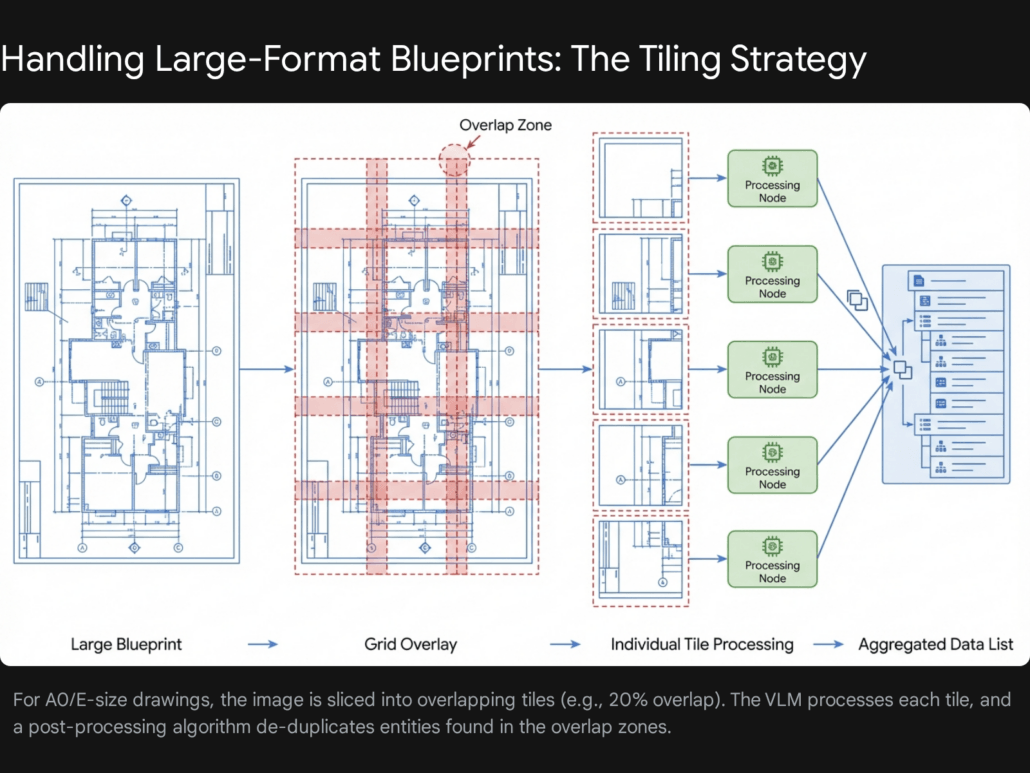
- The Challenge: Resolution. A blueprint is often 36×48 inches. Shrinking it to 1024px erases all the text.
- The Strategy: Tiling.
- We slice the large PDF page into a grid of overlapping tiles (e.g., 3×3 grid with 20% overlap).
- We send each tile to the VLM with a prompt: “Identify all valves and their ID tags.”
- De-duplication: We must implement logic to handle objects that appear in the overlap zones so they aren’t counted twice. This requires coordinate transformation (mapping tile coordinates back to global page coordinates).
Architecture & Scalability: Moving to Production
A Python script on a laptop is not a product. To process thousands of documents per hour, we need a scalable cloud architecture.
Serverless Event-Driven Architecture
We recommend a serverless approach using AWS Lambda or Google Cloud Functions. This architecture scales to zero (costing nothing) when idle and scales up instantly for batch jobs.
The Workflow:
- Trigger: A PDF is uploaded to an S3 Bucket (
/input). - Orchestrator (Step Functions): Detects the upload and triggers the workflow.
- Splitter Lambda: Downloads the PDF, uses
pymupdfto split it into individual page images, and saves them to S3 (/pages). - Processor Lambdas (Fan-Out): Hundreds of Lambda functions trigger in parallel, one for each page image. They call the VLM API (Gemini/GPT-4o) and return the JSON segment.
- Aggregator Lambda: Collects all page JSONs, merges them, validates the final result, and writes to the Database (DynamoDB or PostgreSQL).
Database Strategy
- NoSQL (DynamoDB/MongoDB): Ideal for storing the raw extracted JSON. Documents vary, and a rigid SQL schema can be restrictive during the initial extraction phase.
- SQL (PostgreSQL): Ideal for the refined data. After extraction, we often normalize the data (e.g., matching the “Vendor Name” to our internal Vendor Master ID) and store it in relational tables for analytics.
Quality Assurance & Human-in-the-Loop (HITL)
No AI model is 100% accurate. A production system must have a strategy for failure.
Confidence Scores
Most VLM APIs (unlike traditional OCR) do not strictly provide “confidence scores” for every token generated in JSON mode.
- Proxy Metrics: We can use logprobs (if available, e.g., on GPT-4o text completions) to estimate certainty.
- Validation Failures: The most reliable “confidence” metric is the Pydantic validation. If the model output fails our regex checks or math checks (e.g.,
subtotal + tax!= total), we treat that as “Low Confidence” and flag it for review.
The HITL Interface
When a document is flagged (e.g., “Math check failed”), it must be routed to a human.
- UI Design: The human needs to see the original PDF on the left and the extracted data form on the right.
- Bounding Boxes: Advanced implementations ask the VLM to return “bounding boxes” (coordinates) for extracted fields. This allows the UI to highlight where on the page the model found the “Total”, speeding up human review. Note that getting accurate bounding boxes from current VLMs requires specific prompting (e.g., “Return the bbox [y_min, x_min, y_max, x_max] for every field”) and is not always pixel-perfect.
Compliance & Security: GDPR and HIPAA
Handling invoices and contracts often involves Personally Identifiable Information (PII). When using cloud-based VLMs, security is paramount.
Data Privacy Agreements
Before sending data to OpenAI or Google, enterprises must sign Business Associate Agreements (BAA) (for HIPAA) or verify data processing addendums (for GDPR).
- Zero Retention: Ensure you have opted out of data training. By default, consumer interfaces (like ChatGPT) may use data for training, but Enterprise APIs typically do not. Verify this explicitly.
PII Redaction Pattern
For ultra-sensitive data, we implement a “Redaction Layer” before the VLM.
- Local OCR: Run a lightweight local OCR (Tesseract) on the image.
- PII Detection: Use a library like Microsoft’s Presidio to identify SSNs, Names, or Credit Card numbers in the text stream.
- Masking: Draw black boxes over those coordinates on the image.
- Send to Cloud: Send the redacted image to the VLM. The VLM extracts the structure (layout, non-sensitive data) without ever seeing the secret data.
Future Trends: From Extraction to Agents
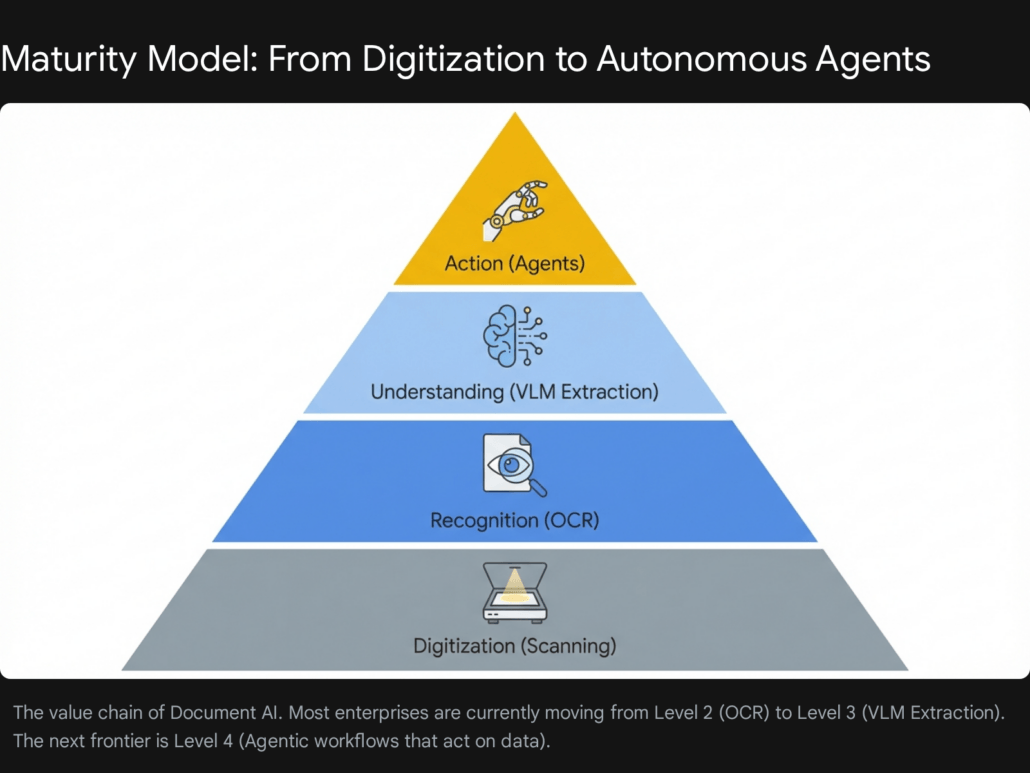
The technology described in this report represents the cutting edge of 2026, but the field is moving fast. The next evolution is the shift from Extraction (Reading) to Action (Doing).
We are moving towards Agentic Workflows. Instead of just extracting an invoice into a database, an AI Agent will:
- Read the invoice.
- Log into the ERP system via API.
- Match the invoice against the original Purchase Order.
- If they match, approve the payment.
- If they don’t, draft an email to the vendor asking for clarification.
The Python extraction pipeline we built today is the sensory organ for these future agents. It provides the structured data they need to reason and act.
Conclusion
Automating complex PDF extraction is no longer a research problem; it is an engineering problem. The tools—Python, PyMuPDF, Pydantic, and Vision Models like Gemini Flash—are mature, accessible, and economically viable.
The days of writing regex for every new vendor template are over. By adopting a VLM-based architecture, organizations can build resilient, scalable extraction pipelines that adapt to change rather than breaking under it.
At Tool1.app, we are pioneering these architectures for clients across logistics, finance, and healthcare. If you are ready to turn your “dark data” into actionable insights, the code and strategies outlined in this report are your starting point.
Ready to automate your document workflows? Our engineering team at Tool1.app specializes in building bespoke VLM pipelines that handle the messy reality of enterprise data. Contact us today to discuss your use case and stop wrestling with PDFs.







Leave a Reply
Want to join the discussion?Feel free to contribute!
Join the Discussion
To prevent spam and maintain a high-quality community, please log in or register to post a comment.